GitLab CI/CD: Scanner Based Secrets Merge Prevention
This document outlines the configuration and functionality of the entro-secret-scan GitLab CI/CD job, designed to automatically detect and prevent secrets from being committed into your repositories
Table of Contents
-
Overview
-
How it Works
-
Prerequisites
-
Pipeline Configuration (
.gitlab-ci.yml)-
Stages
-
Job Definition
-
Script Breakdown
-
Rules
-
-
Job Configuration
- For existing pipelines
-
Troubleshooting
1. Overview
The entro-secret-scan job is a crucial security measure integrated into your GitLab CI/CD pipeline. Its primary function is to scan all changed files within a merge request for sensitive information (secrets) before they are merged into the target branch. If any secrets are detected, the pipeline will fail, preventing the sensitive data from being committed.
This helps maintain the security posture of your codebase by:
-
Preventing accidental exposure of API keys, tokens, passwords, and other credentials.
-
Enforcing a "security-first" approach for all code contributions.
-
Automating secret detection, reducing the reliance on manual reviews.
2. How it Works
The process involves the following steps:
-
Pipeline Trigger: The job is automatically triggered whenever a new merge request is created or updated.
-
Environment Setup: A lightweight
ubuntuimage is used to set up the necessary tools. -
SailPoint Entro CLI Installation: The SailPoint Entro CLI tool is installed within the CI/CD environment.
-
Changed Files Identification: The pipeline identifies all files that have been changed (added, modified) in the current merge request compared to the target branch.
-
File Scanning: Each changed file is then scanned by the SailPoint Entro CLI for potential secrets.
-
Secret Detection & Failure:
-
If the SailPoint Entro CLI detects a secret, the pipeline job will print the details of the detected secret.
-
The job's status will be set to "failed," preventing the merge request from being merged.
-
-
Successful Scan: If no secrets are found, the job will complete successfully, allowing the merge request to proceed.
3. Prerequisites
Before using this pipeline job, ensure the following:
-
GitLab CI/CD Enabled: Your GitLab project must have CI/CD enabled.
-
SailPoint Entro Account/Setup: You must configure the following SailPoint Entro environment variables as CI/CD variables in your GitLab project or group settings for the SailPoint Entro CLI to function properly:
-
ENTRO_SECURITY_PLATFORM_TOKEN(your scanner API token) -
ENTRO_SECURITY_PLATFORM_URL(the SailPoint Entro platform URL, default isapi.entro.security) The CLI will automatically use these environment variables.
-
-
Runner Access: Your GitLab runners must have internet access to download dependencies and the SailPoint Entro CLI.
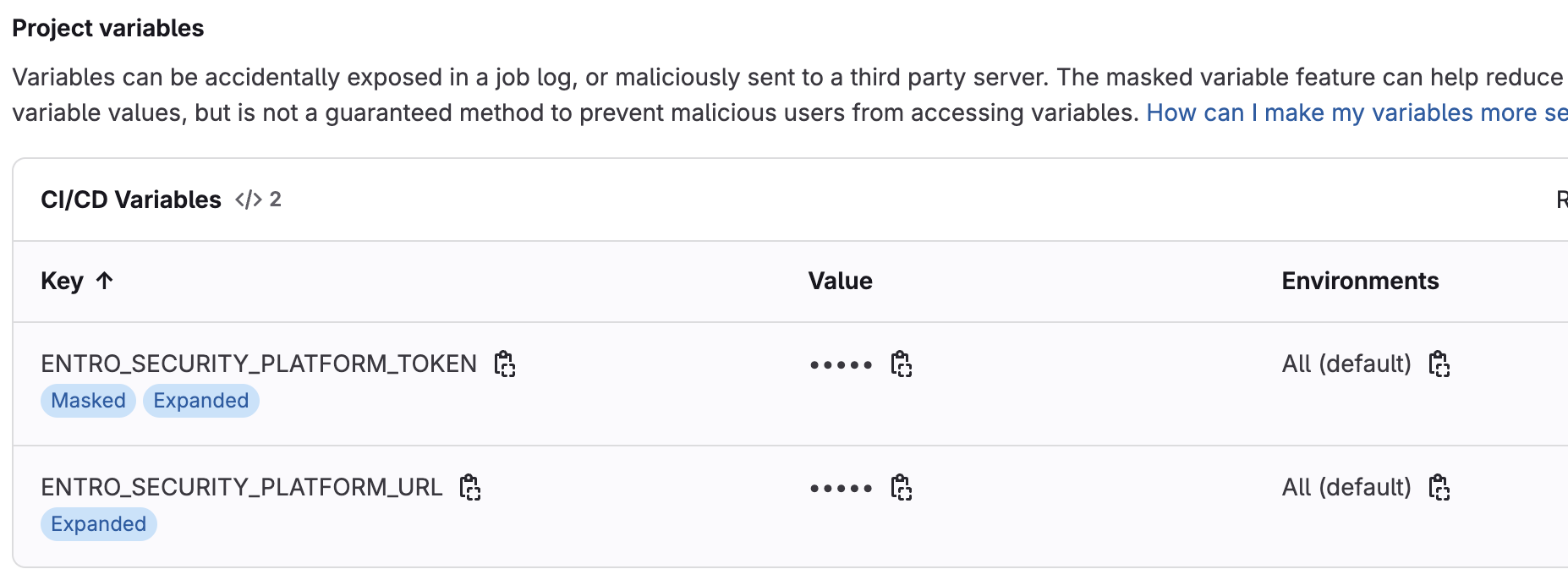
Example of configured Project env variables
4. Pipeline Configuration (.gitlab-ci.yml)
The following .gitlab-ci.yml snippet defines a new Gitlab Pipeline with the entro-secret-scan job:
Scanner based CI CD Pipeline gitlab-ci-yml
# .gitlab-ci.yml
# This pipeline scans for secrets in all changed files within a merge request.

stages:
  - pre-commit

entro-secret-scan:
  stage: pre-commit
  image: ubuntu:latest # Using a lightweight image with shell tools
  script:
    - echo "Installing dependencies..."
    - apt-get update
    - apt-get -y install curl git jq
    - echo "Installing Entro CLI..."
    - |
      set -e
      curl -fL https://public-entro-security.s3.us-east-1.amazonaws.com/entro-cli/install-cli | sh
      echo "Verifying Entro CLI installation..."
      which entro
      # Use 'command -v' to check if 'entro' is available in the system's PATH.
      if ! command -v entro; then
        echo "Entro CLI not found in PATH."
        exit 1
      fi
      echo "Entro CLI installed successfully and is in the PATH."

      echo "Fetching list of changed files in this merge request..."
      git fetch origin $CI_MERGE_REQUEST_TARGET_BRANCH_NAME
      git diff --name-only "origin/$CI_MERGE_REQUEST_TARGET_BRANCH_NAME...$CI_COMMIT_SHA" > changed_files.txt

      echo "Starting scan on changed files..."
      found_secret=false
      if [ ! -s changed_files.txt ]; then
        echo "No files changed in this merge request. Skipping scan."
      else
        while IFS= read -r file; do
          if [ -f "$file" ]; then
            echo "Scanning file: $file"
            # The CLI will automatically use the ENTRO_SECURITY_* environment variables.
            # Pipe the scan output directly to grep. If a secret is found, grep will print the line
            # and exit with a 0 status code, triggering the if block.
            result=$(entro scan "$file" --generic)
            if echo $result | grep -i --color=never -q -e 'total_count' -e 'request_id'; then
              json_data=$(echo $result | perl -0777 -ne 'print $1 if /(\{.*\})/s')
              echo "Secret detected in file '$file':"
              # Print each key of the JSON object on a new line
              scanned_file=$(echo "$json_data" | jq -r '.exposed_secrets[0].scanned_file_path')
              request_id=$(echo "$json_data" | jq -r '.exposed_secrets[0].scan_result.request_id')
              total_count=$(echo "$json_data" | jq -r '.exposed_secrets[0].scan_result.total_count')

              echo "Scanned File Path: $scanned_file"
              echo "Request ID: $request_id"
              echo "Total Found: $total_count"
              echo

              # parse and print each result
              echo "$json_data" | jq -c '.exposed_secrets[0].scan_result.results[]' | while read -r entry; do
                line=$(echo "$entry" | jq -r '.line')
                origin=$(echo "$entry" | jq -r '.origin')
                value=$(echo "$entry" | jq -r '.value')
                echo "Line $line - $origin"
                echo "Value: $value"
                echo
              done
              echo "--- A secret was detected in the file '$file' (see matching output above) ---"
              found_secret=true
            fi
          else
             echo "Skipping deleted file: $file"
          fi
        done < changed_files.txt
      fi

      if [ "$found_secret" = true ]; then
        echo "One or more secrets were detected in the changed files. Failing pipeline."
        exit 1
      fi
      echo "Scan complete. No secrets found in changed files."
  rules:
    # Run this job only for merge requests.
    - if: '$CI_PIPELINE_SOURCE == "merge_request_event"'
Stages
-
stages:- pre-commit: This defines a stage namedpre-commit. Jobs in this stage typically run early in the pipeline to perform checks before other stages.
Job Definition
-
entro-secret-scan:: This is the name of the CI/CD job. -
stage: pre-commit: Assigns this job to thepre-commitstage. -
image: ubuntu:latest: Specifies that the job will run in a Docker container based on theubuntu:latestimage. This image is chosen for its lightweight nature and the availability of basic shell tools.
Script Breakdown
The script section contains the commands executed by the job:
-
Install Dependencies:
This updates the package list and installs
curl(for downloading the SailPoint Entro CLI),git(for fetching and diffing), andjq(for parsing JSON output). -
Install SailPoint Entro CLI:
set -e curl -fL https://public-entro-security.s3.us-east-1.amazonaws.com/entro-cli/install-cli | sh echo "Verifying Entro CLI installation..." which entro if ! command -v entro; then echo "Entro CLI not found in PATH." exit 1 fi echo "Entro CLI installed successfully and is in the PATH."-
set -e: Ensures that the script exits immediately if any command fails. -
Downloads and installs the SailPoint Entro CLI.
-
Verifies the installation by checking if
entrois in the system's PATH.
-
-
Fetch Changed Files:
echo "Fetching list of changed files in this merge request..." git fetch origin $CI_MERGE_REQUEST_TARGET_BRANCH_NAME git diff --name-only "origin/$CI_MERGE_REQUEST_TARGET_BRANCH_NAME...$CI_COMMIT_SHA" > changed_files.txt-
git fetch origin $CI_MERGE_REQUEST_TARGET_BRANCH_NAME: Fetches the target branch of the merge request to enable a proper diff. -
git diff --name-only "origin/$CI_MERGE_REQUEST_TARGET_BRANCH_NAME...$CI_COMMIT_SHA": Generates a list of file names that have changed between the target branch and the current commit of the merge request. This list is saved tochanged_files.txt.
-
-
Scan Changed Files:
echo "Starting scan on changed files..." found_secret=false if [ ! -s changed_files.txt ]; then echo "No files changed in this merge request. Skipping scan." else while IFS= read -r file; do if [ -f "$file" ]; then echo "Scanning file: $file" result=$(entro scan "$file" --generic) if echo $result | grep -i --color=never -q -e 'total_count' -e 'request_id'; then json_data=$(echo $result | perl -0777 -ne 'print $1 if /(\{.*\})/s') echo "Secret detected in file '$file':" # Extract and print high-level scan details using jq scanned_file=$(echo "$json_data" | jq -r '.exposed_secrets[0].scanned_file_path') request_id=$(echo "$json_data" | jq -r '.exposed_secrets[0].scan_result.request_id') total_count=$(echo "$json_data" | jq -r '.exposed_secrets[0].scan_result.total_count') echo "Scanned File Path: $scanned_file" echo "Request ID: $request_id" echo "Total Found: $total_count" echo # Parse and print each individual secret result using jq echo "$json_data" | jq -c '.exposed_secrets[0].scan_result.results[]' | while read -r entry; do line=$(echo "$entry" | jq -r '.line') origin=$(echo "$entry" | jq -r '.origin') value=$(echo "$entry" | jq -r '.value') echo "Line $line - $origin" echo "Value: $value" echo done echo "--- A secret was detected in the file '$file' (see matching output above) ---" found_secret=true fi else echo "Skipping deleted file: $file" fi done < changed_files.txt fi-
Initializes
found_secrettofalse. -
Checks if
changed_files.txtis empty. If so, skips the scan. -
Loops through each file listed in
changed_files.txt:-
Checks if the file still exists (to skip deleted files during the pipeline).
-
entro scan "$file" --generic: Runs the SailPoint Entro CLI scan on the current file. The--genericflag enables generic secret detection. -
grep -i --color=never -q -e 'total_count' -e 'request_id': This crucial part checks the output of the SailPoint Entro scan. If the output contains indicators of a found secret (total_countandrequest_idare in JSON responses from SailPoint Entro's Scanner API), it signifies at least one secret has been detected. -
json_data=$(echo $result | perl -0777 -ne 'print $1 if /(\{.*\})/s'): Extracts the full JSON output of the secret detection. -
Enhanced Output: Uses
jqto parse thejson_dataand display specific fields likescanned_file_path,request_id,total_count, and then iterates throughresultsto showline,origin, andvaluefor each detected secret. -
If a secret is found,
found_secretis set totrue.
-
-
-
Fail Pipeline if Secrets Found:
if [ "$found_secret" = true ]; then echo "One or more secrets were detected in the changed files. Failing pipeline." exit 1 fi echo "Scan complete. No secrets found in changed files."-
After scanning all files, if
found_secretistrue, the script exits with a non-zero status code (exit 1), causing the GitLab CI/CD job to fail. -
Otherwise, it prints a success message.
-
Rules
-
rules:- if: '$CI_PIPELINE_SOURCE == "merge_request_event"': This rule ensures that the**entro-secret-scan**job only runs when the pipeline is triggered by a merge request event. This prevents it from running on other pipeline sources (e.g., pushes to branches).
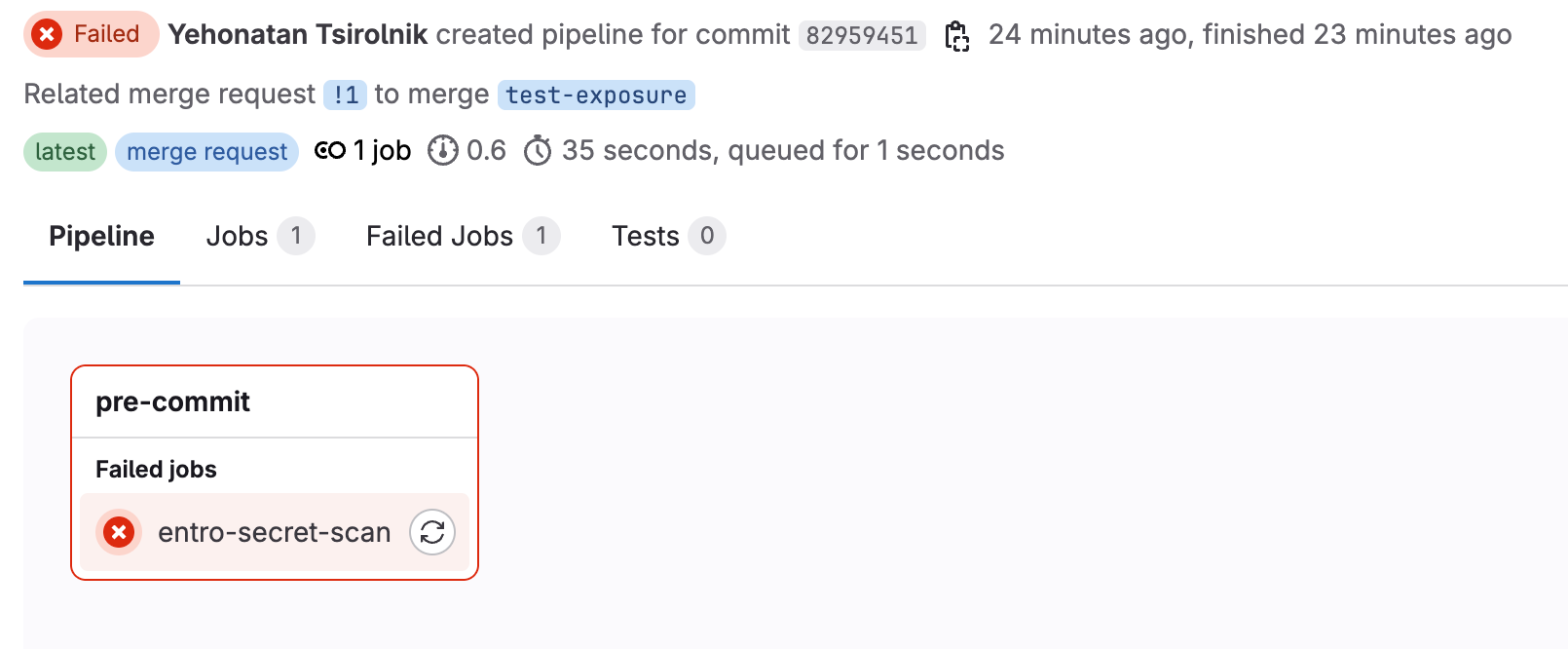
5. Job Configuration
To integrate this secret detection into your project:
-
Add to
**.gitlab-ci.yml**:-
If you have an existing
**.gitlab-ci.yml**file, simply add the**stages:**and**entro-secret-scan:**job definition to your file. Review the full CI/CD pipeline above. Ensure thepre-commitstage is defined, or adjust thestage:forentro-secret-scanto an appropriate existing stage in your pipeline (e.g.,test,build) where you want the secret scan to occur early in the process. -
Example Integration: If your existing
.gitlab-ci.ymlhas stages likebuildanddeploy, you would add thepre-commitstage and theentro-secret-scanjob like this:stages: - pre-commit # Add this stage - build - test - deploy entro-secret-scan: stage: pre-commit # This job will run early image: ubuntu:latest script: # ... (rest of the script as provided in section 3) ... rules: - if: '$CI_PIPELINE_SOURCE == "merge_request_event"' # Your other existing jobs would follow here, # ensuring they depend on or run after 'pre-commit' stage if needed. # For example: # my-build-job: # stage: build # script: # - echo "Building..."
-
-
Configure CI/CD Variables: Set up the necessary environment variables, including
ENTRO_SECURITY_PLATFORM_TOKENandENTRO_SECURITY_PLATFORM_URL, as GitLab CI/CD Variables in your project. -
Create a Merge Request: When you create a new merge request or push new commits to an existing one, the
entro-secret-scanjob will automatically run. -
Review Pipeline Status: Monitor the pipeline status for your merge request.
-
If secrets are detected, the pipeline will fail, and you will see output detailing the detected secret using
jqfor clear formatting. You must then remove the secret from your changes and push new commits to trigger a new scan. -
If the pipeline passes, your changes are free of detected secrets, and the merge request can proceed to be merged (assuming other checks also pass).
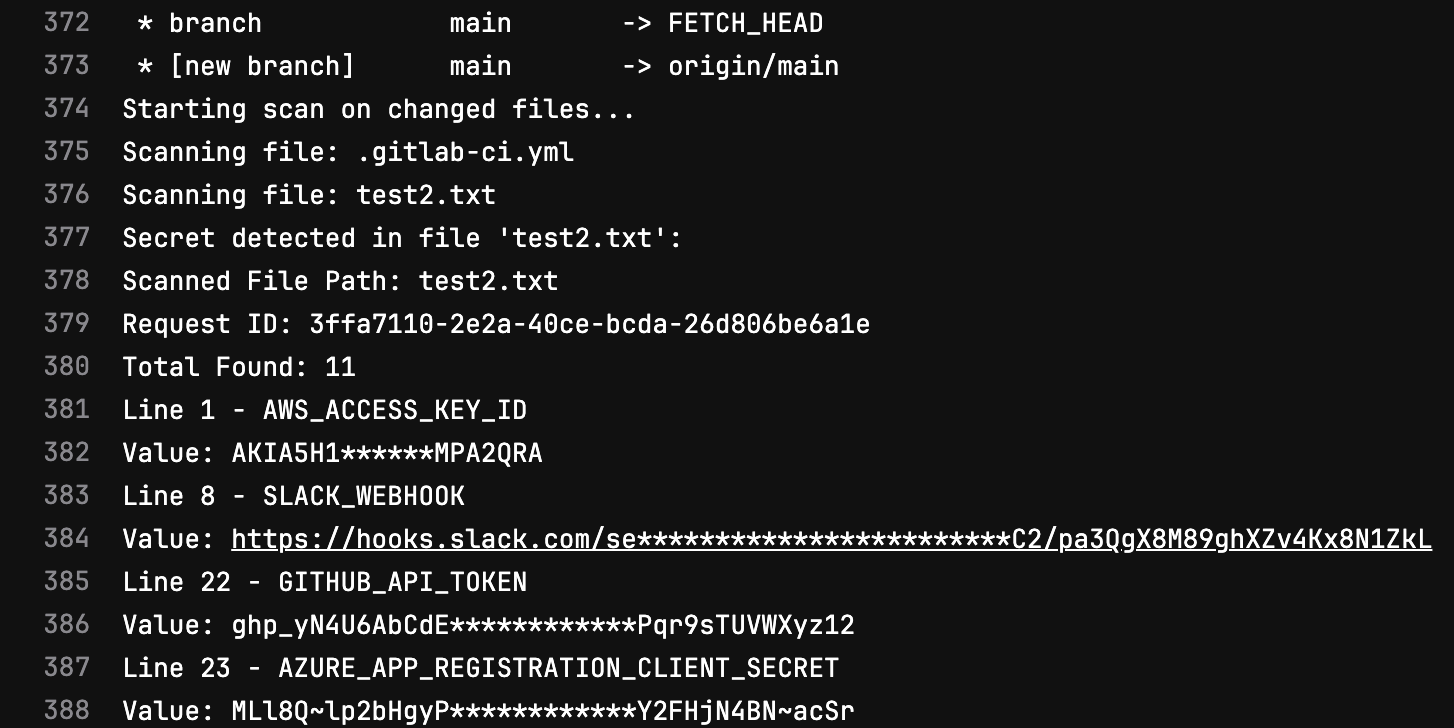
-
6. Troubleshooting
-
SailPoint Entro CLI Not Found: If the job fails with "SailPoint Entro CLI not found in PATH.", verify that the
curlcommand for installation is working correctly and that there are no network issues preventing the download. -
Pipeline Fails but No Secret Output: Double-check the
grepcondition in the script. It relies on specific keywords (total_count,request_id) being present in the SailPoint Entro CLI's JSON output for a detected secret. If SailPoint Entro's output format changes, this condition might need adjustment. -
Network Issues: Ensure your GitLab runners have outbound internet access to download
aptpackages and the SailPoint Entro CLI installer. -
False Positives: If the SailPoint Entro CLI reports a secret that isn't actually sensitive (a "false positive"), please feel free to reach out to support.