Remediation Strategy
How to remediate NHI security risks efficiently and fast
Planning remediation of SailPoint Entro findings differs by your achievement goals. We'll review how it can be done natively from SailPoint Entro, automatically, and manually.
Focus group, champions and milestones
-
Tackle Critical risks as a first milestone
-
Understand potential impact of your critical risks
-
Set a "No critical" as your milestone
-
Set specific usecases as your org point of interest
-
Distribute critical risks to their appropriate owners in the organization
-
-
Secrets scanning: triage Enabled secrets first
-
Enabled validity indicates this secret can be used from everywhere, outside your network segregation, therefore indicates a serious leak risk
-
Set specific type or source of exposure as your org point of interest
-
Create automated alerting to prevent ongoing secret leak through the process
-
-
Campaigns
Pick specific use-cases and monitor them via Campaigns. Eliminating unused identities, right sizing excessive permissions or assigning human owners to each NHI, it can all be managed via Campaigns.
-
Setup distributed alerting directly to owners via SOAR
-
Forward NHIDR to SOC
-
Consider Shift-left approach to prevent secret leakage
Manual Remediation Flows
Usually operated by a security analyst, mitigating security risks can be achieved by the following tactics.
Manually assign to owner via Slack/Teams/JIRA/Email
-
Send messages, tickets manually per risk (Slack, Teams, JIRA, Email, ServiceNow)
-
Create tickets for multiple risks (JIRA)
Any action made by SailPoint Entro will continuously be monitored and logged as a "Risk Comment" and its status will be changed automatically
Export to CSV and send to feature owner
Risks, inventory items are assigned to most appropriate owners automatically. These can be exported as CSV and sent manually to owners outside SailPoint Entro
Create automated alert to a centralized channel
Send messages automatically via Alerts page in the Settings section (Slack, Teams, Email, Webhook)
Any action made by SailPoint Entro will continuously be monitored and logged as a "Risk Comment" and its status will be changed automatically
Take actions via SailPoint Entro Rotation Lifecycle, Zero Trust and Disable Token
-
Disable Tokens via Risks action menu, or right-click in the NHI inventory grid (Requires NHI Management permission of the onboarded account)
-
Rotation Lifecycle feature can be used to provision the same identity via SailPoint Entro's JIT portal learn more
-
Apply Zero Trust on risky identities learn more
Employee Login as Engineer role to see their assigned risks, inventory items
Apply the Engineer RBAC to let your engineers review their assigned risks, NHIs and secrets in the inventory, allowing direct remediation.
Automated Remediation Flows
SailPoint Entro manages autonomous NHI policies that assign alerts to owners and perform preventive actions.
Native alerts to identity owner 🔜
Coming soon (Late March 2026)
Campaigns
The Remediation Campaigns feature is SailPoint Entro's central engine for driving large-scale security improvements across your Non-Human Identity (NHI) landscape. Campaigns allow you to orchestrate the "fix" by grouping high-risk identities and tracking their remediation to completion. Rather than managing individual alerts, Campaigns provide a structured workflow to ensure that every machine user, API key, and service account meets your organization's security standards.
Automated policies: Zero Trust, Permissions Right-sizing and Disabling tokens 🔜
Coming soon (April 2026)
AI Security: AI MCP Sanctioning
Choose which agent access should be sanctioned (alert only) via SailPoint Entro's MCP Policies under AI Agents > AI Agents Policies.
Prevention coming later in Q1, to prevent access by applying EDR Block Rule automatically
Secret Scanning Prevention-First Flows
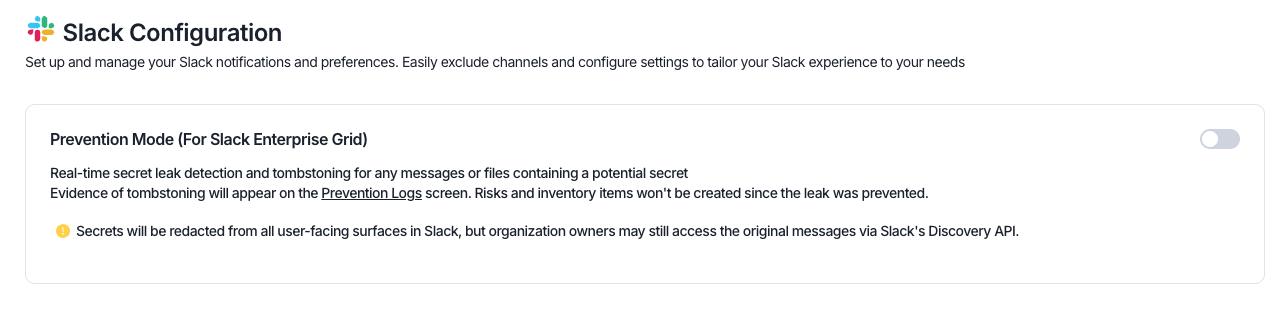
Slack Prevention (Enterprise Grid Only)
Tombstone plain-text secrets sent via messages within private and public channel, with SailPoint Entro's Slack Prevention. Turn it on via Settings > Slack Configuration > Slack Prevention.
Code Scanning: Pre-commit hooks
Leverage SailPoint Entro's scanning capability to prevent devs from committing code with plain-text secrets, via Git's commit hooks. Learn more
Code Scanning: Merge prevention
Before code merged into main, apply secret scanning to check all diffs as additional merge step in your CICD, check out examples for
CLI Scanner: Apply entro everywhere in your flows
Leverage SailPoint Entro's scanning capability to secret leakage by deploying it in your existing flows, at scale Learn more
Integrate with existing remediation stack
-
Integrate with existing SOAR to create automation workflows
-
Setup alerting via SailPoint Entro Webhook, Rest API
SailPoint Entro's webhook integrates seamlessly into your existing SIEM/SOC/automation workflows to incorporate SailPoint Entro's risk framework, including:
-
Risks creation
-
Status change
-
New owner
-
Severity change
Integrating the SailPoint Entro REST API allows seamless interaction with SailPoint Entro, eliminating the need to log into the platform and efficiently managing risks at scale.
SailPoint Entro REST API grants abilities such as:
-
Risks data
-
Inventory data
-
Reading/Modifying risks status and ownership
-
Onboarding accounts to SailPoint Entro
-
-
Integrate with existing SIEM/SOC/Automation/Remediation tools
-
Seemplicity
-
Cortex
-
Cribl
-
Sync Identities to SailPoint Identity Security Cloud
Manage SailPoint Entro's human, non-human and AI identities in the SailPoint Identity Security Cloud management platform.