GitLab CI/CD: Commits Based Secrets Merge Prevention
This document outlines the configuration and functionality of the entro-secret-scan GitLab CI/CD job, designed to automatically detect and prevent secrets from being merged into your repositories
Table of Contents
-
Overview
-
How it Works
-
Prerequisites
-
Pipeline Configuration (
.gitlab-ci.yml)-
Stages
-
Job Definition
-
Script Breakdown
-
Rules
-
-
Job Configuration
- For existing pipelines
-
Troubleshooting
1. Overview
The entro-secret-scan job is a crucial security measure integrated into your GitLab CI/CD pipeline. Its primary function is to scan all commits within a merge request for risks that were detected by SailPoint Entro before they are merged into the target branch. If any risks are found, the pipeline will fail, preventing the sensitive data from being committed.
This helps maintain the security posture of your codebase by:
-
Preventing accidental exposure of API keys, tokens, passwords, and other credentials.
-
Enforcing a "security-first" approach for all code contributions.
-
Automating risk association, reducing the reliance on manual reviews.
2. How it Works
The process involves the following steps:
-
Pipeline Trigger: The job is automatically triggered whenever a new merge request is created or updated.
-
Environment Setup: A lightweight
ubuntuimage is used to set up the necessary tools. -
New Commits Identification: The pipeline identifies all new commits that have been added in the current merge request compared to the target branch.
-
Commit Check: Each commit is then validated against the SailPoint Entro API for potential secrets.
-
Secret Detection & Failure:
-
If a commit was detected as having risks associated with it, the pipeline job will print the details of the detected secret.
-
The job's status will be set to "failed," preventing the merge request from being merged.
-
-
Successful Scan: If no risks are found, the job will complete successfully, allowing the merge request to proceed.
3. Prerequisites
Before using this pipeline job, ensure the following:
-
GitLab CI/CD Enabled: Your GitLab project must have CI/CD enabled.
-
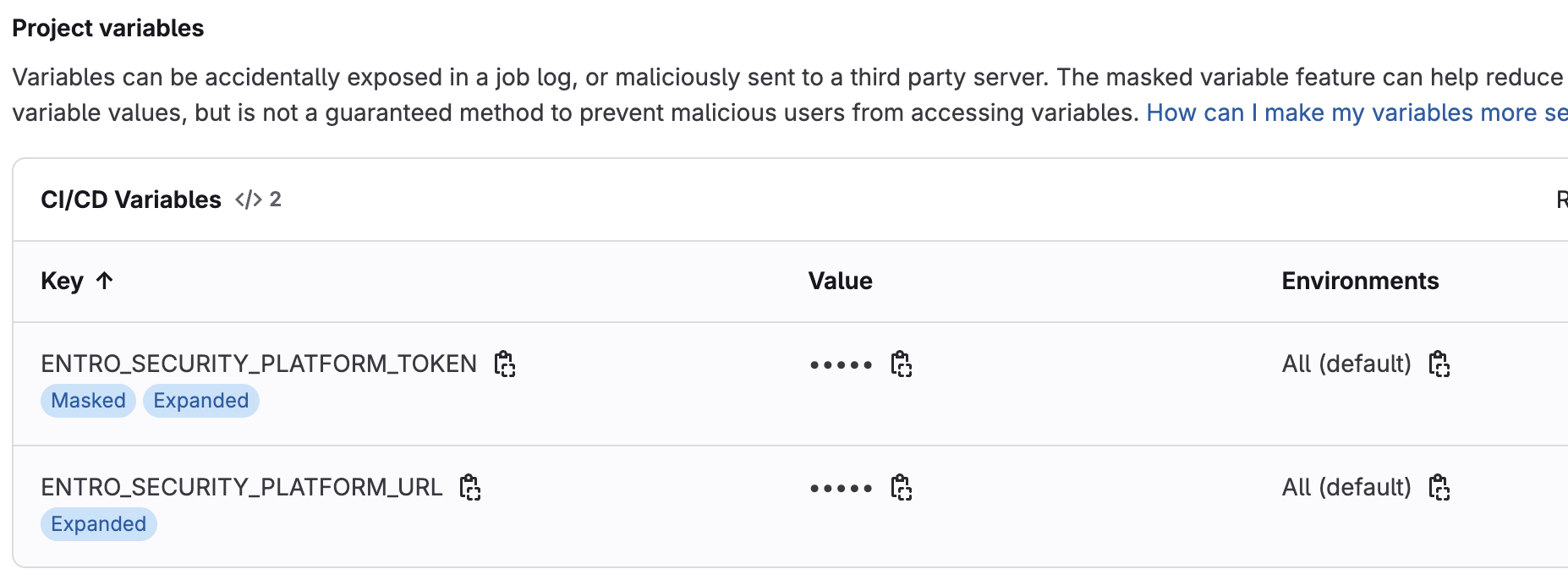
SailPoint Entro Account/Setup: You must configure the following SailPoint Entro environment variables as CI/CD variables in your GitLab project or group settings for the SailPoint Entro CLI to function properly:
-
ENTRO_SECURITY_PLATFORM_TOKEN(your SailPoint Entro API token) -
ENTRO_SECURITY_PLATFORM_URL(the SailPoint Entro platform URL, default isapi.entro.security) The CLI will automatically use these environment variables.
-
-
Runner Access: Your GitLab runners must have internet access to access the SailPoint Entro platform.
4. Pipeline Configuration (.gitlab-ci.yml)
The following .gitlab-ci.yml snippet defines a new Gitlab Pipeline with the entro-secret-scan job:
Commit based CI CD Pipeline gitlab-ci-yml
stages:
  - pre-commit

entro-secret-scan:
  stage: pre-commit
  image: ubuntu:latest
  script:
    - |
      #!/bin/bash

      if [ -z "$ENTRO_SECURITY_PLATFORM_URL" ]; then
        echo "Error: ENTRO_SECURITY_PLATFORM_URL CI/CD variable is not set. This is required for Entro API authentication."
        ENTRO_SECURITY_PLATFORM_URL="api.entro.security"
      fi

      # Define constants directly within the script
      ENTRO_API_ENDPOINT="https://$ENTRO_SECURITY_PLATFORM_URL/v1/risks/query"
      COMMIT_CHUNK_SIZE=10 # Number of commits to send per API request - Limited to 10

      echo "Installing dependencies..."
      apt-get update -qq > /dev/null
      apt-get -y install curl git jq > /dev/null
      echo "Dependencies installed."

      if [ -z "$ENTRO_SECURITY_PLATFORM_TOKEN" ]; then
        echo "Error: ENTRO_SECURITY_PLATFORM_TOKEN CI/CD variable is not set. This is required for Entro API authentication."
        exit 1
      fi

      echo "--- Debugging Git Variables ---"
      echo "CI_MERGE_REQUEST_TARGET_BRANCH_NAME: '$CI_MERGE_REQUEST_TARGET_BRANCH_NAME'"
      echo "CI_COMMIT_SHA: '$CI_COMMIT_SHA'"
      echo "-------------------------------"

      echo "Fetching commit IDs for this merge request..."
      # Get all commit SHAs associated with the current merge request
      # This fetches commits from the source branch that are not yet in the target branch
      git fetch origin "$CI_MERGE_REQUEST_TARGET_BRANCH_NAME" || { echo "Failed to fetch target branch '$CI_MERGE_REQUEST_TARGET_BRANCH_NAME'. Exiting."; exit 1; }

      # Temporarily disable 'exit on error' to capture the exit code of git rev-list
      set +e
      COMMITS=$(git rev-list "$CI_COMMIT_SHA" ^"origin/$CI_MERGE_REQUEST_TARGET_BRANCH_NAME")
      GIT_REV_LIST_EXIT_CODE=$?
      # Re-enable 'exit on error'
      set -e

      echo "git rev-list exit code: $GIT_REV_LIST_EXIT_CODE"
      echo "COMMITS found by git rev-list (raw):"
      echo "$COMMITS"
      echo "--- End of COMMITS ---"

      if [ "$GIT_REV_LIST_EXIT_CODE" -ne 0 ]; then
        echo "Error: 'git rev-list' command failed with exit code $GIT_REV_LIST_EXIT_CODE. This typically means a reference was not found or was invalid."
        exit 1
      fi

      if [ -z "$COMMITS" ]; then
        echo "No new commits found in this merge request that are not in the target branch. Skipping scan."
        exit 0
      fi

      # Read commits into a bash array using a portable while loop.
      # Explicitly using bash ensures this syntax is supported.
      commit_array=() # Initialize empty array
      while IFS= read -r line; do
        [ -n "$line" ] && commit_array+=("$line") # Add line to array only if it's not empty
      done <<< "$COMMITS"

      total_commits="${#commit_array[@]}"
      echo "Found $total_commits commits to scan."

      found_secret=false

      # Chunk commits and send to Entro API
      # The 'for ((...))' syntax is also bash-specific, explicit bash helps here too.
      for (( i=0; i<total_commits; i+=$COMMIT_CHUNK_SIZE )); do
        chunk_start=$i
        chunk_end=$((i + COMMIT_CHUNK_SIZE - 1))
        if (( chunk_end >= total_commits )); then
          chunk_end=$((total_commits - 1))
        fi

        # Extract the current chunk of commits
        current_chunk_commits=("${commit_array[@]:$chunk_start:$((chunk_end - chunk_start + 1))}")
        # Join the array elements with commas for the API parameter
        commits_param=$(IFS=,; echo "${current_chunk_commits[*]}")

        echo "Scanning commits $(($i + 1)) to $((chunk_end + 1)) of $total_commits..."
        echo "Sending commit IDs: $commits_param"

        # Make the API call
        # -s: Silent mode, -w "%{http_code}": Prints HTTP status code after response body
        API_RESPONSE=$(curl -s -w "%{http_code}" -X GET \
          -H "Authorization: $ENTRO_SECURITY_PLATFORM_TOKEN" \
          "$ENTRO_API_ENDPOINT?commits=$commits_param&limit=50")

        # Extract HTTP code (last 3 characters) and response body
        HTTP_CODE="${API_RESPONSE: -3}"
        RESPONSE_BODY="${API_RESPONSE:0:$((${#API_RESPONSE}-3))}"

        if [ "$HTTP_CODE" -ne 200 ]; then
          echo "Error: Entro API returned HTTP $HTTP_CODE"
          echo "Response: $RESPONSE_BODY"
          exit 1
        fi

        # Parse the response to count risks
        RISKS_COUNT=$(echo "$RESPONSE_BODY" | jq '.risks | length')

        if [ "$RISKS_COUNT" -gt 0 ]; then
          echo "!!!!!!!!!!!!!!!!!!!!!!!!!!!!!!!!!!!!!!!!"
          echo "!!!     SECRET(S) DETECTED!          !!!"
          echo "!!!!!!!!!!!!!!!!!!!!!!!!!!!!!!!!!!!!!!!!"
          echo ""
          echo "Details of detected risks:"
          # Pretty print relevant risk information
          echo "$RESPONSE_BODY" | jq '.risks[] | {guid: .guid, severity: .severity, summary: .summary, commitUrl: .payload.commitUrl // "N/A", filePath: .payload.filename // "N/A"}'
          found_secret=true
          break # Stop scanning after the first secret is found
        else
          echo "No secrets detected in this batch of commits."
        fi
      done

      if [ "$found_secret" = true ]; then
        echo "One or more secrets were detected in the analyzed commits. Failing pipeline."
        exit 1 # Ensure the pipeline fails
      else
        echo "Scan complete. No secrets found in analyzed commits."
      fi

  rules:
    # Run this job only for merge requests.
    - if: '$CI_PIPELINE_SOURCE == "merge_request_event"'
      when: always # Ensure the job always runs for MRs, even if previous jobs fail.
Stages
-
stages:- pre-commit: This defines a stage namedpre-commit. Jobs in this stage typically run early in the pipeline to perform checks before other stages.
Job Definition
-
entro-secret-scan:: This is the name of the CI/CD job. -
stage: pre-commit: Assigns this job to thepre-commitstage. -
image: ubuntu:latest: Specifies that the job will run in a Docker container based on theubuntu:latestimage.
5. Job Configuration
To integrate this secret detection into your project:
-
Add to
**.gitlab-ci.yml**:-
If you have an existing
**.gitlab-ci.yml**file, simply add the**stages:**and**entro-secret-scan:**job definition to your file. Review the full CI/CD pipeline above. Ensure thepre-commitstage is defined, or adjust thestage:forentro-secret-scanto an appropriate existing stage in your pipeline (e.g.,test,build) where you want the secret scan to occur early in the process. -
Example Integration: If your existing
.gitlab-ci.ymlhas stages likebuildanddeploy, you would add thepre-commitstage and theentro-secret-scanjob like this:stages: - pre-commit # Add this stage - build - test - deploy entro-secret-scan: stage: pre-commit # This job will run early image: ubuntu:latest script: # ... (rest of the script as provided in section 3) ... rules: - if: '$CI_PIPELINE_SOURCE == "merge_request_event"' # Your other existing jobs would follow here, # ensuring they depend on or run after 'pre-commit' stage if needed. # For example: # my-build-job: # stage: build # script: # - echo "Building..."
-
-
Configure CI/CD Variables: Set up the necessary environment variables, including
ENTRO_SECURITY_PLATFORM_TOKENandENTRO_SECURITY_PLATFORM_URL, as GitLab CI/CD Variables in your project. -
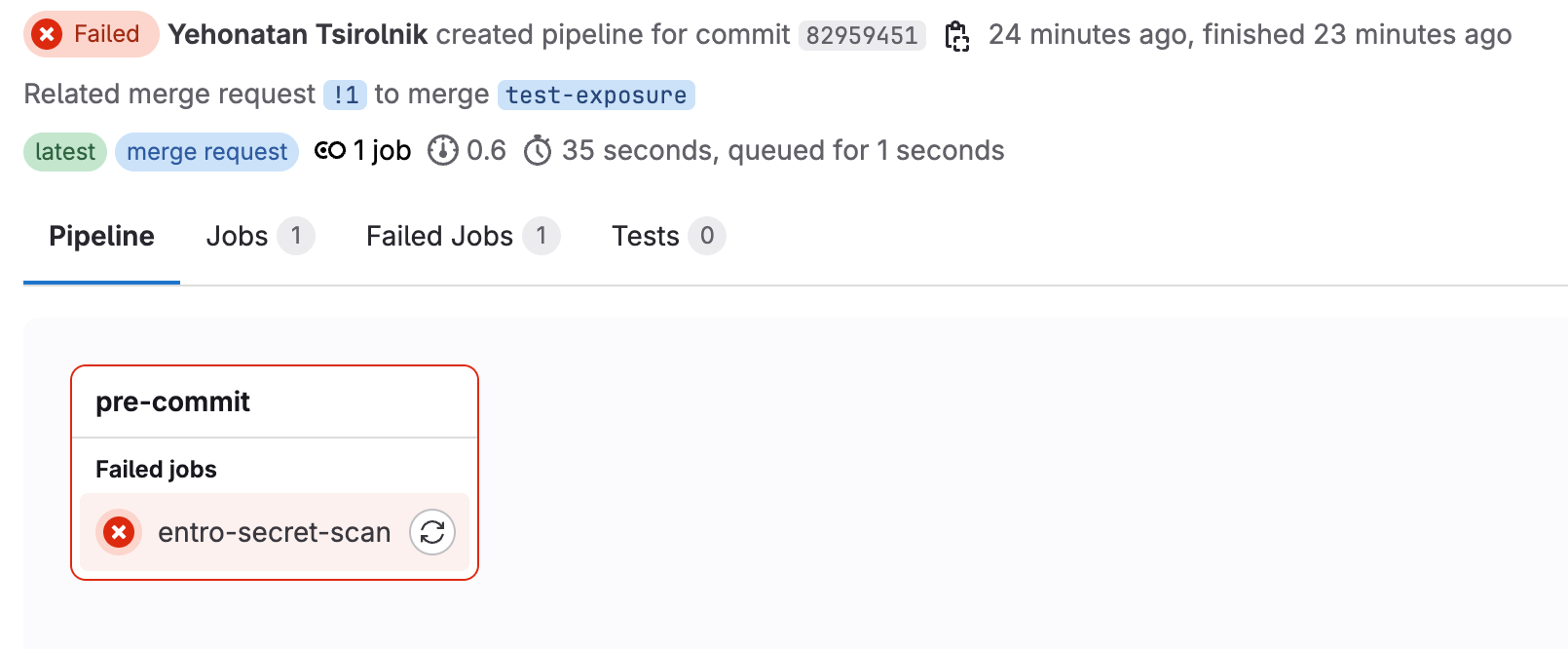
Create a Merge Request: When you create a new merge request or push new commits to an existing one, the
entro-secret-scanjob will automatically run. -
Review Pipeline Status: Monitor the pipeline status for your merge request.
-
If secrets are detected, the pipeline will fail, and you will see output detailing the detected risks using
jqfor clear formatting. You must then remove the secret from your changes and push new commits to trigger a new scan. -
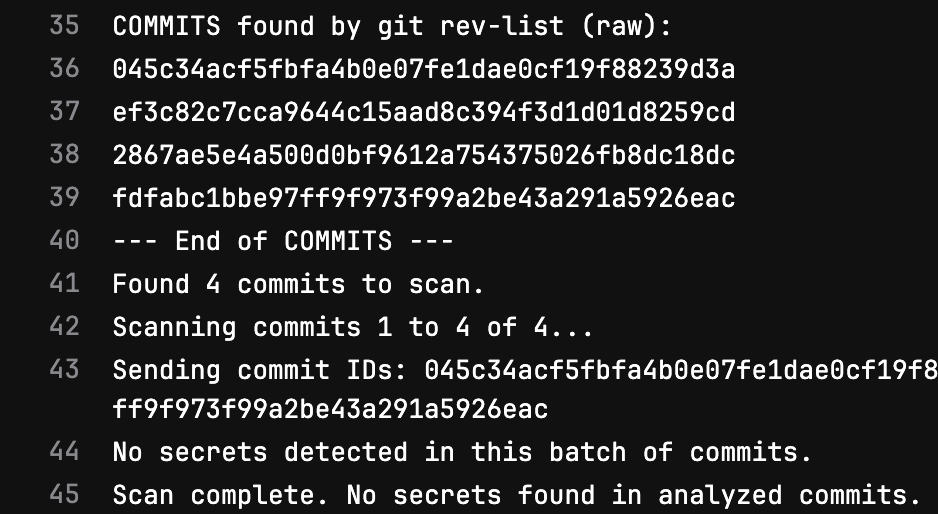
If the pipeline passes, your changes are free of detected secrets, and the merge request can proceed to be merged (assuming other checks also pass).
-
6. Troubleshooting
-
Network Issues: Ensure your GitLab runners have outbound internet access to download
aptpackages and the SailPoint Entro CLI installer. -
API Access: Ensure your API key is valid and not expires