NHI Lineage Map
The Access Lineage Map is a visual investigation tool that provides an end-to-end view of your Non-Human Identities (NHIs) tokens. Unlike static lists of permissions, the Lineage Map traces the complete lifecycle of an identity, connecting the human owner to the credential, the consumers (devices or 3rd parties) using it, and the specific actions performed against your cloud resources.
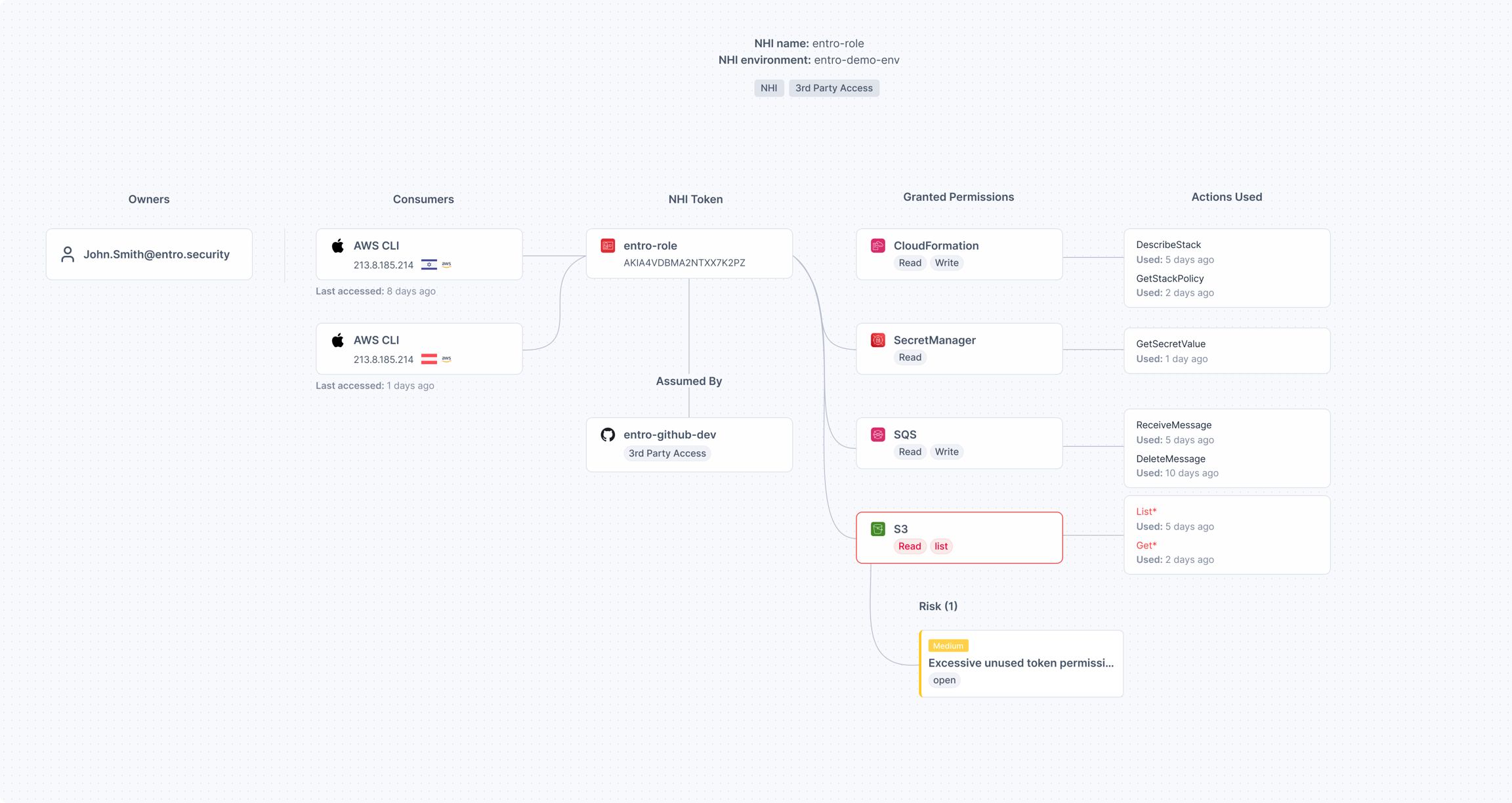
Understanding the Graph: A Walkthrough
Refer to the example diagram above to understand the different nodes in the lineage:
-
Owners: The human or team responsible for the identity.
- Example:
John.Smith@entro.securityis identified as the owner, facilitating quick remediation if issues arise.
- Example:
-
Lifecycle: The actor, device and process creating / modifying / deleting the NHI.
-
Consumers: The source of the traffic, such as IP addresses, specific devices, or bots.
- Example: We see traffic originating from two distinct AWS CLI instances.
-
NHI Token: The central identity node.
- Example: The AWS Role
entro-role.
- Example: The AWS Role
-
Assumed By (Integrations): This node reveals if the role is being assumed by another entity, particularly 3rd-party integrations.
- Example: The graph shows
entro-github-devis assuming this role, flagged clearly as "3rd Party Access." This confirms that an external GitHub workflow has access to your internal environment.
- Example: The graph shows
-
Granted Permissions vs. Actions Used: The map splits "What it can do" from "What it did do."
- Example: The role has permissions for
CloudFormation,SecretManager,SQS, andS3. However, the Actions Used column shows specifically thatDescribeStackwas used 5 days ago, whileGetSecretValuewas used 1 day ago.
- Example: The role has permissions for
-
Risks: Specific security alerts attached to the relevant resource.
- Example: An S3 node is highlighted with a Medium Risk for "Excessive unused token permissions," indicating the role has broader S3 access than it actually utilizes.