Validity Status & Triage
Exposed secrets statuses
Valid secrets (could potentially be used for exploitation)
| Status name | Explanation | Can it be used | Method |
|---|---|---|---|
| Enabled | The secret is valid and can be used for authorization from the public internet | Yes | NHI Enriched API Auth |
| Unreachable | The target server is inaccessible. It could be on-premises, behind a Firewall, preventing secret authorization | Maybe | API Auth |
| Unsupported | SailPoint Entro / Target service does not support validity checks for this secret type | Maybe |
Invalid secrets (can't be used whatsoever for exploitation)
| Status name | Explanation | Can it be used | Method |
|---|---|---|---|
| Invalid | The secret is not usable and cannot be exploited for unauthorized access, the invalidity could be due to incorrect formatting, expiration, revocation, or access restrictions. | No | API Auth |
| Disabled | The token is confirmed to be disabled or deactivated. This state prevents it from being exploited for unauthorized access. Regularly review the status of the token to ensure it remains disabled. | No | NHI Enriched |
| Revoked | This secret has transitioned from enabled to invalid. It is now invalid and cannot be used for authorization. | No | NHI Enriched API Auth |
Automated triage
Triage by Token Revoke Action
SailPoint Entro constantly monitors the validity status of exposed secrets, in a 24h interval. Once a secret is no longer active, its status should change to "Revoked," "Invalid," or "Disabled."
The monitoring interval is every 24 hours for all integrations except GitHub PR Scanning, and beta integrations. Additionally, it can be initiated manually via the secret drawer.
Triage by Deleting the Token from the Exposure Location
SailPoint Entro scanner will periodically check the exposure location of the secret to verify its existence. Once deleted, the exposed secret should transition to "Deleted" status. This action is part of our revalidation process, triggered every 24 hours.
In both scenarios, any open risks related to the token should be promptly resolved.
Severity and Prioritization
Exposed secrets severity level is dependent on their associated risks findings, the risk with the highest severity level will determine the exposed secret severity.
The severity levels across the platform are:
-
Critical
-
High
-
Medium
-
Low
-
No-risk
Severity for exposed secrets risks is determined by the following factors:
-
Validity: 'Enabled' exposed secrets will increase the severity score - and Invalid, Disabled or Revoked findings will always be at 'No-risk' (won't open a risk)
-
Internet-access (Public exposure): if the exposed secret is located in a public location, such as a public code-repository in the cloud, it should increase the severity score.
-
Secret type: The exposed secret type also impacts the severity score, if it's a cloud service credentials, it will get higher severity score.
-
Source: Collaboration platforms will have the highest score impact, code will have medium, and cloud platform configurations will have the lowest score impact
-
Amount of potential viewers
-
NHI Correlation
Enrichment and Context
-
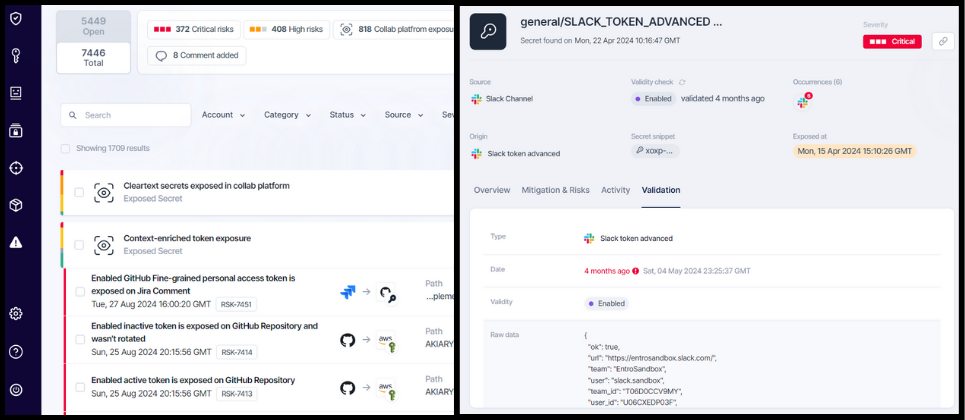
Validation tab Under the 'Validation' tab for each finding, SailPoint Entro will include the response message for validation attempts with additional context. This can provide insights into the potential owner organization, permissions, and the user who created the exposed secret.
-
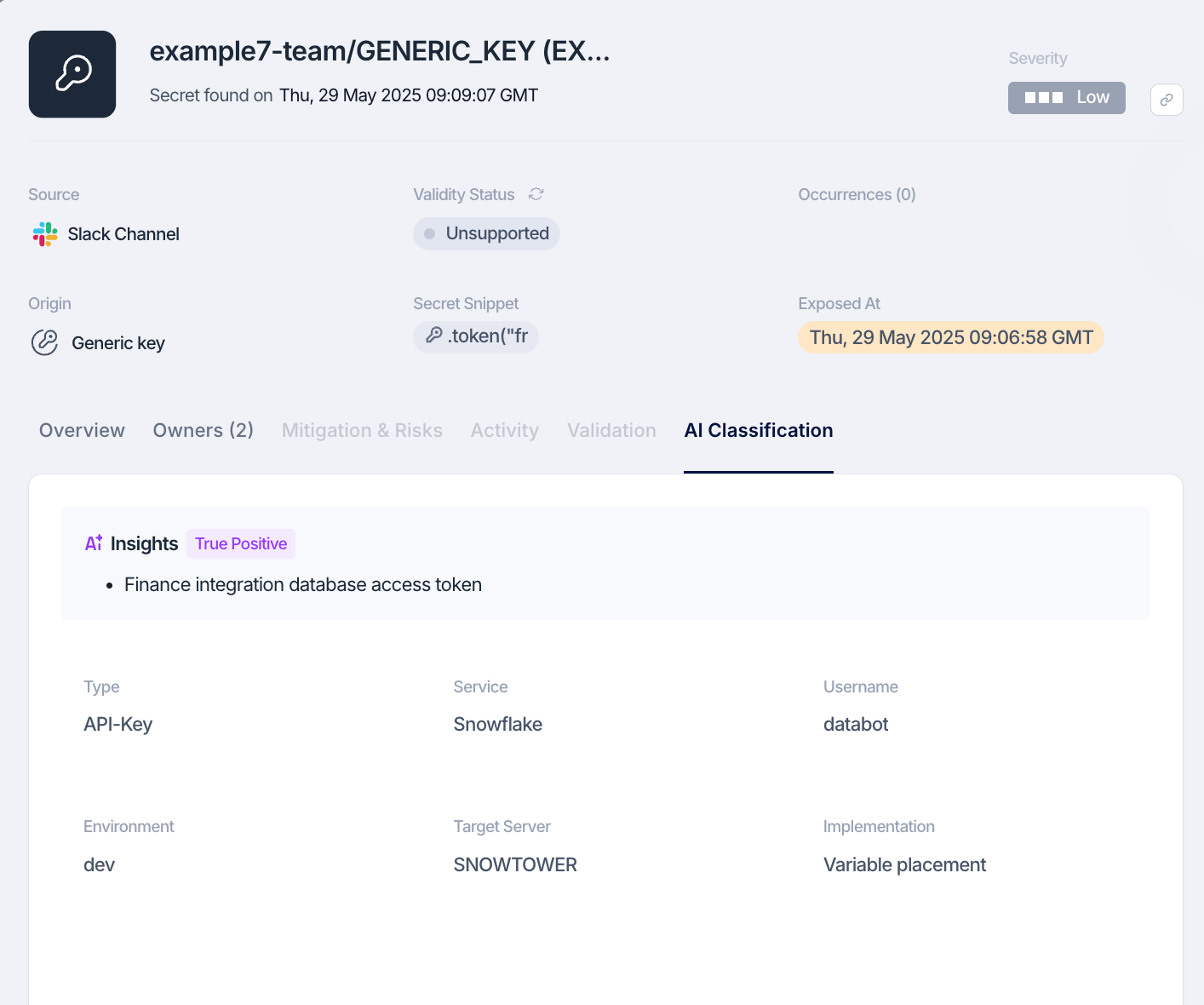
AI Classification tab BETA Using large language models (LLMs) and AI classification capabilities, SailPoint Entro enriches generic, non-validated secret findings with structured, natural language insights, based on metadata and context.
Findings enriched by the AI engine are automatically tagged with the "AI Classified" label as well as "AI TP" for findings detected as True positive or "AI FP" for false positives, to support inventory search, audit workflows, and risk filtering at scale. Within the "AI classification" tab of a secret finding, SailPoint Entro includes the full context as provided by the LLM, along with the classification of true/false positives as detected by the LLM and its reasoning. This includes:
-
Insights: A summary of the finding including the AI's classification of True Positive or False Positive and the reasoning explaining the decision.
-
Type: The kind of secret found
-
Service: The target service associated with the secret
-
Username: The relevant username string
-
Environment: The likely environment for the secret
-
Implementation: How secret is applied or stored
-
Target server: The hostname or IP of the target server
-
Other lines contain more secrets: Whether surrounding lines also contain secrets (boolean)
-
The AI Engine runs on a self-hosted, private LLM stack on AWS Bedrock using Claude Haiku 3.5 model. This architecture ensures that the data processed remains internal, is used exclusively for the purpose of this analysis, and will not be shared externally or used to train our models. Furthermore, the model itself doesn't process the secret value, only the context surrounding it.
Note
The "AI Classification" differs from "Classification" as it's not using AI models, but an internal LLM library
-
Contextual risks For some enabled exposed secrets types, entro will create a contextual risk alert with the affected assets, it's currently supported for GCP, Azure, GitHub, AWS secret types, with this info:
-
Token permissions
-
User Permissions
-
Target organization
-
Target Repository
-
Permissions
-
User owner
-