Campaigns
The Remediation Campaigns feature is SailPoint Entro's central engine for driving large-scale security improvements across your Non-Human Identity (NHI) landscape. Campaigns allow you to orchestrate the "fix" by grouping high-risk identities and tracking their remediation to completion. Rather than managing individual alerts, Campaigns provide a structured workflow to ensure that every machine user, API key, and service account meets your organization's security standards.
Overview
A Campaign is a targeted initiative designed to surface a specific subset of NHIs, such as those that are over-privileged, inactive, or exposed while providing a direct path to remediation.
The goal of a campaign is simple: Move a set of NHIs from "At Risk" to "Remediated."
-
Campaign Creation: The Scoping Wizard
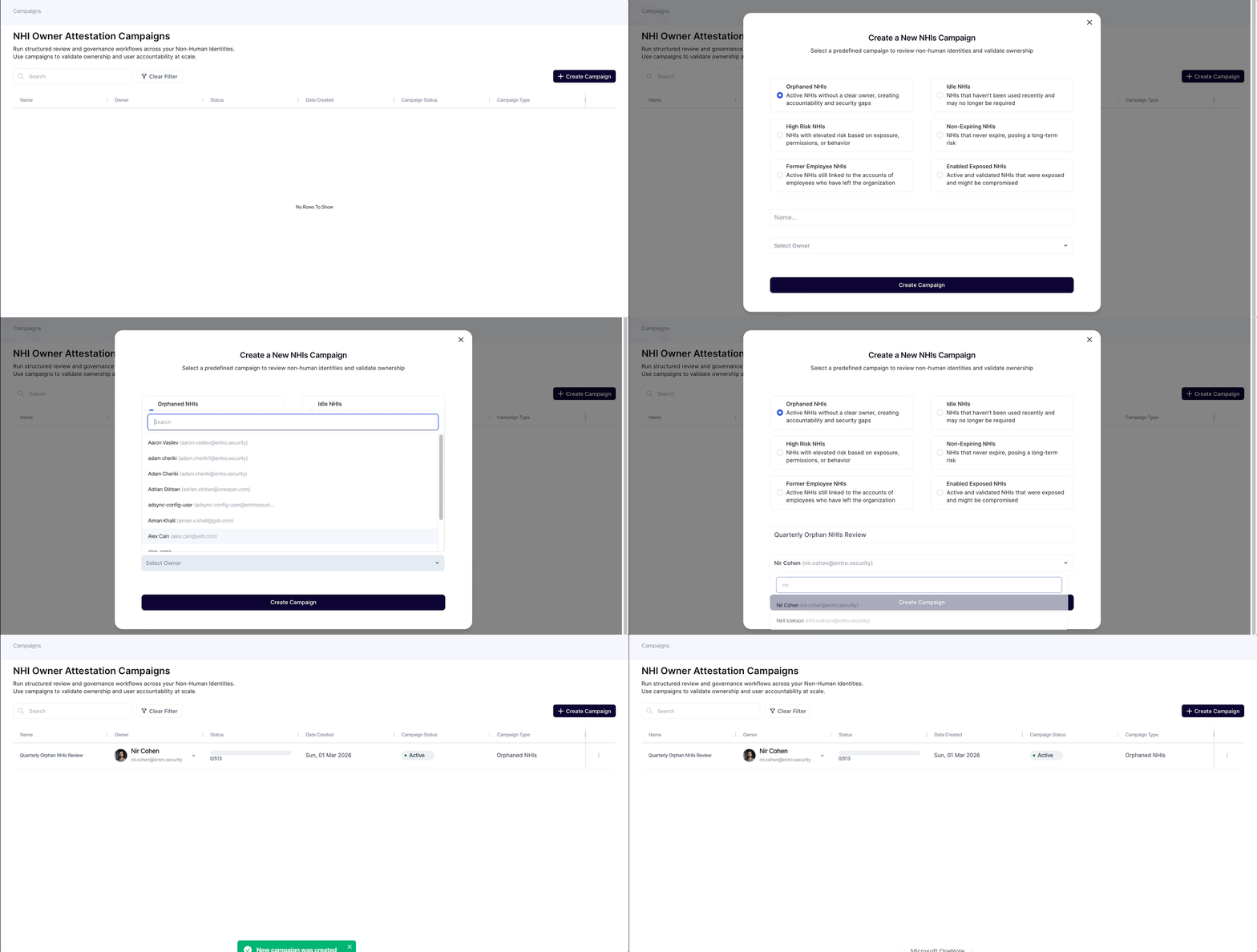
To launch a campaign, you use the Campaign Wizard, which allows you to define exactly what needs your attention. You can choose from two paths:
-
Pre-defined Templates: Choose from curated, high-impact security scenarios, such as:
-
Exposed NHIs: Active and validated NHIs that were exposed and might be compromised.
-
Former Employee NHIs: NHIs still linked to identities of offboarded employees.
-
Orphaned NHIs: NHIs that do not have human identity linked to it as owner.
-
Idle NHIs: NHIs that haven't been used recently and may no longer be required.
-
High-Risk NHIs: NHIs with elevated risk based on exposure, permissions, or behavior.
-
-
[Coming Soon] Custom Condition Builder: Build your own criteria using filters like:
-
Account Type: AWS, GitHub, Okta, GCP, etc…
-
Risk Severity Score: Target only NHIs with a score above a specific threshold.
-
Usage Patterns: Filter by last activity date or frequency of use.
-
Compliance Violations: Filter by NHIs who have deviated from compliance regulations.
-
-
-
Visibility & Tracking
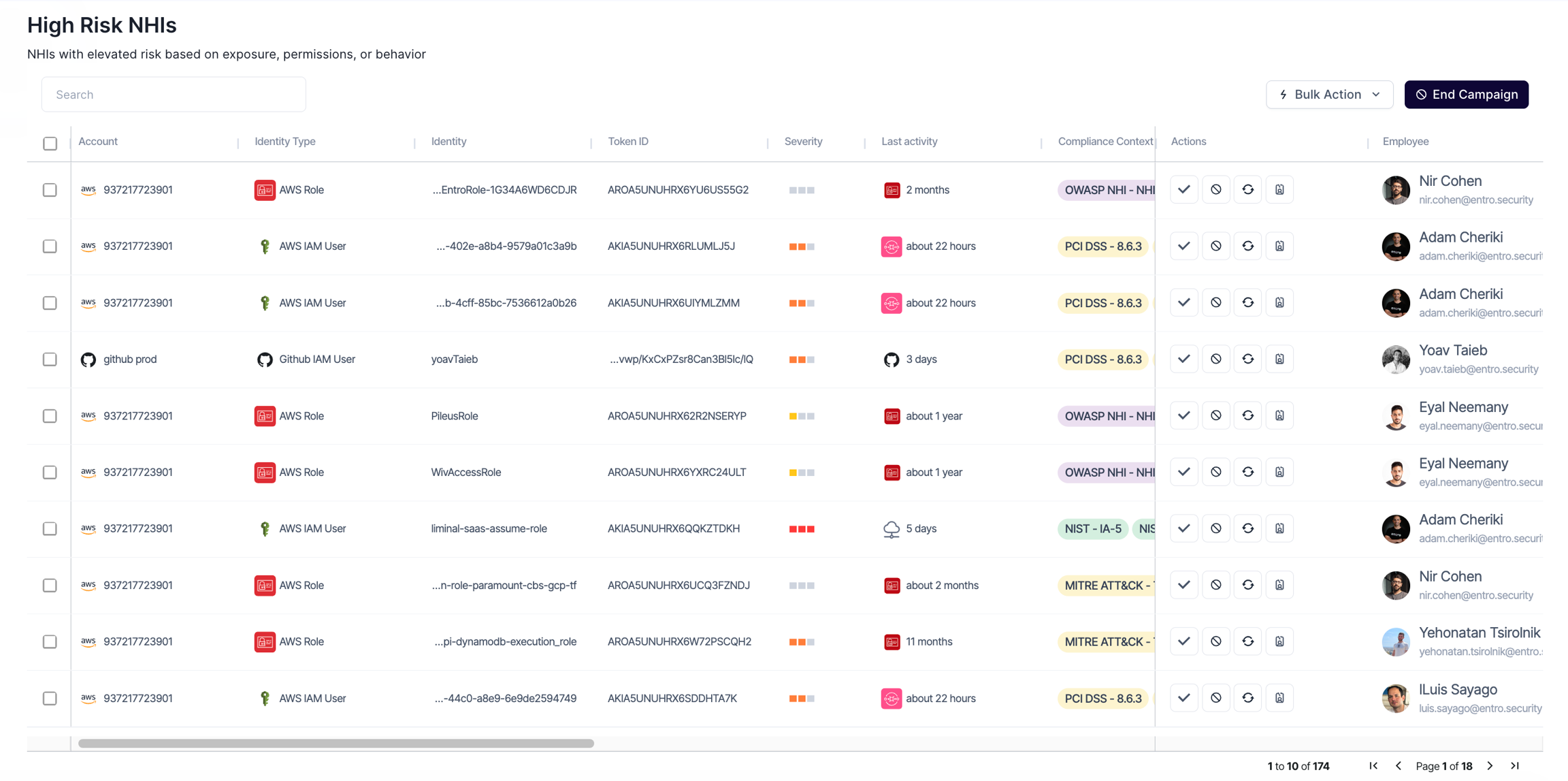
Once a campaign is active, the Campaign Dashboard provides a real-time view of your remediation progress. Instead of a static list, you get an interactive workspace where you can see:
-
Campaign Progress: Gain immediate insight into campaign performance. This view provides a breakdown of handled versus pending assets.
-
Comprehensive NHI Context: Gain centralized full visibility into every identity flagged in your campaign. By selecting an NHI from the dashboard, you can instantly view its metadata, including associated cloud accounts, permission levels, recent activity logs, and current risk factors.
-
Remediation Status: See exactly how many NHIs are Pending, Awaiting Action or Remediated.
-
[Coming Soon] Owner Accountability: If an owner is assigned, you can track who has viewed the instructions and who has completed their tasks.
-
-
Remediation Capabilities
SailPoint Entro provides specific, actionable paths to resolve the risks surfaced in a campaign. For each NHI in your list, you can execute the following remediation actions:
A. Rotate Credentials
For tokens that are too old or potentially compromised, rotation is the primary defense.
-
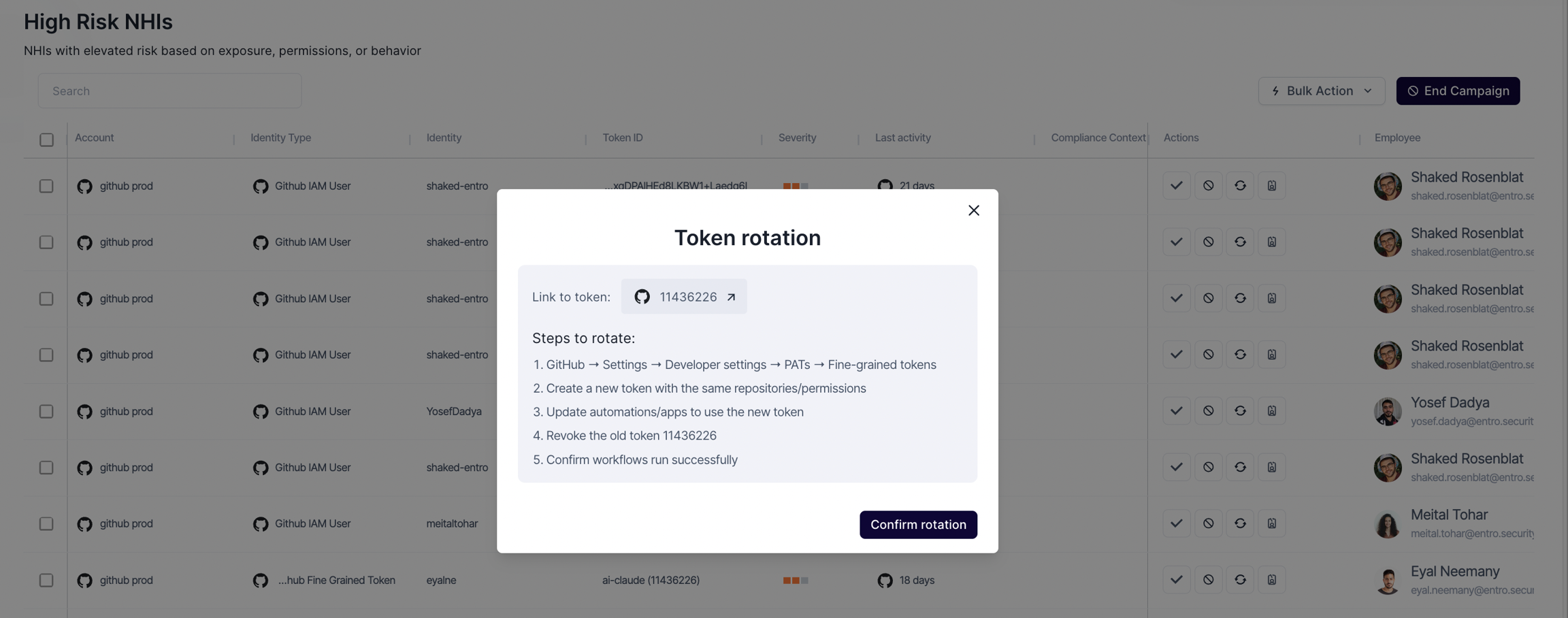
How it works: SailPoint Entro provides a specialized Rotation Guide tailored to the specific provider (e.g., AWS IAM, GitHub PAT).
-
The Workflow: You are provided with a direct link to the NHI location in the console and a checklist of 3-5 steps to ensure the new credential is functional before the old one is revoked.
B. Disable/Revoke NHI
If an NHI is no longer needed (e.g., it's "Idle" or belongs to a "Former Employee"), it should be disabled immediately.
-
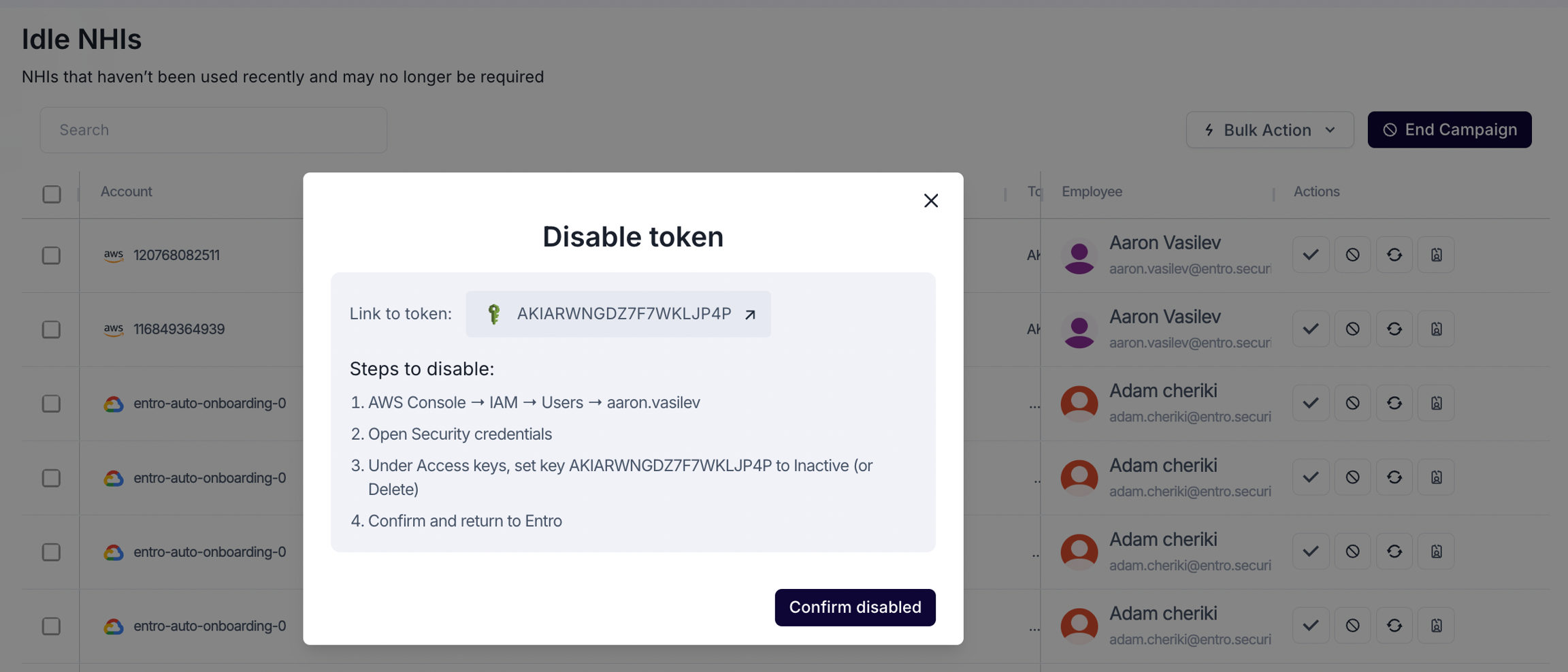
How it works: Selecting "Disable" opens a prompt-box containing the exact path within the cloud provider to safely deactivate the identity.
-
Safety Check: After performing the manual step in the provider, you mark the item as "Disabled" in SailPoint Entro. Once SailPoint Entro will verify the NHI is indeed disabled it will be removed from the campaign dashboard.
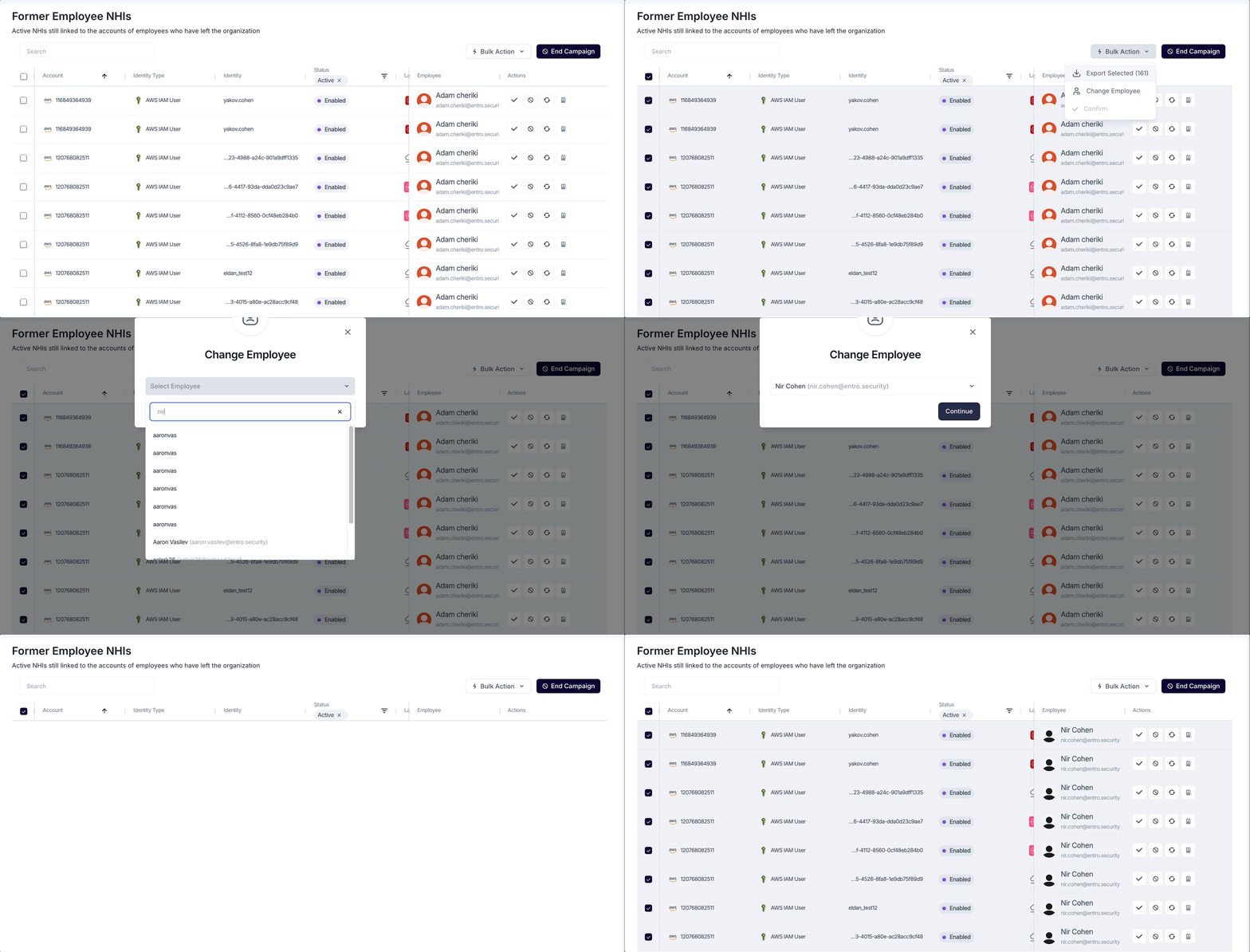
C. Update Ownership & Accountability
Remediation often requires the help of the person closest to the asset.
-
How it works: You can reassign an NHI to a new owner or team.
-
The Workflow: The new owner will be assigned to the risk. Once he logs-in to SailPoint Entro he will be able to see its details and handle accordingly.
-
-
[Coming Soon] Integrated Workflows (Slack, Teams, Jira & Email)
Campaigns are not confined to the SailPoint Entro dashboard. To speed up remediation, SailPoint Entro pushes actionable alerts directly to the tools your teams use every day.
-
Interactive Notifications: When an NHI is flagged for remediation, the responsible party receives a message with "one-click" access to the remediation instructions.
-
Real-time Updates: As soon as an employee completes a rotation or disables a token and clicks "I've Done This" in Slack, the Campaign status updates automatically for the Admin.
-
Summary of Benefits
-
Scalability: Fix hundreds of high-risk tokens through a single organized effort.
-
Clear Instructions: No more guessing "how" to rotate or disable, SailPoint Entro provides the steps and the links.
-
Audit-Ready: Every action taken in a campaign is logged, providing a perfect paper trail for compliance and security audits.