AI Security RTR Integration
Overview
The SailPoint Entro CrowdStrike Real-Time Response (RTR) integration allows SailPoint Entro to securely inspect configuration files on endpoints in order to discover and protect credentials and MCP-related configurations stored on developer machines.
When the integration runs, SailPoint Entro:
-
Opens a temporary CrowdStrike RTR session
-
Locates directories where MCP and developer tools store configuration files
-
Reads relevant configuration files
All commands are executed using CrowdStrike’s RTR capability via the Falcon agent already installed on the endpoint.
Importantly, the integration is executed from the SailPoint Entro Connector, which can be deployed within the customer's environment and controlled by the customer.
No persistent scripts, agents, or binaries are installed on endpoints.
Where Execution Happens
All RTR commands originate from the SailPoint Entro Connector, which is deployed and managed by the customer.
Customer Environment
│
├─ Entro Connector
│    └─ Calls CrowdStrike RTR API
│
├─ CrowdStrike Falcon Cloud
│    └─ Executes commands through Falcon Agent
│
└─ Endpoint
     └─ Read-only commands executed
        └─ LS, CAT commands only
This architecture is designed to ensure that:
-
Customers fully control where the integration runs
-
All communication is performed using CrowdStrike’s native RTR API
-
No direct inbound connectivity to endpoints is required
What Commands Run on Endpoints
The integration performs three types of operations:
-
Open an RTR session
-
Enumerate directories to locate MCP configuration files
-
Read configuration file contents
All commands are read-only.
1. RTR Session Initialization
Before executing commands, SailPoint Entro creates a temporary RTR session with the endpoint.
Session Payload
Purpose:
-
Establish temporary RTR access
-
Ensure commands only run on online endpoints
2. Directory Enumeration
SailPoint Entro inspects known directories where MCP tools and developer environments typically store configuration files.
macOS / Linux
The Falcon agent executes:
and
Purpose:
-
Enumerate configuration directories
-
Identify MCP configuration files or related developer tool configs
Windows
The Falcon agent executes:
and
Purpose:
- Discover configuration directories used by developer tools
3. Configuration File Retrieval
After identifying potential configuration files, SailPoint Entro retrieves the file contents.
macOS / Linux
Example command executed:
Additional example:
Windows
Example command executed:
Additional example:
Purpose:
- Retrieve configuration content to identify credentials, tokens, or MCP server definitions.
Configuration Files That May Be Retrieved
SailPoint Entro looks for commonly used MCP and developer configuration files:
mcp.json
mcp_config.json
config.json
settings.json
claude_desktop_config.json
default.json
mcp-oauth-tokens.json
cli-agents
These files may contain:
-
MCP server configurations
-
OAuth tokens
-
API credentials
-
Agent definitions
-
Developer environment settings
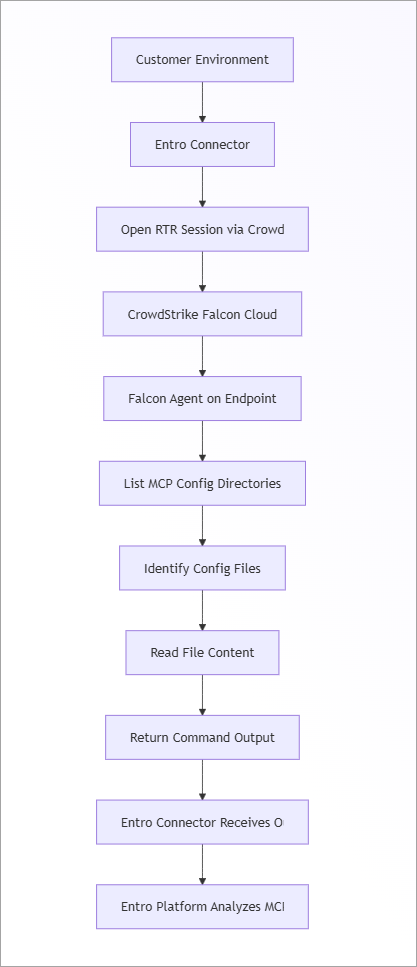
End-to-End Flow
The following diagram shows the full interaction between SailPoint Entro, CrowdStrike, and the endpoint.
Security Characteristics
The integration was designed with strict security controls.
Customer-Controlled Execution
All commands originate from the SailPoint Entro Connector, which is:
-
Could be deployed within the customer environment
-
Fully controlled by the customer
-
Able to be restricted or disabled by the customer
No external system directly accesses endpoints.
Read-Only Operations
Commands executed on endpoints are limited to:
-
Directory listing (
ls) -
File reading (
cat)
No files are modified.
No Persistence
The integration does not install scripts, agents, or binaries on endpoints.
Temporary Sessions
CrowdStrike RTR sessions are temporary and closed after execution.
IP Allowlisting
CrowdStrike supports IP allowlisting for API clients, meaning authentication and API requests will only succeed when originating from an approved source IP.
Native CrowdStrike Execution
All commands are executed via the CrowdStrike Falcon agent, ensuring they respect:
-
Falcon policies
-
Endpoint security controls
-
Customer-managed CrowdStrike configurations
Why This Inspection Is Needed
Modern developer tools and MCP environments frequently store credentials locally in configuration files.
The SailPoint Entro integration helps organizations:
-
Discover Shadow AI connections between AI Clients and enterprise services
-
Detect exposed API keys in AI Configuration files
-
Identify OAuth connections
-
Discover MCP server definitions
-
-
Reduce credential sprawl across developer machines