SailPoint Entro WebGuard
Extension for AI Data Leak Prevention
Overview
SailPoint Entro WebGuard is a Chrome extension that prevents sensitive data from being pasted into AI assistants like ChatGPT.
It scans every prompt before it leaves the browser. It then enforces your policy in real time.
Why Use WebGuard
-
Prevent secret leakage to AI tools.
- API keys, tokens, private keys, JWTs, and certificates.
-
Protect PII in prompts.
- Emails, phone numbers, SSNs, credit cards, IP addresses, and street addresses.
-
Keep a full audit trail.
- Findings, enforcement action, and user bypass decisions.
-
Stay frictionless on clean prompts.
- No warnings when nothing sensitive is found.
How WebGuard Works
WebGuard uses a two-tier detection engine.
Tier 1 detection (local)
Tier 1 runs fully in the browser. It is instant.
It detects:
-
Secrets using Shannon entropy and pattern matching.
-
PII using regex-based rules with validation.
Note
Tier 1 does not send data to SailPoint Entro. Everything runs locally in the browser.
Tier 2 detection (SailPoint Entro API validation)
Tier 2 requires an API key.
When the user sends a prompt, Tier 1 findings are validated by the SailPoint Entro scan API. Tier 2 can also detect additional secrets that Tier 1 missed.
Results are cached for 30 seconds.
Note
If the SailPoint Entro API is unavailable, WebGuard falls back to Tier 1 only.
Enforcement flow
WebGuard enforces policy at two points:
-
While typing: real-time scanning with a 600ms debounce.
-
On Send: intercepts the outbound request and scans the full prompt.
- This includes text extracted from attached files.
What WebGuard Detects
Secrets (Tier 1 - local)
Tier 1 runs entirely in the browser as a fast first pass. No data leaves the browser.
It uses Shannon entropy analysis to flag high-randomness strings as potential secrets.
Any string with:
-
Shannon entropy >= 4.2 bits/char
-
Length >= 20 chars
It is flagged as a possible secret.
Tier 1 also catches a small set of unambiguous patterns locally:
-
Private keys (PEM) (Critical).
-
Certificates (PEM) (High).
-
JSON Web Tokens (JWT) (High).
-
High-entropy tokens (High).
This provides immediate feedback as the user types, with zero latency.
Secrets (Tier 2 - SailPoint Entro API)
Tier 2 requires an API key.
When the user sends a prompt, Tier 1 findings are validated by the SailPoint Entro scan API. Tier 2:
-
Confirms whether a high-entropy token is actually a secret.
-
Classifies it into a specific type.
- Example: GitHub token, AWS access key, Stripe key.
-
Can detect additional secrets that Tier 1 missed.
Examples include:
-
AWS access keys and secret keys.
-
GitHub tokens.
-
Slack tokens.
-
Stripe keys.
-
SendGrid API keys.
And many more.
Tier 2 results are cached for 30 seconds. This reduces redundant calls. Validation often completes before the user clicks Send.
If the SailPoint Entro API is unavailable, WebGuard falls back to Tier 1 local detection only.
PII (optional)
PII detection is optional. It is disabled by default. You can toggle it on in Settings.
PII types include:
-
Email address (Medium).
- Validation: pattern match.
-
US phone number (Medium).
- Validation: pattern match.
-
International phone number (Medium).
- Validation: pattern match.
-
Social Security number (SSN) (Critical).
- Validation: pattern match.
-
Credit card (Critical).
-
Visa, Mastercard, Amex, Discover.
-
Validated with the Luhn algorithm.
-
-
IPv4 address (Low).
- Excludes private and reserved ranges.
-
Street address (Medium).
- Validation: pattern match.
Policy Actions
Each detection type can be configured with one of these actions:
-
Block
-
Stops the request.
-
Shows a block modal.
-
Redacts the sensitive content in the input field.
-
-
Prevent
-
Shows a warning modal with findings.
-
User can cancel or proceed anyway.
-
User choice is logged.
-
-
Audit
-
Allows the request.
-
Logs the finding locally.
-
Optionally forwards the event to your audit endpoint.
-
Default actions:
-
Secrets: Prevent
-
PII: Prevent
Audit Logging
WebGuard logs every scan locally. The popup shows the last 50 events.
Each event can include:
-
Timestamp.
-
Action taken:
block,warn,audit, orallow. -
Prompt length.
-
Findings summary.
-
Whether the user bypassed a warning.
Forward audit events (optional)
You can forward events to an external endpoint (for example, a SIEM).
You configure:
-
API Endpoint URL: where to
POSTaudit events. -
Audit Payload Template: JSON body with placeholders.
Supported placeholders:
-
{{source}}: alwaysentro-webguard. -
{{version}}: extension version. -
{{timestamp}}: ISO 8601 timestamp. -
{{action}}:block,warn,audit, orallow. -
{{userProceeded}}: boolean. -
{{interceptedUrl}}: intercepted ChatGPT API request URL. -
{{pageUrl}}: browser tab URL. -
{{promptLength}}: character count. -
{{promptText}}: prompt text with secrets and PII redacted. -
{{findings}}: JSON array of redacted findings.
Note
If either the endpoint URL or the payload template is empty, remote forwarding is disabled. Local logging still works.
Installation
Load the extension
-
Download the extension ZIP and unzip it.
-
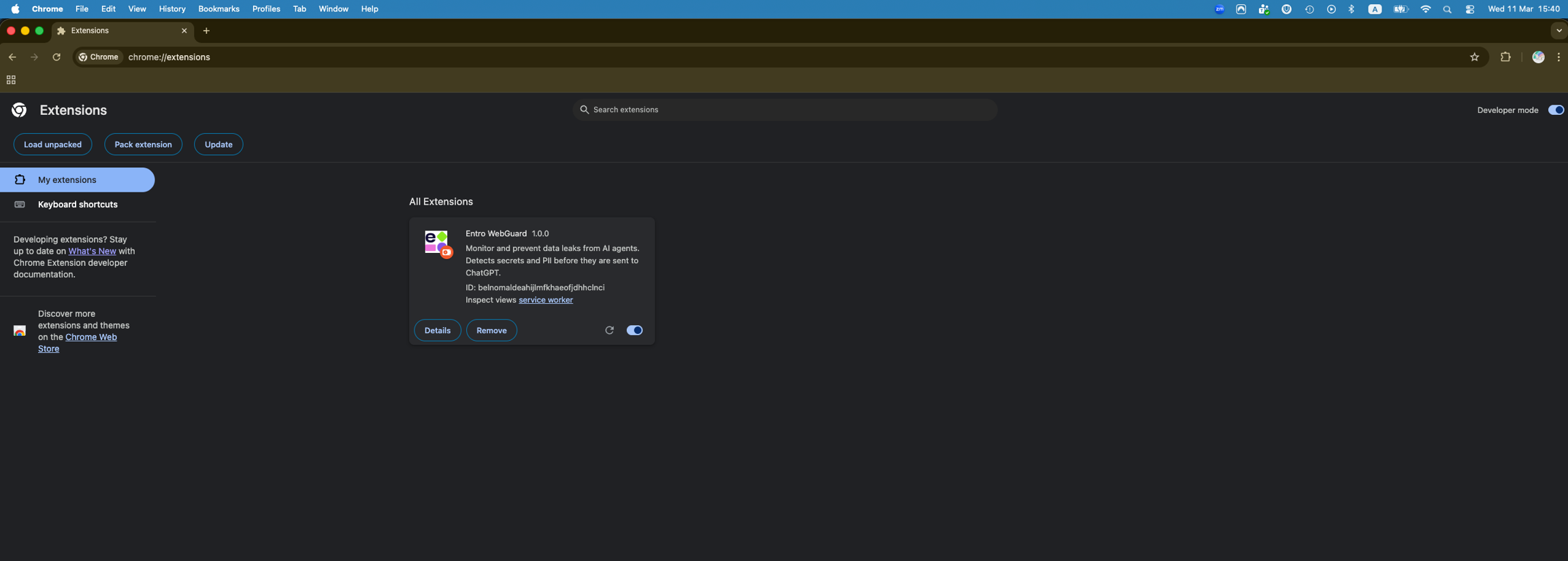
Open
chrome://extensions/. -
Turn on Developer mode.

-
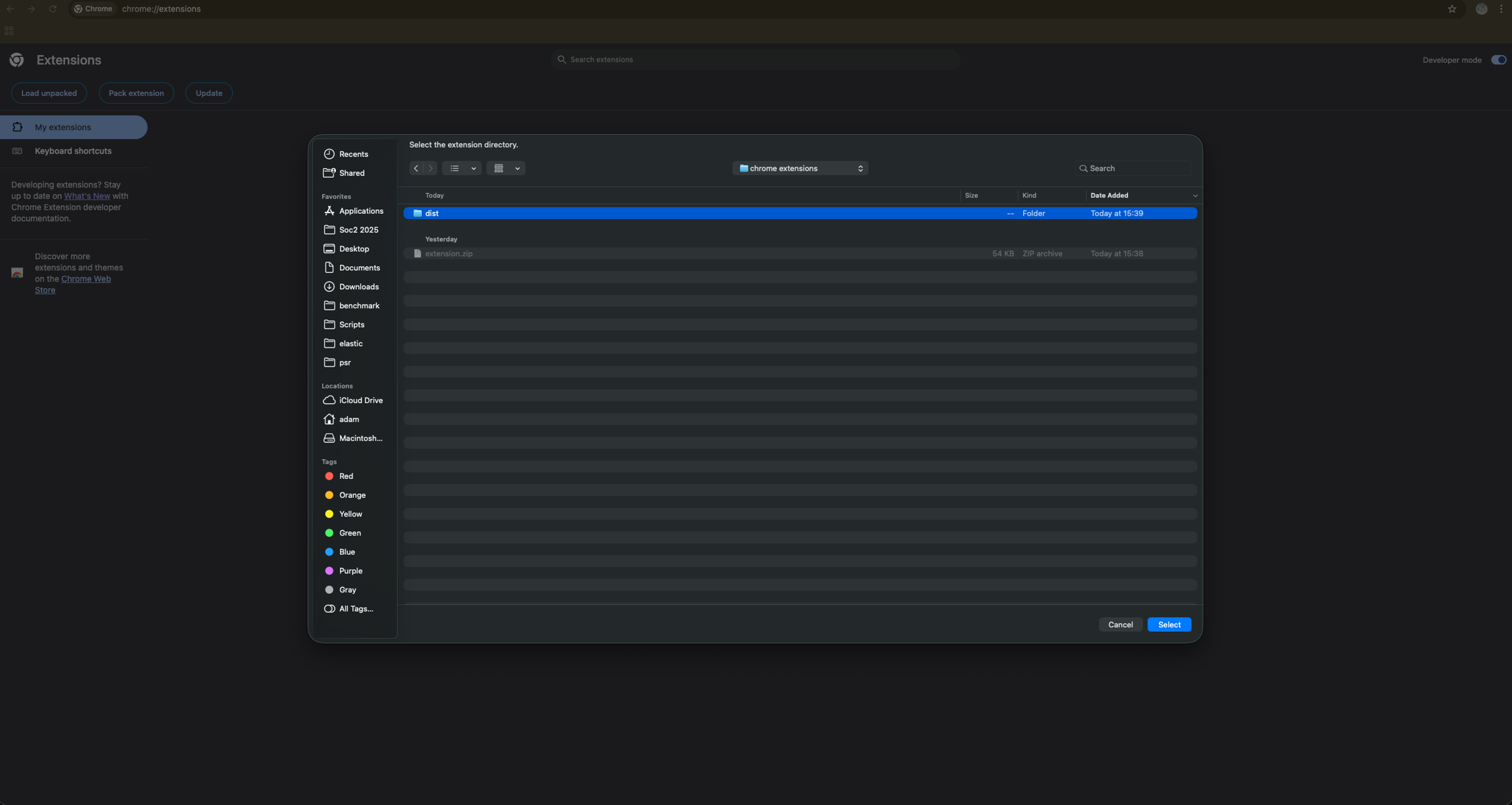
Click Load unpacked.
-
Select the unzipped
distfolder.
Pin WebGuard
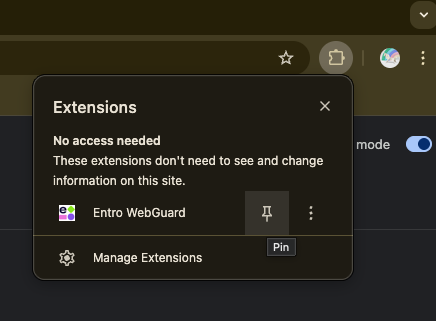
Pin the WebGuard extension to your Chrome toolbar. This makes it easier to open the popup and Settings.
Configuration
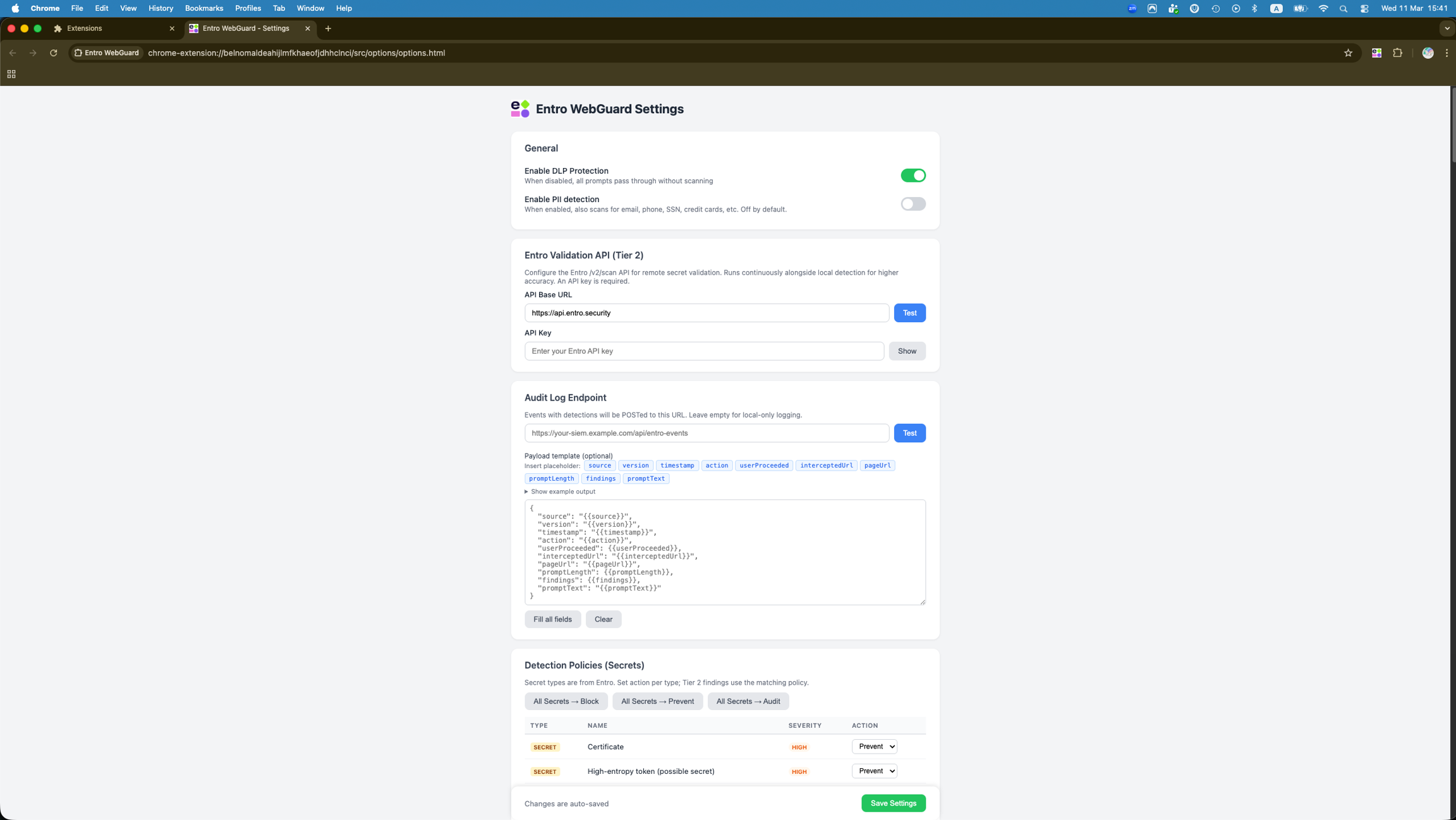
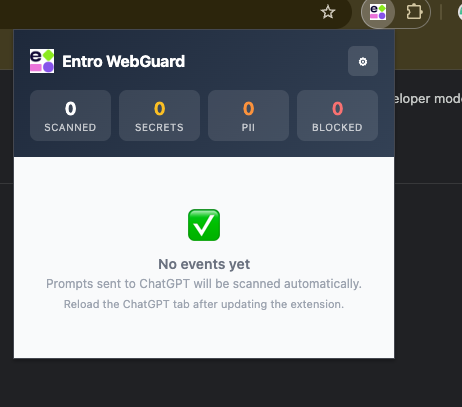
Open the extension popup. Click the gear icon to open Settings.
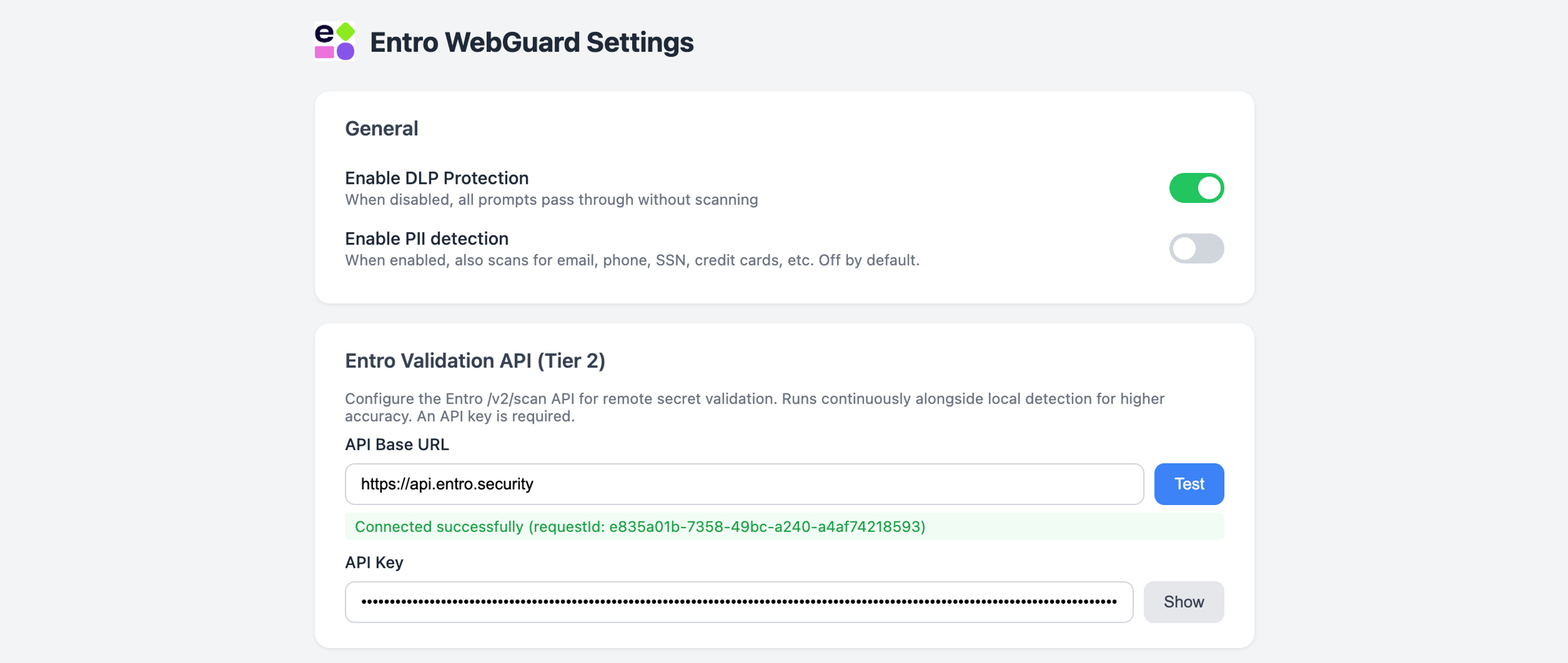
General
-
Enable DLP Protection (default: On)
-
Master toggle.
-
When off, prompts pass through without scanning.
-
-
Enable PII Detection (default: Off)
- Enables scanning for PII patterns listed above.
Tier 2: SailPoint Entro Validation API (optional)
Tier 2 provides remote validation and accurate secret classification. It requires a SailPoint Entro REST API key.
-
Set API Base URL
Set API Base URL to your tenant URL. Default is:
-
Generate an API key
In SailPoint Entro, go to Settings → API Keys. Generate a new REST API key.
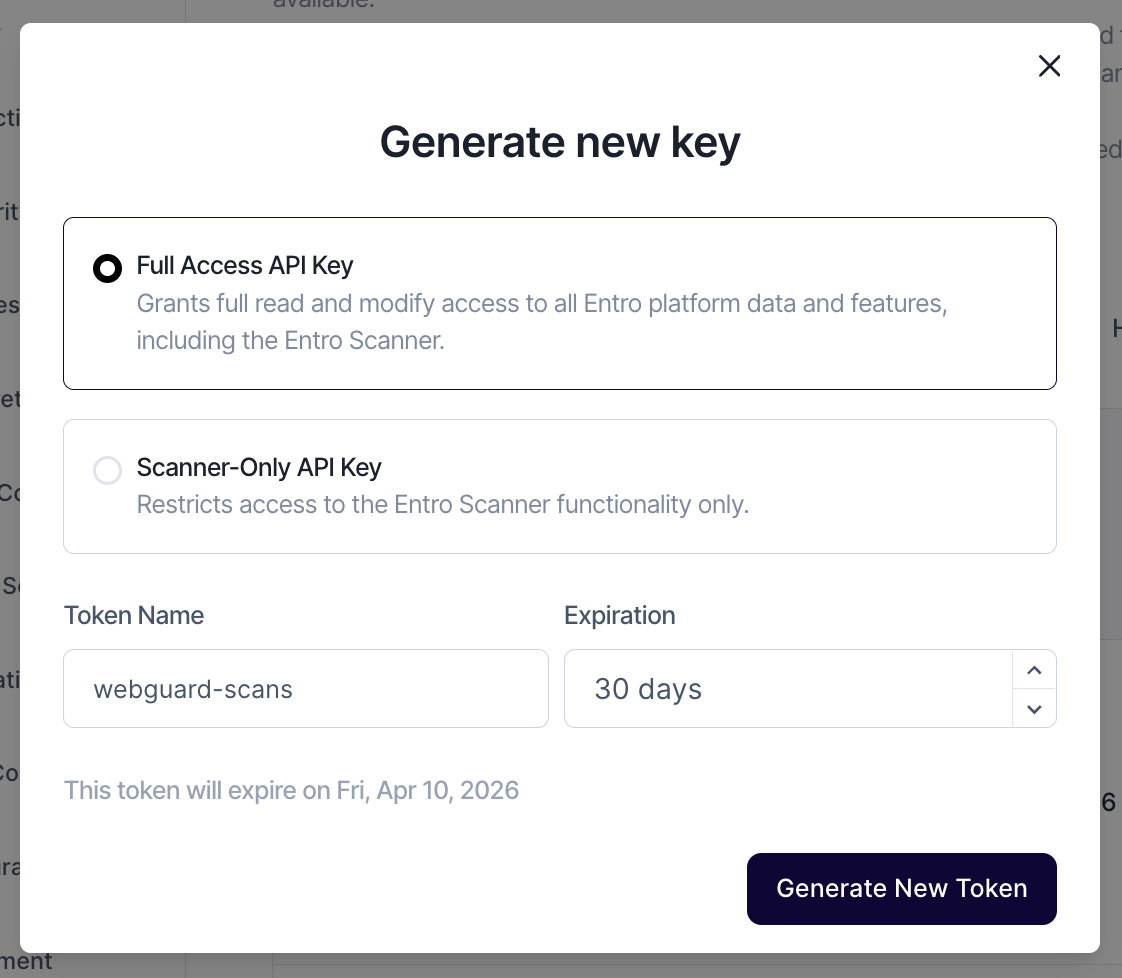
Direct link:
-
Test connection and save
-
Paste the key into API Key.
-
Click Test Connection.
-
Confirm the test returns a request ID.
-
Click Save.
-
Detection policies
You can set an action per detection type. Bulk actions let you set all Secrets or all PII types at once.
Recommended starting point:
-
Set Secrets to Prevent.
-
Set PII to Audit first.
-
Move high-confidence PII types to Prevent after tuning.
Testing the Extension
Use a known test token. Do not test with real secrets.
Note
This string is for testing only. Do not paste production credentials into any AI assistant.
Paste the following into ChatGPT:
Expected behavior:
-
Tier 1 detects it as a high-entropy token.
-
Tier 2 (if configured) classifies it as a GitHub token.
-
Your configured policy is enforced.
Extension Popup
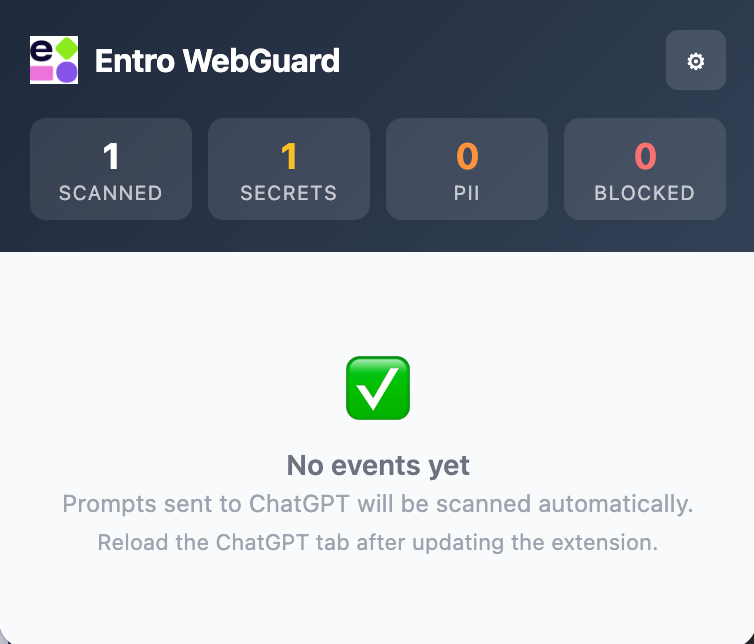
The popup shows:
-
Statistics.
-
Total prompts scanned.
-
Secrets found.
-
PII found.
-
Submissions blocked.
-
-
Recent events.
-
Last 50 events.
-
Timestamp, action, and finding badges.
-
Supported Platforms
WebGuard currently monitors:
-
chatgpt.com -
chat.openai.com
File Scanning
WebGuard scans text-based files uploaded to ChatGPT. Files are scanned before upload.
Common supported types:
-
.txt,.md,.csv,.json,.xml -
.yaml,.yml,.env -
.pem,.key,.crt -
.py,.js,.ts,.java,.sql
Other common code and config formats are also supported.