Requesting New Secret Types
SailPoint Entro allows any customer to request a new secret type for secrets SailPoint Entro does not have coverage for. SailPoint Entro requests not just examples of the new secret type, but any possible regular expressions that you might already have, any common prefixes, and especially the command to validate the token with the service it is used for.
To request a new secret type, please sign in to the SailPoint Entro platform and perform the following steps:
-
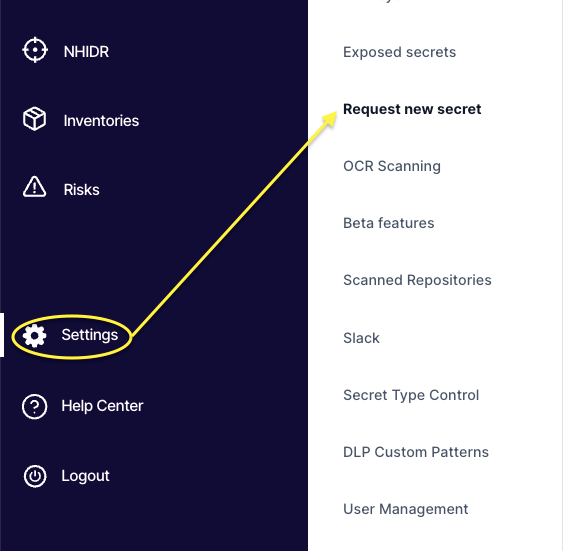
Go to Settings > Request new secret.
-
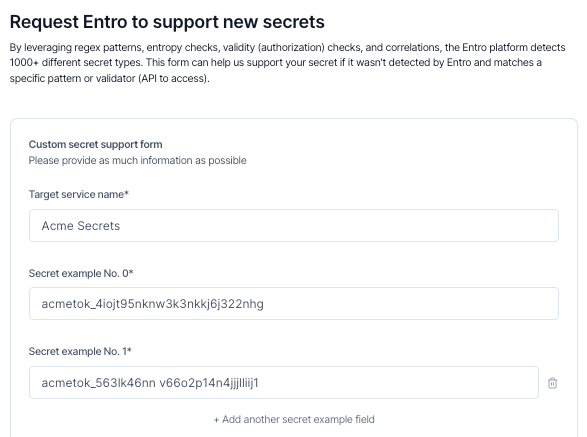
Set the name of the new secret type and provide an example.
-
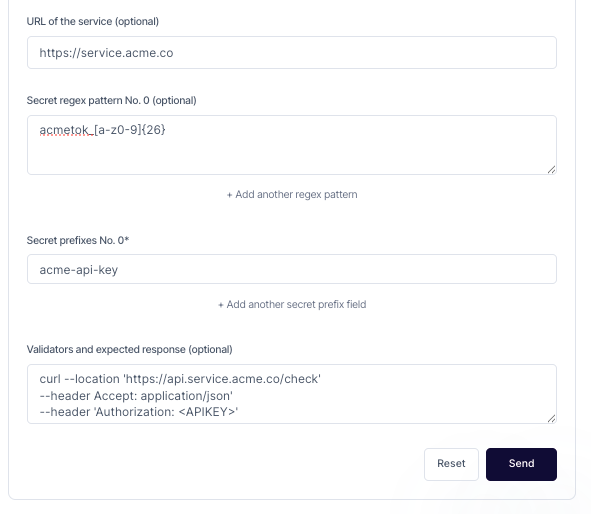
Fill as many optional fields for the new secret type as possible. These help SailPoint Entro correctly find these secrets, and validate them with the highest precision as possible.
-
Select Send to create a new request with the SailPoint Entro engineering team. SailPoint Entro Customer Success will work with engineering and you to verify the creation and deployment of the new secret pattern.