Troubleshooting and Validation
This section provides validation and troubleshooting steps for the Microsoft Azure integration with SailPoint Entro. Use these procedures to verify configuration accuracy, connectivity, and permission scope.
Navigation Path
In the SailPoint Entro Dashboard, navigate to: Management → Accounts & Integrations → Target Service filter → Select Azure
Validate Connection Status
-
Check integration status
-
In the SailPoint Entro Dashboard, go to Management → Accounts & Integrations → Azure.
-
Confirm that the Connector Status displays Active.
-
Confirm that the Integration Status displays Verified.
-
-
If status shows Failed / Error / Missing Permissions
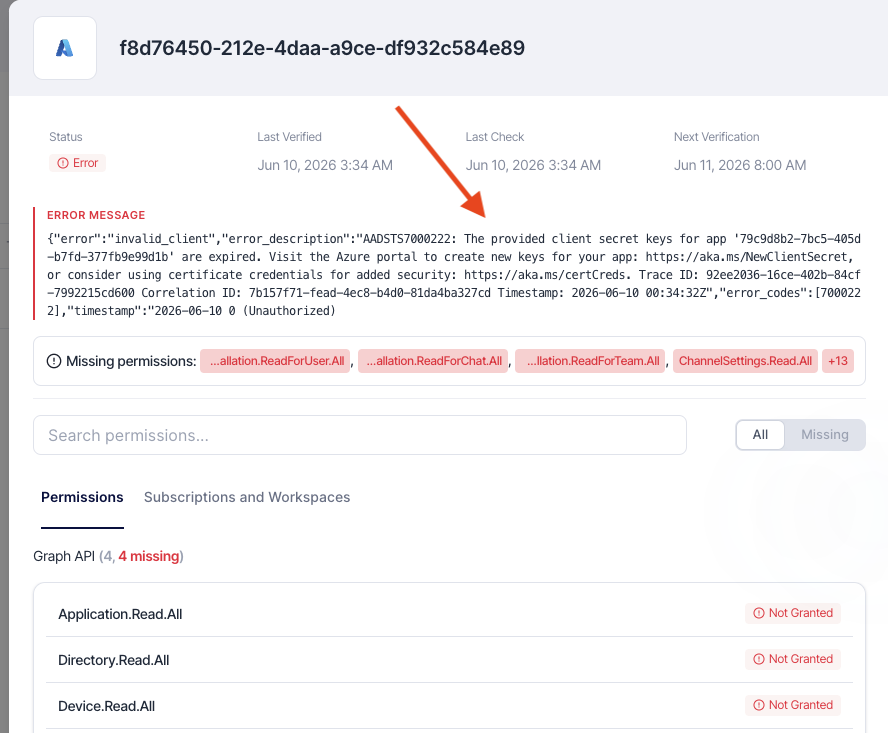
Open the integration details and check for error message.
-
401 Unauthorized — Token expired or invalid.
-
403 Forbidden — Insufficient role permissions.
-
404 Not Found — Resource scope mismatch or deleted app registration.
-
Azure CLI Validation
Use the following Azure CLI commands to validate API access and role configuration:
az ad sp show --id <client_id>
az role assignment list --assignee <client_id> --all --output table
az ad app permission list --id <client_id> --output table
Expected results:
-
Service principal is valid and active.
-
Only
ReaderandKey Vault Readerroles appear. -
No write or owner permissions are assigned.
Common Errors
| Error | Cause | Resolution |
|---|---|---|
| 401 Unauthorized | Token expired or invalid secret | Generate a new client secret in Azure App Registration, update it in SailPoint Entro, and make sure the right fields are inserted. |
| 403 Forbidden | Insufficient privileges | |
| Connector Timeout or Connection Error | Network or API issue | Confirm outbound HTTPS access to https://api.entro.security |
Note
After applying corrections, re-run connection validation from the SailPoint Entro Dashboard.
Revoke or Rotate Credentials
-
Delete old secret
- In the Azure Portal → App Registrations → Certificates & Secrets, delete the old Client Secret.
-
Generate and update
-
Generate a new client secret, then update credentials in SailPoint Entro.
-
Updating credentials is also available via API
-
Rotation is recommended every 6 months for compliance and security hygiene
-