Request New Secret
The Request New Secret page allows administrators to request detection support for secret types that are not yet recognized by SailPoint Entro. By submitting details about your secret’s format, prefix, or validation logic, you help SailPoint Entro expand its detection coverage and improve accuracy across diverse environments.
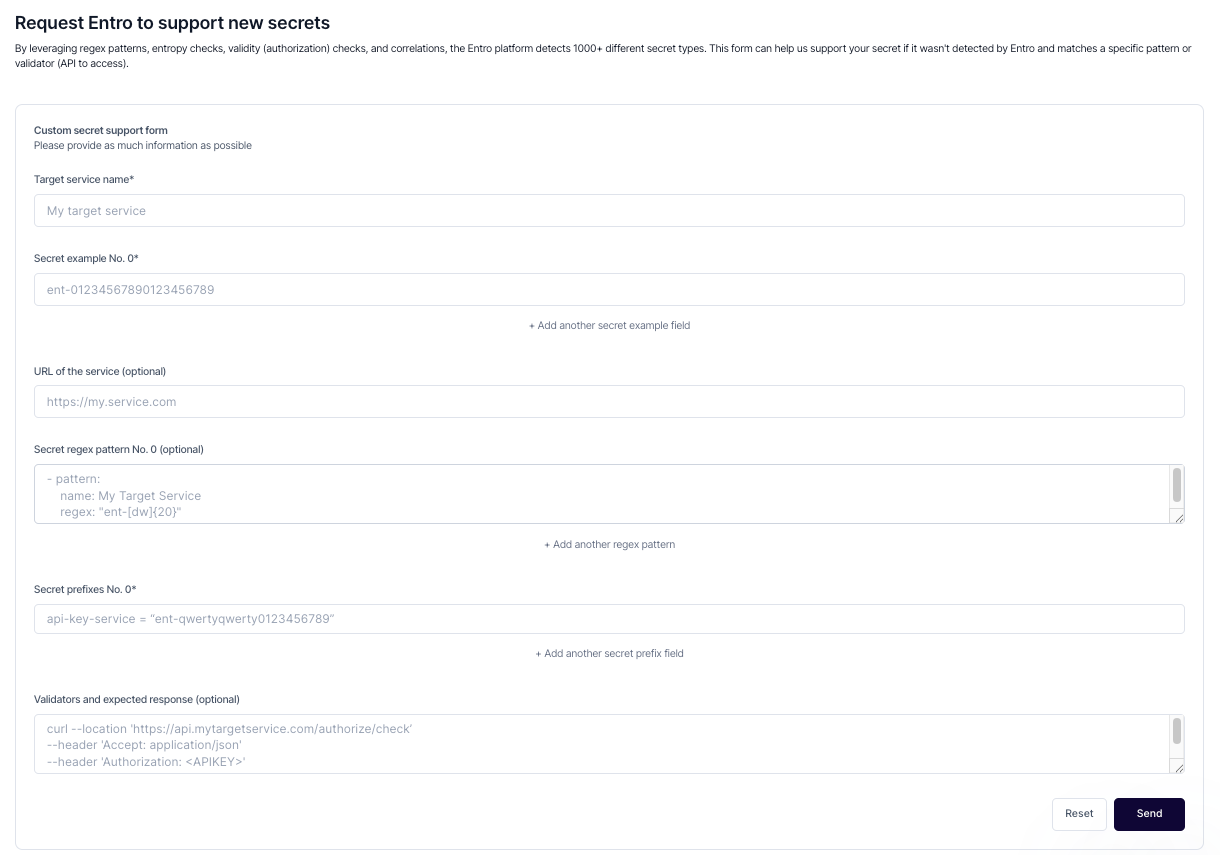
Submitting a Request
To submit a new secret type for support:
-
Navigate to Settings → Request New Secret.
-
Complete the Custom Secret Support Form by providing as much detail as possible.
The form includes the following fields:
-
Target Service Name (required) — The name of the platform, app, or service using the secret.
-
Secret Example (required) — One or more representative examples of the secret format.
-
Service URL (optional) — A link to the service or API documentation for additional context.
-
Regex Pattern (optional) — The detection pattern (regex) used to identify the secret structure.
-
Secret Prefix (optional) — Any known prefix associated with the secret type.
-
Validators and Expected Response (optional) — Example API calls or validator endpoints used to verify secret authenticity.
Review and Support
Once submitted, the SailPoint Entro research team reviews your request and evaluates the secret for detection support. If approved, the new secret type will be incorporated into SailPoint Entro’s detection engine and automatically available for your organization and other users in future updates.
Tip
Provide as much detail as possible — including real examples and validation logic — to help SailPoint Entro replicate the detection pattern accurately.