Version Upgrade Considerations
Review the upgrade considerations for ServiceNow Service Catalog versions 2.3.27 through 5.4.
Upgrading to V5.4
This section lists points to consider when you upgrade from any previous version to v5.4, or upgrade through v5.4.
Note
This page does not capture product changes from other versions.
Important
v5.4 changes how SailPoint and ServiceNow communicate, and it includes mandatory connection changes. Follow all prerequisites and upgrade steps carefully.
This release delivers a significant architectural change. It provides the following benefits:
- RITM status updates are faster when approvals complete or provisioning finishes.
- Workflows are less likely to stall in timer windows when SailPoint response times vary.
- ServiceNow makes fewer REST API polling calls to SailPoint.
- Search returns more precise results when users need an exact multi-word phrase.
SailPoint recommends that admins review the release notes and update their configuration to suit their business needs.
Updating Identity Security Cloud Links
Update the Identity Security Cloud Links table to reflect the latest endpoints. For more information, refer to Version 5.4.
Configuring ISC Event Triggers
v5.4 replaces timer-based polling with SailPoint event triggers for approval synchronization and access request status updates. Configure the required triggers before you use the app. For more information, refer to Configuring ISC Event Triggers. These triggers are available only to licensed ServiceNow Catalog customers. Workflows and the related code have changed. If you customized these objects, review them for conflicts.ISC Event Triggers require additional connection configuration. Refer to Prerequisites for the new setup steps.
ISC Backup Utility
The ISC Backup Utility scheduled job reconciles missed events when ISC connectivity or event delivery fails. The job is set to run On Demand by default. For more information, refer to Configuring the ISC Backup Utility.
ISC Event Processing Table Cleaner
The ISC Event Processing table receives a high volume of events from SailPoint. SailPoint recommends that you activate the Data Management Policy to clean this table periodically. Set a retention period of seven days, or a period that matches your data management policy. For more information, refer to Configuring the ISC Event Processing Table Cleaner.
Quoted Phrase Search in ISC Access Object Search
The ISC Access Object Search widget query parser now treats text in double quotes as a single phrase token. Unquoted text keeps the existing match behavior. This applies to the Name, Description, and Additional Search filters when the operator is Contains ALL the keywords. Upgrade this widget and apply the widget options. For more information, refer to SailPoint Widget Library.
Upgrading to V5.3
Optimised Authentication for Performance Improvement
To provide greater runtime efficiency and reduce repeated OAuth token calls, a new Application Registries Auth Provider Name for Service Account parameter is now available on the Setup page. ServiceNow Administrator must create a third-party OAuth provider registry (configuring the client ID/secret, grant type, and token URL) and map it here to enable this from v5.3 onwards. This will not impact the upgrade for this release but will be mandated for releases starting 2027. hence, its suggested to implement with this release itself. For more information, refer to Service Account Configuration.
Additional Approval Types Support
This update expands approval routing options by introducing support for Identity Security Cloud Primary Owner, Additional Owners, and All Owners patterns. It clarifies owner resolution behavior by fetching owners from SailPoint and mapping them to local ServiceNow users. If no valid owner mapping is found, approvals fall back to the default approval group (for example, SailPoint Access Governance Group). It also notes naming updates and compatibility rules (for example, “All Owners” is mutually exclusive with certain other owner-based types).
Note
Upon upgrading, any existing configurations using the "Identity Security Cloud Owner" approval type will automatically be updated to "Identity Security Cloud Primary Owner." This update is seamless and does not affect the underlying functionality. For more information Refer to Approval Flexibility. This will not impact any other existing functionality during upgrade.
Questionnaire and “Additional Info” Form Enhancements
With the release of version 5.3, we've updated the behavior of the Review and Submit widget to better handle additional information validation. You can now configure the widget using two response modes: “ Mandatory Questions Only” and “Response Required Per Access”. This update replaces the existing widget behavior and includes refreshed instance options to improve the user experience during request submission. This will not impact the existing functionality during upgrade. For more information, refer to SailPoint Widget Library.
Additional Search in Access Object Search Widget
With the release of version 5.3, we've enhanced the Access Search widget to support broader, tenant-specific search behaviour. This widget too has ability to search from any searchable objects of SailPoint, including meta-data and tags. The Additional Search Label and Additional Searchable Fields options are now available as widget instance options, allowing you to configure a comma-separated list of custom search fields. This removes the previous limitation of only searching predefined fields like name, description, owner, and application, greatly improving discoverability in large catalogs. This will not impact the existing functionality during upgrade. For more information, refer to SailPoint Widget Library.
Re-Organized Setup Page
With the release of version 5.3, the SailPoint Setup page has been redesigned and reorganized. As the application has grown, new configuration options have been added. To improve usability and make administration easier, settings are now logically grouped into distinct categories. For more information, refer to Configuring Other Parameters.
Note
Upgrading to v5.3 will not overwrite, reset, or delete your existing configurations. All parameters configured in v5.2 or earlier will automatically carry over to their new designated section. Since only the label has changed and the value remains the same, all parameters will automatically carry over to the new designated section.
Upgrading to V5.2
This section lists points to be considered while upgrading from any previous version to v5.2 or upgrading through v5.2.
Note
This page does not capture changes to the product of other versions.
Multi Accounts Enhanced Information
To provide greater flexibility and for compatibility with previous version , a new Multi Account support enabled parameter is now available on the Setup page. You must enable this parameter if you are upgrading from v5.1 to v5.2 and want to use the Multi Account functionality. The default value is disabled. For more information Refer to Configuring Multi Account.
New Instance Options for Access Object Section Widget
New instance options are added for ISC Access Object Selection and ISC Access Object Selection 2
-
Encoded Query for roles, access profiles, and entitlements under Remove Access - This optional filters are applicable only on the Remove Access tab and These are searchable fields. This will not impact the upgrade. For more information Refer to SailPoint Widget Library.
-
Show Disabled access objects under Add Access and Show Disabled access objects under Remove Access - The checkboxes to include or hide disabled roles and access profiles (not entitlements) in Add and Remove tab results. This will not impact the upgrade. For more information Refer to SailPoint Widget Library.
HTML Rendering in Access Object Selection Widgets
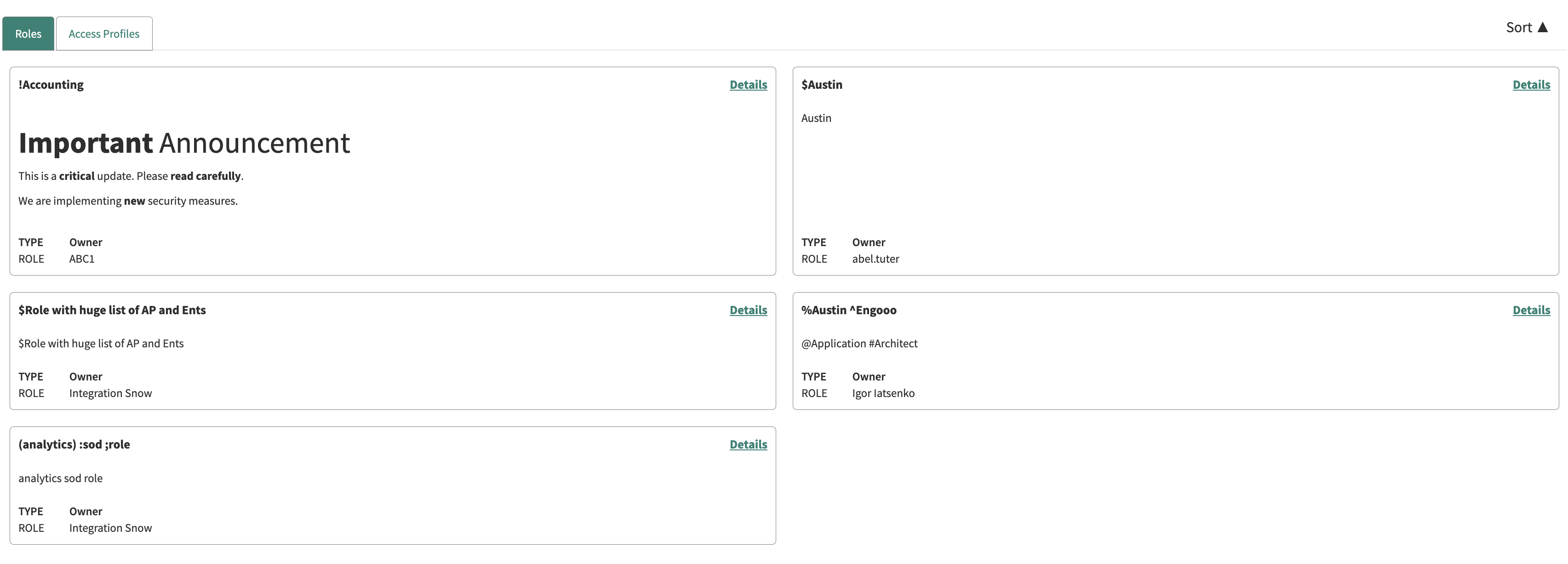
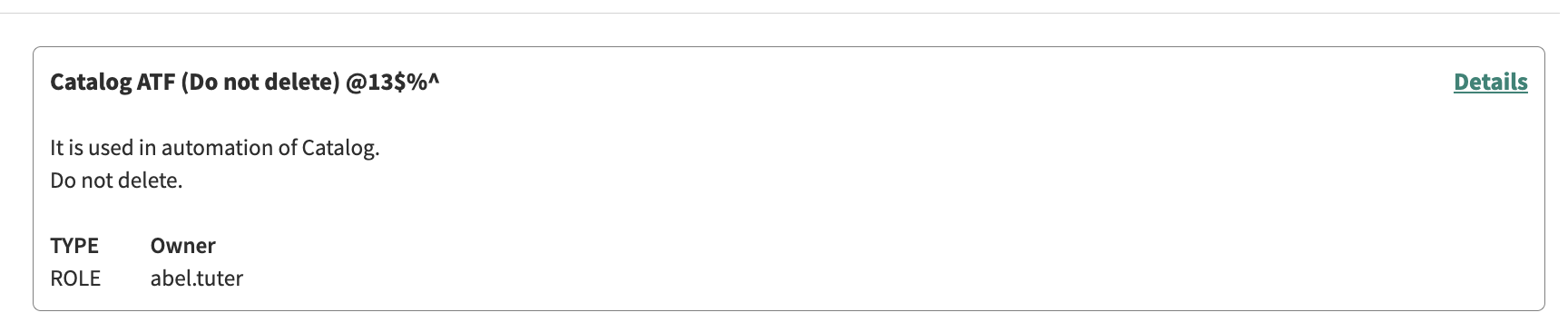
The Access Object Selection widget now supports HTML markup in descriptions for Roles, Access Profiles, and Entitlements. The access object description displayed in the Access Object Selection widget now supports HTML markup. When HTML tags are present in the description, the system renders the content without escaping the tags, allowing the browser to display the intended formatting such as paragraph breaks, bold text, and lists.The description is shown as-is, exactly as configured in SailPoint, ensuring consistency of information across platforms. This enhancement applies to all three access types Roles, Access Profiles, and Entitlements improving readability and providing a clearer and more accurate representation of access details for users during access selection. This will not impact the upgrade.
Screenshot
Screenshot
Screenshot

Widget Option to Hide "Remove Access" in ISC Access Type Widget
The ServiceNow administrators can now control whether the "Remove Access" option is visible to end-users within the Access Type widget. This prevents accidental or unauthorised access removal requests directly from the widget. This will not impact the upgrade. For more information Refer to SailPoint Widget Library.
Migration of Existing APIs to V2025 APIs
Now all the links available in the application under the “SailPoint Links” table are migrated to v2025 APIs. For more information Refer to Version 5.2 Updated.
Enhanced Search Support for Special Characters
Previously, when users searched for access objects containing special characters, the system displayed an alert message “Search string with special characters may fetch incorrect results” and the results can be inaccurate. The search functionality has now been enhanced to fully support special characters, ensuring accurate results, and the alert message has been removed. This enhancement is available in both Add Access and Remove Access tabs, providing a smoother and more reliable search experience for users. This will not impact the upgrade.
Screenshot

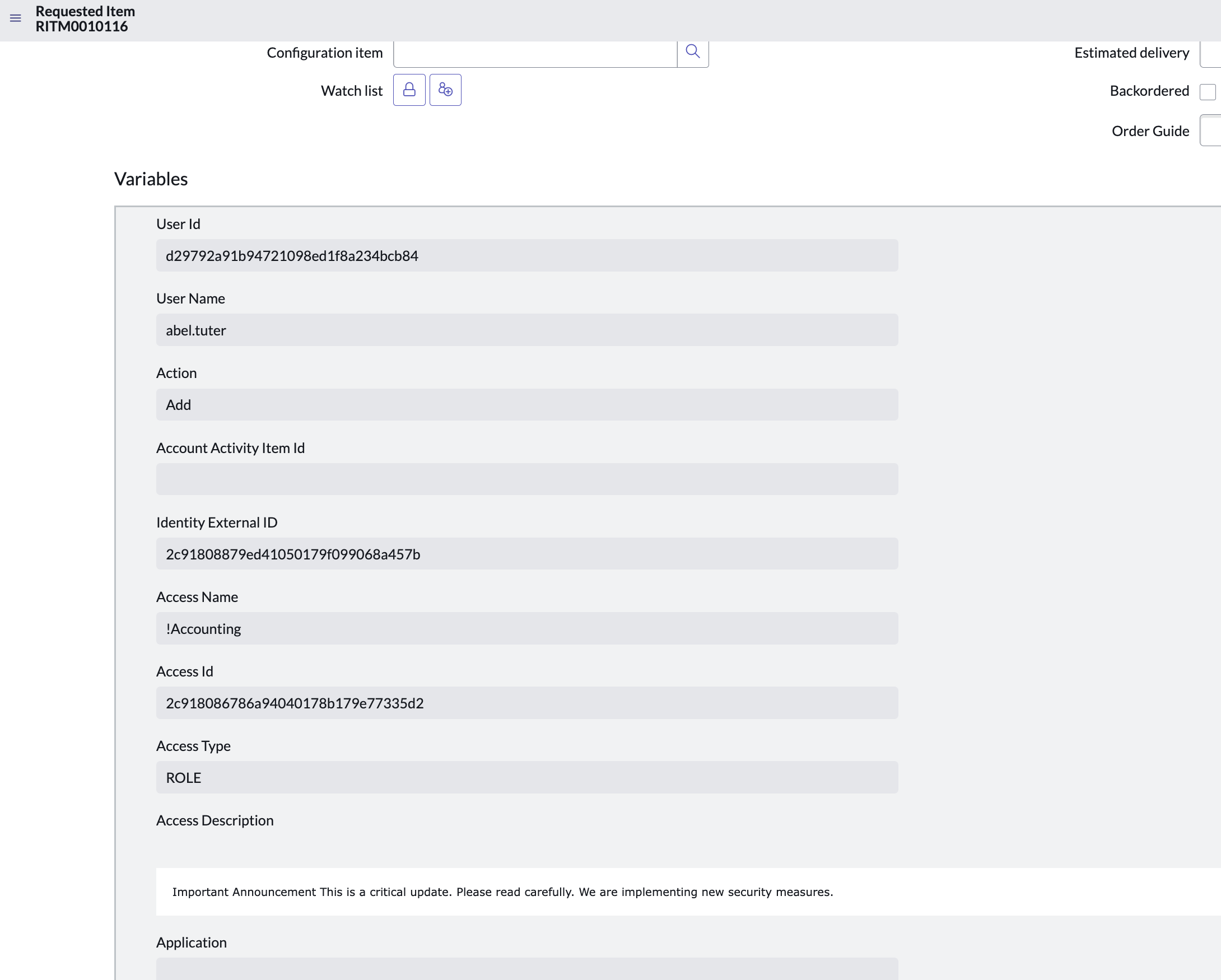
Access Description Variable
A new Access Description variable has been added to the SailPoint Access Request catalog. This field automatically pulls description from the access object to provide context during the request phase. This will not impact the upgrade.
Screenshot
Free Text Search for Add Access
New filtering capabilities have been introduced for ISC Request 2 and SailPoint Record Producer 2. Users can now use keywords to filter Requestable Entitlements Access Profiles and Dependent Roles. To upgrade from any previous version to v5.2 or upgrade through v5.2 “Select Filters” option is not present.
Note
This filtering logic is currently exclusive to the Add Access tab.
Configure Search Tabs Using Instance Option
With the release of version 5.2, we've made widget configuration more convenient. The List and order of Search results tab. Exact text separated by comma to be used.(For manage_access page and Native search only) option is now directly available as an instance option for widgets. Prior to this version, this setting was located only on the Setup page. For more information Refer to Configuring the Search Results Tab.
Upgrading to V5.1
This section lists points to be considered while upgrading from any previous version to v5.1 or upgrading through v5.1.
Note
This page does not capture changes to the product of other versions.
Custom Questionnaire
No changes are required if you don't plan to use this feature; The upgrade will not be impacted. Refer to corresponding pages on how to use this functionality.
Search Filter Configuration
The options you select in the ISC Access Object Search widget impact how your end users use the search. These selections help configure the search with what your users are familiar with. Refer to corresponding widget documentation on how to use this functionality.
MultiAccounts Enhanced Information
Additional information is displayed if you use the MultiAccounts feature of SailPoint. No changes are required during the upgrade.
Certification Widget Has a Custom Pop-Up
Additional information to help certifiers make a decision can be displayed in a custom pop-up. The information will be specific to the needs, and a provided a pop-up widget will be unlocked for making edits. By default, the pop-up does not display; The upgrade will not be impacted. Refer to corresponding widget documentation on how to use this functionality.
Ability to Accept Empty Approver Value from Script
If there is a need to skip an approval step based on approval logic, the script won't force the send (to one or more users). No changes are required during the upgrade. To take advantage of this functionality use the ServiceNowScript during approval.
Custom Pop-Up Page and Push Metadata Along with Submit
Additional information can be accepted while submitting a request for adding/revoking access. By default, the pop-up does not display; The upgrade will not be impacted. Refer to corresponding widget documentation on how to use this functionality.
Review and Submit Widget Alignment
The widget interface is best coded for the most probable combinations to display the columns. If you want a different view of the displayed information you can make a copy of the widget and edit the HTML component.
Block Duplicate Requests
Duplicate requests are blocked. A new request can't be submitted for a user if its identical to an existing request waiting to be processed. The same applies for a user with multiple accounts, respective of the source and account combination.
Upgrading to V5.0
This section lists points to be considered while upgrading from any previous version to v5.0 or upgrading through v5.0.
Note
This page does not capture changes to the product of other versions.
This release has multiple improvements and code fixes to v5.0 which had a significant architectural change.
SailPoint recommends admins go through the release notes of this release and update the related setup as per business needs.
ISC Certification Support
The ServiceNow Certification Portal for Identity Security Cloud enables designated people to review users’ access to your enterprise systems and data. Certifiers determine whether the access is appropriate for those users or if access should be revoked. Certifiers will review certifications, approve or revoke access, and sign off on decisions
This ServiceNow portal focuses only on SailPoint’s Certification Review Process.
This works independently to the request process. OAUTH2 authentication is mandatory for this integration. Setup parameters for certification can be ignored if this process is not used in your implementation.
Enabling this functionality in the ServiceNow instance requires you to follow these activities:
- Ensure the Identity Security Cloud Links now include the APIs related to Certification.
- Refer to Configuring Connection Parameters for Certification.
- Configure the ISC Certification page or use the widgets related to Certification in your custom page.
- Assign appropriate roles to access this page and functionality.
Note
Version 5.0 supports limited features of the Certification interface. Additional features will be added in upcoming releases.
- Role Composition Certification Campaign is not supported.
Multi Account Support
Note
With the multi-account feature, validation of existing access will no longer be performed.
SailPoint is designed to correlate multiple accounts belonging to the same human to a single "identity." This is crucial for maintaining a unified view of a user's access across various systems, even if they have different accounts in the same application.
SailPoint has recently added "Multi-Account Support" in the Access Request flow. With v5.0, similar functionality can be achieved through ServiceNow using this version of the Catalog App. This means that when a user has more than one account on a source, the requester is prompted to choose which specific account to provision access to. This applies to Roles and Entitlements as per the design of SailPoint.
This also applies to access revocation from the appropriate account for roles. Ability to revoke for entitlements will be introduced in a future release.
Upgrading to V4.1
This section lists points to be considered while upgrading from any previous version to v4.1 or upgrading through v4.1.
Note
This page does not capture changes to the product of other versions.
This release has multiple improvements and code fixes to v4.0 which had a significant architectural change.
SailPoint recommends admins go through the release notes of this release and update the related setup as per business needs.
Improved Widget Options
Additional widget options to the following widgets have been introduced. For more information, refer to SailPoint Widget Library.
- The ability to further filter users in the ISC User Selection widget
- The ability to further filter users in the ISC User Selection 2 widget
- Multiple widget options for ISC Access Object Selection including query filter
- Multiple widget options for ISC Access Object Selection 2 including query filter
- The ability to select a default operator in the ISC Access Object Search widget
- Multiple widget options for Sunset Date
- Multiple widget options for ISC Review And Submit
- Multiple widget options for ISC Review And Submit 2
Search by Applications
A dropdown list of applications has been introduced in Access Object Search. End users will have the ability to select the active applications. The related access profiles, roles and/or entitlements will be listed and can be selected to request access.
Ability to Add Attachments
SailPoint Record Producer can be configured to add attachments. This feature is not available for request pages.
Upgrading to V4.0
This section lists points to be considered while upgrading from any previous version to v4.0 or upgrading through v4.0.
Note
This page does not capture changes to the product of other versions.
This release marks a significant architectural change. While the current page, Manage_Access, has minimal changes, two new options have been added to configure access requests. SailPoint recommends transitioning to the new architecture, using either the page SailPoint_Request or the record producer. Manage_Access will receive minimal upgrades in upcoming releases.
SailPoint requests that you read through the release notes and update the related setup as per your business needs. To watch a video of the v4.0 demo, refer to ServiceNow Catalog for Identity Security Cloud 4.0: New architecture demo.
References to IDN (IdentityNow) Changed to ISC (Identity Security Cloud)
All references to IdentityNow (IDN) are now updated to Identity Security Cloud (ISC) including the application name. This change should not impact your usage unless there are hard-coded references or specific documentation requirements.
Manage_Access Page - Additional Labels for Internationalization
Additional labels have been added to the Manage_ Access page for Internationalization. For detailed information on the process, refer to Language Internationalization.
Approval Flexibility - Additional Approval Types
The capability to define the following approval types, in addition to the existing ones, enhances flexibility in creating suitable approval workflows. For more information, refer to Approval Flexibility.
- ISC Source Owner
- ISC App Owner
SetUp Property - Native Search Redirect Page ID (Example: Manage_access)
Now, with the availability of multiple pages for access requests, you can leverage this feature to direct users to the submission page when using native search. For more information on configuring native search, refer to Configuring Native Search. The target page must either be the Manage_Access page, or the new page must include the ISC Access Object Selection widget.
Additional States Handled in Access Request Status
The Access Request Status now encompasses additional states based on SailPoint logic. This enhancement addresses provisioning failure errors caused by missing statuses. If you have made any adjustments to this logic, you must ensure the code is integrated accordingly.
Ability to Relate Entitlements to Roles
For Roles, selecting the option for Details will show related Entitlements in addition to Access profiles. This functionality is available only in the widgets.
Setup Property Determines Which Logs to Print
Widgetized architecture uses this property. The default is warn, and the additional options are debug, info, and error. All logs are printed based on this setting. For more information, refer to the SailPoint Widget Library.
Widgetized Architecture
New architecture has been introduced to provide flexibility to configure and customize the behavior of the app. Widgets will be released and you will have the choice to select and customize them as per your business needs.
Additionally, with this change customers can let their end users request access via Record producer. For more information, refer to the SailPoint Widget Library.
Upgrading to V3.2
This section lists points to be considered while upgrading from any previous version to v3.2 or upgrading through v3.2.
Note
This page does not capture changes to the product of other versions.
Version 3.2
Skip User Selection Page for Users Who Can't Request for Others
A field named Skip user selection screen for users who can request access for self only has been introduced on the setup page with a default value of Yes. This option enables skipping the user selection page for users who only need to select access for themselves. If it becomes necessary to make user selection mandatory again, you can change the value to No.
Ability to Use Global Search for SailPoint Searchable Data
For more information on the configuration and limitations, refer to Configuring Native Search.
Ability to Use OAuth2 for Approval Flexibility
OAuth2 connections can also configure approval flexibility. For more information, refer to Approval Flexibility.
Recommendations Tab Visibility
A field named Show Recommendations, applicable only if required license available? has been introduced on the setup page. Selecting Yes will display the recommendations tab, which is applicable only if the required licenses are available.
Support for Employee Service Center
You can now set up SailPoint’s Manage Access page from within the Employee Service Center to allow for easy access. For more information, refer to Employee Service Center Portal Configuration.
Linking Service Desk Tickets with Service Catalog Tickets
If you have both the SailPoint Identity Security Cloud for Service Catalog and the SailPoint for Service Desk store applications installed on the same ServiceNow instance, you can now link the tickets created by both these applications. For more information, refer to Linking with the SailPoint for Service Desk Application.
Additional SoD Policy Violation Details in Requests
If Separation of Duties policy checks are set to Allow: Soft Submission additional policy violation details will be added in the requested items to help approvers make better informed decisions.
Upgrading to V3.1
This section lists points to be considered while upgrading from any previous version to v3.1 or upgrading through v3.1.
Important
A mandatory upgrade by all customers is required before the end of Q2’24 irrespective of the previously published support calendar. Some of the API’s used by the catalog app are being decommissioned, therefore, present apps must be upgraded. All presently installed versions (including 3.0) must be upgraded, otherwise the app will not be able to perform its primary functionalities.
Note
This page does not capture changes to the product of other versions.
There is no change in setup required by admins for this release, however, caution needs to be maintained by keeping a close watch on skipped items during the upgrade.
The following are the changes in this release:
Version 3.1
- Upgraded API to comply with APIs being decommissioned in Q2’24.
- Catalog App now supports the ability to search and request using the related Entitlement Owner.
- Review existing access search query improvements related to special characters.
Admins need to validate that each new value has been populated in the Identity Security Cloud Links column for the following:
| Action | Previous Value | New Value |
|---|---|---|
| getAllGovernanceGroups | /v2/workgroups | /beta/workgroups |
| getGovernanceGroupMembersById | /v2/workgroups/%groupId%/members | /beta/workgroups/%groupId%/members |
| getAccessProfileDetails | /v2/access-profiles | /v3/access-profiles |
| getOrgInfo | /cc/api/org/get | /beta/org-config |
| getSourceList | /beta/sources | /v3/sources |
| getAccessRequestStatus | /beta/access-request-status | /v3/access-request-status |
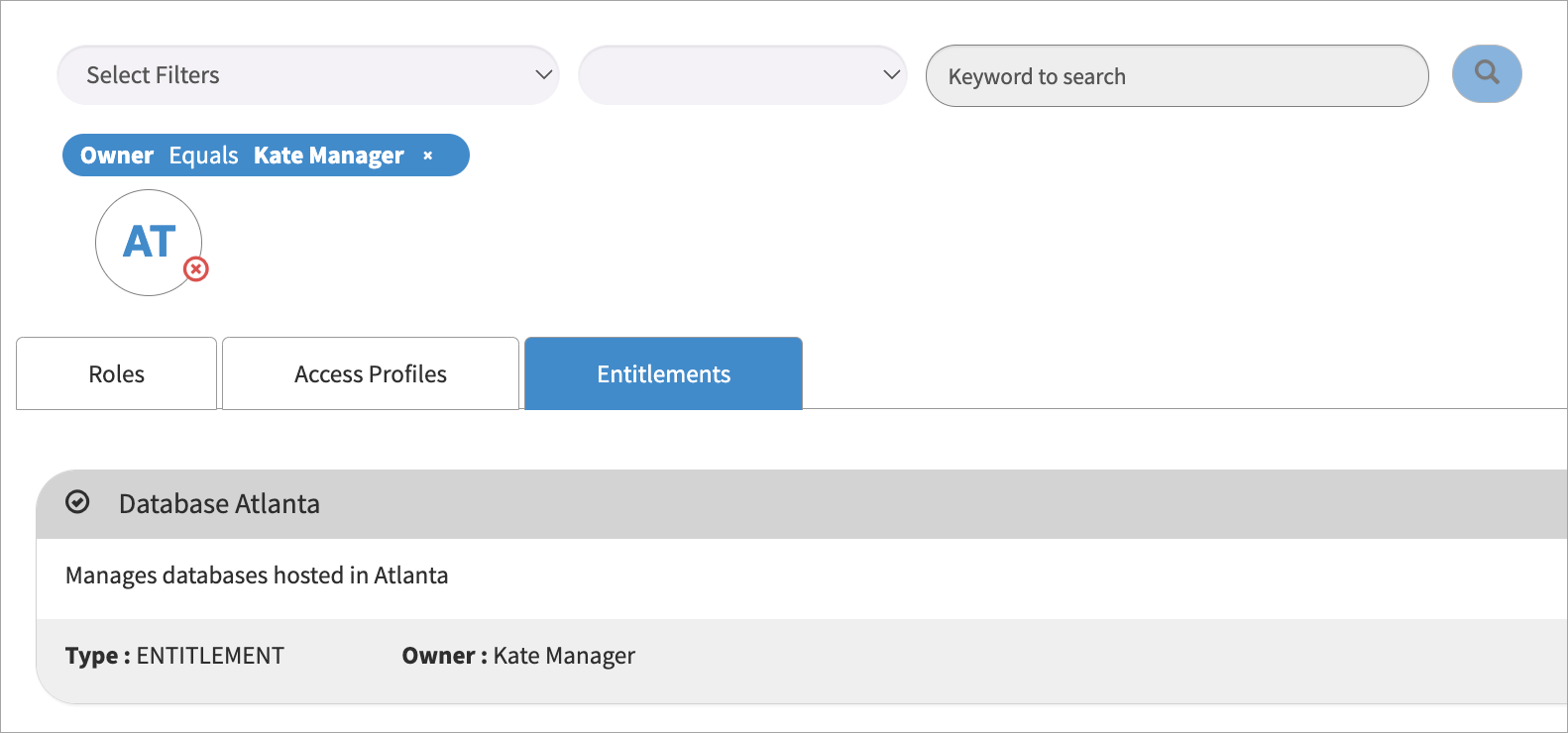
Access Items Search with Entitlement Owner
This feature provides the ability to search and request for entitlements by Owners. Previously, the Owner value in the entitlements tab was blank, however, SailPoint has extended the feature available in SailPoint.
Screenshot
There is an existing system property that is no longer used and is removed from the application repository. It will not be added with a fresh new installation of the application. However, for existing customers upgrading from an older version to a newer version, this property is not automatically deleted. Although the property is not used in any of the code, it will still appear in the setup page.
Screenshot

To keep upgraded applications in sync with latest changes, you must manually delete the property by performing the following steps.
-
Use the URL to navigate to the property, replacing
instance_namewith your instance name. -
Select the property shown in the list layout.
Screenshot

-
In the drop-down from related action link, select the Delete option.
Screenshot

Upgrading to V3.0
This section lists points to be considered while upgrading from any previous version to v3.0 or upgrading through v3.0.
Note
This page does not capture changes to the product of other versions.
Admins must set the following fields in the Setup page.
- Comments Configuration, Label: Default comments for requested items. Keep it blank to impose comment configuration of IDN. For more information, refer to Configuring the Comments.
- Ability to Hide/Re-Order Search tabs, Label: List and order of Search results tab. Exact text separated by comma to be used. Refer to documentation for examples. For more information, refer to Configuring the Search Results Tab.
- Default/Generic Approval Definitions, Label: Generic Approval Definition Enabled (Applicable only if Configurable Approvals selected for Approval Flow). For more information, refer to Generic Approval Definition.
- Auto Approval settings are read from Identity Security Cloud Manager and Identity Security Cloud Owner rule types. For more information, refer to Approval Flexibility.
- Expiration/Sunset date configuration, Label: Is Sunset Date Mandatory for Access Requests?. For more information, refer to Configuring the Sunset Date.
There is an existing system property that is no longer used and is removed from the application repository. It will not be added with a fresh new installation of the application. However, for existing customers upgrading from an older version to a newer version, this property is not automatically deleted. Although the property is not used in any of the code, it will still appear in the setup page.
Screenshot
To keep upgraded applications in sync with latest changes, you must manually delete the property by performing the following steps.
-
Use the URL to navigate to the property, replacing
instance_namewith your instance name. -
Select the property shown in the list layout.
Screenshot
-
In the drop-down from related action link, select the Delete option.
Screenshot
Upgrading to V2.3.30
This section lists points to be considered while upgrading from any previous version to v2.3.30 or upgrading through v2.3.30
Note
This page does not capture changes to the product of other versions.
-
Admins must set the following fields in the Setup page:
-
Configuration of page headers:
- To enable the customizable text box, select
Yeson the Show Header text box. For more information, refer to Configuring Page Headers.
- To enable the customizable text box, select
-
Admins and members of the change management team need to train the end users on the updates related to:
- The ability to raise a request to review entitlement access. Users were not able to request this at the entitlement level in previous versions.
- The ability to configure your pages for internationalization. For more information, refer to Language Internationalization.
-
Upgrading to V2.3.28 or V2.3.29
This section lists points to be considered while upgrading from any previous version to v2.3.28 or upgrading through v2.3.28 and v2.3.29.
Note
This page does not capture changes to the product of other versions.
-
Admins must set the following fields in the Setup page:
- Label the Approval Flow. From the dropdown, select Configurable Approvals to add it. For more information on the configuration, refer to Approval Flexibility. This setting affects the previously configured label for Disable ServiceNow Manager Approval. The old value cannot be carried forward to the new label, so you must plan to configure it accordingly.
Upgrading to V2.3.27
This section lists points to be considered while upgrading from any previous version to v2.3.27 or upgrading through v2.3.27.
Note
This page does not capture changes to the product of other versions.
-
Admins and members of the change management team need to train the end users on the updates related to:
- New and improved search fields
- The tabbed version of search results
-
Admins must set the following fields in the Setup page:
-
Label the enable requests for entitlements
- The default is
falseto maintain compatibility with the previous version. - Set it to
trueif your organization intends to allow access requests for entitlements.
- The default is
-
-
Label displays non-requestable access objects.
- Controls whether to show or hide the non-revocable access objects on the Review Existing Access tab.
- The default is set to
No. - Refer to Integrating Identity Security Cloud with ServiceNow Service Catalog for more information.
Documentation Feedback
Feedback is provided as an informational resource only and does not form part of SailPoint’s official product documentation. SailPoint does not warrant or make any guarantees about the feedback (including without limitation as to its accuracy, relevance, or reliability). All feedback is subject to the terms set forth at https://developer.sailpoint.com/discuss/tos.