Privileged Access and Azure Cloud Governance
Azure Cloud Object Management
Important
You must have a SailPoint Cloud Infrastructure Entitlement Management (CIEM) license to enable cloud governance features. Contact your SailPoint Customer Success Manager to request access.
To display cloud resource data through SailPoint CIEM, you must also configure the CIEM Azure source. For more information, refer to Connecting Azure and CIEM to learn more.
The Microsoft Entra ID SaaS connector provides support for access management of the following Azure Management Objects:
- Management Groups
- Subscriptions
- Resource Groups
- Role Assignment (RBAC role assignments. This is a custom group object)
The newly supported group objects (Azure Management objects) and operations are:
| Operations | Group Objects |
|---|---|
| Aggregation | Management Groups, Subscriptions, and Resource Groups |
| Aggregation and Add / Remove Entitlement | Role Assignment (RBAC role assignments. This is a custom group object.) |
The following attributes can be configured in the source XML using the REST APIs in accordance with your requirements:
| Parameter | Description |
|---|---|
| managementGroup-api-version | API version to be used for management group API. Type: String Default value: 2020-02-01 |
| subscription-api-version | API version to be used for subscription API. Type: String Default value: 2020-01-01 |
| resourceGroup-api-version | API version to be used for resource group API. Type: String Default value: 2020-06-01 |
| role-assignment-api-version | API version to be used for Role Assignments API. Type: String Default value: 2018-07-01 |
| azure-management-resource-base | Azure management API resource base in case of Entra Gov or another private instance. Type: String Default value: https://management.azure.com |
| fetch-azure-roleassignment-getobject | Specify if role assignments need to be fetched during Get Account call. Type: boolean Default value: False |
Prerequisites
-
The Microsoft Entra ID SaaS connector supports the following grant types for OAuth2 authentication:
- Client Credentials
- Auth Code / Refresh Token
- Certificate Credentials
Ensure that the appropriate permissions are granted as mentioned in the Administrator Permissions section below.
-
Existing clients must be modified for supporting
management.azure.comas the scope.
Administrator Permissions
Based on the supported operations (Aggregation and Add/ Remove Entitlements), the following are the required permissions:
| Parameter | Description |
|---|---|
| Object Aggregation | Permission: Microsoft.Management/managementGroups/read Or Role: Reader Scope: Management Group |
| Role Assignment Aggregation | Permission: Microsoft.Authorization/roleAssignments/read Or Role: Reader Scope: Management Group / Subscription |
| Role Definition Aggregation | Permission: Microsoft.Authorization/roleDefinitions/read Or Role: Reader Scope: Management Group / Subscription |
| Add Role Assignment | Permission: Microsoft.Authorization/roleAssignments/write Or Role: User Access Administrator Scope: Management Group / Subscription |
| Remove Role Assignment | Permission: Microsoft.Authorization/roleAssignments/delete Or Role: User Access Administrator Scope: Management Group / Subscription |
API Permissions
| OAuth2.0 Authentication | Type | API | Permission |
|---|---|---|---|
| Client Credentials | Delegated | Azure Service Management | user_impersonation |
| Client Credentials | Application | Microsoft Graph | Directory.ReadWriteAll |
| Refresh Token / AuthCode | Delegated | Azure Service Management | user_impersonation |
| JWT Certificate Credentials | Delegated | Azure Service Management | user_impersonation |
Refer to the following table to learn more about object management when CIEM license is enabled (Cloud Governance) and otherwise (Identity Governance).
| Management Type | Object | Identity Governance | Cloud Governance |
| Account Management | User | Yes | Yes |
| Account Management | Federated User (Synchronized with On-Prem AD) | Yes | |
| Entitlement Management | Groups | Yes | |
| Entitlement Management | Administrator Roles | Yes | |
| Entitlement Management | Management Groups | No | |
| Entitlement Management | Subscriptions | No | |
| Entitlement Management | Resource Groups | No | |
| Entitlement Management | Roles Assignment (RBAC) | No |
Azure Government Endpoint Configuration
Important
When SailPoint CIEM is enabled for MS Entra source that uses GCC High, ensure azure-management-resource-base attribute is set to https://management.usgovcloudapi.net so that entitlement aggregation works correctly.
To meet security and compliance needs of federal agencies, state and local governments, Microsoft provides a separate instance of the Azure service. A few example of such instances are Azure Government, and Azure China. As these instances are separated from general Azure services, endpoint (host address) for such instances might also be different.
With endpoint configuration functionality, the Microsoft Entra connector can be configured to communicate with these instances.
The following attributes must be configured in the source XML using the REST APIs:
Note
For more information on SailPoint's REST APIs, refer to Best Practices: REST API Authentication and REST API - Update Source (Partial) in the SailPoint Developer Community.
| Parameter | Description |
|---|---|
| msGraphResourceBase | Base resource URL to be used for Microsoft Graph API rest calls. The following example points base to default Microsoft Graph resource base: POST https://{orgName}.api.identitynow.com/cc/api/source/update/{source ID}In the body of the POST, use the form-data as follows:
|
| msGraphTokenBase | Base token URL to be used to get access token for Microsoft Graph API rest calls The following example points base to default Microsoft Graph token base: POST https://{orgName}.api.identitynow.com/cc/api/source/update/{source ID}In the body of the POST, use the form-data as follows:
|
| azure-management-resource-base | Base resource URL to be used for Microsoft Graph API rest calls when CIEM is enabled. The following example points base to default Microsoft Graph resource base: key: azure-management-resource-base value: https://management.azure.com |
Note
The actual values of endpoints can be found in Microsoft documentation for specific instance. For connector operation, the values for the above attributes must be provided.
Azure Privileged Identity Management (PIM)
The Microsoft Entra ID SaaS connector supports Privileged Identity Management (PIM) as a service in Microsoft Entra ID. PIM enables you to manage, control, and monitor access to important resources in your organization.
Azure PIM for Roles
The Microsoft Entra ID SaaS connector supports Privileged Identity Management (PIM) as a service in Microsoft Entra ID. PIM enables you to manage, control, and monitor access to important resources in your organization.
These resources include resources in Microsoft Entra ID, Azure, and other Microsoft Online Services such as Microsoft 365 or Microsoft Intune.
PIM provides time-based and approval-based role activation to mitigate the risks of excessive, unnecessary, or misused access permissions on resources. It reduces the chance of a malicious actor getting access to the resource or an authorized user accidentally impacting a sensitive resource.
Supported Features
- Aggregation of PIM Role Assignment objects for Azure and Microsoft Entra ID during entitlement aggregation of type "Groups"
- Aggregation of PIM Role Assignment objects for Azure and Microsoft Entra ID during Account aggregation
- Aggregation of Azure and Microsoft Entra ID PIM roles during Entitlement Aggregation
- Provisioning of eligible role assignment on user for Azure or Microsoft Entra ID PIM role
| Operations | Group Objects |
|---|---|
| Entitlement Aggregation of type "Groups" | The following group objects are aggregated as entitlements: Azure Eligible Roles, Microsoft Entra ID Eligible Roles, Azure Active Roles, and Microsoft Entra ID Active Roles. |
| Entitlement Aggregation | Azure Eligible Roles, Microsoft Entra ID Eligible Roles, Azure Active Roles, and Microsoft Entra ID Active Roles (These are custom group objects) |
| Account Aggregation | The following group objects are aggregated as entitlements: Azure Eligible Roles, Microsoft Entra ID Eligible Roles, Azure Active Roles, and Microsoft Entra ID Active Roles. |
| Add or Remove Entitlement | Azure Eligible Roles, Microsoft Entra ID Eligible Roles |
Permissions
Microsoft Entra Roles (azureADActiveRoles and azureADEligibleRoles)
To communicate with the PIM Graph API for Microsoft Entra ID roles, you must have at least one of the following permissions:
RoleManagement.ReadWrite.DirectoryRoleManagement.Read.Directory
To grant these permissions to the client application, refer to the steps in the Required Permissions.
Azure Resource Roles (azureActiveRoles and azureEligibleRoles)
The PIM API for Azure resource roles is developed on top of the Azure Resource Manager framework. You will need to give consent to Azure Resource Management but won’t need any Graph API permission. You must ensure that the user or the service principal communicating with the API has at least the Owner or User Access Administrator role on the resource.
To assign the Owner or User Access Administrator role, complete the following:
- Login to portal.azure.com and go to All Services > Management Groups or <CU Subscription> (CU tenant).
- On the left-hand side of the screen, select Access Control (IAM).
- Select Role Assignments and then the +Add button to assign the Owner or User Access Administrator role on the resource.
PIM with Single Account Aggregation
If PIM is enabled, use full aggregation only.
Single Account Aggregation is not recommended, as processing the PIM membership cache for one user can be time-consuming and may lead to a timeout, especially with large amounts of PIM data.
Azure PIM for Groups
The Microsoft Entra ID SaaS connector now supports Privileged Identity Management (PIM) for Groups. This includes time-bound eligible and active group memberships managed through Microsoft Entra PIM.
- Aggregation of PIM Group Assignment objects (
azureADEligibleGroupandazureADActiveGroup) for Microsoft Entra ID during entitlement aggregation. - Aggregation of PIM Group Assignment objects (
azureADEligibleGroupsandazureADActiveGroups) for Microsoft Entra ID during Account aggregation. - Provisioning of Group Assignment on Users for Microsoft Entra ID PIM Group.
- Provisioning requests for eligible and active PIM group memberships can include a duration, a start date, and an end date. You can also set a default duration on the source. For the request attributes and the order the connector applies them, refer to Azure PIM Provisioning Policy. For the source attributes, refer to Azure PIM Configuration.
Prerequisites
-
Azure AD Premium P2 license.
-
Required to use Privileged Identity Management for Groups.
-
Enable Privileged Identity Management
The Enable Privileged Identity Management checkbox must be selected in the connector's Azure Privileged Identity Management Settings section. For more information, refer to Manage Azure Privileged Identity Management.
-
Microsoft Graph API permissions
The Enterprise Application used for the integration must have the permissions granted (Application type).
Microsoft Graph API Permissions
| Permission | Purpose |
|---|---|
| PrivilegedEligibilitySchedule.Read.AzureADGroup | Read PIM eligible group schedule instances |
| PrivilegedEligibilitySchedule.ReadWrite.AzureADGroup | Assign/revoke eligible group memberships |
| PrivilegedAssignmentSchedule.Read.AzureADGroup | Read PIM active group schedule instances |
| PrivilegedAssignmentSchedule.ReadWrite.AzureADGroup | Assign/revoke active group memberships |
Important
- Microsoft Graph returns a
Request_UnsupportedQuery error (filter height 4, max 3)when you combine the PIM groups filter field value with the connector's internal group type filter. The internal filter always takes precedence. The user-defined filter applies independently. - The Graph API for eligibility and assignment schedule instances accepts
principalIdas a filter. The system fetches membership per account, not in bulk.
Cloud Infrastructure Entitlement Management (CIEM) Settings
Configure this feature if your application is intended to manage Azure Management Objects. This includes Management Groups, Subscriptions, Resource Groups, and Role assignments.
Important
You must have a SailPoint Cloud Infrastructure Entitlement Management (CIEM) license to enable cloud governance features. Contact your SailPoint Customer Success Manager to request access. For more information on CIEM Cloud Governance, refer to CIEM Cloud Governance Overview.
Prerequisites
- Before enabling CIEM and adding your instance IDs, you need to configure Azure and Microsoft Entra ID SaaS. For more information on these steps, refer to Configuring Azure and Microsoft Entra.
- CIEM currently supports only the Client Credential authentication method.
Screenshot
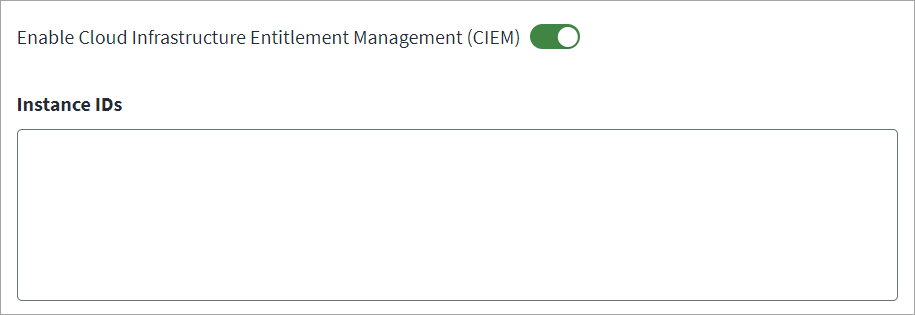
To configure CIEM, complete the following:
- Go to CIEM Settings.
- Select Enable Cloud Infrastructure Entitlement Management (CIEM) to manage Azure Management Objects, which include Management Groups, Subscriptions, Resource Groups, and Role Assignments.
- Enter up to 250 Instance IDs, separated by a comma. These are the Application IDs used to resolve Microsoft Entra ID SaaS accounts with federated IAM roles with AWS. For more information, refer to the Microsoft Entra documentation.
- Select Save.
Azure PIM Configuration
| Attribute | Details |
|---|---|
| enablePIM | Select the Enable Privileged Identity Management checkbox to define the scope of the Microsoft Entra ID PIM roles (Microsoft Entra ID as well as Azure). |
| eligibleRoleExpiresAfter | Specifies the default duration for which Azure and Microsoft Entra ID eligible roles must be assigned to user. The values must be in the ISO_8601 duration format. For example, if eligible role needs to be assigned for 180 Days, use <entry key="eligibleRoleExpiresAfter" value="P180D" /> |
| activeRoleExpiresAfter | Specifies the default duration for which Azure and Microsoft Entra ID Active roles must be assigned to user. The values must be in the ISO_8601 format. For example, if eligible role must be assigned for 10 Hours, use <entry key="activeRoleExpiresAfter" value="PT10H" /> |
| eligibleGroupExpiresAfter | Specifies the default duration for an eligible PIM group membership when the provisioning request does not include duration or endDateTime. Use the ISO 8601 duration format, or permanent for a membership that does not expire. If this attribute is not set, the connector uses P365D.For example, to set the default to 60 days, use <entry key="eligibleGroupExpiresAfter" value="P60D" /> |
| activeGroupExpiresAfter | Specifies the default duration for an active PIM group membership when the provisioning request does not include duration or endDateTime. Use the ISO 8601 duration format, or permanent for a membership that does not expire. If this attribute is not set, the connector uses P180D.For example, to set the default to 90 days, use <entry key="activeGroupExpiresAfter" value="P90D" /> |
Documentation Feedback
Feedback is provided as an informational resource only and does not form part of SailPoint’s official product documentation. SailPoint does not warrant or make any guarantees about the feedback (including without limitation as to its accuracy, relevance, or reliability). All feedback is subject to the terms set forth at https://developer.sailpoint.com/discuss/tos.