Service Principals and Managed Identities
Service Principal Account Management
To access resources that are secured by the Microsoft Entra tenant, the entity that requires access must be represented by a security principal. This requirement is true for both users (user principal) and applications (service principal). The security principal defines the access policy and permissions for the user/ application in the Microsoft Entra tenant. With this feature, the connector supports managing such service principals for enterprise applications as accounts.
Important
If you want to enable additional cloud governance features for your Entra Cloud Objects (for example, visualization of effective access,Azure Cloud Object Management, such as, Management Groups, Subscriptions, Resource Groups and Role Assignment), you must have SailPoint CIEM license. Contact your SailPoint Customer Success Manager to request access and for more information.
Note
To gauge the probability of compromised service principals (workload identities) accounts in your environment. Refer to Risky Service Principal Alert Feature for more information.
Supported Operations
The following operations are supported for the azure service principal:
| Operations | Service Principal |
| Aggregation | Yes |
| Get Account | |
| Create | |
| Update | |
| Enable and Disable Users | |
Add and Remove Entitlements
|
Administrator Permissions
| Purpose | Type | Permissions |
|---|---|---|
| Aggregation of Service Principals | Application | Application.Read.All |
| Create and Update Service Principals | Application | Application.ReadWrite.All |
| Add and Remove Owners | Application | Application.ReadWrite.OwnedBy |
| Add and Remove Application Roles for Service Principals | Application | AppRoleAssignment.ReadWrite.All |
| Aggregation of Application Roles | Application | Application.Read.All |
| Aggregation and Add/Remove Microsoft Entra ID Group and Roles for Service Principals | Refer to Required Permissions. | |
| Aggregation and Add/Remove RBAC Roles for Service Principals | Refer to Group Attributes for Azure Cloud Objects. | |
| Aggregation of Admin/User Consented Permissions for Service Principals | Application | DelegatedPermissionGrant.Read.All |
| Add/Remove Admin Consented Delegated Permissions for Service Principals | Application | DelegatedPermissionGrant.ReadWrite.All |
| Remove User Consented Delegated Permissions for Service Principals | Application | DelegatedPermissionGrant.ReadWrite.All |
Supported Schema Attributes
To aggregate service principal related information for the user during account aggregation, ensure that the service principal attributes are present in the account schema. For more information, refer to Service Principal as Accounts Attributes.
Supported Provisioning Attributes
To provision service principal related information, ensure that the attributes in Account Profile for Service Principal are present in your provisioning policy.
Configure Microsoft Entra Service Principals As Accounts in Source
Screenshot
-
Go to Feature Management.
-
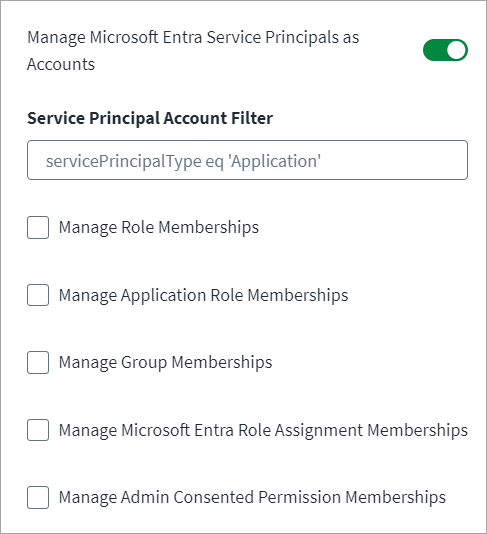
Select Manage Microsoft Entra Service Principals as Accounts to aggregate Azure Service Principals along with Users during the account aggregation process. By default, when this is enabled, entitlements are not fetched. You must select the entitlements you want to fetch from the available list.
-
In the Service Principal Account Filter field, enter filter statements to ensure only the correct Azure Service Principals are included in the aggregation process. The default filter is
servicePrincipalType eq 'Application'Note
Advanced queries are not supported.
Example filters:
-
For a filter to match the Enterprise Application default view on the Azure portal use the following:
tags/Any(x: x eq 'WindowsAzureActiveDirectoryIntegratedApp')
-
-
Select the Manage Role Memberships checkbox to manage Directory Role memberships for Service Principal.
-
Select the Manage Application Role Memberships checkbox to manage Azure Application Role memberships for Service Principal.
-
Select the Manage Group Memberships checkbox to manage Microsoft Entra ID Group memberships for Service Principal.
-
Select the Manage Microsoft Entra Role Assignment Memberships checkbox to manage Azure Cloud Group memberships for Service Principals.
-
Select the Manage Admin Consented Permission Memberships checkbox to manage Azure admin consented permissions for Service Principals.
Note
This is for delegated permissions.
-
Select Save.
Risky Service Principal Alert Feature
With the security reports in Microsoft Entra, you can gauge the probability of compromised service principals (workload identities) accounts in your environment. A service principal flagged for risk is an indicator of a service principal account that might have been compromised. The risky service principal represents the probability that a given service principal (workload identity) is compromised. These risks are calculated offline using Microsoft's internal and external threat intelligence sources including security researchers, law enforcement professionals, security teams at Microsoft, and other trusted sources.
Note
- Before utilizing Risky Service Principal Alert feature, ensure that Service Principals are configured as accounts in the source. For more information, refer to Service Principal Account Management.
- By default, this feature is not enabled for new connectors. If your Microsoft Entra instance requires support of the Risky Service Principal Alert feature, you must enable the feature by adding attributes to the Account Schema in the SailPoint user interface.
Supported Operations
This feature supports the following operations:
- Account Aggregation (Service Principal Aggregation)
- Get Object (Get Service Principal)
Prerequisites
The tenant must have a Microsoft Entra P2 license.
Administrator Permissions
To fetch risky service principal details using MS Graph APIs, the following API permissions must be assigned:
| OAuth2.0 Authentication | Type | Permission | Purpose |
|---|---|---|---|
| Client Credentials | Application | IdentityRiskEvent.Read.All IdentityRiskyServicePrincipal.Read.All |
Aggregate or get risky service principal related information |
| Refresh Token / AuthCode JWT Certificate Credentials |
Delegated | IdentityRiskEvent.Read.All IdentityRiskyServicePrincipal.Read.All |
Aggregate or get risky service principal related information |
Supported Schema Attributes
To manage the risky service principal alert feature, ensure that the following attributes are present in the account schema:
Note
The account schema cannot be extended for other risk related attributes.
| Attribute Name | Description |
|---|---|
| spn_riskLevel | Level of the detected risky service principal. |
| spn_riskState | State of the service principal's risk. |
| spn_riskDetail | Details of the detected risk. |
| spn_riskLastUpdatedDateTime | The date and time when the risky service principal was last updated. |
Managed Identity Management
Managed identities for Azure resources offer a secure and convenient way for Azure services to authenticate to other Azure services that support Microsoft Entra ID authentication, without the need to manage or store credentials in the code.
User-Assigned Managed Identities
Managed identities for Azure resources provide Azure services with an automatically managed identity in Microsoft Entra ID. These identities can be used to authenticate to any Azure service that supports Microsoft Entra ID authentication, without having credentials in the code. SailPoint supports managing only user-assigned managed identities as they have an independent lifecycle.
The following operations are supported for user-assigned managed identity objects:
- Aggregation of user-assigned managed identities in account aggregation.
- Aggregation of assigned Microsoft Entra ID groups as an entitlement during account aggregation, and add or remove Microsoft Entra ID groups to or from managed identities.
- Aggregation of assigned PIM roles (only Azure Active Roles) as an entitlement during account aggregation, and add or remove PIM roles (only Azure Active Roles) to or from managed identities.
- Aggregation of assigned Azure Role Assignments (RBAC) as an entitlement during account aggregation, and add or remove Azure Role Assignments (RBAC) to or from managed identities (This feature requires a SailPoint Cloud Infrastructure Entitlement Management (CIEM) license).
Prerequisites
If you want to configure your source to aggregate managed identities, you need to modify the account schema to define any of the managed identity attributes as Account Name. For example, the displayName attribute of the managed identity can be tagged as Account Name.
Correlation for Managed Identities
The existing out-of-the-box correlation rule does not work directly for managed identities correlation, as it is defined using the Microsoft Entra ID user attributes. You must modify it using the attributes for managed identities. Otherwise, there are different ways to manage identities for these service accounts. For more information, refer to Best Practices: Managing Service Accounts.
Administrator Permissions
| Purpose | Permissions |
|---|---|
| Aggregation and Assignment of Managed Identities | Role: Managed Identity Operator OR Role: Reader Scope: Tenant Root Group (to fetch from all subscriptions) |
| Aggregation and Add/Remove Microsoft Entra ID Groups for Managed Identities | Refer to Required Permissions. |
| Aggregation and Add/Remove RBAC Roles for Managed Identities | Refer to Group Management for Azure Cloud Objects. |
| Aggregation and Add/Remove PIM Azure Active Roles for Managed Identities | Refer to Azure Privileged Identity Management (PIM). |
To assign the Reader role at Tenant Root Group:
- Sign in to https://portal.azure.com and go to All Services > Management Groups or <CU Subscription> (CU tenant).
- Select the Tenant Root Group.
- On the left-hand side of the screen, select Access Control (IAM).
- Select Role Assignments, then +Add, and assign the Reader role on the resource.
Supported Schema Attributes
To aggregate user-assigned managed identities during account aggregation, ensure that managed identity attributes are present in the account schema. For more information, refer to User-Assigned Managed Identity Attributes.
Configure User-Assigned Managed Identities in Source
Screenshot

-
Go to Feature Management.
-
Select the Manage User-Assigned Managed Identities as Accounts checkbox if you want to manage Azure Role Assignments (RBAC) for user-assigned managed identities.
Note
To automate the process of adding user-assigned managed identities account attributes to the account schema during Account Schema configuration, select Include Attributes in Schema for managing user-assigned managed identities . For more information, refer to User-Assigned Managed Identity Attributes.
-
In the Azure Privileged Identity Management Setting section, select the Enable Privileged Identity Management checkbox if you want to manage PIM roles (only Azure Active Roles) for user-assigned managed identities.
-
Select Save.
System-Assigned Managed Identities
SailPoint supports managing system-assigned managed identities, but with limited capabilities due to the tight coupling between the identity and the Azure resource lifecycle.
The following operations are supported for system-assigned managed identity objects:
- Aggregation of system-assigned managed identities in account aggregation.
- Aggregation of assigned Microsoft Entra ID groups as an entitlement during account aggregation, and add or remove Microsoft Entra ID groups to or from managed identities.
- Aggregation of assigned PIM roles (only Azure Active Roles) as an entitlement during account aggregation, and add or remove PIM roles (only Azure Active Roles) to or from managed identities.
- Aggregation of assigned Azure Role Assignments (RBAC) as an entitlement during account aggregation, and add or remove Azure Role Assignments (RBAC) to or from managed identities. (This feature requires a SailPoint Cloud Infrastructure Entitlement Management (CIEM) license).
Note
If you want to enable additional cloud governance features for your Entra Cloud Objects (for example, visualization of effective access,Azure Cloud Object Management, such as, Management Groups, Subscriptions, Resource Groups and Role Assignment or Service Principal Account Management), you must have SailPoint CIEM license. Contact your SailPoint Customer Success Manager to request access and for more information.
Prerequisites
If you want to configure your source to aggregate managed identities, ensure to modify the Account Schema to define any of the managed identity attributes as Account Name. For example, the displayName attribute of the managed identity can be tagged as Account Name.
Correlation for Managed Identities
The existing out-of-the-box correlation rule does not work directly for managed identities correlation, as it is defined using the Microsoft Entra ID user attributes. You must modify it using the attributes for managed identities. Otherwise, there are different ways to manage identities for these service accounts. For more information, refer to Best Practices: Managing Service Accounts.
Administrator Permissions
| Purpose | Permissions |
|---|---|
| Aggregation and Assignment of Managed Identities | Role: Managed Identity Operator OR Role: Reader Scope: Tenant Root Group (to fetch from all subscriptions) |
| Aggregation and Add/Remove Microsoft Entra ID Groups for Managed Identities | Refer to Required Permissions. |
| Aggregation and Add/Remove RBAC Roles for Managed Identities | Refer to Group Management for Azure Cloud Objects. |
| Aggregation and Add/Remove PIM Azure Active Roles for Managed Identities | Refer to Azure Privileged Identity Management (PIM). |
To assign the Reader role at Tenant Root Group:
- Sign in to https://portal.azure.com and go to All Services > Management Groups or <CU Subscription> (CU tenant).
- Select the Tenant Root Group.
- On the left-hand side of the screen, select Access Control (IAM).
- Select Role Assignments, then +Add, and assign the Reader role on the resource.
Supported Schema Attributes
To aggregate system-assigned managed identities during account aggregation, ensure that managed identity attributes are present in the account schema. For more information, refer to System-Assigned Managed Identity Attributes.
Configure System-Assigned Managed Identities in Source
Screenshot
- Go to Feature Management.
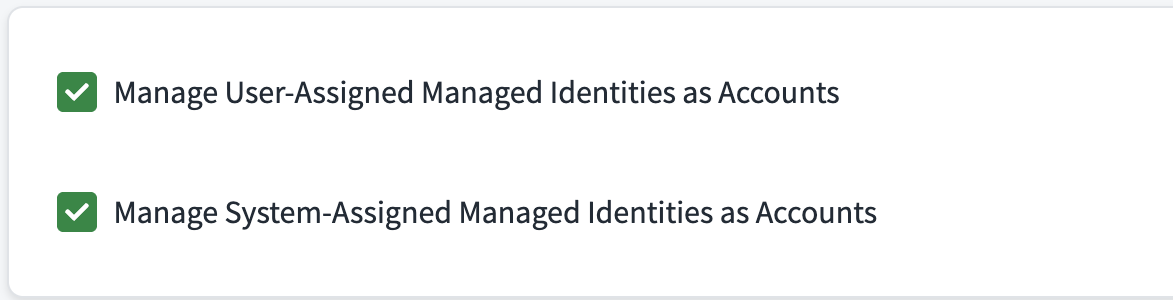
- Select the Manage Cloud Resources checkbox if you want to manage Azure Role Assignments (RBAC) for system-assigned managed identities.
- Select the Include System-Assigned Managed Identities checkbox to manage system-assigned identities.
- In the Azure Privileged Identity Management Setting section, select the Enable Privileged Identity Management checkbox if you want to manage PIM roles (only Azure Active Roles) for system-assigned managed identities.
- Select Save.
Documentation Feedback
Feedback is provided as an informational resource only and does not form part of SailPoint’s official product documentation. SailPoint does not warrant or make any guarantees about the feedback (including without limitation as to its accuracy, relevance, or reliability). All feedback is subject to the terms set forth at https://developer.sailpoint.com/discuss/tos.