Integrating SailPoint Ivanti Cherwell Service Desk
Integration
This is an integration and requires additional licensing or subscriptions to utilize it. For more information, contact your customer success manager.
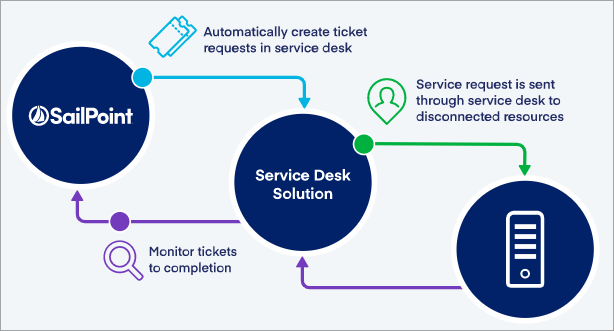
SailPoint's Ivanti Cherwell Service Desk connector integrates with the Ivanti Cherwell Management System to bring the Ivanti Cherwell experience to SailPoint, where you can raise and track service desk tickets (Incident and Service Request) to their logical closure without leaving SailPoint - for example, creating an account, removing or deleting access, and other operations - using REST APIs. The seamless integration of SailPoint with the Ivanti Cherwell Management System eliminates the need to build and maintain a custom integration and reduces time-to-deployment.
Note
All activity on the Service Desk connector appears as events in Search and on the Activity tab of an identity.
The new service desk functionality provides an easy way to:
- See a list of integrations
- View summaries of the integrations
- Create new integrations
- Edit/Update existing integrations
- Delete integrations
This document describes how to configure a Ivanti Cherwell Service Desk Integration Module.
Note
The Ivanti Cherwell Service Desk configuration requires SailPoint Services hours or Partner involvement. For more information, contact your SailPoint Customer Success Manager.
Note
To view the latest features, enhancements, and fixes for all SaaS connectors, refer to the SaaS Release Notes page.
Supported Features
SailPoint's Ivanti Cherwell Service Desk connector supports the following features:
- Creating tickets for manual provisioning operations.
- Checking status of the tickets.
- Synchronizing ticket status between SailPoint's Ivanti Cherwell Service Desk Integration Module and the Cherwell Service Management system.
- Retry Mechanism for Create Ticket request failure.
Note
The Ivanti Cherwell Service Desk Integration can be configured as a SaaS Connection Type for SaaS connectivity that doesn't require a Virtual Appliance Cluster.
Prerequisites
Important
For Service Desk Integration Module to function properly, ensure that the feature flag GOV_DISABLE_PLAN_INITIALIZER is set to true for your organization. For more information, reach out to Professional Services/Expert Services.
-
Configure the virtual appliance cluster only when using a VA-based connection type. For instructions, refer to the Virtual Appliance Reference Guide.
Note
This requirement doesn't apply to SaaS connections.
-
Configure at least one source to generate manual tasks for Provisioning. For more information, refer to Configuring Source Account Provisioning.
-
Be familiar with Apache Velocity scripting. For more information, refer to Apache Velocity Engine - Getting Started.
-
Know the authentication option (OAuth 2.0 Authentication) to use to authenticate into the Ivanti Cherwell instance.
- Aggregate the customers from the Cherwell Service Management system into SailPoint.
- Create a new Client ID for the service account. For more information, refer to Obtaining API Client IDs.
System Requirements
SailPoint's Ivanti Cherwell Service Desk supports the following versions of the Ivanti Cherwell product:
- Cherwell Service Management (cloud) version 2023.1.1
- Cherwell Service Management (cloud) version 10.4.0
-
The Ivanti Cherwell Service Management system is deployed on the cloud.
-
The virtual appliance must be able to connect to the ITSM system when using a VA-based connection type, typically using outbound access for port 443 (HTTPS).
Note
This requirement doesn't apply to SaaS connections.
Required Permissions
- Assign the following minimum access permissions to create and get the status of the ticket:
- The Security Group assigned to the service account requires View, Add, and Edit permissions on the Incident business object.
- Admin user level permissions are required to create and configure Ivanti Cherwell Service Desk connections. Refer to Setting User Level Permissions for more information about setting the user level permissions.
Documentation Feedback
Feedback is provided as an informational resource only and does not form part of SailPoint’s official product documentation. SailPoint does not warrant or make any guarantees about the feedback (including without limitation as to its accuracy, relevance, or reliability). All feedback is subject to the terms set forth at https://developer.sailpoint.com/discuss/tos.