Integrating SailPoint with BMC Helix ITSM Service Desk
Integration
This is an integration and requires additional licensing or subscriptions to utilize it. For more information, contact your customer success manager.
Notes
- The configuration of BMC Helix ITSM Service Desk requires SailPoint Services hours or Partner involvement. For more information, contact SailPoint Customer Support.
- The BMC Helix ITSM Service Desk Integration supports Incident, Change Request, Service Request, and DWP Service Request ticket types.
- All activity on the Service Desk source appears as events in Search and on the Activity tab of an identity. For more information, refer to Using Search - Events.
Note
To view the latest features, enhancements, and fixes for all SaaS connectors, refer to the SaaS Release Notes page.
SailPoint's BMC Helix ITSM Service Desk connector integrates with BMC Helix ITSM for service to bring the BMC Helix ITSM experience to SailPoint where the users can raise and track service desk tickets to their logical closure without leaving SailPoint.
Note
For support, SailPoint requires the organization to provide access to its BMC sandbox or development environment.
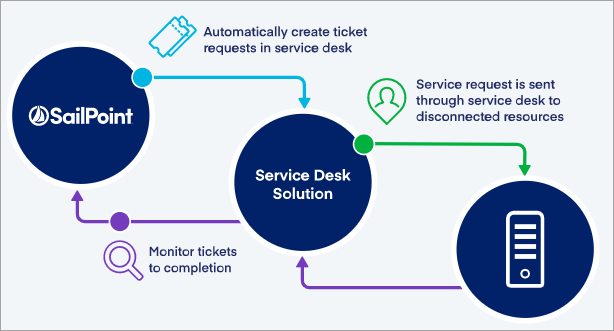
The new service desk functionality provides an easy way to:
- See a list of integrations
- View summaries of the integrations
- Create new integrations
- Edit/Update existing integrations
- Delete integrations
Supported Features
SailPoint's BMC Helix ITSM Service Desk Integration Module (SDIM) supports the following features:
- Creation of tickets for manual provisioning operations and status check.
- Synchronization of ticket status between SailPoint's BMC Helix ITSM Service Desk Integration Module (SDIM) and the BMC Helix ITSM Service Desk system.
- The supported operations are:
- List
- View
- Create
- Edit/Update
- Delete
- Digital Workplace (DWP) Service Requests when using BMC Helix ITSM Version 21.3 or later. For more information, refer to DWP Service Request.
Note
The BMC Helix ITSM Service Desk Integration can be configured as a SaaS Connection Type for SaaS connectivity that doesn't require a Virtual Appliance Cluster.
System Requirements
The BMC Helix ITSM Service Desk Integration Module (SDIM) supports the following BMC products:
-
For Cloud Environments:
- BMC Helix ITSM 22.1
- BMC Helix ITSM 21.3
-
The virtual appliance must be able to connect to the ITSM system when using a VA-based connection type, typically using outbound access for port 443 (HTTPS).
Note
This requirement doesn't apply to SaaS connections.
Prerequisites
Important
For Service Desk Integration Module to function properly, ensure that the feature flag GOV_DISABLE_PLAN_INITIALIZER is set to true for your organization. For more information, reach out to Professional Services/Expert Services.
-
Configure the virtual appliance cluster only when using a VA-based connection type. For instructions, refer to the Virtual Appliance Reference Guide.
Note
This requirement doesn't apply to SaaS connections.
-
Configure at least one source to generate manual tasks for Provisioning. For more information, refer to Configuring Source Account Provisioning.
-
Be familiar with Apache Velocity scripting. For more information, refer to Apache Velocity Engine - Getting Started.
-
Configure a Delimited File connector to aggregate all the People records (BMC Helix ITSM Users) from the BMC Helix ITSM system and use it as a Requester Source during configuration. For more information, refer to Requester Source.
Following is the list of attributes you need for the Delimited File connector in addition to any other attributes that are marked as mandatory within the BMC Helix ITSM system:
- RemedyLoginID
- FirstName
- LastName
- Company
- InternetEmail
- PersonID
-
Determine the authentication option (AR-JWT or OAuth2 Authentication) you want to use to authenticate to the BMC Helix ITSM system. The BMC Helix ITSM Service Desk uses Remedy Single Sign-On (Remedy SSO) for OAuth2 authentication. For more information about installation and setup, refer to Installing Remedy SSO.
Required Permissions
The BMC Helix ITSM Service Desk Integration Module (SDIM) service account requires the following application permissions:
- Incident Master Application permission for Incident Management application.
- Infrastructure Change Master application permission for Change Management application.
- SRM Administrator application permission for Service Request Management application.
- SailPoint Admin user level permissions to create and configure BMC Helix ITSM Service Desk connections. See Granting and Removing User Level Permissions for more information about setting user level permissions.
- BMC Helix Digital WorkPlace (BMC DWP) Administrator application permission for DWP Service Request Management application.
Best Practices
Before you start the configuration process, you should make decisions about the following components of this integration:
- Identify - Find the BMC Helix ITSM Service Desk system and the resources that will be used in the connection. Use the Name and Description fields in General Settings to clearly identify the specific BMC Helix ITSM Service Desk system and the sources used in the connection.
- BMC Helix ITSM Details - You can create an integration for each BMC Helix ITSM Service Desk system your company uses. If the integration meets the prerequisites, you need to identify the URL for each instance you want to integrate with. You also need to identify the administrator details and the applicable authentication requirements.
-
Sources - For each source you want to integrate with an BMC Helix ITSM system, verify that it is configured for provisioning. For more information, refer to Prerequisites.
Tip
Edit the Description field for these sources to indicate they are used in the BMC Helix ITSM Service Desk Integration Module.
-
BMC Helix ITSM Statuses - Make a list of each possible status in the BMC Helix ITSM Service Desk system that you want to map to a status in SailPoint. This will help you track tickets as they're worked. Most importantly, SailPoint uses this mapping to determine when a ticket is closed in the BMC Helix ITSM Service Desk system so that the related provisioning task is also treated as complete. For more information about mapping statuses, refer to Status Mapping.
- Requests - Identify each type of provisioning action in SailPoint that you want to create a ticket for in the BMC Helix ITSM Service Desk system, along with the information from those actions that should be included in the related BMC Helix ITSM Service Desk system ticket. For more information, refer to Ticket Creation.
Documentation Feedback
Feedback is provided as an informational resource only and does not form part of SailPoint’s official product documentation. SailPoint does not warrant or make any guarantees about the feedback (including without limitation as to its accuracy, relevance, or reliability). All feedback is subject to the terms set forth at https://developer.sailpoint.com/discuss/tos.