Integrating SailPoint with Amazon Web Services (AWS) SaaS
The SailPoint Amazon Web Services (AWS) SaaS connector enables organizations to extend existing identity lifecycle and compliance management capabilities within SailPoint to mission-critical AWS IaaS environments to provide a central point of visibility, administration, and governance across the entire enterprise. This includes policy discovery and access history across all organization accounts, provisioning AWS entities and objects, access review and certification, and federated access support.
This guide is designed to give specific information about the requirements and field definitions needed to get a working instance of an AWS SaaS source.
Important
If you want to enable additional cloud governance features (for example, visualization of effective access) for your AWS Cloud Infrastructure, you must have a CIEM license. Contact your SailPoint Customer Success Manager to request access and for more information.
For more information on the additional features supported with cloud governance, refer to the table in the Supported Features section.
Onboard AWS with SailPoint Agentic Fabric (SAF)
SailPoint Agentic Fabric (SAF) provides an automated, guided onboarding experience to connect your AWS environment to SailPoint. SAF automatically creates, deploys, and configures the AWS SaaS source in SailPoint, reducing the manual setup steps. After onboarding, the source is ready for aggregation and governance.
For detailed onboarding instructions, prerequisites, and supported deployment models, refer to Configuring the AWS SaaS Connector.
Important
To enable advanced governance capabilities for AWS resources and AI agents, an active SailPoint Agentic Fabric Advanced Governance license is required. Contact your SailPoint Customer Success Manager to request access and for more information.
Note
To view the latest features, enhancements, and fixes for all SaaS connectors, refer to the SaaS Release Notes page.
Supported Features
Note
Before you can use any item marked with an asterisk (*), SailPoint must activate the feature for your site.
The AWS SaaS supports the following features:
- Load AWS Accounts
- *Provision AWS Accounts
- *Access Certifications (certification of entitlements connected to AWS accounts)
- *Password management
For more information on features, refer to Source Features.
Account Management
- Manage IAM Users under the AWS Account as Accounts
- Aggregate, Refresh Accounts
-
Create, Update, Delete, Enable, Disable
Note
For more information on enabling and disabling, see IAM User Status.
-
Change Password
- Add/Remove Entitlements (Groups, AWS Managed Policies, Customer Managed Policies, Inline Policies)
Non-Human Identity Discovery
The connector discovers the following non-human identities through Dataset Management.
Agent Discovery
- Amazon Bedrock Agents
- Amazon Bedrock AgentCore Agents
- Amazon Connect Customer Agents
- Amazon Quick Agents
- AWS Agent Registry
Credential Discovery
- AWS IAM Credentials
- AWS Secrets Manager Secrets
Refer to Dataset Management for more information.
Refer to Discovering Potential Non-Human Accounts for more information.
IAM Entities
- IAM Groups: Aggregate, Refresh
- AWS Managed Policy Management: Aggregate, Refresh
- Customer Managed Policies: Aggregate, Refresh
- Inline Policies: Aggregate, Refresh
- Role Management: Aggregate, Refresh
Tags Management
This connector supports the aggregation and refresh of tags attribute for the following entities:
- IAM Role
- Customer Managed Policy
- Service Control Policy
- Organization Unit
- AWS Account
Organization Entities
This connector supports the following on Organization Entities (managed as group object only):
- AWS Accounts Management: Aggregate, Refresh
- Organization Unit Management: Aggregate, Refresh
- Service Control Policy Management: Aggregate, Refresh
Permissions Management
This connector supports the JSON Policy for Permission Policy and Trust Policy as a direct permission.
The Permission Policy for the following AWS entities are represented as Permissions:
- AWS Managed Policies
- Customer Managed Policies
- Inline Policies
- Service Control Policies
The Trust Policy for the following AWS entity is represented as direct permission:
- Roles
Note
*Role aggregation takes care of aggregating the trust polices (entities that can assume a role) as direct permission.
Supported Features Comparison with Cloud Governance
Important
If you want to enable additional cloud governance features (for example, visualization of effective access) for your AWS Cloud Infrastructure, you must have a CIEM license. AWS Managed Policies, Customer Managed Policies, and Inline Policies are also available with Machine Identity Security or Agentic Identity Security. Contact your SailPoint Customer Success Manager to request access and for more information.
| Supported Features | AWS Connector (Standard Features) | AWS Connector (With Cloud Governance) | AWS Connector (With Machine Identity Security or Agentic Identity Security) |
|---|---|---|---|
| Account Management Manage IAM Users under the AWS Account as Accounts Aggregate, Refresh Accounts Create, Update, Delete Change Password Enable and Disable Aggregate IAM Users and its connected Entitlements (Groups, AWS Managed Policies, Customer Managed Policies, and Inline Policies) Add/Remove Entitlements (Groups, AWS Managed Policies, Customer Managed Policies, and Inline Policies) |
Yes Note: Only IAM groups have user-friendly names, while all other Entitlements are displayed using ARN. |
Yes Note: Every Entitlement is displayed using user-friendly names. |
Yes |
| Group Management* Manage IAM Groups Aggregate, Refresh Group |
Yes | Yes | Yes |
| AWS Managed Policies Manage as group object Aggregate, Refresh |
No | Yes | Yes |
| Customer Managed Policies Manage as group object Aggregate, Refresh, Create, Update, Delete Note: Updating the Customer Managed Policy creates a new policy version. |
No | Yes | Yes |
| Inline Policies Management Manage as group object Create, Update, Delete Aggregate, Refresh |
No | Yes | Yes |
| Organization Unit Manage as group object Aggregate, Refresh |
No | Yes | No |
| Service Control Policy Manage as group object Aggregate, Refresh |
No | Yes | No |
| AWS Accounts Manage as group object Aggregate, Refresh |
No | Yes | No |
| Tags Management Aggregate and refresh of tags attribute for the following entities: IAM Role Customer Managed Policy Service Control Policy Organization Unit AWS Account |
No | Yes | No |
| IAM Role Management Manage as group object Aggregate, Refresh Provisioning * Update, Add, and Remove AWS Managed Policy or Customer Managed Policy from Role |
No | Yes | No |
IAM User Status
The following are the SailPoint operations with the corresponding IAM User Status:
Enable
- Set Console Password (This would also activate the Signing Certificate if it is associated with an IAM User.)
- Activates Last Created Access Keys
- Activates Last Created AWS CodeCommit HTTPS Credentials
- Activates Last Created AWS CodeCommit SSH Keys
- Activates Signing Certificates
Disable
- Deletes Console Password
- Inactivates Both Access Keys
- Inactivates Both AWS CodeCommit HTTPS Credentials
- Inactivates All AWS CodeCommit SSH Keys
- Inactivates Signing Certificates
Note
When you enable an AWS IAM (Identity Access Management) user for the AWS source it activates the Signing Certificate (if the certificate is associated with that user) along with setting the console password. When you disable the user, the source will deactivate the Signing Certificate.
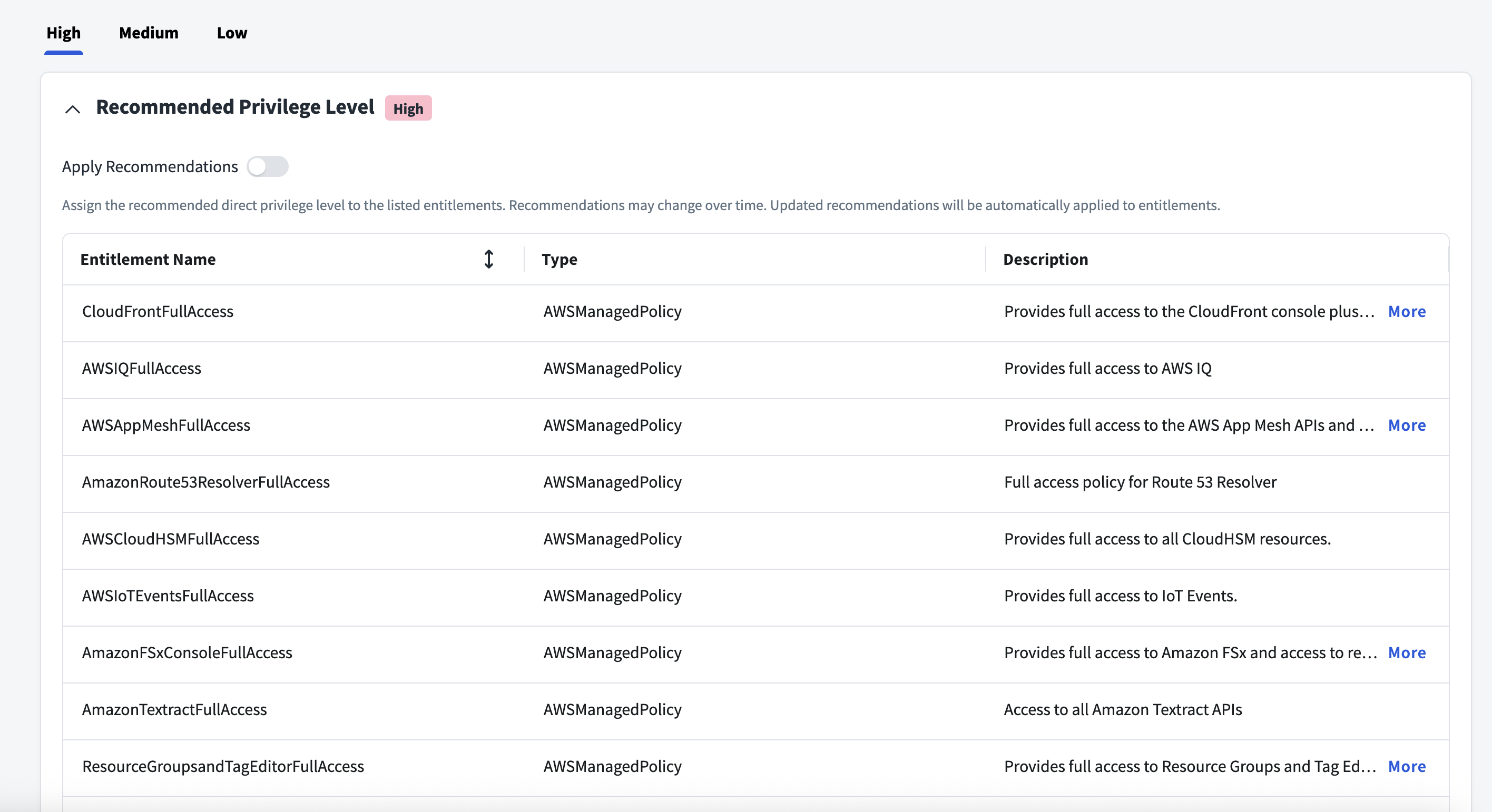
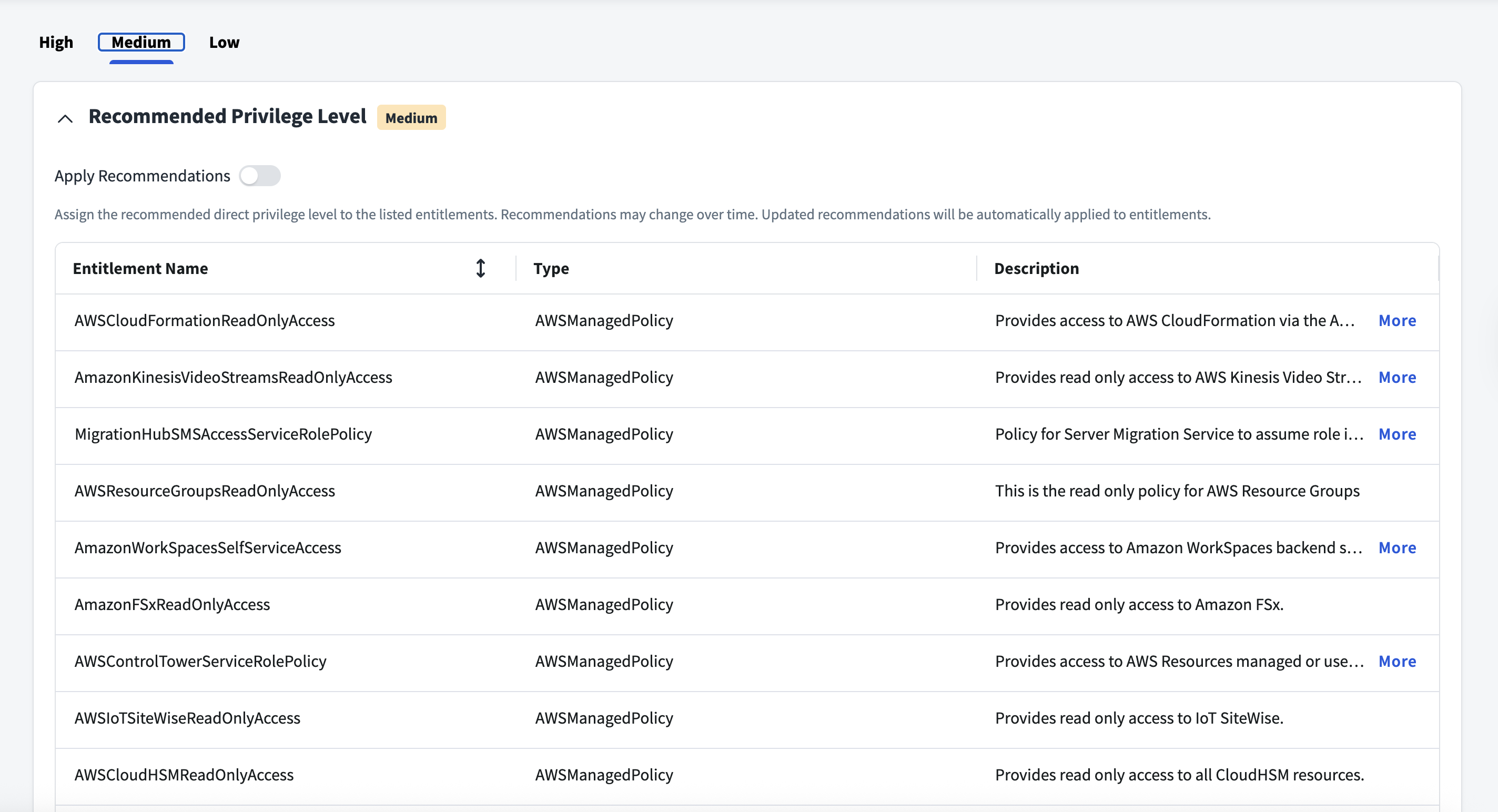
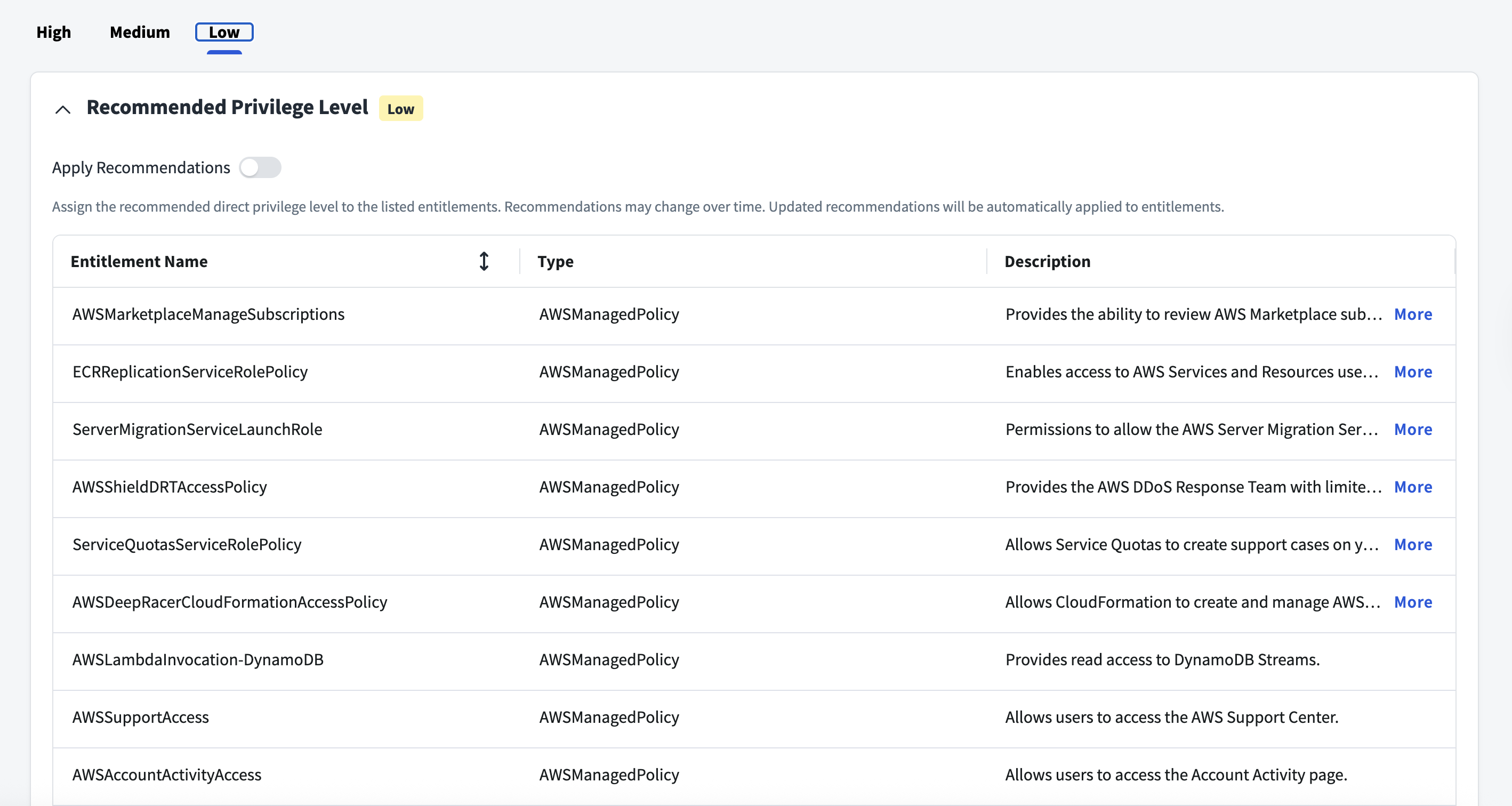
Privilege Classification
SailPoint Privilege Classification helps organizations systematically categorize and manage the privilege levels of entitlements within their sources. By classifying entitlements as high, medium, or low, administrators can better understand the potential risk and impact associated with specific access rights. This allows automatic assignment of privilege levels based on system recommendations, custom-defined criteria, or a same level across all entitlements.
| Privilege Level | Description |
|---|---|
| High | Administrative level access to accounts |
| Medium | Administrative level access for a specific role or function |
| Low | Only basic access of data |
Note
To manage Privilege Classification, users must have administrative roles such as Org Admin, Source Admin or Source Sub-Admin.
For more information, refer to Managing Privilege Classification.
Examples
Privilege Level: High
Privilege Level: Medium
Privilege Level: Low
Password Management
If Password Management is enabled for your organization, you can change the password for a user of the source. After enabling password management on the source, be aware of the following:
- The password policy defined in SailPoint applies to accounts on this source.
- If you change the password for an application connected to this source, the change will automatically be made to the source itself.
For more information on configuring password management, refer to Password Management Overview.
Prerequisites
- Create an IAM role and assign required permission to it so that it uses all the cross-account roles.
- Create a Customer/ Inline managed policy in each AWS account that you want to manage. Use the exact JSON policy provided by SailPoint. For more information, refer to Multiple Group Object Source Policies, Non Multiple-group Object Source Policies, and Machine Identity Governance Policies.
- Create Cross Account Roles in each AWS account that you want to manage and attach the appropriate policies to the role. Create an IAM role and assign required permission to it so that it uses all the cross-account roles.
- The AWS System Administrator can refine the Permission Policies as needed.
- For agent discovery, use the policies in Machine Identity Governance Policies for Amazon Bedrock Agents, Amazon Bedrock AgentCore Agents, Amazon Connect Customer Agents, and Amazon Quick Agents, and AWS Agent Registry.
- For IAM credential discovery, use the policy in Machine Identity Governance Policies for AWS IAM Credentials.
Before onboarding AWS with SailPoint Agentic Fabric (SAF), ensure you meet the following prerequisites:
- All features must be enabled for your AWS Organization.
- Your management account administrator must enable trusted access for CloudFormation StackSets.
Documentation Feedback
Feedback is provided as an informational resource only and does not form part of SailPoint’s official product documentation. SailPoint does not warrant or make any guarantees about the feedback (including without limitation as to its accuracy, relevance, or reliability). All feedback is subject to the terms set forth at https://developer.sailpoint.com/discuss/tos.