Pagination
Web Services supports generic paging for Account and Entitlement Aggregations.
Notes
- If there are multiple Account or Entitlement Aggregation operations (endpoints) configured, paging is supported only for the first operation instance of Account or Entitlement Aggregation.
- By default, the page size is 50 and page offset is 0.
- The Web Services source correctly evaluates the
)character within a string in the paging configuration.
Configure Paging
Paging can be configured in Account/Entitlement Aggregation endpoints using the Paging tab with one of the following methods:
- Paging based on limit-offset
- Paging based on response markers
- Paging based on response header links
Note
The Paging tab becomes available when you configure certain HTTP operations, such as account and entitlement aggregation. Refer to Configuring Paging as an HTTP Operation for more information on configuring paging as an HTTP operation.
Configuration Considerations
Consider the following while configuring paging in the Paging tab:
- Every paging configuration step must start on a new line.
- SailPoint recommends providing a space after every operator, condition, or placeholder for correct evaluation of the paging expression.
-
The paging mechanism follows the placeholder notation for resolution of attribute values:
Any attribute which follows the placeholder notation is resolved or assigned a value depending upon the operator being used.
-
Intermediate values can also be stored between page requests by using the placeholder notation. To achieve this, any attribute key which does not match any of the predefined keywords can be used. For more information, see the example in Paging Based on Limit-Offset where
$sysparm_offset$is updated and used between page requests. -
For complex expressions or conditions, multiple conditions can be grouped together using parentheses. For example:
Important
For more information and implementation of paging, contact SailPoint Services.
Paging Keywords
The paging mechanism has the following predefined set of keywords you can use:
| Keyword | Description |
|---|---|
application |
Represents the application. baseUrl - Base URL configured in the source. |
endpoint |
Represents endpoint configuration. relativeURL - Relative URL of the endpoint. fullUrl - Full URL contained within the endpoint. |
limit |
Indicates page limit configured in the endpoint configuration. |
offset |
Indicates page offset configured in the endpoint configuration. |
request |
Represents request body. |
requestHeaders |
Represents request header. |
response |
Represents response body object. |
responseHeaders |
Represents response header. |
TERMINATE_IF |
Indicates termination condition; multiple conditions can exist. NO_RECORDS - Indicates no records retrieved; to be used in conjunction with TERMINATE_IF, evaluates to TRUE/FALSE. RECORDS_COUNT - Indicates number of records retrieved. |
NULL |
Indicates null or empty object. |
REMOVE |
Indicates to remove an attribute. |
Important
Avoid using arithmetic operations in the TERMINATE_IF statement. Arithmetic statements should be performed before checking for termination conditions.
Supported Operators
| Type | Operations |
|---|---|
| Regular operations | +, -, *, /, =, &&, and || |
| Conditional operations | <, >, <=, >=, ==, and != |
Paging Based on Request Body Configuration
Configure paging using request body parameter configuration.
For example, an initial aggregation URL for an example managed system is as follows:
The example URL has the following parameters:
- baseUrl -
https://test.com - relativeURL -
/GetUserList
The request body is as follows:
Use the following configuration steps on the Paging tab based on the request body:
$limit$ = 50
TERMINATE_IF $RECORDS_COUNT$ < $limit$
$offset$ = $offset$ + 1
$endpoint.fullUrl$ = $application.baseUrl$ + "/GetUserList"
$request.PageIndex$ = $offset$
Paging Based on Limit-Offset
You can limit pagination based on the $offset$ and $limit$ placeholders.
$offset$- Initial page offset$limit$- Page size
For example, in the following configuration, the maximum number of users to fetch per page is 100, and the starting offset of the API is 0. The index in the subsequent page is 101.
-
In General Information > Context URL, enter the following:
-
Go to the Paging tab and set the following:
- Page Size -
100 - Initial Page Offset -
0
- Page Size -
-
Configure the following in Paging Steps:
Managed System Specific Configurations
This section describes paging based on limit-offset for ServiceNow and Workday managed systems.
For ServiceNow
For example, the initial aggregation URL for a ServiceNow managed system is as follows:
The above URL includes the following parameters:
- baseUrl -
https://XYZ.service-now.com - relativeURL -
api/now/v1/table/sys_user?sysparm_limit=100&sysparm_fields=sys_id
To configure paging based on limit-offset:
-
Use the following for a ServiceNow managed system:
TERMINATE_IF $RECORDS_COUNT$ < $sysparm_limit$
$sysparm_offset$ = $sysparm_offset$ + $sysparm_limit$
$endpoint.fullUrl$ = $application.baseUrl$ + "/api/now/v1/table/sys_user?sysparm_fields=sys_id&sysparm_limit=100&sysparm_offset=" + $sysparm_offset$
In this example, the maximum record count is set using
sysparm_limitandRECORDS_COUNT.RECORDS_COUNTrepresents the number of records fetched from the response andsysparm_limitcan be changed as required. Based on this step, the next page URL is as mentioned in the following steps. -
The second page URL is based on the paging steps configuration:
-
The next page URL is based on the paging steps configuration:
The paging operation is terminated when RECORDS_COUNT is less than sysparm_limit, as follows:
For Workday
For example, the initial aggregation URL for a Workday managed system is as follows:
The above URL includes the following parameters:
- baseUrl -
https://XYZ.workday.com - relativeURL -
/ccx/service/sailpoint_pt1/Human_Resources/v24.1
The following are the configuration steps in the paging tab based on limit-offset:
-
Use the following for a Workday managed system:
TERMINATE_IF $response.wd:Response_Results.wd:Page$ > $response.wd:Response_Results.wd:Total_Pages$
$offset$ = $response.wd:Response_Results.wd:Page$ + 1
$request.bsvc:Response_Filter.bsvc:Page.text()[1]$ = $offset$
In the above example, the number of pages is verified with the response from Workday and compared with the total number of pages. If the current page number is less than the total pages, then the request body (SOAP Body) is updated with the new page by incrementing it.
The following is an example of an initial payload request with Initial Page Size (the initial page is the beginning index) as 1 and Page Size (number of records per page) as 10:
<soapenv:Body> <bsvc:Get_Workers_Request bsvc:version="v24.1"> <bsvc:Request_Criteria> .... </bsvc:Request_Criteria> <bsvc:Response_Filter> <bsvc:Page>1</bsvc:Page> <bsvc:Count>10</bsvc:Count> </bsvc:Response_Filter> <bsvc:Response_Group> .... </bsvc:Response_Group> </bsvc:Get_Workers_Request> </soapenv:Body> -
Based on the previous paging step, the next payload is as follows. The second aggregation payload increments the offset (page number):
<soapenv:Body><bsvc:Get_Workers_Request bsvc:version="v24.1">
<bsvc:Request_Criteria>
          ....
          </bsvc:Request_Criteria>
         <bsvc:Response_Filter>
  <bsvc:Page>2</bsvc:Page>

  <bsvc:Count>10</bsvc:Count>
</bsvc:Response_Filter>

        <bsvc:Response_Group>
          ....
        </bsvc:Response_Group>
        </bsvc:Get_Workers_Request>
   </soapenv:Body>
Paging Based on Response Markers
This section describes paging based on a marker value in the response. Based on the marker value in the response, an aggregation process is terminated or continued.
The following table lists examples of response marker based paging for Dropbox, Salesforce, and SuccessFactors.
Note
Other managed systems may use different response marker formats. In some configurations, it may be better to use the Before or After Operation Rule to configure paging.
Dropbox
TERMINATE_IF $response.has_more$ == FALSE

$endpoint.fullUrl$ = $application.baseUrl$ + $endpoint.relativeUrl$ + "/continue"

$request.cursor$ = $response.cursor$

REMOVE $request.limit$
Salesforce
TERMINATE_IF $response.ns:result.ns:done$ != FALSE

$request.soapenv:Body$ = "<urn:queryMore><urn:queryLocator>" + $response.ns:result.ns:queryLocator$ + "</urn:queryLocator></urn:queryMore>"
SuccessFactors
TERMINATE_IF $response.ns:result.ns:hasMore$ != TRUE

$request.soapenv:Body$ = "<urn:queryMore><urn:querySessionId>" + $response.ns:result.ns:querySessionId$ + "</urn:querySessionId></urn:queryMore>"
Paging Based on Response Header Links
This section describes paging based on response header links.
The following table lists examples of response header links-based paging for ServiceNow, and Okta managed systems.
Note
Other managed systems may use different response header link formats. In some configurations, it may be better to use the Before or After Operation Rule to configure paging.
ServiceNow
Okta
Paging Based on lastRecord
The Web Services SaaS connector can support pagination by dynamically injecting a value from one response into the response that immediately follows it using the lastRecordAttribute attribute and the $lastRecord$ placeholder. Add lastRecordAttribute to connectorAttributes.
lastRecordAttribute- Defines the attribute (key) from the response records whose value is used as the starting point for the next page. Type: String. Default value:id.
Pagination continues until no records are returned. For example:
The endpoint URL is constructed dynamically using placeholders:
$endpoint.fullUrl$ = $application.baseUrl$ + "/v1/$application.appId$/users?limit=" + $limit$ + "&startingAfter=" + $lastRecord$
The connector checks for the $lastRecord$ placeholder in the paging configuration. During response aggregation, it does the following:
- References the last record in the current page of the response.
- Extracts the value of the field specified in
lastRecordAttribute. For example, you can configure this as theidattribute. - In the next page, replaces the
$lastRecord$placeholder in the URL with the extracted value.
For example, if the last record in a page has:
And lastRecordAttribute is "id", then the next request URL includes the following:
To configure this feature, enter the attribute name you want to use as a page delimiter as the lastRecordAttribute attribute value in the source XML file via the REST API.
Note
Refer to Best Practices: REST API Authentication and REST API - Update Source (Partial) in the SailPoint Developer Community for more information on SailPoint's REST APIs.
Configuring Paging as an HTTP Operation
Configure paging as an HTTP operation. The Paging option appears for aggregation operations.
Refer to Pagination for more information on the paging feature.
Screenshot
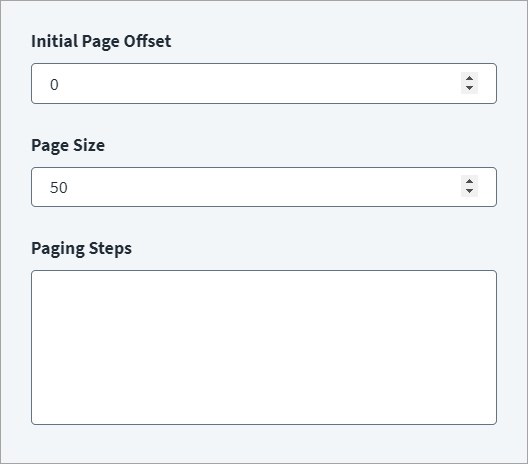
- Set the Initial Page Offset, which sets the page offset configured in the endpoint configuration.
- Set the Page Size, which determines how many records the connector displays on each page.
- In Paging Steps, enter configuration steps as required for limit-offset, response markers, or response header links paging.
- Select Save.
Documentation Feedback
Feedback is provided as an informational resource only and does not form part of SailPoint’s official product documentation. SailPoint does not warrant or make any guarantees about the feedback (including without limitation as to its accuracy, relevance, or reliability). All feedback is subject to the terms set forth at https://developer.sailpoint.com/discuss/tos.