Integrating SailPoint with Microsoft Active Directory
This document is designed to give specific information about the requirements and field definitions needed to get a working instance of an Active Directory connector in SailPoint.
Note
To view the latest features, enhancements, and fixes for all SaaS connectors, refer to the SaaS Release Notes page.
The SailPoint Active Directory connector offers complete management of your Active Directory infrastructure, which can be distributed across multiple domains/multiple forests. You can manage users, contacts, groups, Exchange mailbox, mail users, mail contacts, and Skype users from a single source. For more information on what you can do with the Active Directory connector, refer to Supported Features.
Architecture
Screenshot
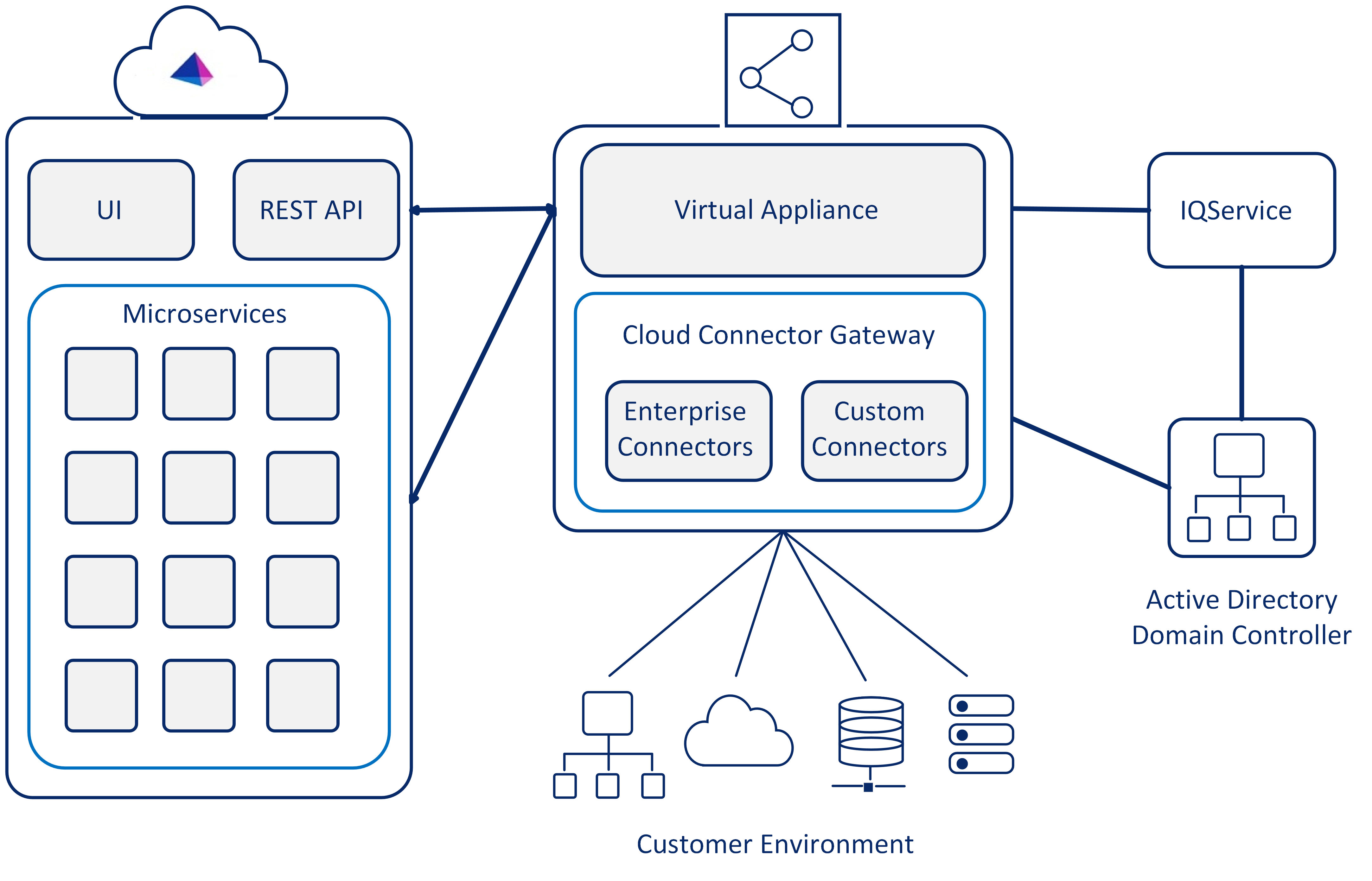
There are three main architecture components:
- SailPoint
- Virtual Appliance Cluster (virtual appliances are in the customer's-controlled environment and updated by SailPoint) with Cloud Connector Gateway (CCG)
- Customer Environment
Note
SailPoint recommends reviewing the Virtual Appliance and Cloud Connector Gateway documentation before starting the configuration of your connector.
SailPoint has the UI and the REST API interface. This interface has the following internal services:
- SSO
- Access Review
- Password
- Provisioning
- Task Processing Engine (performs aggregation, refresh, synchronization operations, and serves multiple tenants)
Supported Features
Note
Before you can use any item above marked with an asterisk (*), SailPoint must activate the feature for your site.
The connector supports the following features:
-
Load and *Provision
- Active Directory Accounts
- Exchange Mailboxes
- Skype for Business Accounts
-
Active Directory Contacts
- Manages Active Directory Contacts as Accounts
- Aggregation, Refresh Account, and Delta Aggregation of Contacts
Note
The Entitlement aggregation only fetches child entitlements that are associated with the same domain.
- Create/ Delete Contacts
- Add or Remove Entitlements
- Create Exchange Mail Contact
-
Active Directory Service Accounts (Managed Service Accounts/ Group Managed Service Accounts)
- Account Aggregation
- Create or Refresh
- Add or Remove Entitlements
- Delete Account
-
Resource Forest Topology Exchange Management. For more information, see Active Directory Resource Forest Topology Exchange Management.
- Aggregate Linked Mailbox properties for the Account Forest User
- Aggregate Mail User or Mail Contact from the Resource Forest Exchange
-
Delta Aggregation supports aggregation for the following delta changes:
- Create Linked Mailbox or Update Linked Mailbox Properties
- Mail enabled Distribution List membership changes for the shadow account
-
Create Linked Mailbox for the Account Forest User
-
Delta aggregation (using DirSync search) to fetch changes since last aggregation from Active Directory. For more information, see Delta Aggregation.
- *Access Certifications (certification of entitlements connected to accounts)
- Authentication
- *Password management
- Password Interception
- The Active Directory source supports the Active Directory group hierarchy
For more information on features, see Source Features.
User Features
| Feature | Accounts | Contacts | Service Accounts |
|---|---|---|---|
| Aggregate | ✔ | ✔ | ✔ |
| Partitioning Aggregation | ✔ | N/A | N/A |
| Delta Aggregation | ✔ | ✔ | N/A |
| Authentication | ✔ | N/A | N/A |
| Create | ✔ | ✔ | ✔ |
| Delete | N/A | ✔ | N/A |
| Password Management | ✔ | N/A | N/A |
| Enable/Disable | ✔ | N/A | N/A |
| Entitlement (Read, Request, or Revoke) | ✔ Groups | ✔ Groups | ✔ Groups |
| Exchange (Read or Create) - Mailbox | ✔ | N/A | N/A |
| Exchange (Read or Create) - Mail User | ✔ | N/A | N/A |
| Exchange (Read or Create) - Mail Contact | N/A | ✔ | N/A |
| Skype for Business Account (Read or Create) | ✔ | N/A | N/A |
Group Entitlements
Group Entitlements are the entitlement types for which SailPoint provides ability to aggregate additional details of these entitlement types from the managed system. These objects have separate schema defining list of attributes that aggregation task fetches as additional details when aggregation is run for that Group Entitlement type.
| Feature | Groups | sharedMailBox |
|---|---|---|
| Aggregation | ✔ | ✔ |
| Read Group Hierarchy | ✔ | N/A |
Shared Mailbox Management
The Active Directory source supports managing Shared Mailbox as additional group object.
Supported Operations
| Operations | Details/Features |
|---|---|
| Aggregation | Aggregate Shared Mailbox as Account Group Object. Aggregation of User's Shared Mailbox assignment as an entitlement. |
| Add or Remove Shared Mailboxes | Add or remove Shared Mailboxes to users, as an entitlement. |
Privilege Classification
SailPoint Privilege Classification helps organizations systematically categorize and manage the privilege levels of entitlements within their sources. By classifying entitlements as high, medium, or low, administrators can better understand the potential risk and impact associated with specific access rights. This allows automatic assignment of privilege levels based on system recommendations, custom-defined criteria, or a same level across all entitlements.
| Privilege Level | Description |
|---|---|
| High | Administrative level access to accounts |
| Medium | Administrative level access for a specific role or function |
| Low | Only basic access of data |
Note
To manage Privilege Classification, users must have administrative roles such as Org Admin, Source Admin or Source Sub-Admin.
For more information, refer to Managing Privilege Classification.
Supported Managed Systems
Supported Active Directory Domain Services (AD DS) Functional Levels
- Microsoft Windows Server 2025
- Microsoft Windows Server 2016
- Microsoft Windows Server 2012 R2
- Microsoft Windows Server 2012
- Microsoft Windows Server 2008 R2
Note
Microsoft has not made any changes in the functional level for Active Directory in Microsoft Windows Server 2019 and 2022.
As a result, Microsoft Windows Server 2016 is the latest Active Directory functional level supported.
Supported Microsoft Exchange Servers
- Microsoft Exchange Server 2019
- Microsoft Exchange Server 2016
Supported Microsoft Lync\Skype for Business Servers
- Microsoft Skype for Business Server 2019
- Microsoft Skype for Business Server 2015
Supports AWS Managed Microsoft AD Service.
Prerequisites
This page lists the prerequisites required to integrate SailPoint with Active Directory.
- Configure at least one virtual appliance cluster and successfully test the connection. For more information, refer to the Virtual Appliance Reference Guide.
-
Create an Active Directory service account with the Required Permissions. A service account is a special user account that is created for the sole purpose of running a particular service or application on the Windows operating system.
Services use the service accounts to log on and interact with the operating system.
-
Secure Active Directory connector.
- Configure SailPoint for provisioning.
Important
Before you start using the connector, install and register IQService on any Windows system with any of the supported Operating Systems. For more information on installing and registering IQService, refer to IQService Settings.
IQService installation now enforces TLS configuration by default to improve security and safeguard your environment. To proceed with the installation, ensure you have completed the necessary prerequisites for TLS configuration. For more information, refer to Configuring TLS and Client Authentication for IQService.
Domain and Trust Requirements
If the Authentication Type is set to Strong (SASL), then the IQService host must be in the same domain or in a trusted domain. For a source managing multiple domain trees, either from the same or different forests, there must be a two-way trust relationship between them.
Managing Service Accounts (MSA and gMSA) Prerequisites
For managing Managed Service Accounts (MSA) or group Managed Service Accounts (gMSA), the following prerequisites are required:
- For reading
msDS-GroupMSAMembershipandmsDS-AllowedToActOnBehalfOfOtherIdentitygMSA object properties, IQService is required and Active Directory Module for Windows PowerShell must be enabled on the IQService Host. - For Provisioning operations of MSA and gMSA objects, IQService is required and Active Directory Module for Windows PowerShell must be enabled on the IQService Host.
- To use group Managed Service Account (gMSA) for forest and domain settings, ensure you select Strong (SASL) as the authentication type.
-
The permissions for gMSA accounts are similar to those of service accounts. No special permissions are needed for gMSA accounts. For more information, refer to Required Permissions.
Important
Configuration of IQService is mandatory to utilize gMSA as a service account for forest and domain settings in Active Directory. For more information, refer to Configuring IQService to use gMSA as a service account for Active Directory.
Refer to Using gMSA as a Service Account for more information.
Strong (SASL) Authentication Requirements
Strong (SASL) authentication internally uses kerberos authentication to authenticate the service account. To utilize Strong (SASL) authentication, ensure the following requirements are fulfilled:
- Service account in the User Principal Name (UPN) format. For example,
UserName@DNSDomainName.com. - For domain settings, use a non-TLS port. TLS is not supported with Strong (SASL) authentication.
Documentation Feedback
Feedback is provided as an informational resource only and does not form part of SailPoint’s official product documentation. SailPoint does not warrant or make any guarantees about the feedback (including without limitation as to its accuracy, relevance, or reliability). All feedback is subject to the terms set forth at https://developer.sailpoint.com/discuss/tos.