Troubleshooting
If you encounter any of the following issues or errors, SailPoint recommends that you follow the guidance provided below to resolve the error before contacting SailPoint Support.
For issues or errors that are not addressed in this connector guide, refer to the following resources for troubleshooting information:
- SailPoint Identity Services Documentation
- SailPoint Support Knowledge Base
- SailPoint Developer Community
Aggregation fails for STAT2_Next and STAT2_Next_Start_Date for Pre-Hire Records
Issue: Unable to aggregate STAT2_Next and STAT2_Next_Start_Date values for pre-hire type of records.
Resolution: Confirm that action type code 01 (default code for hiring) is added in the Action types field on the Additional Settings tab in SailPoint, along with other required action type codes.
Aggregation completed with errors
Resolution: Check the permissions for /SAILPOIN/CONF as mentioned in the document for table PA0000, Configuration Table For SAP HR/HCM.
Additional attributes added in account schema to be fetched using additional attribute BAPI are not aggregated.
Resolution: Make sure that the additional attribute description in the account schema matches the name of the attribute configured in additional attribute BAPI.
While performing Test Connection through SAP router strings, an error message is displayed
Resolution: Add the following entry in the saprouttab of your SAProuter:
Activate the new saprouttab with the following command or restart the SAProuter:
Test Connection fails with an error even when all the required jars are there in the required path
_JCo initialization failed with java.lang.UnsatisfiedLinkError: C:\apache-tomcat-9.0.35\webapps\identityiq\WEB-INF\lib\sapjco3.dll: Can't find dependent libraries
Resolution: To resolve the issue, install the Microsoft Visual Studio 2005 C/C++ runtime libraries (version 8.0.50727.6195). The VC++ 2013 can be downloaded from https://support.microsoft.com/en-us/help/4032938/update-for-visual-c-2013-redistributable-package.
Test connection and aggregation fail with a JCoRuntimeFactory initialization error
Error: Could not initialize class com.sap.conn.jco.rt.JCoRuntimeFactory" in Test Connection and Aggregation in IdentityNow
Resolution: The host value must be updated on the VA with the FQDN of the SAP server. Reupload the sapjco and libsapjco jars on the UI.
Could not initialize class com.sap.conn.jco.rt.JCoRuntimeFactory error on test connection and aggregations in SailPoint
Resolution: The host value must be updated on VA with the FQDN of the SAP server. Re-upload the sapjco and libsapjco jars on the UI.
Note
Ensure that all SAP sources pointing to the same VA cluster have the latest and identical versions of SAP JARs uploaded.
SAP source config test connection fails when the VA is configured with a secure tunnel or VA, and the manage system are in different networks
"sailpoint.connector.ConnectionFailedException: Server is DOWN or Connection parameters are incorrect.
OR
OR
Resolution: There are three possible options to solve this error.
Option 1: One of the reasons for the issue to occur is the IP address of the VA is not recognized by the connector. To resolve this, you need to make an entry in hosts.yaml file with the IP address of the VA as well as the managed source (SAP server).
Note
For information on creating a hosts.yaml file, refer to Configuring a Hosts.yaml File.
Example:
Where 10.200.80.60 is the IP, SAPSER4 is the hostname of the SAP server, 10.22.131.14 is the IP of the VA, and sailpoint-va is the default name of the VA. Ensure that SAP is installed with JCO enabled.
Similarly, add the IP and hostname of the VA being used in the file. Restart CCG/ Reboot the VA after the update.
Option 2: Add a Route entry in the static.network file to persist routing the table entry of the VA hostname. To do so, perform the following steps:
- In your VA, go to
../etc/systemd/network/static.network -
Add the following entry:
-
Run
sudo systemctl restart systemd-networkdto apply the configuration. - Run
route -nto show the routes. - Restart CCG/ Reboot the VA and check if the entry still persisted.
Option 3: Update DNS entries for VAs on your network so that FQDN resolves for each VA. To do so, perform the following steps:
- Run
sudo hostnamectl set-hostname <hostname of your choice>to set the VA hostname. - Run the
hostnamecommand to validate. - Run
sudo rebootto reboot the VA.
The VA should reflect the new hostname.
Account aggregation is taking a long time to complete (approx. 2 to 3 days)
Resolution: Account aggregation takes a longer time if the SAP target system and the VA are in two separate regions. To resolve the issue, move the VA region to the SAP region to reduce the aggregation time.
Assign type conflict exception occurs in the UI during connector operations
The following error message is displayed when using the /SAILPOIN/SAIL_READ_TABLE or /SAILPOIN/SAIL_READ_TABLE_LEG function modules:
Exception during aggregation. Reason: java.lang.RuntimeException: ASSIGN_TYPE_CONFLICT while querying table *Table_Name*. One of the fields queried (field1,field2,field3… ) may have incorrect COLUMN_LENGTH or COLUMN_DTYPE set in /SAILPOIN/CONF table. Please refer ASSIGN_TYPE_CONFLICT in troubleshooting section of documentation for more details.
Resolution: Ensure COLUMN_LENGTH/COLUMN_DTYPE is correctly configured for the fields of Table_Name in the /SAILPOIN/CONF table. This can be validated through the t-code "SE11" while viewing the table details, under the Fields tab.
Function [/SAILPOIN/SAIL_READ_TABLE] was not found
Resolution: Ensure that SailPoint's function module is installed on the SAP system as per Installation of SAILPOIN Add-On.
Aggregation fails with error : Data was lost while copying a value : Message 341 of class 00 type X
This error is Caused by class com.sap.conn.jco.JCoException: (104) Data was lost while copying a value.: Message 341 of class 00 type X: SAPSQL_DATA_LOSS.
Resolution: If SAP has been patched to SP 17 or later, change the client language to a single character. For example, if the client language is EN, change it to E,as shown below:
SAP connector throws "Unencrypted communication is rejected by this system" error when snc/only_encrypted_rfc is set to 1 on SAP server
[ ConnectorException ] [ Error details ] Exception occurred while test configuration operation, refer logs for more details. Initialization of repository destination SAP FS failed: Unencrypted communication is rejected by this system.
Resolution: Please check the 'snc/only_encrypted_rfc' parameter on SAP server, if set to 1, SAP server expects encrypted connections to it. We need to either set the value for this parameter to 0 or setup SNC connection both on SailPoint UI and SAP server to communicate.
SAP HR connector throws error: "[ ConnectorException ] [ Error details ] Exception occurred while iterate operation, refer logs for more details. Field 'RETURN' is not a member of record 'TABLES'
"[ ConnectorException ] [ Error details ] Exception occurred while iterate operation, refer logs for more details. Field 'RETURN' is not a member of record 'TABLES'
Resolution:
-
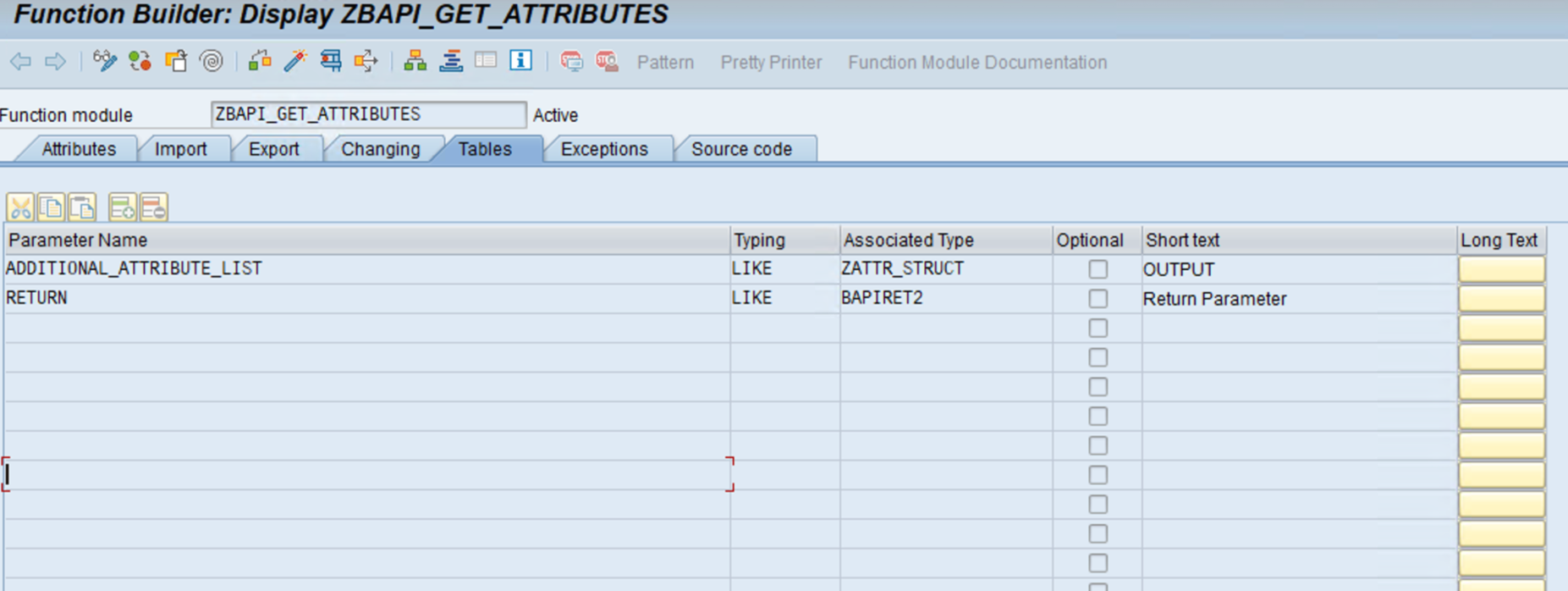
Ensure the output of the custom BAPI includes the table
JCOTableswith the following names:ADDITIONAL_ATTRIBUTE_LISTRETURN
-
Both
ADDITIONAL_ATTRIBUTE_LISTandRETURNtables must be placed under the TABLES tab of the custom BAPI definition. These tables are not included under the Export Tab. - The Export tab should be left empty.
Provisioning fails with an error message when trying to configure SNC using SAP JCO version 3.1
Provisioning fails with the following error message when trying to configure SNC using SAP JCO version 3.1 and when the client.snc_sso parameter is set to 0 in the application debug page:
"WARN: Warning from SAP while executing function [BAPI_USER_CHANGE]Password for user XXXX changed, but not set as productive"
Resolution: The value of client.snc_sso parameter must be set to 1 (that is, client.snc_sso = 1) or not defined (default is 1) in the SAP application. On the SAP managed system, JCO (SNC Name) value must not be specified in JCO ACL, that is JCO entry must be deleted from SNC0 tcode (table SNCSYSACL). Refer to SAP Note # 3016480 as recommended by SAP and only specific to SAP JCO 3.1.x.
Change password is not working with SNC when PRODUCTIVE_PWD attribute is X
The change password feature is not working with SNC, when PRODUCTIVE_PWD attribute is X.
Resolution: Define the productivePasswordValue in a POST via REST API.
Note
For more information on SailPoint's REST APIs, refer to Best Practices: REST API Authentication and REST API - Update Source (Partial) in the SailPoint Developer Community.
In the body of the POST, set form-data values as follows:
Note
In the sample above, the value is 1. By default, the value is X.
Resolution 2: Check the following JCO parameters and add them in the source XML as per your environment requirements:
The possible values of X are:
1: Authentication only2: Integrity protection3: Privacy protection8: Use the value fromsnc/data_protection/useon the SAP Application Server.
The possible values of X are:
0: Single Sign-On protocol disabled1: Single Sign-On protocol enabled
Note
Set the value to 0 as of JCO 3.0.9
Resolution 3: Ensure the SNC name in table SNCSYSACL (transaction SNC0), is not maintained. If it is present, remove the entry from the table.
Attributes are not aggregated during account aggregation or Get object processes
Resolution: Ensure that the subtype codes and the communication names are mapped properly. For more information, refer to Advanced Settings.
Aggregation failure with exception when fetching additional attributes using a custom BAPI
Aggregation fails as an exception under fetchAdditionalAttributes with a java.lang.NullPointerException error using a custom BAPI.
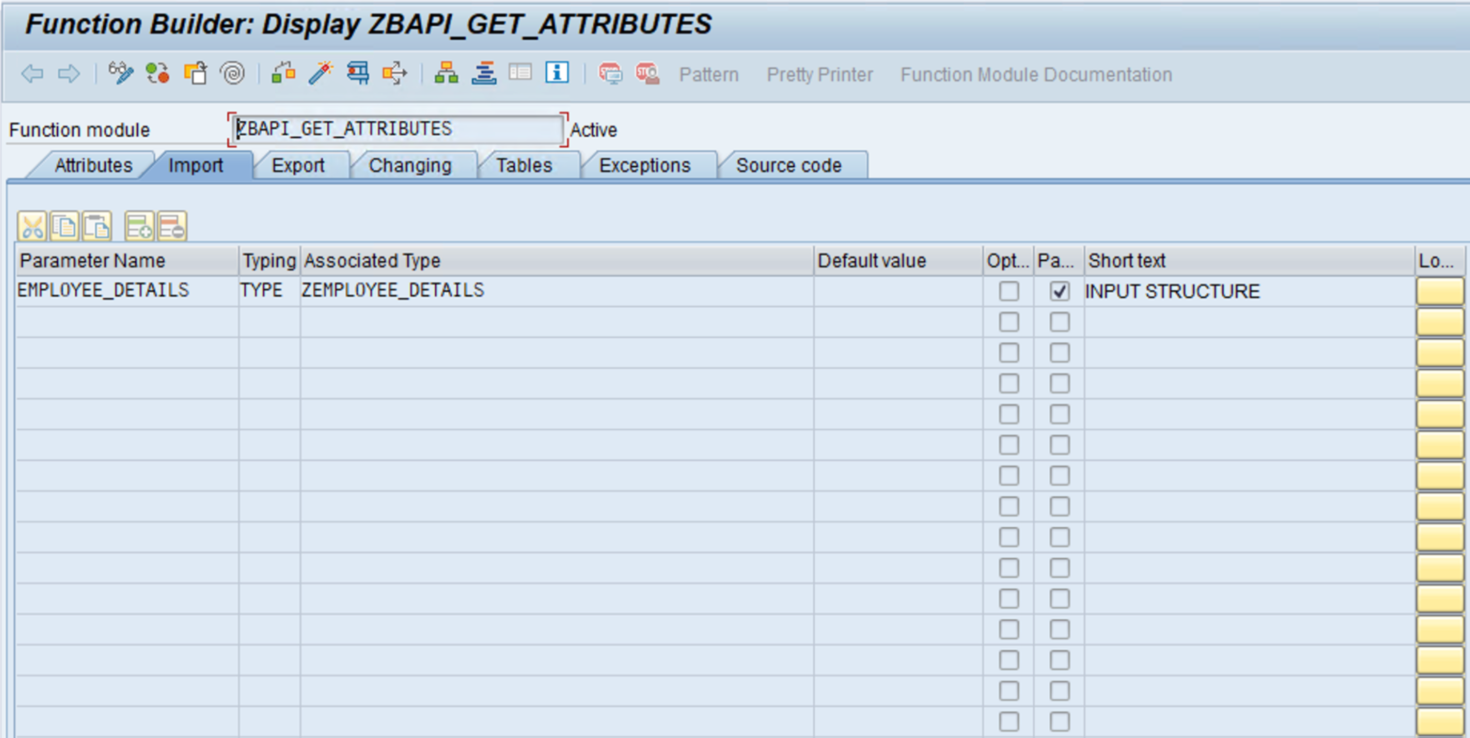
Resolution: Ensure you have the required permissions set. In the source, check the Input in the Import tab. Also check the Output and RETURN in the Tables tab. Refer to the second screenshot below for a Custom BAPI entry using SE37.
Expand for correct configuration examples
Input under Import
Output and Return under Tables column
Documentation Feedback
Feedback is provided as an informational resource only and does not form part of SailPoint’s official product documentation. SailPoint does not warrant or make any guarantees about the feedback (including without limitation as to its accuracy, relevance, or reliability). All feedback is subject to the terms set forth at https://developer.sailpoint.com/discuss/tos.