Integrating SailPoint with SAP GRC
Integration
This is an integration and requires additional licensing or subscriptions to utilize it. For more information, contact your customer success manager.
This document is designed to provide the information required to configure a working instance of a SAP GRC connector for SailPoint. This connector supports:
Access Management
This integration is used to aggregate all the Users and Roles from the systems (SAP SCM, JAVA, SAP ERP HCM, and so on) connected to SAP GRC and facilitates their provisioning by creating requests in GRC irrespective if there is risk present or not, as illustrated in the following figure:
Screenshot
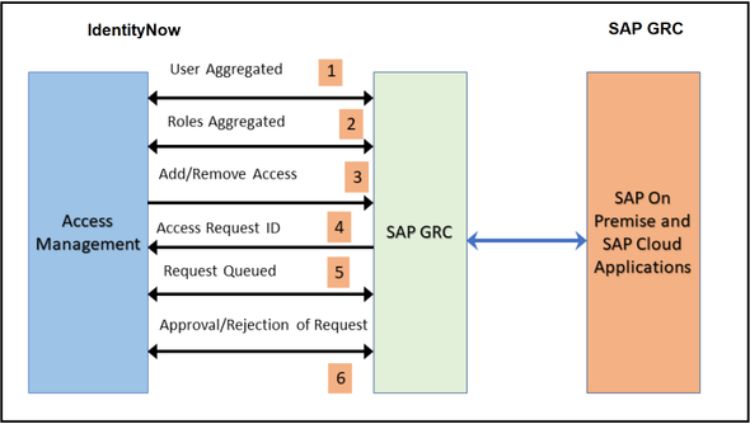
The figure explains the following methods:
- User Aggregated from the GRC connected system.
- Roles Aggregated from the GRC connected system.
- Request sent for adding or removing access to the connected system.
- Access Request ID created in GRC.
- Requests wait and are queued until a response is issued by SAP GRC.
- On the basis of the response returned from SAP GRC (approval or rejection in GRC), SAP GRC provisions or rejects the request and the corresponding status is maintained in the SAP GRC source.
SAP GRC IAG Bridge
Note
SAP GRC IAG Bridge is an additional optional feature provided in the existing SailPoint SAP GRC connector. An existing SailPoint SAP GRC connector set up is a prerequisite for this feature.
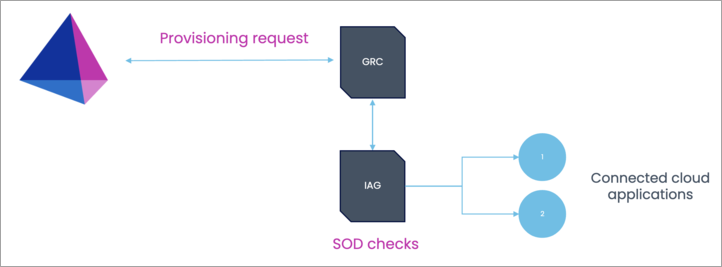
SAP GRC IAG Bridge is an additional setup on top of an existing SAP Access Control (GRC) on-premise solution, which communicates with SAP Cloud Identity Access Governance (IAG). This feature extends access governance functionality to cloud systems in a hybrid landscape.
IAG Bridge is a SAP suggested approach for the customers who have invested heavily in SAP GRC access control, but now want to provide support for cloud applications as well. This configuration helps to perform risk analysis of user requests in IAG for connected SAP cloud systems using the SAP GRC system as a bridge.
The major benefit for this integration is that the source of truth for access requests and risk analysis remains to be SAP GRC, and IAG acts as secondary system to communicate with cloud applications. Separate licenses must be procured from SAP for both GRC and IAG systems to use this feature.
Screenshot
Note
The RFC_READ_TABLE integration function module has been deprecated, and replaced with the ABAP Function module. For more information on configuration, refer to SailPoint Add-On to replace the use of RFC_READ_TABLE.
Note
To view the latest features, enhancements, and fixes for all SaaS connectors, refer to the SaaS Release Notes page.
Supported Features
The SAP GRC integration supports the following functions:
-
Aggregation of users from connected GRC systems of User Type - Dialog
Note
With the upgrade of GRC from AC12 SP19 and above, the SailPoint connector can show
Systemas INACTIVE_USER for the accounts that are disabled on the highest priority system. For more information, refer to the Troubleshooting section. -
Additional attribute support in account aggregation and account provisioning:
- Function
- SNC Name
- Multi-Valued User Group Assignments (multi-valued user group assignments are for account aggregation only. Use single use User Group Assignments for authorization checks).
-
Functional Area
These attributes are aggregated from a custom BAPI. For more information, refer to Creating a Custom Business Application Programming Interface (BAPI).
-
Aggregation of the following role types from SAP GRC:
-
Business, Composite, CUA Composite, Derived, and Single Role
Important
Ensure business role names follow the standard naming convention with single spaces between words to avoid data loss during aggregation. For example, the role names should be like "BUPA Healthcare Manager" with single spacing between words.
-
Group
- HANA Analytic Privileges
- Firefighter ID Role Type (
FireFighterID)
-
-
Create and Update User
- Add / Remove Entitlement
-
Enable / Disable Account
- Update the Valid From and/or Valid To dates when the account is enabled or disabled.
- Update the User Group and/or User Group Assignments when the account is disabled.
- Disable All Systems Connected to SAP GRC.
- Read-only Systems to Bypass.
For more information, refer to Additional Information.
-
Remove All Roles When Account is Disabled.
- For more information, refer to Additional Information.
-
Modify Account
- Update of the following user attributes
- FirstName
- LastName
- Manager
- EmployeeID
For more information, refer to Modify Account.
- Update of the following user attributes
-
SailPoint SAP GRC Integration now supports Access Management Requests that are configured for Auto-Approval in the SAP GRC system.
- Display actual requester details and description on access request.
SAP GRC Access Analysis
The SAP GRC connector supports the skipSystemItem attribute. The default value is false. When it is set to true in the source XML, the first item in RequestedLineItem containing the source name is skipped in the GracIdmUsrAccsReqServices API for the Create operation. You can use the skipSystemItem attribute when a user is created through request access. It is not mandatory to pass the source name (system name) in your environment.
IAG Bridge Supported Features
SAP GRC IAG Bridge supports the following features for accounts:
-
Aggregation
- Account
- Groups
-
Provisioning
- Create
- Add / Remove Entitlement
Note
The following operations are not supported by the SAP GRC IAG Bridge configuration due to API limitations and IAG design by SAP:
- Modify user attributes
- Enable/Disable user accounts
- Risk analysis/access violation visibility on the SailPoint platform
Workarounds:
- Modify user attributes: There are no alternate options or APIs for managing user attributes, provided by SAP.
- Enable/Disable user accounts: For de-provisioning accounts permanently or leaver use cases, a before provisioning rule can be used to map 'Disable' requests in SailPoint to the 'Delete' user request in IAG, as the IAG platform does not support disabling a user account.
- Risk analysis/access violation visibility on the SailPoint platform: Due to the limitations of the SAP APIs, we cannot show the risk or access violations on the SailPoint platform. Administrators need to log into GRC or IAG to check and mitigate the risks. This is in accordance with the SAP application design (SAP KBA 3492795).
Firefighter ID Role Type
The SAP GRC connector supports the FireFighterID attribute to manage critical or emergency tasks in SAP systems. The SAP GRC connector allows you to add or remove entitlements for FireFighterID role type. For more information, refer to Access Request Schema Attributes.
To add FirefighterID to the mapping, follow the instructions provided in step 5 of the Access Request Type Mapping configuration process. For more information, refer to Configuring Provisioning Settings.
Important
When Firefighter IDs (FFIDs) with expired validity are removed from the SAP GRC system based on the configured settings, SailPoint will process these changes in the next aggregation cycle. As a result, the removed FFIDs will continue to appear in SailPoint until the next successful aggregation is completed. This approach ensures continuity in tracking and managing FFIDs throughout the removal process, guaranteeing that the FFIDs are fully removed from all connected systems.
Privilege Classification
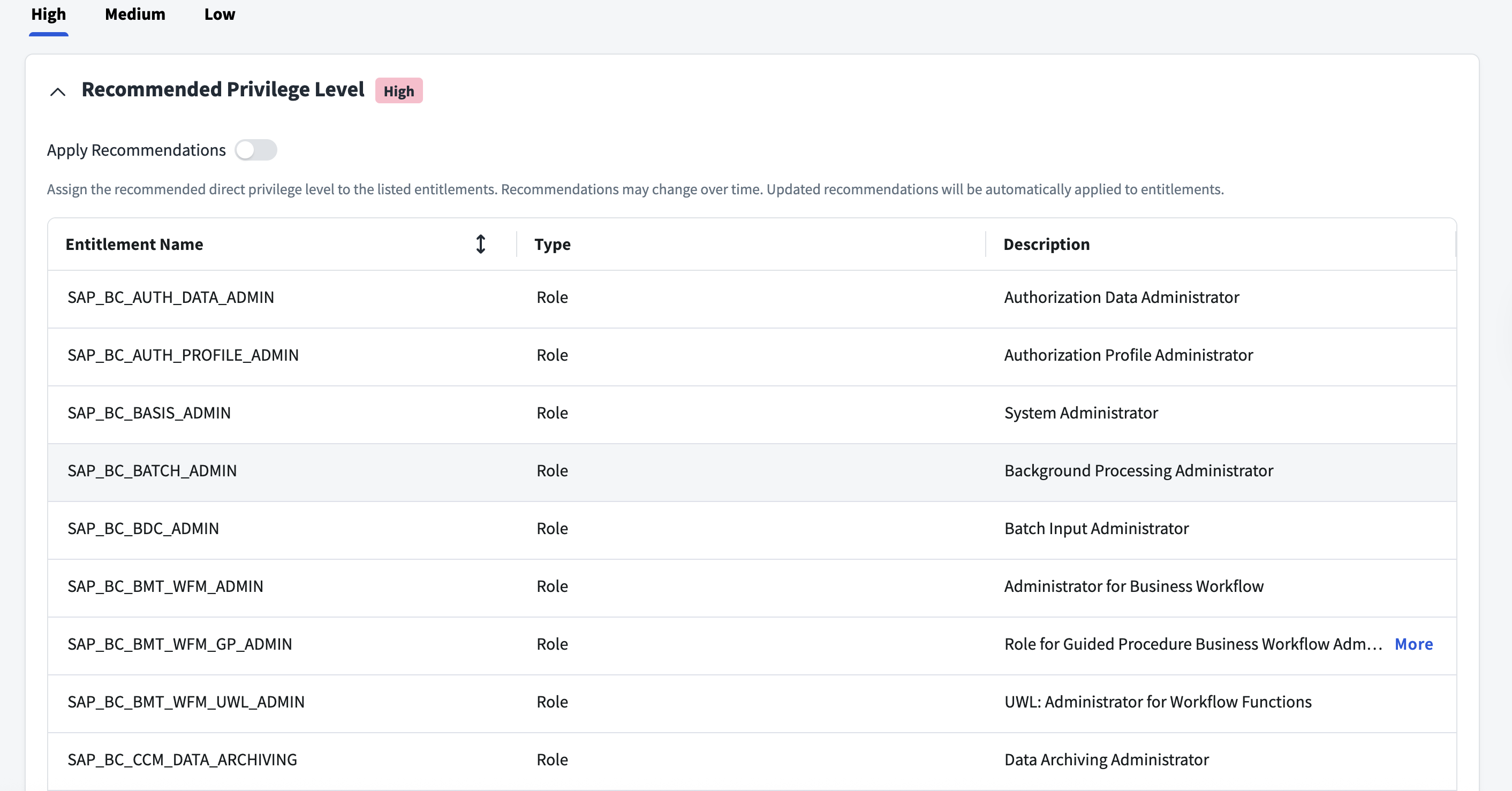
SailPoint Privilege Classification helps organizations systematically categorize and manage the privilege levels of entitlements within their sources. By classifying entitlements as high, medium, or low, administrators can better understand the potential risk and impact associated with specific access rights. This allows automatic assignment of privilege levels based on system recommendations, custom-defined criteria, or a same level across all entitlements.
| Privilege Level | Description |
|---|---|
| High | Administrative level access to accounts |
| Medium | Administrative level access for a specific role or function |
| Low | Only basic access of data |
Note
To manage Privilege Classification, users must have administrative roles such as Org Admin, Source Admin or Source Sub-Admin.
For more information, refer to Managing Privilege Classification.
Example
Supported Managed Systems
The SAP GRC connector supports SAP GRC Access Control 12.0 SP10 to SPS31.
Note
For SP24 and above, ensure that SAP Note 3523140 is implemented.
The SAP GRC connector supports the following versions of managed systems:
- SAP NetWeaver 7.51 and above
- SAP Enterprise Resource Planning (ERP) Central Component (ECC) 6.0 with EHP8 (Enhancement package 8)
- SAP S/4HANA 2021 to SAP S/4HANA 2025 (on-premise)
Note
SAP GRC connector works with SAP private cloud environments and supports SAP RISE solutions.
SAP ABAP-Based Systems
- All
SAP Non-ABAP Systems
- SAP Enterprise Portal
- SAP Process Orchestration
SAP IAG Supported Systems
- All SAP IAG supported systems mentioned by SAP at the SAP official website. Use your S-user ID to sign in.
Prerequisites
Note
The SAP GRC integration requires an additional license purchase for the number of users that will be integrated.
Important
SailPoint strongly recommends installing the SAP-certified add-on in the SAP environment and then using /SAILPOIN/SAIL_READ_TABLE instead of RFC_READ_TABLE.
- Configure at least one virtual appliance (VA) cluster and successfully test the connection.
- Configure the Multi-Step Multi-Process (MSMP) workflow on the SAP GRC server.
- Configure the SAP GRC Server
- Obtain the SAP GRC URLs
- Download the JCO libraries
- Synchronization Jobs
- Obtain the values for Filter Parameters
- Verify the Request Type and Configuration
- (Optional) If you want to configure Secure Network Communication (SNC), refer to SAP Secure Network Communication for SAP Source for additional SNC prerequisites.
Prerequisites for Aggregation
Create a custom Business Application Programming Interface (BAPI) in SAP GRC. For more information, refer to Creating a Custom Business Application Programming Interface (BAPI).
Configure the SAP GRC Server
Perform the following on the SAP GRC Server using the administrator privileges:
- Execute SPRO transaction code and select SAP Reference IMG.
- Go to Governance, Risk and Compliance > Access Control > User Provisioning.
- Select the image to execute Maintain Provisioning Settings transaction.
- In Dialog Structure, select Maintain Global Provisioning.
- In the Provisioning option section, go to Auto Provisioning > Auto provisioning at end of request.
Obtain the SAP GRC URLs
Note
All required web services must be set to the active mode before performing the following steps.
Perform the following steps for each of the following web services:
- Request Details: GRAC_REQUEST_DETAILS_WS
- Search Roles: GRAC_SEARCH_ROLES_WS
- Role Details: GRAC_ROLE_DETAILS_WS
To obtain the required SAP GRC URLs:
- Execute the SOAMANAGER transaction code on the SAP GRC server.
- Go to Service Administration > Web Service Configuration.
- In Search criteria, select Object Type as Service Definition and Object Name contains GRAC*.
- Select Search.
- In the search results, search (User Access web service) and select GRAC_USER_ACCESS_WS web service.
- Complete the following for
GRAC_USER_ACCESS_WSweb service:- Select the icon to open Service WSDL Generation.
- Copy the URL from the WSDL Generation section and open this URL in a browser.
-
Locate the following string in the XML and copy the binding URL (in bold) mentioned in the string:
These URLs are used for User Request and Request Details in the SAP GRC connector configuration.
Download the JCO Libraries
The JCO libraries (JCO Release 3.1.X) must be downloaded from the SAP website by going to the customer service marketplace and downloading the Java Integration Module.
SAP JCO version 3.1.X libraries, libsapjco3.so (on UNIX), must be present in the java.library.path (WEB-INF/lib) directory on the VA host. Upload these .jar and .so files on the Basic Configuration page.
For more information on downloading the .jar files, refer to Obtaining the Custom Connector Files. Ensure these jar files are compatible with the VA.
The following ports must be open on the SAP system:
| Port Name | Service in etc/services | Default | Range | Rule |
|---|---|---|---|---|
| SAP Dispatcher | sapdp<NN> | 3200 | 3200-3299 | 32<NN> |
| Gateway | sapgw<NN> | 3300 | 3300-3399 | 33<NN> |
| Gateway Secured | sapgw<NN>s | 4800 | 4800-4899 | 48<NN> |
| ICM HTTPS / Web Dispatcher HTTPS | (typically HTTPS; no SAP-specific fixed service name in many hosts) | 443NN | 44300-44399 (instance-based) | Must be open when GRC Web Service endpoint URL uses HTTPS on 443NN. |
| ICM HTTP / Web service binding port | HTTP | 80NN (common alternative) | 8000-8099 (instance-based) | Open if service bindings are HTTP rather than HTTPS. |
Note
- The <NN> represents the system number.
- The specific port used for the GRC service binding must be open for communication between SailPoint and the GRC system. For example, if your service uses HTTPS on port 443NN, that port must be open. Similarly, if it uses port 80NN or another custom port, that specific port must be open.
Synchronization Jobs
For all the connected systems, ensure that the Repository Object Synchronization job is successful and is in the same order as maintained in User Detail Data Sources.
For verifying the order, complete the following steps:
- Go to SPRO > SAP Reference IMG > Governance Risk and Compliance > Access Control > Maintain Data Source Configuration.
- Select User Detail Data Source.
Obtain the Values for Filter Parameters
This section describes the procedure for obtaining the values for Business Process, Sub Process, and Role Type parameters.
Obtaining the Values for Business Process and Sub Process
- Execute SPRO transaction code and select SAP Reference IMG.
-
Go to Governance > Risk and Compliance > Access Control > Maintain Business Process and Subprocesses.
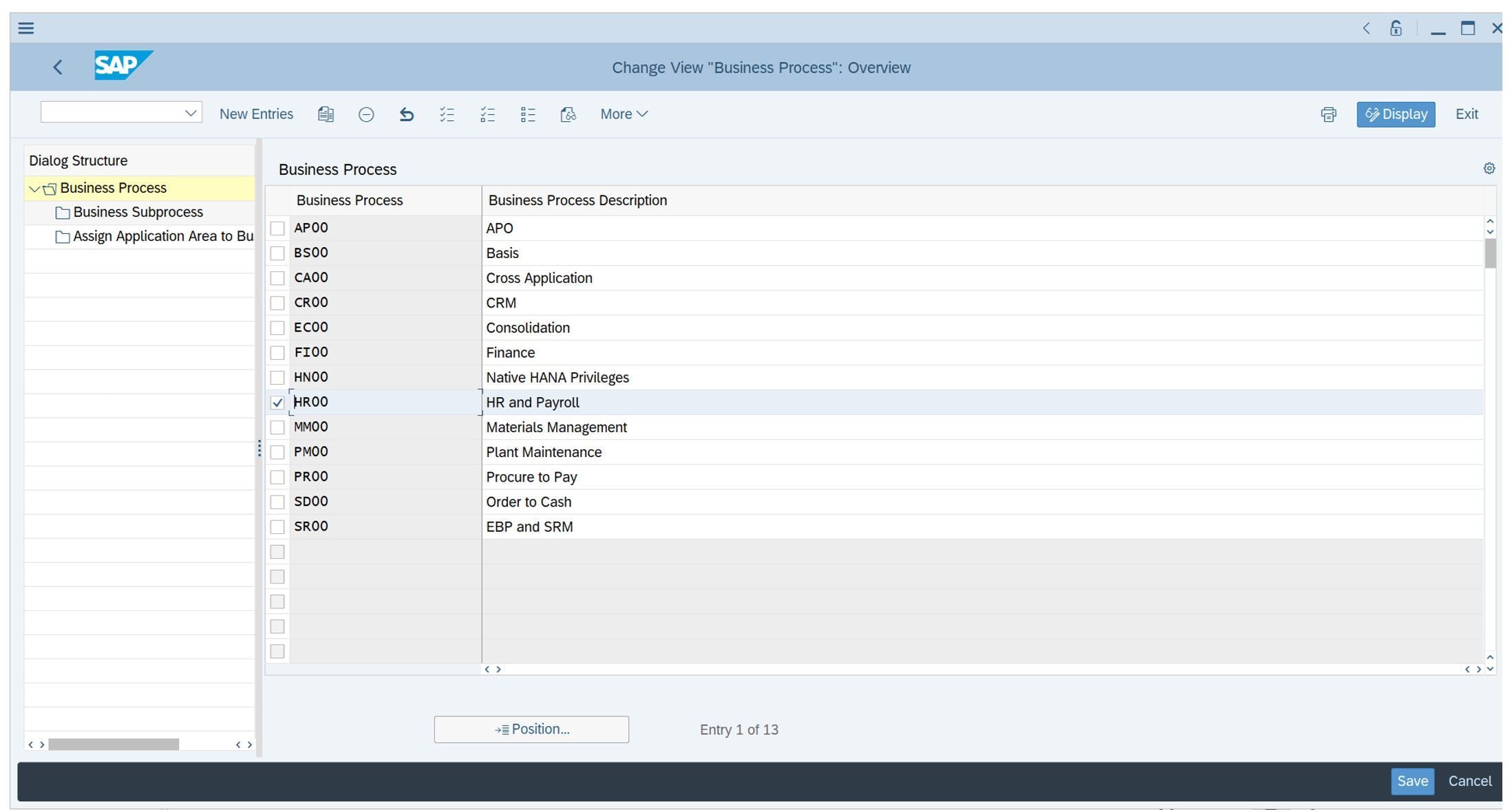
The following figure displays the list of business processes:

As displayed in the above figure, code must be added instead of the description. For example
AP00. -
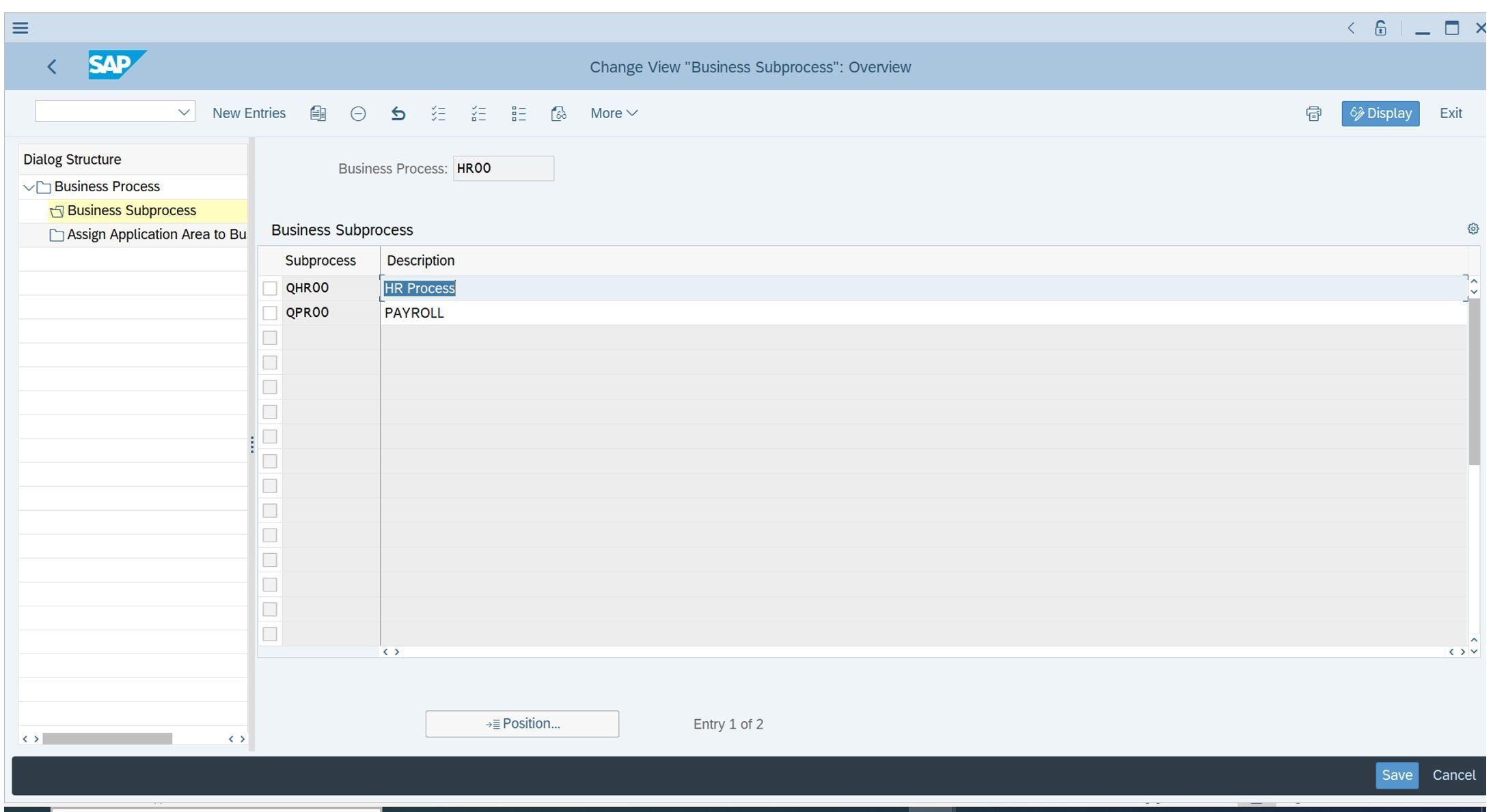
To get the sub processes associated with Business Process, select the code from the list of the business processes as displayed in the following figure:
-
Select Business Subprocess from the pane.
The following figure displays the business subprocess:
Obtaining the Value for Role Type
By default, the connector aggregates all role types. To filter for a specific role type, the roleTypeFilter entry key must be used with the following values:
| Role Type | Description |
|---|---|
| BUS | Business Role |
| COM | Composite Role |
| CUA | CUA Composite Role |
| DRD | Derived Role |
| GRP | Group |
| HAP | HAN AnalyticPrivileges |
| PRF | Profile |
| SIN | Single Role |
Verify the Request Type and Configuration
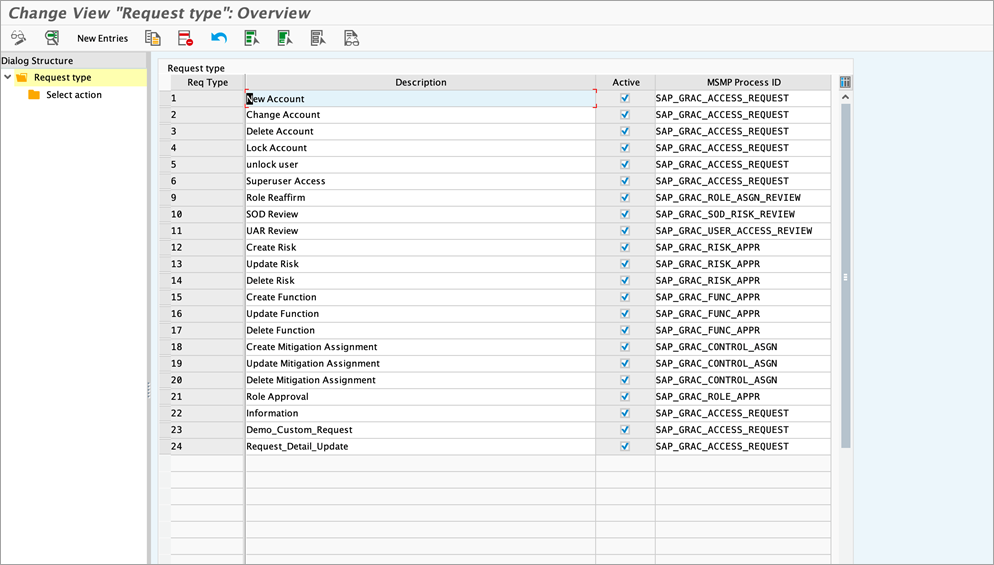
As part of the configuration process, you must map access request types and provisioning actions for the role and system. Verify the default request type codes and determine if you need to change them.
Complete the following steps to verify the request type and configuration:
- Go to SPRO > SAP Reference IMG > Governance Risk and Compliance > Access Control > User Provisioning.
-
Select Define Request Type and verify the request type code is mapped to the default value. If not, change it by specifying the Configuring Provisioning Settings.
Screenshot
-
Select Maintain Priority configuration and provide the priority value.
Optional Configuration of SAP GRC IAG Bridge
The following applications must be configured before enabling the SAP GRC IAG Bridge setup:
- SAP Access Control 12.0 system (SP 15 and higher)
- SAP IAG tenant with connected managed systems
- SAP Cloud connector
IAG System Configuration
- The target application ID must be created and repository sync jobs must already be run on them.
-
Maintain the destination for SAP GRC under the BTP subaccount.
For example,
IAGAuthServiceandIAGProvisionStatusUpdatemust be present. -
You must schedule a recurring provisioning job in IAG.
Note
The provisioning request is sent to IAG from SAP GRC. IAG then picks each of the requests in the queue and provisions them to the corresponding cloud systems. For this reason, you are required to schedule recurrent provisioning jobs.
GRC System Configuration
- The RFC destination for authentications and SOD check must be present in Tcode SM59. (Ex. IAG_SOD_AUTH, IAG_SOD)
-
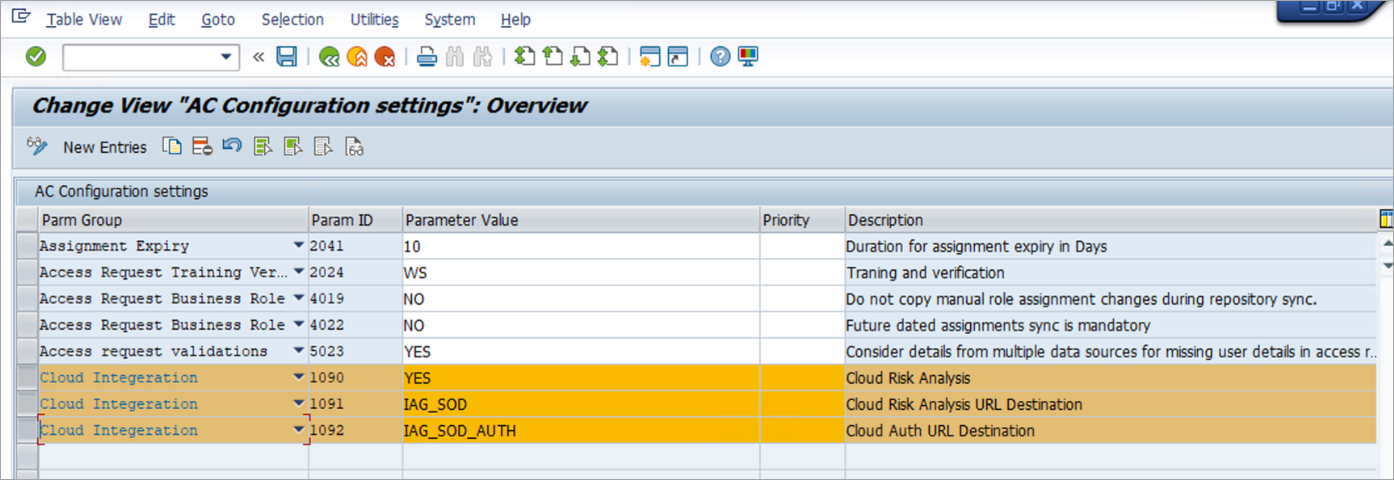
Configuration parameters for the bridge must be set up with the RFC names created in step 1 under SPRO > Governance, Risks and Compliance > Access Control > Maintain Configuration Settings.
Parameter Group Parameter ID Parameter value Cloud Integration 1090 YES Cloud Integration 1091 RFC name created in step 1 for SOD Cloud Integration 1092 RFC name created in step 1 for SOD Auth Example of parameter names:
-
Separate RFC destinations for all the cloud applications.
Note
The name of the RFC destination for every cloud application must be exactly the same as its corresponding application ID name in IAG. This behavior is for SAP by-design.
-
In SAP Gateway administrator, the
IAG_PROVISION_STATUS_UPDATE_SRVservice must be maintained under SPRO > Governance, Risks and Compliance > SAP NetWeaver > SAP Gateway Administration > General Settings > Activate and Maintain Services. - The repository sync job
GRAC_REPOSITORY_OBJECT_SYNCmust be ran in GRC as well for cloud applications.
Required Permissions
Note
The RFC_READ_TABLE integration function module has been deprecated, and replaced with the ABAP Function module. For more information on configuration, refer to SailPoint Add-On to replace the use of RFC_READ_TABLE.
The following table lists the required permissions for the specific operations mentioned below:
| Operation | Required Permissions |
|---|---|
| Access Management - Test Connection | Test Connection |
| Access Management - Account Aggregation | Test Connection and Account Aggregation |
| Access Management - Group Aggregation | Test Connection and Group Aggregation |
| Access Management - Provisioning | Test Connection, Account Aggregation, Group Aggregation, and Provisioning |
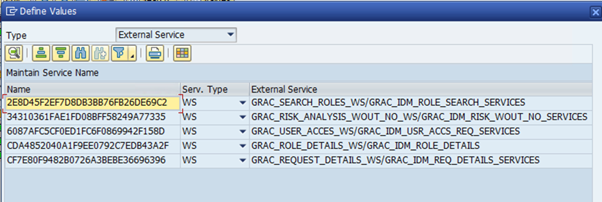
The SAP GRC account must have the following Authorization Objects assigned to it:
Note
- Asterisks (*) indicate required values.
- To assign service authorization select External services and under that select WS from dropdown.
Test Connection
| Authorization Objects | Field Names | Values |
|---|---|---|
| S_SERVICE | SRV_NAME | GRAC_SEARCH_ROLES GRAC_USER_ACCESS_WS GRAC_ROLE_DETAILS_WS GRAC_REQUEST_DETAILS_WS |
| S_SERVICE | SRV_TYPE | WS |
| S_RFC | Activity: 16, RFC_NAME | RFCPING |
| S_RFC | RFC TYPE | FUGR, FUNC |
Account Aggregation
Note
To open a profile object with blank text when aggregating accounts from SAP GRC version 750, you can use the new USR11 admin permission field value in the Table Name field of the S_TABU_NAM Authorization Object.
| Authorization Objects | Field Names | Values |
|---|---|---|
| S_SERVICE | SRV_NAME | GRAC_SEARCH_ROLES_WS, GRAC_USER_ACCESS_WS, GRAC_ROLE_DETAILS_WS, GRAC_REQUEST_DETAILS_WS |
| S_SERVICE | SRV_TYPE | WS |
| S_RFC | Activity: 16, RFC_NAME | MSS_GET_SY_DATE_TIME, RFCPING, RFC_GET_FUNCTION_INTERFACE, RFC_METADATA_GET, SDTX, SYST Note: Based on the options configured in the UI, select one of the following options: - RFC_READ_TABLE. Note: SailPoint will continue to support the RFC_READ_TABLE as per our deprecation policies. SailPoint highly recommends that you start planning the move to use SailPoint's Function Module. - /SAILPOIN/SAIL_READ_TABLE_LEG. Add this permission to use SailPoint's Function Module over RFC_READ_TABLE if your SAP_BASIS version is 740, Support Package 08, up to BASIS 750. - /SAILPOIN/SAIL_READ_TABLE. Add this permission to use SailPoint's Function Module over RFC_READ_TABLE if your SAP_BASIS version is 751 and later. Note: If you configure the permissions for SailPoint's function module then remove RFC_READ_TABLE value from S_RFC authorization object. |
| S_RFC | RFC_TYPE | FUGR, FUNC, GRACUSER, GRACUSERCONN |
| S_TABU_NAM | Activity: 03, TABLE | GRACUSERPROFILE, GRACUSERROLE, GRACUSERSOURCE, GRACRLCONN, GRACROLE, GRACRLCUARELAT, GRACRLCOMPRL, CVERS, PRDVERS, GRACUSER Note: For SAP GRC AC12 SP19 and above versions, additional permissions for the GRACUSERSOURCE table are required. |
Entitlement Aggregation
| Authorization Objects | Field Names | Field Values |
|---|---|---|
| S_SERVICE | SRV_NAME | GRAC_SEARCH_ROLES_WS GRAC_USER_ACCESS_WS GRAC_ROLE_DETAILS_WS GRAC_REQUEST_DETAILS_WS |
| S_SERVICE | SRV_TYPE | WS |
| S_RFC | Activity: 16, RFC_NAME | MSS_GET_SY_DATE_TIME RFCPING RFC_GET_FUNCTION_INTERFACE RFC_METADATA_GET SDTX SYST Note: Based on the options configured in the UI, select one of the following options: - RFC_READ_TABLE. Note: SailPoint will continue to support the RFC_READ_TABLE as per our deprecation policies. SailPoint highly recommends that you start planning the move to use SailPoint's Function Module. - /SAILPOIN/SAIL_READ_TABLE_LEG. Add this permission to use SailPoint's Function Module over RFC_READ_TABLE if your SAP_BASIS version is 750 and earlier. - /SAILPOIN/SAIL_READ_TABLE. Add this permission to use SailPoint's Function Module over RFC_READ_TABLE if your SAP_BASIS version is 751 and later. Note: If you configure the permissions for SailPoint's function module then remove RFC_READ_TABLE value from S_RFC authorization object. |
| S_RFC | RFC_TYPE | FUGR, FUNC |
| S_TABU_NAM | Activity: 3, TABLE | GRACPROFILE, GRACRLCONN, GRACROLE, GRACROLERELAT, and GRACRLCOMPRL |
| GRAC_ROLED | GRAC_ACTRD: 03 GRAC_BPROC: * OR AS required GRAC_LDSCP: * OR AS required GRAC_RLSEN * OR AS required GRAC_RLTYP * OR AS required GRAC_ROLE * OR AS required |
|
| GRAC_ROLEP | ACTVT: 78 | GRAC_BPROC: * OR AS required GRAC_OUNIT: * OR AS required GRAC_RLTYP: * OR AS required GRAC_ROLE: * OR AS required GRAC_SYSID: * OR AS required |
| GRAC_SYS | ACTVT: 01 | GRAC_APPTY: * OR AS required GRAC_ENVRM: * OR AS required GRAC_SYSID: * OR AS required |
Provisioning
| Authorization Objects | Field Names | Values |
|---|---|---|
| GRAC_REQ | ACTVT: 1 | GRAC_BPROC * OR AS required GRAC_FNCAR * OR AS required GRAC_RQFOR * OR AS required GRAC_RQINF * OR AS required GRAC_RQTYP: 001, 002, 003, 004, 005 |
| S_USER_GRP | Activity: 03, CLASS | * OR AS required |
Creating a Custom Business Application Programming Interface (BAPI)
| Authorization Objects | Field Names | Values |
|---|---|---|
| S_SERVICE | SRV_NAME | GRAC_SEARCH_ROLES, GRAC_USER_ACCESS_WS, GRAC_ROLE_DETAILS_WS, GRAC_REQUEST_DETAILS_WS |
| S_SERVICE | SRV_TYPE | WS |
| S_RFC | Activity: 16, RFC_NAME | MSS_GET_SY_DATE_TIME, RFCPING, RFC_GET_FUNCTION_INTERFACE, RFC_METADATA_GET, SDTX, SYST, {Custom BAPI Name} Note: Based on the options configured in the UI, select one of the following options: - RFC_READ_TABLE. Note: SailPoint will continue to support the RFC_READ_TABLE as per our deprecation policies. SailPoint highly recommends that you start planning the move to use SailPoint's Function Module. - /SAILPOIN/SAIL_READ_TABLE_LEG. Add this permission to use SailPoint's Function Module over RFC_READ_TABLE if your SAP_BASIS version is 750 and earlier. - /SAILPOIN/SAIL_READ_TABLE. Add this permission to use SailPoint's Function Module over RFC_READ_TABLE if your SAP_BASIS version is 751 and later. Note: If you configure the permissions for SailPoint's function module then remove RFC_READ_TABLE value from S_RFC authorization object. |
| S_RFC | RFC_TYPE | FUGR, FUNC |
| S_TABU_NAM | Activity: 03, TABLE | GRACUSER, GRACUSERCONN, GRACUSERPROFILE, GRACUSERROLE, GRACRLCONN, GRACROLE, GRACRLUARELAT, GRACRLCOMPRL |
IAG Bridge Required Permissions
Apart from existing GRC permissions, the following permission is required:
| Authorization Objects | Field Names | Values |
|---|---|---|
| S_TABU_NAM | Activity: 03, TABLE | GRFNCCICONNECTOR Note: For the cloud Target Connector, the supported connector types are: IAG, and IAG_GRP. |
FireFighterID Permissions
Following permissions are required for configuring FireFighterID to perform different operations:
| Operation | Authorization Objects | Field Names | Values |
|---|---|---|---|
| Account Aggregation | S_TABU_NAM | Activity: 03, TABLE | GRACFFUSER Note: This is required for configuring FireFighterID. |
| Group Aggregation | S_TABU_NAM | Activity: 03, TABLE | GRACFFCTRL, GRACFFOBJECT, GRACFFOWNER, GRACCONFIGSET Note: These are required for configuring FireFighterID. |
| Provisioning | GRAC_FFOWN | ACTVT (All Activities) | GRAC_SYSID GRAC_USER* GRAC_OWN_T (All Values) |
| Provisioning | GRFN_USER | ACTVT | Display, Lock, Generate, Discard, Override, Unlock |
Role Aggregation Based on Connector Group and System
| Operation | Authorization Objects | Field Names | Values |
|---|---|---|---|
| Group Aggregation | S_TABU_NAM | Activity: 03, TABLE | GRFNCCICONNECTOR, GRFNCONNGRP |
Refer to Troubleshooting for more information.
Documentation Feedback
Feedback is provided as an informational resource only and does not form part of SailPoint’s official product documentation. SailPoint does not warrant or make any guarantees about the feedback (including without limitation as to its accuracy, relevance, or reliability). All feedback is subject to the terms set forth at https://developer.sailpoint.com/discuss/tos.