Integrating SailPoint with SAP Direct
Integration
This is an integration and requires additional licensing or subscriptions to utilize it. For more information, contact your customer success manager.
This document is designed to give specific information about the requirements and field definitions needed to get a working instance of a SAP Direct connector in SailPoint.
SAP Enterprise Resource Planning software solution is an integrated software solution that incorporates the key business functions of the organization.
SailPoint for SAP ERP aggregates and provisions all the users along with their roles/profiles of the SAP system.
SailPoint for SAP ERP supports provisioning to a standalone SAP system as well as SAP Central User Administration (CUA) system.
Note
The RFC_READ_TABLE integration function module has been deprecated, and replaced with the ABAP Function module. For more information on configuration, refer to SailPoint Add-On to replace the use of RFC_READ_TABLE.
Note
To view the latest features, enhancements, and fixes for all SaaS connectors, refer to the SaaS Release Notes page.
Supported Features
The SAP Direct connector supports the following features:
Note
Before you can use any item marked with an asterisk (*), SailPoint must activate the feature for your site.
- Manages SAP users as Accounts
- Aggregation, Delta Aggregation (to sync changes from SAP Direct), Refresh Accounts
- Create, Update, and Delete
- Enable, Disable, and Unlock
- *Password Management
-
Add and Remove Entitlements
- Entitlements are Roles (for user), Profiles (for user), ContractualUserType (Licenses of the use)., UserGroup (User group of the user), and User Groups (for user).
-
Add and Remove Contractual User Type ID
- Read and update the SAP UUID (Global User ID) associated with SAP Direct Accounts.
- Add and Remove the EmployeeID assigned to an Account
-
Manage the Indirect Roles assigned to the accounts via Organization Data.
For more information, refer to Configuring Indirect Role Assignment.
Note
- UserGroup (User group of the user) is managed as an entitlement account attribute only.
- SAP recommends to assign only one user group in single request.
For more information on features, refer to Source Features.
The SAP Direct connector supports following group and entitlement objects:
| SAP Direct Source Object | Supported Operation |
|---|---|
| Roles as group object | Read |
| ContractualUserType (Licenses for user) | Add and Remove Entitlement |
| Entitlement objects - Roles (for user) - Profiles (for user) |
Add and Remove Entitlements |
The SAP Direct connector displays the parent child relationship between composite role and child roles on the connector UI as Parent and Child Entitlements.
Note
When performing group aggregation in a SAP Central User Administration (CUA) environment, the connector does not fetch child roles or child profiles of any composite role or profile. This is due to the fact that the CUA system does not maintain child level roles or profile details for child subsystems. This works in a similar way, where the attribute ID does not fetch attributes like TCodes assigned through Menus, TCodes assigned directly and Other Menu Items or Generated Profiles for the group object type.
The following lists the details of the supported features:
| Feature | Users |
|---|---|
| Create | ✔ |
| Aggregate | ✔ |
| Enable and Disable | ✔ |
| Delta Aggregation | ✔ |
| Password Management | ✔ |
| Group Entitlements (Read, Request, Revoke, and Access Certifications) | ✔ Roles |
| Entitlements (Read, Request, Revoke, and Access Certifications) | ✔ (Profiles, UserGroups, and ContractualUserType) |
Group Entitlements
Group entitlements are the entitlement types for which SailPoint provides the ability to aggregate additional details of these entitlement types from the managed system. These objects have a separate schema defining list of attributes that the aggregation task fetches as additional details when aggregation is run for that group entitlement type.
| Feature | Groups |
|---|---|
| Aggregation | ✔ |
| Read group hierarchy | ✔ |
Notes
The following table lists the special considerations of certain supported features:
| Supported Features | Notes |
|---|---|
| Pass Through Authentication | If Pass-Through authentication is enabled, the user can login through SailPoint using the user name and password without any authorization required. |
| Aggregation | SailPoint for SAP Direct aggregates Generated Profile associated to Role as a part of Account-Group Aggregation. |
| Change Password | - For "Change password in Permanent Mode" ensure that the SNC is configured on SAP server. The log on session during which a productive password is set must be secured using Secure Network Communications (SNC). - SAP recommends that setting of productive passwords is more risky than setting an initial one, therefore additional security checks must be applied as follows: - The log on session during which a productive password is set must be secured using Secure Network Communications (SNC). - The user needs an additional authorization to set a productive password (authorization object: S_USER_GRP, activity: 'PP' - Set Productive) For more information, refer to SAP note https://service.sap.com/sap/support/notes/1287410 (SAP Service marketplace login required). |
| Manages SAP Profiles as Account-Groups | A few system composite profiles might have child profiles which are not present in SAP system. For example, for each release composite profile SAP_NEW contains a single profile SAP_NEW_<rel>, (for example, SAP_NEW_21D). This profiles holds its release status. Profiles like SAP_NEW_<rel> may not be aggregated. |
| Account - Group Aggregation | In Account-Group aggregation for SAP Central User Administration (CUA) environment, the connector does not fetch child roles or child profiles of any composite role or profile. This is due to the fact that the CUA system does not maintain child level roles or profile details for child subsystems. This works in a similar way, where the attribute ID does not fetch attributes like TCodes assigned through Menus, TCodes assigned directly and Other Menu Items or Generated Profiles for the group object type. |
SAP UUID (Global User ID)
In order to enable this functionality, following attributes needs to be added manually in account schema:
- SAP User UUID
- SAP User UUID History
Note
SAP User UUID History attribute has read only support.
Additional Permission for UUID (Global User ID)
| Authorization Objects | Field Name | Field Description | Field Value |
|---|---|---|---|
| S_USER_UID | ACTVT | Activity | Display |
| S_USER_UID | CLASS | User group | Specify the Group you want to assign for the user. For example: SUPER |
| S_USER_UID | EXTUID_TYP | Type of the External User ID (UID) | Global User ID |
Additional Permission for Adding and Removing UUID (Global User ID)
| Authorization Objects | Field Name | Field Description | Field Value |
|---|---|---|---|
| S_USER_UID | ACTVT | Activity | Enter, Include, and Assign |
| S_USER_UID | CLASS | User group | Specify the Group you want to assign for the user. For example: SUPER |
| S_USER_UID | EXTUID_TYP | Type of the External User ID (UID) | Global User ID |
Enabling PD Profiles
This topic describes how to use the PD Profile functionality for SAP Direct connector by adding required attributes to the account/entitlement schema and configuring necessary permissions.
Fetching Directly Assigned PD Profiles
Adding Attributes
To fetch PD Profiles assigned directly to users, manually add the following attributes to the Account Schema:
-
PDProfilesThis attribute stores the PD profiles assigned directly to the user.
-
PDProfile DetailsThis attribute stores the associated PD profiles with their start and end dates. PD profile details are displayed in the following format:
PDProfileName#Startdate(YYYYMMDD)#EndDate(YYYYMMDD)
Configuring Direct Assignment Permissions
To fetch PD Profiles assigned directly to users, ensure to provide following permissions for T77UA table. T77UA table stores the PD profile assignments for users.
| Authorization Objects | Field Name | Field Description | Field Value |
|---|---|---|---|
| S_TABU_NAM (To aggregate PD Profiles directly assigned to User) | Activity: 03, Table Name | Table affected by the operation | T77UA |
The tables below list the permissions required for the service account. For more information on service account permissions, refer to Configuration Table for SAP Direct.
| SERVICE_ACCOUNT | NAME | COLUMNNAME | ENTITY_TYPE | COLUMN_DNAME | COLUMN_DTYPE | COLUMN_LENGTH |
|---|---|---|---|---|---|---|
| \<service-account-name> | T77UA | BEGDA | TABLE | PD_BEGDA | D | 8 |
| \<service-account-name> | T77UA | ENDDA | TABLE | PD_ENDDA | D | 8 |
| \<service-account-name> | T77UA | GEN_FLAG | TABLE | FLAG | C | 1 |
| \<service-account-name> | T77UA | PROFL | TABLE | PROFL | C | 12 |
| \<service-account-name> | T77UA | UNAME | TABLE | USRNAME | C | 12 |
Fetching Indirectly Assigned PD Profiles
Adding Attributes
To fetch PD Profiles assigned indirectly to users via jobs, positions, or orgainizational units, manually add the following attributes:
- Add a new schema attribute
PDProfilesunder theorganizationdata(Group Attributes for Organization Data) in the Entitlement Schema. - Add a new schema attribute
Organization Datain the Account Schema (Account Attributes for Organization Data).
Configuring Indirect Assignment Permissions
To fetch PD Profiles assigned indirectly to users via jobs, positions, or orgainizational units, ensure to provide following permissions for HRP1000 and HRV1017A table. HRP1000 stores object types (such as, organizational units, positions, jobs), whereas HRV1017A provides information about PD profiles.
| Authorization Objects | Field Name | Field Description | Field Value |
|---|---|---|---|
| S_TABU_NAM (To aggregate PD Profiles directly assigned to User) | Activity: 03, Table Name | Table affected by the operation | HRP1000, HRV1017A |
The tables below list the permissions required for the service account. For more information on service account permissions, refer to Configuration Table for SAP Direct.
| SERVICE_ACCOUNT | NAME | COLUMNNAME | ENTITY_TYPE | COLUMN_DNAME | COLUMN_DTYPE | COLUMN_LENGTH |
|---|---|---|---|---|---|---|
| \<your-service-account-name> | HRP1000 | ENDDA | TABLE | ENDDATUM | D | 8 |
| \<your-service-account-name> | HRP1000 | LANGU | TABLE | LANGU | C | 2 |
| \<your-service-account-name> | HRP1000 | OBJID | TABLE | HROBJID | N | 8 |
| \<your-service-account-name> | HRP1000 | OTYPE | TABLE | OTYPE | C | 2 |
| \<your-service-account-name> | HRP1000 | PLVAR | TABLE | PLVAR | C | 2 |
| \<your-service-account-name> | HRV1017A | OBJID | TABLE | OBJID | N | 8 |
| \<your-service-account-name> | HRV1017A | PROFL | TABLE | PROFL | C | 12 |
Note
PD Profile assigned via a Role in the SAP Direct managed system can be viewed under the Authorization Objects attribute of the group in the Entitlement Schema.
Privilege Classification
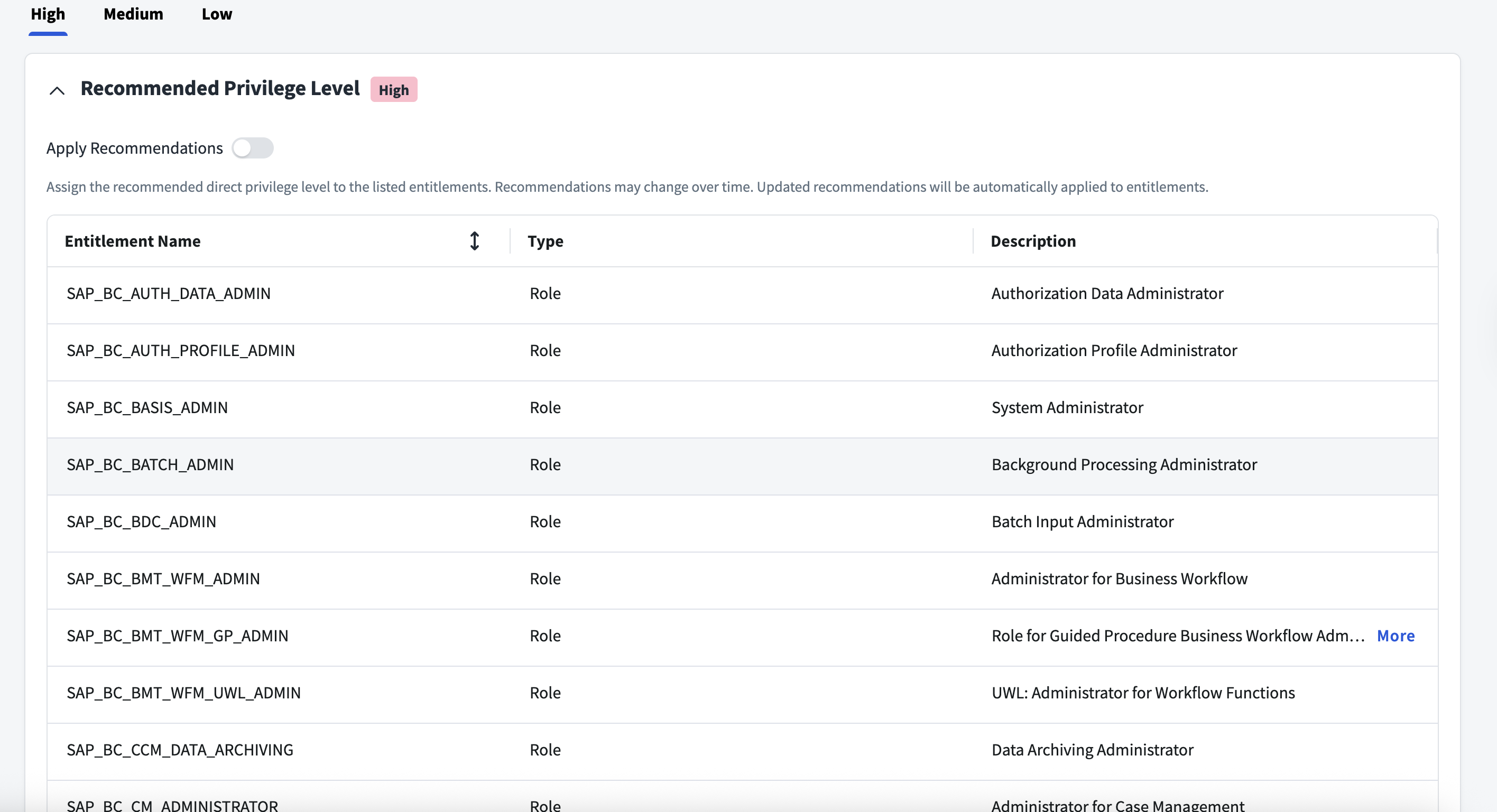
SailPoint Privilege Classification helps organizations systematically categorize and manage the privilege levels of entitlements within their sources. By classifying entitlements as high, medium, or low, administrators can better understand the potential risk and impact associated with specific access rights. This allows automatic assignment of privilege levels based on system recommendations, custom-defined criteria, or a same level across all entitlements.
| Privilege Level | Description |
|---|---|
| High | Administrative level access to accounts |
| Medium | Administrative level access for a specific role or function |
| Low | Only basic access of data |
Note
To manage Privilege Classification, users must have administrative roles such as Org Admin, Source Admin or Source Sub-Admin.
For more information, refer to Managing Privilege Classification.
Example
Supported Managed Systems
The SailPoint SAP Direct connector supports the managed system versions listed on this page.
Note
SailPoint for SAP ERP manages ABAP users. For more information, refer to Supported Features.
- SAP NetWeaver 7.51 and above
- SAP Enterprise Resource Planning (ERP) Central Component (ECC) 6.0 with EHP8 (Enhancement package 8)
-
SAP S/4HANA (On-premises)
- Version 2021 up to FP/SP Stack 05
- Version 2022 up to FP/SP Stack 04
- Version 2023 up to FP/SP Stack 03
- Version 2025 Initial Shipment Stack
-
SAP Business Warehouse
- SAP Customer Relationship Management (CRM)
- SAP Process Integration (PI)
- SAP Supply Chain Management (SCM)
- SAP Advanced Planning and Optimization (SAP APO)
- SAP_MARKETING (Hybris Marketing)
Note
SAP GRC connector works with SAP private cloud environments and supports SAP RISE solutions.
Prerequisites
Important
SailPoint strongly recommends installing the SAP-certified add-on in the SAP environment and then using /SAILPOIN/SAIL_READ_TABLE instead of RFC_READ_TABLE.
- Configure at least one virtual appliance cluster and successfully test the connection. For instructions, refer to the Virtual Appliance Reference Guide.
-
The JCO libraries (JCO Release 3.1.X) must be downloaded from the SAP website by going to the customer service marketplace and downloading the Java Integration Module.
SAP JCO version 3.1.X libraries,
libsapjco3.so(on UNIX), must be present in thejava.library.path(WEB-INF/lib) directory on the VA host. Upload these.jarand.sofiles on the Basic Configuration page.For more information on downloading the
.jarfiles, refer to Obtaining the Custom Connector Files. Ensure these jar files are compatible with the VA. -
The following ports must be open on the SAP system:
Note
"
" represents the system number. Port Name Service in etc/servicesDefault Range Rule SAP Dispatcher sapdp 3200 3200-3299 32 Gateway sapgw 3300 3300-3399 33 Gateway secured sapgw s 4800 4800-4899 48
Required Permissions
This document describes the permissions required for users to perform operations on the SAP Direct source.
For the SAP Direct source, the service account is an administrative account. The following tables list the permissions associated with different operations on SAP authorization objects. The tables include the SAP fields used to specify the permissions.
Note
The RFC_READ_TABLE integration function module has been deprecated, and replaced with the ABAP Function module. For more information on configuration, refer to SailPoint Add-On to replace the use of RFC_READ_TABLE.
The following table lists the required permissions for specific operations:
Note
There are additional permissions for change password with Secure Network Communication (SNC) below.
| Operation | Required Permissions |
|---|---|
| Test Connection | Test Connection |
| Account Aggregation | Test Connection and Account Aggregation. For Account Aggregation of CUA systems, additional permissions must be executed as specified in the Account Aggregation section. For information on Additional Permissions for SAP UUID (Global User ID) and Additional Permissions to update the SAP UUID (Global User ID) for a user, refer to SAP UUID (Global User ID). |
| Entitlement Aggregation | Test Connection and Entitlement Aggregation. For Group Aggregation in CUA systems, additional permissions must be executed as specified in the Entitlement Aggregation section. |
| Delta Aggregation | Test Connection, Account Aggregation and Delta Aggregation |
| Create Account | Test Connection, Account Aggregation and Create Account. For Create Account in CUA systems or a SNC network, additional permissions must be executed as specified in the Create Account section. |
| Enable/Disable/Unlock Account | Enable/Disable/Unlock Account, Account Aggregation and Enable/Disable/Unlock Account |
| Delete Account | Test Connection, Account Aggregation and Delete Account |
| Add/Remove Entitlement | Test Connection, Account Aggregation and Add/Remove Entitlements |
| Change Password | Test Connection, Account Aggregation and Change Password. For Change Password in a SNC network, additional permissions must be executed as specified in the Add/Remove Entitlements and Change Password sections. |
Test Connection
| Authorization Object | Field Name | Field Description | Field Value |
|---|---|---|---|
| S_RFC | ACTVT | Activity | 16 - Execute |
| S_RFC | RFC_NAME | Name of RFC object | RFCPING |
| S_RFC | RFC_TYPE | Type of RFC object | FUGR, FUNC |
Account Aggregation
Note
To open a profile object with blank text when aggregating accounts from SAP Direct version 750 and earlier, you can use the new USR11 admin permission field value in the Table Name field of the S_TABU_NAM Authorization Object.
| Authorization Objects | Field Name | Field Description | Field Value |
|---|---|---|---|
| S_RFC | Activity: 16, RFC_NAME | Name of RFC object | Add the following: Function Modules (FUNC): BAPI_USER_GETLISTBAPI_USER_GET_DETAILDDIF_FIELDINFO_GETRFC_METADATA_GETFunction Groups (FUGR): SDTXSMSSDATA1SU_USERBased on the options configured in the UI, select one of the three options below: - Add this permission: RFC_READ_TABLE. Note: SailPoint will continue to support the RFC_READ_TABLE in accordance with our depreciation policies. SailPoint recommends that you start planning to move to use SailPoint's Function Module.- Add this permission to use SailPoint's Function Module instead of RFC_READ_TABLE if your SAP_BASIS version is 740, Support Package 08, up to BASIS 750: /SAILPOIN/SAIL_READ_TABLE_LEG- Add this permission to use SailPoint's Function Module instead of RFC_READ_TABLE if your SAP_BASIS version is 751 and later: /SAILPOIN/SAIL_READ_TABLE. Note: If you configure the permissions for SailPoint's function module then remove RFC_READ_TABLE value from S_RFC authorization object.To aggregate Organization Data, add the following: For FUNC: BAPI_EMPLOYEE_GETDATAFor FUGR: RFC_METADATA |
| S_TABU_NAM | ACTVT | Activity | 03 - Display |
| S_TABU_NAM | Activity: 03, Table Name | Table affected by the operation | Add the following:USR11, USR06, USR02, TUTYP, TUTYPA, CVERS, PRDVERSTo aggregate Organization Data, add the following: PA0105 |
| S_USER_GRP | ACTVT | Activity | 03 - Display |
| S_USER_GRP | CLASS | User group in user master maintenance | * or specify the Group you want to assign for the user. For example: SUPER |
| P_Orgin (To aggregate Organization data) | AUTH | Authorization Level | R |
| P_Orgin (To aggregate Organization data) | INFTY | INFOTYPE | 0001 |
| P_Orgin (To aggregate Organization data) | PERSA | Personal area | * |
| P_Orgin (To aggregate Organization data) | PERSG | Employee group | * |
| P_Orgin (To aggregate Organization data) | SUBTYPE | SUBTY | * |
| P_Orgin (To aggregate Organization data) | PERSK | Employee subgroup | * |
| P_Orgin (To aggregate Organization data) | VDSK1 | Organization Key | * |
Additional Permissions for Central User Administration (CUA) Systems
| Authorization Objects | Field Name | Field Description | Field Value |
|---|---|---|---|
| S_RFC | RFC_NAME | Name of RFC object | Add the following: Function Modules (FUNC): BAPI_USER_LOCACTGROUPS_READBAPI_USER_LOCPROFILES_READ |
Entitlement Aggregation
| Authorization Objects | Field Name | Field Description | Field Value |
|---|---|---|---|
| S_RFC | ACTVT | Activity | 16-Execute |
| S_RFC | Activity: 16, RFC_NAME | Name of RFC object | Add the following: Function Modules (FUNC): BAPI_HELPVALUES_GETPRGN_ACTIVITY_GROUPS_LOAD_RFCPRGN_EXCHANGECOLL_ACTGROUPS_GET_ACTGROUPSDDIF_FIELDINFO_GETMSS_GET_SY_DATE_TIMERFC_GET_FUNCTION_INTERFACEFunction Groups (FUGR): PRGN_COLLECTIVE_ACTGROUPSSDTXSMSSDATA1Based on the options configured in the UI, select one of the three options below: - Add this permission: RFC_READ_TABLE. Note: SailPoint will continue to support the RFC_READ_TABLE in accordance with our deprecation policies. SailPoint recommends that you start planning to move to use SailPoint's Function Module.- Add this permission if your SAP_BASIS version is 740 Support Package 08 or later: /SAILPOIN/SAIL_READ_TABLE_LEG- Add this permission to use SailPoint's Function Module instead of RFC_READ_TABLE if your SAP_BASIS version is 751 and later: /SAILPOIN/SAIL_READ_TABLE. Note: If you configure the permissions for SailPoint's Function Module, then remove the RFC_READ_TABLE value from the S_RFC authorization object. |
| S_TABU_NAM | Table Name | Table | Roles: AGR_FLAGS, AGR_PROF, AGR_TCODES, AGR_TEXTS,USGRP,USGRPTProfiles: AGR_DEFINE, USR11, UST10C, UST10STo aggregate Authorization Objects associated with a role: AGR_1251, AGR_1252. Note: If you do not want to aggregate Authorization Objects AGR_1251 and AGR_1252, omit the permissions and remove them from schema.To aggregate Organization Data and Indirect Roles, add the following: HRP1000, HRP1001 |
Note
Group aggregation specific to Authorization Objects are not supported for the SAP CUA system.
Additional Permissions for CUA Systems
| Authorization Objects | Field Name | Field Description | Field Value |
|---|---|---|---|
| S_TABU_NAM | Table Name | Table | ProfilesUSRSYSPRFUSRSYSPRFTRoles USRSYSACTTUSRSYSACT |
Delta Aggregation
| Authorization Objects | Field Name | Field Description | Field Value |
|---|---|---|---|
| S_RFC | RFC_NAME | Name of RFC object | Add the following: /SAILPOIN/USR_CHANGE_DOC_USERS, /SAILPOIN/IDENTITYIQ_FUGR, /SAILPOIN/USR_CHANGE_DOC_ROLES |
| S_TABU_NAM | Table Name | Table affected by the operation | USBAPILINK |
| S_USER_GRP | ACTVT | Activity | 08 - Display change document |
Create Account
Create user with assigned role and profiles.
| Authorization Objects | Field Name | Field Description | Field Value |
|---|---|---|---|
| S_USER_GRP | ACTVT | Activity | 01 - Create or generate |
| S_RFC | RFC_NAME | Name of RFC object | Function Modules (FUNC):BAPI_USER_ACTGROUPS_ASSIGNFunction Groups (FUGR): SDIFRUNTIME |
| S_USER_SAS | ACTVT | Activity | Add the following: 22 - Enter, Include, Assign, 01 - Create |
| S_USER_SAS | ACT_GROUP | Role name | * or you can specify role name for which you have assigned |
| S_USER_SAS | CLASS | User group in user master maintenance | * or specify the Group you want to assign for the user. For example SUPER |
| S_USER_SAS | PROFILE | Auth. profile in user master maintenance | * or you can specify Profile for which you have assigned |
| S_USER_SAS | SUBSYSTEM | Receiving system for central user administration | * or specify the system you are targeting |
Enable/Disable/Unlock Account
| Authorization Objects | Field Name | Field Description | Field Value |
|---|---|---|---|
| S_USER_GRP | ACTVT | Activity | 05 - Lock |
Delete Account
| Authorization Objects | Field Name | Field Description | Field Value |
|---|---|---|---|
| S_USER_GRP | ACTVT | Activity | 06 - Delete |
Add/Remove Entitlements
| Authorization Objects | Field Name | Field Description | Field Value |
|---|---|---|---|
| S_RFC | RFC_NAME | Name of RFC object | Function Groups (FUGR): SDIFRUNTIME |
| S_USER_SAS | ACTVT | Activity | Add the following: 22 - Enter, Include, Assign |
| S_USER_SAS | ACT_GROUP | Role name | * or you can specify role name for which you have assigned |
| S_USER_SAS | CLASS | User group in user master maintenance | * or specify the Group you want to assign for the user. For example: SUPER |
| S_USER_SAS | PROFILE | Authentication profile in user master maintenance | * or you can specify Profile for which you have assigned |
| S_USER_SAS | SUBSYSTEM | Receiving system for central user administration | * or specify the system you are targeting |
| S_USER_AGR | ACTVT | Activity | 02-change |
| S_USER_AGR | ACT_GROUP | Role Name | * or you can specify role name for which you want to provide access |
| S_USER_PRO | ACTVT | Activity | Add the following: 22 - Enter, Include, Assign |
| S_USER_PRO | PROFILE | Auth. profile | * or you can specify profile name for which you want to provide access |
| S_USER_GRP | ACTVT | Activity | Add the following: 22 - Enter, Include, Assign, 78 - Assign |
| S_USER_GRP | CLASS | User group in user master maintenance | * or specify the group you want to assign or remove for the user |
Change Password
| Authorization Objects | Field Name | Field Description | Field Value |
|---|---|---|---|
| S_USER_GRP | ACTVT | Activity | Add the following: 02 - Change, 05 - Lock, 78 - Assign |
(For Change Password only) For SNC (Secure Network Communication)
| Authorization Objects | Field Name | Field Description | Field Value |
|---|---|---|---|
| S_USER_GRP | ACTVT | Activity | PP - Set Productive |
Provision EmployeeID (Link username with the System user name for SAP HR)
For more information on table-level permissions, refer to Configuration Table for SAP Direct.
| Authorization Objects | Field Name | Field Description | Field Value |
|---|---|---|---|
| S_RFC | ACTVT | Activity | 16-Execute |
| S_RFC | RFC_NAME | Name of RFC object | Add the following: Function Modules (FUNC): BAPI_EMPLCOMM_CHANGEBAPI_EMPLCOMM_CREATEBAPI_EMPLOYEE_ENQUEUEBAPI_EMPLOYEE_DEQUEUEBAPI_EMPLOYEE_GETDATABAPI_EMPLOYEE_CHECKEXISTENCEBAPI_EMPLCOMM_GETDETAILEDLIST |
| P_Orgin | AUTHC | Authorization Level | Add the following: E, S, W |
| P_Orgin | INFTY | INFOTYPE | 0105 |
| P_Orgin | PERSA | Personal area | * |
| P_Orgin | PERSG | Employee group | * |
| P_Orgin | SUBTYPE | SUBTY | * |
| P_Orgin | PERSK | Employee subgroup | * |
| P_Orgin | VDSK1 | Organization Key | * |
| S_USER_GROUP | ACTIVITY | Activity | 03 |
| S_USER_GROUP | CLASS | User group in user master maintenance | * |
Permissions for Organization Data Aggregation
Refer to the following for information about configuring permissions to aggregate Organization Data:
- Account Aggregation
- Entitlement Aggregation
- Required Service Account Permissions for Organization Data
Documentation Feedback
Feedback is provided as an informational resource only and does not form part of SailPoint’s official product documentation. SailPoint does not warrant or make any guarantees about the feedback (including without limitation as to its accuracy, relevance, or reliability). All feedback is subject to the terms set forth at https://developer.sailpoint.com/discuss/tos.