Automation Anywhere Connection Settings
Configure a direct connection to the Automation Anywhere RPA platform.
Screenshot
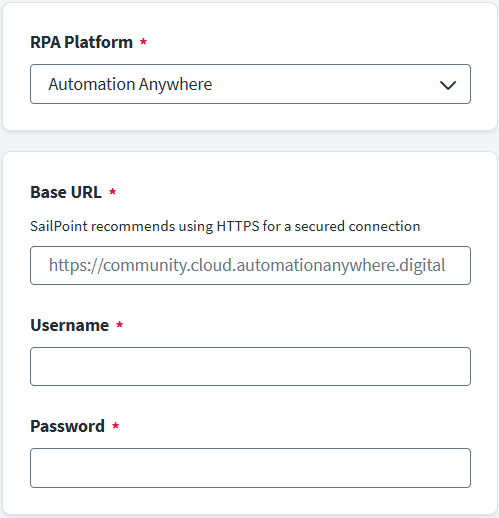
- Go to Connection Settings and in the RPA Platform drop-down list, select Automation Anywhere.
- Enter the fully qualified Control Room URL in the Base URL field. For example:
https://community.cloud.automationanywhere.digital. Refer to Control Room Base URL for more information. - Enter the valid Control Room username in the Username field.
- Enter the valid Control Room user password in the Password field.
- Select Save.
Documentation Feedback
Feedback is provided as an informational resource only and does not form part of SailPoint’s official product documentation. SailPoint does not warrant or make any guarantees about the feedback (including without limitation as to its accuracy, relevance, or reliability). All feedback is subject to the terms set forth at https://developer.sailpoint.com/discuss/tos.