Integrating SailPoint with Oracle E-Business Suite
Important
The Oracle E-Business Suite connector has only been certified for on-premises versions of the target system.
The Oracle E-Business connector provides a complete solution to manage Oracle E-Business accounts data, passwords, and access.
This guide has information on loading and provisioning Oracle E-Business accounts, responsibilities, and roles along with the password management features.
Note
To view the latest features, enhancements, and fixes for all SaaS connectors, refer to the SaaS Release Notes page.
Supported Features
The Oracle E-Business connector supports the following features:
-
Load and *Provision
- Oracle E-Business accounts
- Responsibilities
- Roles
-
*Access Certifications (certification of entitlements connected to accounts)
- *Password management
For more information on features, refer to Source Features.
Note
Before you can use any item above marked with an asterisk (*), SailPoint must activate the feature for your site.
The Oracle E-Business source supports the following multiple group and entitlement objects:
| Source Objects | Supported Operation |
|---|---|
| RESPONSIBILITY as RESPONSIBILITY object | Read |
| ROLE as ROLE object | Read |
| ROLE and RESPONSIBILITY as entitlement objects | Add / Remove entitlement |
The following ROLE schema attributes are supported:
- NAME
- DISPLAY_NAME
- DESCRIPTION
- START_DATE
- EXPIRATION_DATE
- APPLICATION_NAME
- STATUS
- SUBORDINATE_ROLES
The following RESPONSIBILITY schema attributes are supported:
- RESPONSIBILITY_NAME
- APPLICATION_NAME
- RESPONSIBILITY_ID
- RESPONSIBILITY_KEY
- START_DATE
- END_DATE
- DESCRIPTION
- STATUS
- VERSION
- WEB_HOST_NAME
- WEB_AGENT_NAME
- DATA_GROUP_APPL_NAME
- REQUEST_GROUP_APPL_NAME
- DATA_GROUP_ID
- DATA_GROUP_NAME
- MENU_NAME
- REQUEST_GROUP_NAME
Using Multiple Group Objects for Pre-Existing Sources
- Use createSchema API to create new group schema for your source.
-
Update Account Schema with the following steps:
- Get account schema using getSchema API.
- Copy the schema to a file and search for the attribute corresponding to the group schema that is added in the previous step. Add/update the below two properties for the attribute found in the previous step
"isGroup": true, "schema": {"type": "CONNECTOR_SCHEMA","id": "<Schema_ID_From_Step1>","name": "<Name_Of_Schema_Created_In_Step1>"} - Add the modified schema to the payload to update the account schema in the source using replaceSchema API
Example to Add ROLE Schema
ROLE Hierarchy
The ROLE schema has the SUBORDINATE_ROLES attribute that holds the hierarchy of ROLE. The hierarchy attribute can be defined and childHierarchy can be used to set the correct parent-child relationship. To display the child hierarchy of the Role, you must remove the convertListToCSV configuration attribute (related to the list) to the CSV from the source template.
API to add new ROLE schema
Details
Method: POST
URL: beta/sources/<source-id>/schemas
JSON Payload example:
{
"nativeObjectType": "ROLE",
"identityAttribute": "NAME",
"displayAttribute": "DISPLAY_NAME",
"hierarchyAttribute": "SUBORDINATE_ROLES",
"includePermissions": false,
"features": [],
"configuration": {
"childHierarchy": "true"
},
"attributes": [
{
"name": "NAME",
"type": "STRING",
"schema": null,
"description": "An internal name for the role",
"isMulti": false,
"isEntitlement": false,
"isGroup": false
},
{
"name": "DISPLAY_NAME",
"type": "STRING",
"schema": null,
"description": "The display name of the role",
"isMulti": false,
"isEntitlement": false,
"isGroup": false
},
{
"name": "DESCRIPTION",
"type": "STRING",
"schema": null,
"description": "DESCRIPTION",
"isMulti": false,
"isEntitlement": false,
"isGroup": false
},
{
"name": "START_DATE",
"type": "STRING",
"schema": null,
"description": "The date at which the role becomes valid",
"isMulti": false,
"isEntitlement": false,
"isGroup": false
},
{
"name": "EXPIRATION_DATE",
"type": "STRING",
"schema": null,
"description": "The date at which the role is no longer
valid in the directory service",
"isMulti": false,
"isEntitlement": false,
"isGroup": false
},
{
"name": "APPLICATION_NAME",
"type": "STRING",
"schema": null,
"description": "Application that owns the information for the role",
"isMulti": false,
"isEntitlement": false,
"isGroup": false
},
{
"name": "STATUS",
"type": "STRING",
"schema": null,
"description": "The availability of the
Role to participate in a workflow process",
"isMulti": false,
"isEntitlement": false,
"isGroup": false
},
{
"name": "SUBORDINATE_ROLES",
"type": "STRING",
"schema": null,
"description": "Subordinate roles for a role",
"isMulti": true,
"isEntitlement": true,
"isGroup": false
}
],
"id": "2c91808f79180d49017918643cb60153",
"name": "ROLE",
"created": "2021-01-25T12:07:25.596Z",
"modified": null
}
Example to Add MENU Schema (Must Be Added Manually) - Optional Step
API to add new MENU schema
Details
Method: POST
URL: beta/sources/<source-id>/schemas
JSON Payload example:
{
"nativeObjectType": "MENU",
"identityAttribute": "MENU_ID",
"displayAttribute": "MENU_NAME",
"hierarchyAttribute": "SUB_MENU",
"includePermissions": false,
"features": [],
"configuration": {
"childHierarchy": "true"
},
"attributes": [
{
"name": "MENU_ID",
"type": "STRING",
"schema": null,
"description": "An internal ID for the menu",
"isMulti": false,
"isEntitlement": false,
"isGroup": false
},
{
"name": "MENU_NAME",
"type": "STRING",
"schema": null,
"description": "The name of the menu",
"isMulti": false,
"isEntitlement": false,
"isGroup": false
},
{
"name": "TYPE",
"type": "STRING",
"schema": null,
"description": "The type of menu",
"isMulti": false,
"isEntitlement": false,
"isGroup": false
},
{
"name": "SUB_MENU",
"type": "STRING",
"schema": null,
"description": "The list of sub-menus",
"isMulti": true,
"isEntitlement": true,
"isGroup": false
},
{
"name": "FUNCTION_NAME",
"type": "STRING",
"schema": null,
"description": "The functions assigned to a menu",
"isMulti": false,
"isEntitlement": false,
"isGroup": false
},
"id": "2c91808f79180d49017918643cb60153",
"name": "MENU",
"created": "2021-01-25T12:07:25.596Z",
"modified": null
}
Privilege Classification
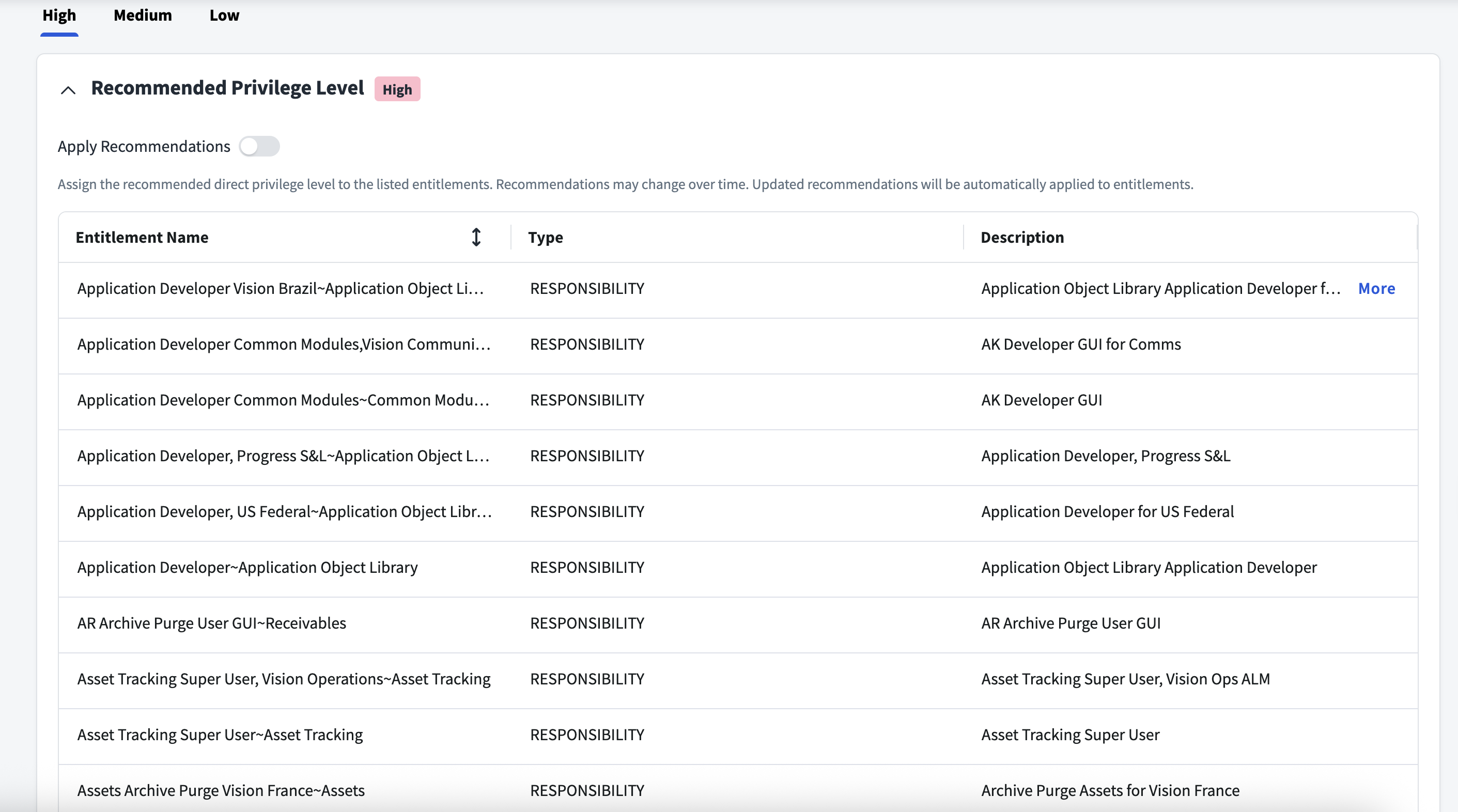
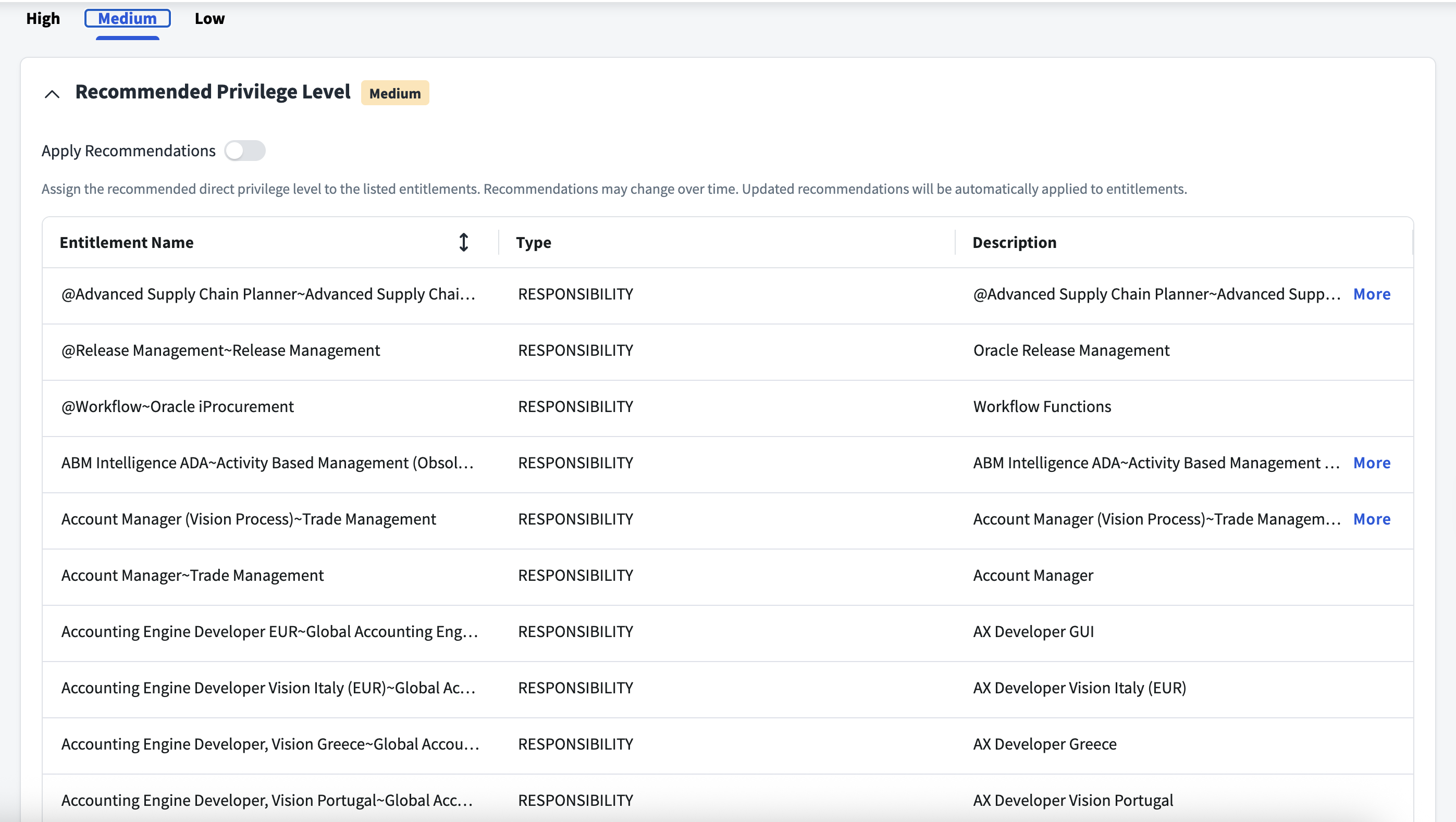
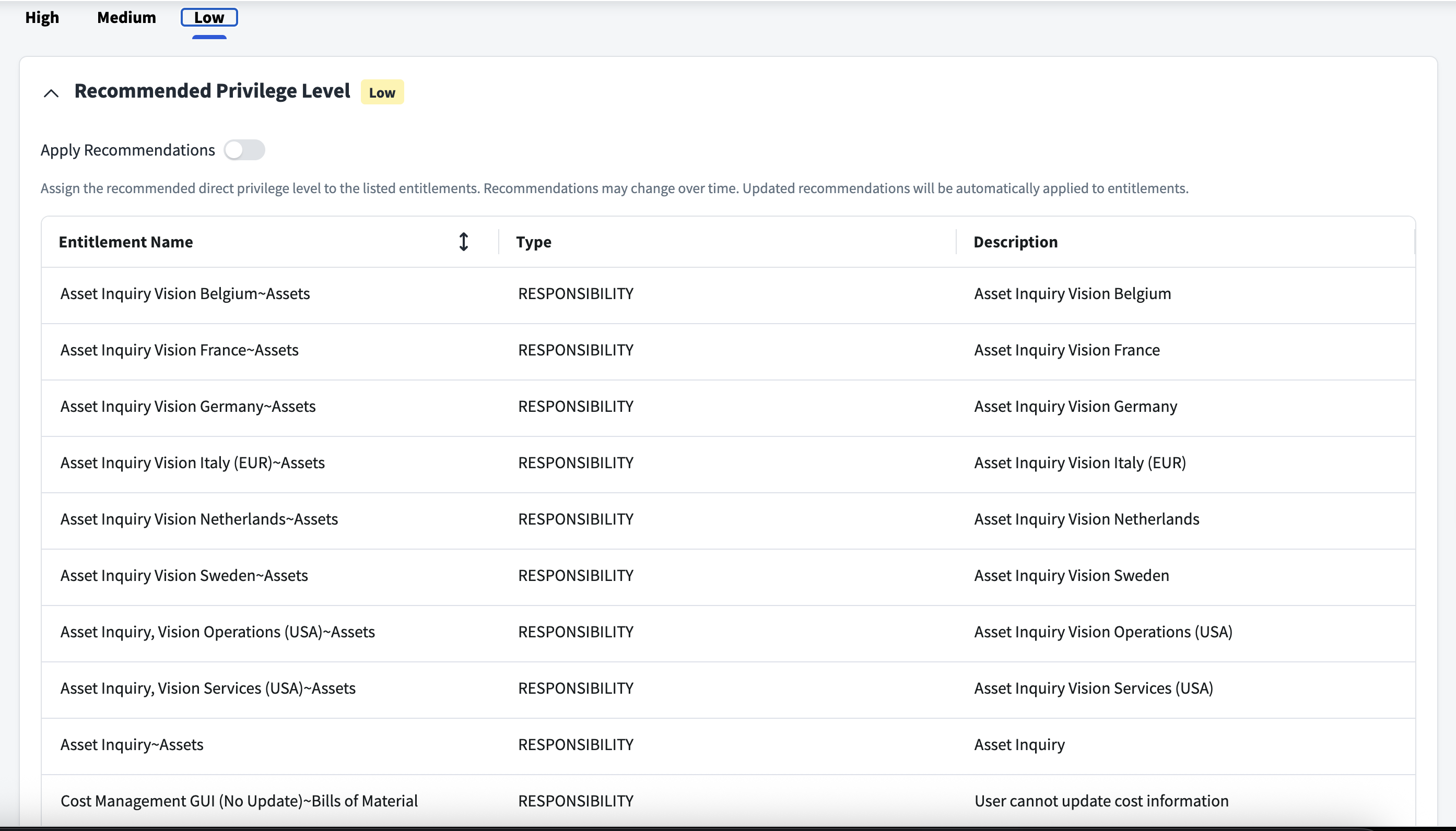
SailPoint Privilege Classification helps organizations systematically categorize and manage the privilege levels of entitlements within their sources. By classifying entitlements as high, medium, or low, administrators can better understand the potential risk and impact associated with specific access rights. This allows automatic assignment of privilege levels based on system recommendations, custom-defined criteria, or a same level across all entitlements.
| Privilege Level | Description |
|---|---|
| High | Administrative level access to accounts |
| Medium | Administrative level access for a specific role or function |
| Low | Only basic access of data |
Note
To manage Privilege Classification, users must have administrative roles such as Org Admin, Source Admin or Source Sub-Admin.
For more information, refer to Managing Privilege Classification.
Example
Password Management
If Password Management is enabled for your organization, you can change the password for a user of the source. After enabling password management on the source, be aware of the following:
- The password policy defined in SailPoint applies to accounts on this source.
- If you change the password for an application connected to this source, the change will automatically be made to the source itself.
For more information on configuring password management, refer to Password Management Overview.
Prerequisites
- Configure at least one virtual appliance cluster and successfully test the connection. For more information, refer to the Virtual Appliance Reference Guide.
- Create a service account on the Oracle E-Business instance with the required permissions.
Supported Managed Systems
Oracle E-Business Suite 12.2.1 to 12.2.12
Required Permissions
SailPoint's Oracle E-Business Suite Connector supports the service account permissions provided through the AD_ZD.GRANT_PRIVS API from Oracle E-Business Suite version 12.2.4 and later versions. For more information on these versions, refer to Support for AD_ZD.GRANT_PRIVS Package.
For previous versions:
-
Log in to the Oracle database as database administrator for creating the Service Account (Minimum privileges user for the configured application) using
SQL*Plusas follows: -
Grant SELECT permissions to the new role created in the above step (${new role}):
grant select on APPS.FND_PRODUCT_GROUPS to ${new role}; grant select on APPS.FND_USER to ${new role}; grant select on SYS.DBA_USERS to ${new role}; -- Only required if the proxy user is not provided. grant select on APPS.FND_RESPONSIBILITY_VL to ${new role}; grant select on APPS.FND_APPLICATION_VL to ${new role}; grant select on APPS.FND_DATA_GROUPS to ${new role}; grant select on APPS.FND_USER_RESP_GROUPS_ALL to ${new role}; grant select on DUAL to ${new role}; grant select on APPS.PER_ALL_PEOPLE_F to ${new role}; grant select on APPS.RA_CUSTOMERS to ${new role}; grant select on APPS.FND_MENUS to ${new role}; grant select on APPS.FND_REQUEST_GROUPS to ${new role}; grant select on APPS.FND_APPLICATION to ${new role}; grant select on APPS.FND_DATA_GROUP_UNITS to ${new role}; grant select on APPS.FND_APPLICATION_TL to ${new role}; grant select on APPS.FND_RESPONSIBILITY to ${new role}; grant select on APPS.WF_ROLES to ${new role}; grant select on APPS.WF_LOCAL_ROLES to ${new role}; grant select on APPS.WF_ALL_ROLES_VL to ${new role}; grant select on APPS.WF_ROLE_HIERARCHIES to ${new role}; grant select on APPS.FND_REQUEST_GROUP_UNITS to ${new role}; grant select on APPS.WF_LOCAL_USER_ROLES TO ${new role}; grant select on APPS.FND_USER_RESP_GROUPS_DIRECT TO ${new role}; grant select on APPS.PER_PERIODS_OF_PLACEMENT TO ${new role}; grant select on APPS.PER_PERIODS_OF_SERVICE TO ${new role}; grant select on APPS.FND_MENUS_VL to ${new role}; grant select on APPS.FND_MENU_ENTRIES to ${new role}; grant select on APPS.FND_MENU_ENTRIES_VL to ${new role}; grant select on APPS.FND_FORM_FUNCTIONS to ${new role}; grant select on APPS.FND_FORM_FUNCTIONS_VL to ${new role}; -
Check the Rights present on Oracle E-Business FND packages (INVOKER / DEFINER):
SELECT dbo.object_name,
(DECODE(SIGN(bitand(options,16)),1,'INVOKER','DEFINER')) "authid"
FROM dba_objects dbo, sys.PROCEDURE$ p
WHERE p.obj# = dbo.object_id
AND dbo.object_type = 'PACKAGE'
AND dbo.object_name IN ('FND_USER_PKG','FND_RESPONSIBILITY_PKG', 'WF_LOCAL_SYNCH', 'FND_WEB_SEC', 'FND_GLOBAL','FND_USER_RESP_GROUPS_API')
AND dbo.owner = 'APPS';
Note
Remove any new line character inserted in the query.
Based on the above query result, perform one of the following procedures if the rights present are INVOKER or DEFINER:
For INVOKER Rights
-
Create Packages:
- Copy the package scripts from http://files.accessiq.sailpoint.com/integrations/OracleEBS/resources.zip (open link in new window) directory to the
OracleHome\bindirectory and rename the type of scripts from*.txtto*.sql: -
Using SQL*Plus, create one more session to the Oracle database by the APPS user and run the following:
For example, if
FND_USER_PKGhas invoker rights, run the@SP_FND_USER _PKG -
Perform this step for all xxx packages, where xxx package is
FND_USER_PKG,FND_RESPONSIBILITY_PKG,WF_LOCAL_SYNCH,FND_WEB_SEC,FND_GLOBAL, orFND_USER_RESP_GROUPS_API. - After performing the above step, log out from the APPS session.
- Copy the package scripts from http://files.accessiq.sailpoint.com/integrations/OracleEBS/resources.zip (open link in new window) directory to the
-
Grant EXECUTE permissions to the new role created in the above step (${new role}):
grant execute on APPS.SP_FND_USER_PKG to ${new role}; grant execute on APPS.SP_FND_RESPONSIBILITY_PKG to ${new role}; grant execute on APPS.SP_WF_LOCAL_SYNCH to ${new role}; grant execute on APPS.SP_FND_WEB_SEC to ${new role}; grant execute on APPS.SP_FND_GLOBAL to ${new role}; grant execute on APPS.SP_FND_USER_RESP_GROUPS_API to ${new role}; -
Sign in to the Service Account ${new user} and create the following synonym:
Note
Ensure that the synonyms are created under the Service Account login. If this is not performed under the Service Account login a failure may occur while performing operations (Troubleshooting).
create synonym FND_PRODUCT_GROUPS for APPS.FND_PRODUCT_GROUPS;
create synonym FND_USER for APPS.FND_USER;
create synonym DBA_USERS for SYS.DBA_USERS;
create synonym FND_RESPONSIBILITY_VL for APPS.FND_RESPONSIBILITY_VL;
create synonym FND_APPLICATION_VL for APPS.FND_APPLICATION_VL;
create synonym FND_DATA_GROUPS for APPS.FND_DATA_GROUPS;
create synonym FND_USER_RESP_GROUPS_ALL for APPS.FND_USER_RESP_GROUPS_ALL;
create synonym PER_ALL_PEOPLE_F for APPS.PER_ALL_PEOPLE_F;
create synonym RA_CUSTOMERS for APPS.RA_CUSTOMERS;
create synonym FND_MENUS for APPS.FND_MENUS;
create synonym FND_REQUEST_GROUPS for APPS.FND_REQUEST_GROUPS;
create synonym FND_APPLICATION for APPS.FND_APPLICATION;
create synonym FND_RESPONSIBILITY for APPS.FND_RESPONSIBILITY;
create synonym FND_APPLICATION_TL for APPS.FND_APPLICATION_TL;
create or replace synonym FND_DATA_GROUP_UNITS for APPS.FND_DATA_GROUP_UNITS;
create or replace synonym WF_ROLES for APPS.WF_ROLES;
create or replace synonym WF_LOCAL_ROLES for APPS.WF_LOCAL_ROLES;
create or replace synonym WF_ROLE_HIERARCHIES for APPS.WF_ROLE_HIERARCHIES;
create or replace synonym WF_ALL_ROLES_VL for APPS.WF_ALL_ROLES_VL;
create synonym FND_REQUEST_GROUP_UNITS for APPS.FND_REQUEST_GROUP_UNITS;
create synonym PER_PERIODS_OF_SERVICE for APPS.PER_PERIODS_OF_SERVICE;
create or replace synonym WF_LOCAL_USER_ROLES for APPS.WF_LOCAL_USER_ROLES;
create or replace synonym FND_USER_RESP_GROUPS_DIRECT for APPS.FND_USER_RESP_GROUPS_DIRECT;
create synonym PER_PERIODS_OF_PLACEMENT for APPS.PER_PERIODS_OF_PLACEMENT;
create or replace synonym FND_USER_PKG for APPS.SP_FND_USER_PKG;
create or replace synonym FND_RESPONSIBILITY_PKG for APPS.SP_FND_RESPONSIBILITY_PKG;
create or replace synonym WF_LOCAL_SYNCH for APPS.SP_WF_LOCAL_SYNCH;
create or replace synonym FND_WEB_SEC for APPS.SP_FND_WEB_SEC;
create or replace synonym FND_GLOBAL for APPS.SP_FND_GLOBAL;
create or replace synonym FND_USER_RESP_GROUPS_API for APPS.SP_FND_USER_RESP_GROUPS_API;
create synonym FND_MENUS_VL for APPS.FND_MENUS_VL;
create synonym FND_MENU_ENTRIES for APPS.FND_MENU_ENTRIES;
create synonym FND_MENU_ENTRIES_VL for APPS.FND_MENU_ENTRIES_VL;
create synonym FND_FORM_FUNCTIONS for APPS.FND_FORM_FUNCTIONS;
create synonym FND_FORM_FUNCTIONS_VL for APPS.FND_FORM_FUNCTIONS_VL;
For DEFINER Rights
-
Grant EXECUTE permissions to the new role (${new role}):
grant execute on APPS.FND_USER_PKG to ${new role}; grant execute on APPS.FND_RESPONSIBILITY_PKG to ${new role}; grant execute on APPS.WF_LOCAL_SYNCH to ${new role}; grant execute on APPS.FND_WEB_SEC to ${new role}; grant execute on APPS.FND_GLOBAL to ${new role}; grant execute on APPS.FND_USER_RESP_GROUPS_API to ${new role}; -
Sign in to the Service Account ${new user} and create the following synonym:
Note
Ensure that the synonyms are created under the Service Account login. If this is not performed under the Service Account login a failure may occur while performing operations (Troubleshooting).
create synonym FND_PRODUCT_GROUPS for APPS.FND_PRODUCT_GROUPS;
create synonym FND_USER for APPS.FND_USER;
create synonym DBA_USERS for SYS.DBA_USERS;
create synonym FND_RESPONSIBILITY_VL for APPS.FND_RESPONSIBILITY_VL;
create synonym FND_APPLICATION_VL for APPS.FND_APPLICATION_VL;
create synonym FND_DATA_GROUPS for APPS.FND_DATA_GROUPS;
create synonym FND_USER_RESP_GROUPS_ALL for APPS.FND_USER_RESP_GROUPS_ALL;
create synonym PER_ALL_PEOPLE_F for APPS.PER_ALL_PEOPLE_F;
create synonym RA_CUSTOMERS for APPS.RA_CUSTOMERS;
create synonym FND_MENUS for APPS.FND_MENUS;
create synonym FND_REQUEST_GROUPS for APPS.FND_REQUEST_GROUPS;
create synonym FND_APPLICATION for APPS.FND_APPLICATION;
create synonym FND_RESPONSIBILITY for APPS.FND_RESPONSIBILITY;
create synonym FND_APPLICATION_TL for APPS.FND_APPLICATION_TL;
create or replace synonym FND_DATA_GROUP_UNITS for APPS.FND_DATA_GROUP_UNITS;
create or replace synonym WF_ROLES for APPS.WF_ROLES;
create or replace synonym WF_LOCAL_ROLES for APPS.WF_LOCAL_ROLES;
create or replace synonym WF_ROLE_HIERARCHIES for APPS.WF_ROLE_HIERARCHIES;
create or replace synonym WF_ALL_ROLES_VL for APPS.WF_ALL_ROLES_VL;
create synonym FND_REQUEST_GROUP_UNITS for APPS.FND_REQUEST_GROUP_UNITS;
create synonym PER_PERIODS_OF_SERVICE for APPS.PER_PERIODS_OF_SERVICE;
create or replace synonym WF_LOCAL_USER_ROLES for APPS.WF_LOCAL_USER_ROLES;
create or replace synonym FND_USER_RESP_GROUPS_DIRECT for APPS.FND_USER_RESP_GROUPS_DIRECT;
create synonym PER_PERIODS_OF_PLACEMENT for APPS.PER_PERIODS_OF_PLACEMENT;
create or replace synonym FND_USER_PKG for APPS.FND_USER_PKG;
create or replace synonym FND_RESPONSIBILITY_PKG for APPS.FND_RESPONSIBILITY_PKG;
create or replace synonym WF_LOCAL_SYNCH for APPS.WF_LOCAL_SYNCH;
create or replace synonym FND_WEB_SEC for APPS.FND_WEB_SEC;
create or replace synonym FND_GLOBAL for APPS.FND_GLOBAL;
create or replace synonym FND_USER_RESP_GROUPS_API for APPS.FND_USER_RESP_GROUPS_API;
create synonym FND_MENUS_VL for APPS.FND_MENUS_VL;
create synonym FND_MENU_ENTRIES for APPS.FND_MENU_ENTRIES;
create synonym FND_MENU_ENTRIES_VL for APPS.FND_MENU_ENTRIES_VL;
create synonym FND_FORM_FUNCTIONS for APPS.FND_FORM_FUNCTIONS;
create synonym FND_FORM_FUNCTIONS_VL for APPS.FND_FORM_FUNCTIONS_VL;
Important
In the case of a permission mismatch, validate the Service Account Permissions as mentioned in the Validating Service Account Permissions on Oracle E-Business document.
-
Additional Permissions for Menu Group Object
The following permissions are required:
grant select on APPS.FND_MENUS_VL to ${new role};
grant select on APPS.FND_MENU_ENTRIES to ${new role};
grant select on APPS.FND_MENU_ENTRIES_VL to ${new role};
grant select on APPS.FND_FORM_FUNCTIONS to ${new role};
grant select on APPS.FND_FORM_FUNCTIONS_VL to ${new role};
Service Account Permissions Provided Through the AD_ZD.GRANT_PRIVS API
The Oracle E-Business source supports the service account permissions provided through the AD_ZD.GRANT_PRIVS API from Oracle E-Business Suite 12.2.4 version onward.
The syntax for granting permissions via AD_ZD.GRANT_PRIVS is:
EXECUTE APPS.AD_ZD.GRANT_PRIVS( X_PERMISSIONS in VARCHAR2, X_OBJECT_NAME in VARCHAR2,X_GRANTEE in VARCHAR2, X_OPTIONS in VARCHAR2 default NULL);
For example, you can use: EXECUTE APPS.AD_ZD.GRANT_PRIVS('SELECT','FND_USER','<some user>');, which is equivalent to "grant select on APPS.FND_USER to ${some user};"
The following two permissions cannot be granted using the AD_ZD.GRANT_PRIVS API because the objects are owned by SYSTEM:
grant select on SYS.DBA_USERS to ${new user};grant select on DUAL to ${new user};
Documentation Feedback
Feedback is provided as an informational resource only and does not form part of SailPoint’s official product documentation. SailPoint does not warrant or make any guarantees about the feedback (including without limitation as to its accuracy, relevance, or reliability). All feedback is subject to the terms set forth at https://developer.sailpoint.com/discuss/tos.