Introduction to IQService
IQService, also referred to as the Integration Service, is a native Windows service that enables SailPoint to participate in a Windows environment and access information only available through Windows APIs. It is a lightweight service that must be installed on any supported Windows Server that has connectivity to the target systems you want to manage in SailPoint.
Note
The latest version of IQService is IQService-May-2025.
The following figure shows the communication flow of IQService with various end systems. A single IQService instance can serve multiple sources of the same or different source types. For enhanced performance, SailPoint recommends setting up separate instances for each of the sources. IQService supports setting up multiple instances on the same system, though these instances share the same system resources and it might degrade performance.
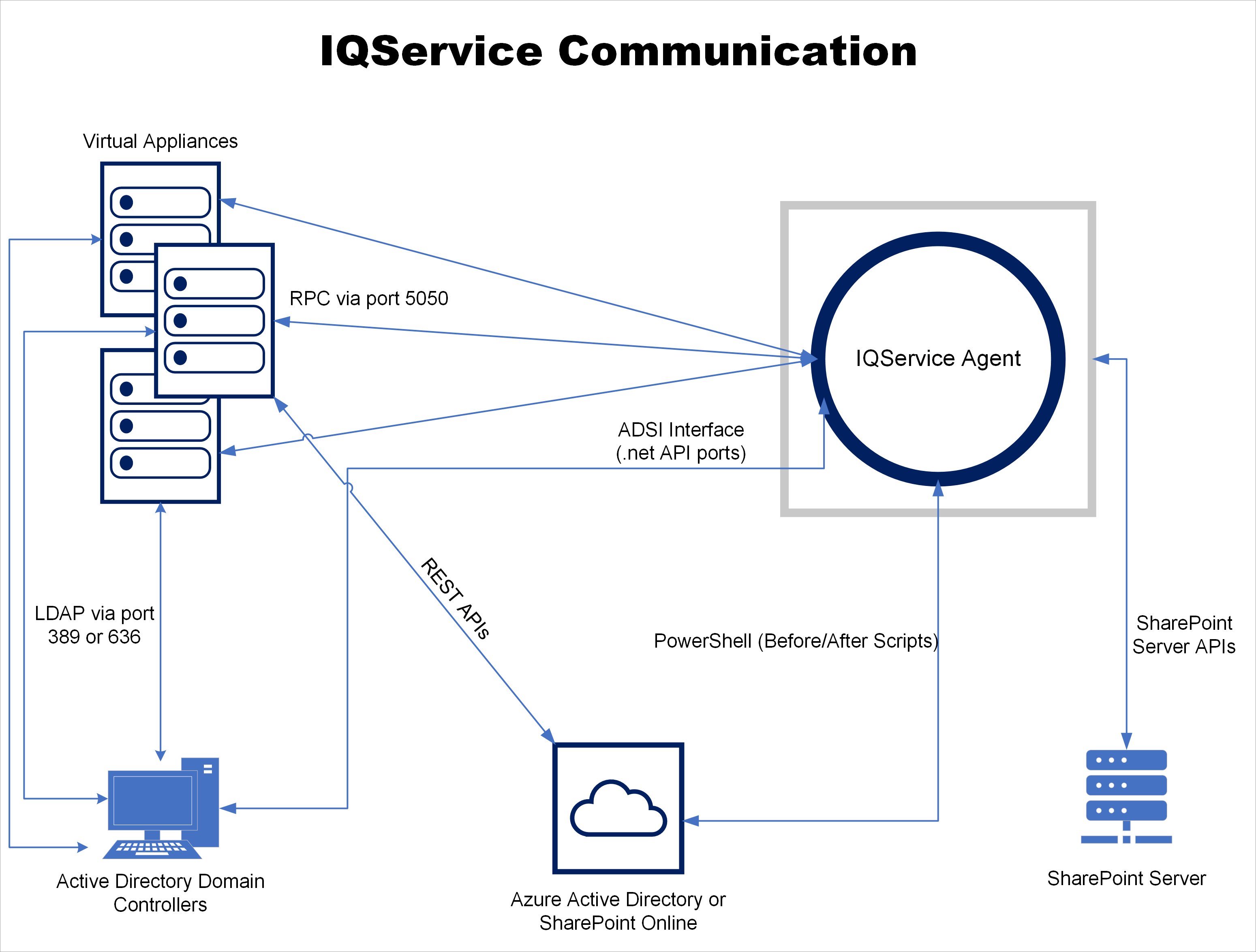
Securing all communications coming in and going out from IQService is very crucial to ensure overall security of the solution and data integrity. For more information, refer to IQService Security Considerations. IQService executable and libraries are digitally signed to ensure integrity of the files.
Supported Sources
Active Directory
- Provisioning operations
- Managing Exchange
- Managing Skype
- Managing (Read\Write) terminal service attributes
- Before and After script
- Shared Mailbox Management
Azure Active Directory
- Before and After script
- Exchange Online management
HCL Domino (IBM Lotus Domino)
- Password management
- ID Vault operations
- Delta aggregation
- Before and After script
Microsoft SharePoint Online
- Before and After script
Microsoft SharePoint Server
- Test Connection
- Account Aggregation
- Entitlement Aggregation
- Provisioning operations
- Before and After script
Windows Local Source
- Test Connection
- Account Aggregation
- Entitlement Aggregation
- Provisioning operations
- Before and After script
Documentation Feedback
Feedback is provided as an informational resource only and does not form part of SailPoint’s official product documentation. SailPoint does not warrant or make any guarantees about the feedback (including without limitation as to its accuracy, relevance, or reliability). All feedback is subject to the terms set forth at https://developer.sailpoint.com/discuss/tos.