IQService Settings
IQService, also referred to as the Integration Service, is a native Windows service that enables SailPoint to participate in a Windows environment and access information only available through Windows APIs.
Important
IQService installation now enforces TLS configuration by default to improve security and safeguard your environment. To proceed with the installation, ensure you have completed the necessary prerequisites for TLS configuration. For more information, refer to Configuring TLS and Client Authentication for IQService.
Note
For more information on prerequisites, refer to Source-specific Additional Prerequisites.
Operations supported through IQService: Before and After Scripts for IQService
IQService Installation

Download IQService
To download the IQService installation complete the following:
-
Select the Download IQService button.
Note
IQService has the built-in capability to auto update (this is the default). To enable the auto update capability, UpdateService must be configured alongside the IQService installation. Refer to Configuring IQService Auto Update.
Download, install, and configure IQService by following the steps mentioned in the Identity Security Cloud IQService Administrator's Guide for Installing and Registering IQService.
Note
You are only entitled to download components for which you have an active license with SailPoint and the availability of a component for download does not grant you a license to use a component or entitle you to use a component for which you do not have an active license. Contact your Account Representative or CSM for more information.
IQService Settings
-
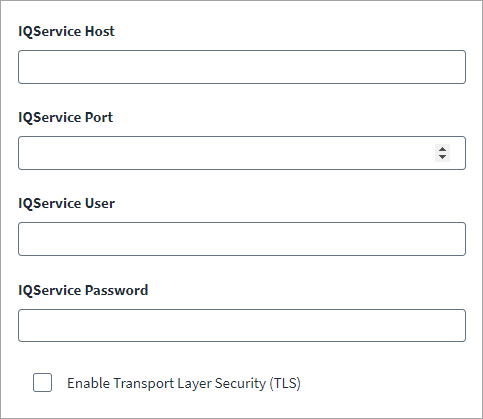
In the IQService Host field, enter the IP address of the system where IQService is installed.
Note
For client authentication, you must configure the IQService using the following command:
IQService.exe -a <Domain User/s> -
Enter the IQService Port used by IQService. The default port is 5050. If you enable TLS, configure the corresponding IQService TLS port.
-
Enter the IQService User and Password for client authentication.
-
Select the Enable Transport Layer Security (TLS) checkbox for TLS communication for IQService. For more information on TLS communication, refer to Configuring TLS and Client Authentication for IQService.
Note
Before setting up TLS communication, install IQService on the TLS port using the following command:
IQService.exe -i -o <TLS Port Number>Warning
To enhance security, it is mandatory to configure the TLS for IQService. If you continue using non-TLS configuration, any before and after script execution will be disabled to safeguard your environment. Remove non-TLS configuration for IQService to execute any rules and scripts.
-
Select Save.
Documentation Feedback
Feedback is provided as an informational resource only and does not form part of SailPoint’s official product documentation. SailPoint does not warrant or make any guarantees about the feedback (including without limitation as to its accuracy, relevance, or reliability). All feedback is subject to the terms set forth at https://developer.sailpoint.com/discuss/tos.