Partitioning
Web Services supports partitioning through the following modes:
-
Static Partitioning - Defines the separate partitions through fixed mappings.
-
Dynamic Partitioning - Discovers partitions at run time based on information returned by a REST or Web Services API call from a remote system.
Static and Dynamic partitioning modes can be used at the same time. Partitions can be defined both in fixed configuration blocks and by dynamic values returned from the remote system. When both types of configurations are used, the list of partition records is concatenated and all of the defined partitions are aggregated.
Conceptually, each partition retrieves the accounts from the managed system that correspond to a specific field or field values. The connector expects that those values can be passed to a search or filter API exposed by the managed system. The connector supports partitioning through token substitution of a URL pattern and/or a POST payload body's JSON or XML.
For example, the Acme Human Resources department groups account searches by their costCenter attribute, and configures the API to return accounts using the following configuration:
In this example, the API returns account records which belong only to the "AdminHQ" cost center.
Assuming an even distribution of accounts to various costCenter values, each value for the costCenter attribute in this example can be mapped to a partition that aggregates the accounts corresponding to that grouping. Each partition is effectively a map of key-value pairs that define a unique grouping of accounts.
The partition's key-value pairs are exposed to the Before/After Rules of a Connector Operation. They are available in the Context URL field, which is appended to the request, and in the body text of a POST operation. In the Context URL, the partition to aggregate is exposed as the $partition.*$ keyword, where the asterisk (*) is replaced by the field name from the partition. This behaves similarly to the $response.* keyword and other tokens used by the Web Services connector.
For example, in a partitioned account aggregation type of operation, you could have a Context URL as follows:
When evaluated during aggregation, the partition's costCenter value is substituted for the $-encapsulated field and is then passed to the remote system. In situations where a simple path substitution is not sufficient, the URL can be generated in the Before Operation Rule by modifying the request endpoint's URL field. The partition variable is exposed in the Before Operation Rule for use by connector-specific rule logic.
Partitioning Settings
Configure partitioning aggregation to enable parallel data processing across multiple threads, enhancing the performance of aggregation tasks. Refer to Partitioning for information on configuration.
Screenshot
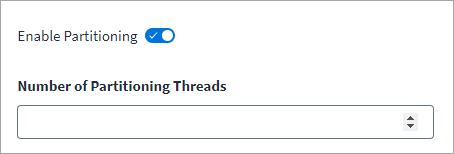
- Select Enable Partitioning.
- Specify the Number of Partitioning Threads so that the aggregation processes the data in parallel and across multiple threads to help increase the aggregation performance.
Partitioning Operations
Partition Aggregation is supported by the following operation types:
- Get Partitions
- Partitioned Account Aggregation
You must configure a Get Partition type connector operation to support dynamic partitioning.
You must configure a Partitioned Account Aggregation connector operation to support static and dynamic partitioning. The Partitioned Account Aggregation operation is similar to the Account Aggregation endpoint. The only difference between the two is that the Partitioned Account Aggregation operation invokes when Account Aggregation with partitioning is enabled. The Partitioned Account Aggregation receives the $partition.$ keyword tokens, but the original operation does not. Having these two as separate operations allows the connector to support single-threaded and partitioned (multi-threaded) aggregations with one configuration.
Configuring Static Partitions
The following example displays two static partitions that are identified by different costCenter values:
[
    {
        "op": "add",
        "path": "/connectorAttributes/partitions",
        "value": [
            {
                "name": "Partition 1",
                "size": 0,
                "attributes": {
                    "costCenter": "CC-AD"
                }
            },
            {
                "name": "Partition 2",
                "size": 0,
                "attributes": {
                    "costCenter": "CC-AE"
                }
            }
        ]
    }
]
Configuring Dynamic Partitioning
When invoked, the Get Partitions operation returns a list of partition records. This is a top-level operation which can be chained by referring to its Parent Operation.
For example, a web service that returned the list of unique cost centers inside an HR application from an API request is as follows:
GET https://hr.acme.com/admin/listCostCenters

{
"idList": [
"CC-00",
"CC-AA",
"CC-AAZY",
...
"CC-AZYXWVUT",
"CC-AZYXWVUTS"
]
}
In this example, the JSON payload returns an idList that contains an array of string values, and each is a Cost Center name. A Get Partitions operation must be configured to handle this JSON response. The relevant fields are:
- Context URL -
/admin/listCostCenters - Method -
GET - Response - Root Path -
$.idList.* - Response - Schema Attribute -
costCenterAttribute Path:$ - Response - Schema Attribute -
nameAttribute Path:$
By passing the string to the partition's name and the costCenter attribute, the partition's name is rendered cleanly in the Aggregation Task's status interface. Partitions with no assigned name are randomly assigned a UUID value as their name.
When the aggregation is performed and partitioning is enabled, it first asks the connector what dynamic partitions it has. The connector then calls this Get Partitions operation and returns the list of partition maps to the aggregation process. Each partition has a costCenter field and a name field populated for use in the aggregation operation.
Configuring Partitioned Account Aggregation Operation
The Partitioned Account Aggregation connector operation is invoked once for each partition map. The Partitioned Account Aggregation is conceptually very similar to the regular Account Aggregation operation and serves the same function. The only difference is the Partitioned Account Aggregation operation is always invoked with a $partition.xxx$ keyword map providing the fields that uniquely describe the partition being aggregated by the operation.
The account aggregation operations are designed to coexist. If the user runs a regular, non-partitioned account aggregation, the Account Aggregation operation is used. If the user selects to run a partitioned aggregation, which is specified by which Task and Task Options are selected in SailPoint, then the Partitioned Account Aggregation is used. The connector supports both modes simultaneously. Admins configuring Web Services connectors are encouraged to configure non-partitioned account aggregation before configuring a partitioned one. The connector logic places no restrictions or assumptions on the mode of operation; it freely supports non-partitioned, partitioned, or both at once.
The Partitioned Account Aggregation operation expects you to substitute one or more $partition.xxx$ keyword tokens into the URL for the operation or a POST body delivered to the remote system. Continuing with the earlier example, imagine that you have a system that allows you to return only the accounts or account IDs that exist in a specific Cost Center. That GET request displays as follows:
GET https://hr.acme.com/admin/listAccounts?costCenter=CC-AA

{
"idList": [
"3de42cd8-d0f6-4ff6-b683-e386b246e8da",
"73d3eacd-624e-4ca3-8b13-9095ccb9c8b3",
...
"67f8ab59-2923-422d-8772-c52cb4185723"
]
}
Configuring this in a Partitioned Account Aggregation is a matter of entering the $partition.costCenter$ keyword into the URL as follows:
- Context URL -
/listAccounts?costCenter=$partition.costCenter$ - Method -
GET - Response - Root Path -
$.idList.* - Response - Schema Attribute -
costCenterAttribute Path:$ - Response - Schema Attribute -
nameAttribute Path:$
As with the non-partitioned Account Aggregation operation, the Partitioned Account Aggregation operation can be chained with child operations referring to it by name. In the examples above, the API only returns the ID property of the account record. A subsequent GET call must be made to retrieve the full account record. The child operation or sequence of operations that retrieve the full account must reference the Partitioned Account Aggregation.
Multiple Partitioned Account Aggregation
You can use multiple Partitioned Account Aggregation operations. Like the Get Partitions operation, its use is intended to be strictly parent-child invocations. The behavior of multiple top-level peer Partitioned Account Aggregation operations is not recommended.
Documentation Feedback
Feedback is provided as an informational resource only and does not form part of SailPoint’s official product documentation. SailPoint does not warrant or make any guarantees about the feedback (including without limitation as to its accuracy, relevance, or reliability). All feedback is subject to the terms set forth at https://developer.sailpoint.com/discuss/tos.