Troubleshooting
If you encounter any of the following issues or errors, SailPoint recommends that you follow the guidance provided below to resolve the error before contacting SailPoint Support.
For issues or errors that are not addressed in this connector guide, refer to the following resources for troubleshooting information:
- SailPoint Identity Services Documentation
- SailPoint Support Knowledge Base
- SailPoint Developer Community
Unable to set custom headers during the creation of a ticket or check the status
Resolution: You need to manually add the required headers in the request using the REST APIs and update the source. Following are the steps to include headers in the API request:
- Use GET API to get to the particular SDIM using its Id.
-
Add the header you want under the
provisionto create a ticket or else add the header under thecheckStatusto check the status of a ticket.For example, to create a ticket add the custom header under
provisionas shown in the body of the request:"id": "8863a433fec3", "name": "xyz Generic SDIM", .... "provision": { .... "headers": { "Accept": "application/json", "Content-Type": "application/json" } }To check status of a ticket add the custom header under
checkStatusas shown in the body of the request: -
Update the Source using PUT API.
Unable to pass an empty array through the provisioning plan during ticket creation
Resolution: The steps to add an empty array so the connector can pass it to the managed system are as follows:
- Request to enable feature flag on SailPoint:
CON_SDIM_EMPTY_ARRAY_SUPPORT. -
Go to Integration Edit page. You can enable this feature in two ways:
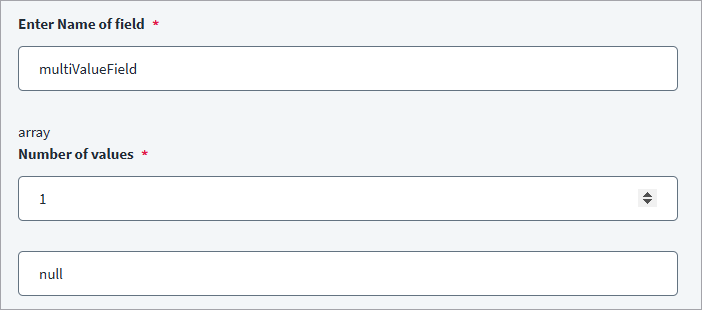
Option 1: Add a Multi-Valued Field in Ticket Creation
- Create a multi-valued field with any field name.
-
Assign a single value with
nullas its value.Screenshot
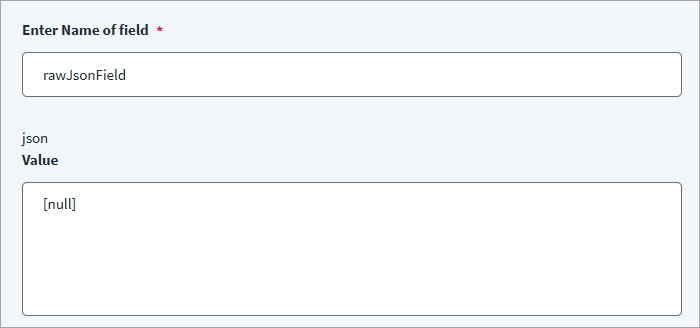
Option 2: Add a Raw JSON Field
-
Add a raw JSON field with the following value
[null].Screenshot
Documentation Feedback
Feedback is provided as an informational resource only and does not form part of SailPoint’s official product documentation. SailPoint does not warrant or make any guarantees about the feedback (including without limitation as to its accuracy, relevance, or reliability). All feedback is subject to the terms set forth at https://developer.sailpoint.com/discuss/tos.