Configuring Aggregation
Aggregation Settings
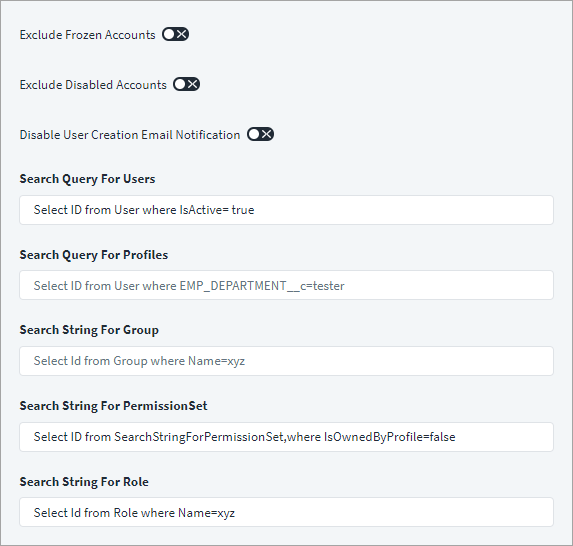
Define the scope of the records to fetch when aggregating user accounts and entitlements.
Screenshot
-
(Optional) Select Exclude Frozen Accounts to exclude frozen user accounts. These accounts have the Salesforce attribute
IsFrozenset totrue. -
(Optional) Select Exclude Disabled Accounts to aggregate only active accounts. This adds the following condition in the
whereclause of the search query for users:AND user.IsActive = true -
(Optional) Select Disable User Creation Email to disable sending emails when a user is created.
-
(Optional) Select the Create Contact on User Creation option to enable the creation of new Salesforce contacts at the same time you create new users. The newly created contacts use the same attribute data provided for the new users as applicable.
Note
SailPoint only supports simultaneous contact creation during user creation at this time. Simultaneous contact updates and deletions during user updates or deletions aren't supported.
Afterward, if you want to add a new attribute for a contact that is also available as a user attribute, add the following entry key into the source XML:
<entry key="contactAttributes">
    <value>
        <List>
            <String>Custom_Attribute</String>
            <String>NewAttribute</String>
        </List>
    </value>
</entry>
Refer to Best Practices: REST API Authentication and REST API - Update Source (Partial) for more information.
-
Enter the Page Size, which is the number of records to aggregate in a single page when iterating over large datasets. Default: 2000 records
-
Enter the scope of the users that are retrieved during Account or Entitlement aggregation in Search Query for Users.
For more information, refer to Search Query for Users and Profiles.
-
Enter the scope of the profiles that are retrieved during account or entitlement aggregation in Search Query for Profiles.
For more information, refer to Search Query for Users and Profiles.
-
Enter the string for the public groups that are retrieved during account or entitlement aggregation in Search String for Public Groups.
- Enter the string for the roles that are retrieved during account or entitlement aggregation in Search String for Role.
- Enter the string for the permission sets that are retrieved during account or entitlement aggregation in Search String for Permission Set.
- Select Save.
Aggregating Only Active Users
The Salesforce source has an option to aggregate only active users.
To configure the Salesforce source to only aggregate active accounts:
- In the Salesforce, go to the Aggregation Filters panel.
- Check the Exclude Disabled Accounts box.
Search Query for Users and Profiles
Configure the search queries for users and profiles in the Salesforce source.
On the Salesforce UI, in the Aggregation Filter panel, in the Search Query for Users field enter the scope of the users that are retrieved during Account or Entitlement aggregation.
In the Search Query for Profiles field, enter the scope of the profiles that are retrieved during account or entitlement aggregation.
For instance, specifying the following search query, retrieves only active users during account aggregation:
select Id from User where IsActive = true
The scope users or profiles retrieved during aggregation can be defined using custom attributes in the where clause, as follows:
select Id from Profile where Name = xyz
Note
- The Salesforce source escapes special characters such as
<,>, and&in a search query string and in entitlement provisioning. - Only the
whereclause of the search query can be modified per the requirement. -
When Exclude Disabled Account is enabled, the connector adds the following condition in the
whereclause of Search Query for Users:AND user.IsActive = true -
If the where clause contains an apostrophe ('), use a backslash (\) prefix to escape it. For example:
Find Id,username from user where lastname is buru'4Expected Query: Select Id,username from user WHERE lastname ='buru\'4' -
If Manage Active Accounts is selected, the connector adds the same
AND user.IsActive = truecondition into thewhereclause of the user search query.
Documentation Feedback
Feedback is provided as an informational resource only and does not form part of SailPoint’s official product documentation. SailPoint does not warrant or make any guarantees about the feedback (including without limitation as to its accuracy, relevance, or reliability). All feedback is subject to the terms set forth at https://developer.sailpoint.com/discuss/tos.