Troubleshooting
If you encounter any of the following issues or errors, SailPoint recommends that you follow the guidance provided below to resolve the error before contacting SailPoint Support.
For issues or errors that are not addressed in this connector guide, refer to the following resources for troubleshooting information:
- SailPoint Identity Services Documentation
- SailPoint Support Knowledge Base
- SailPoint Developer Community
Debug Logs
For information about managing additional source settings, including debug logging and downloading connector logs, refer to Managing Additional Settings.
Health check and test connection dependent on SFTP server
To remove dependency on SFTP server, enable via API Authentication toggle in Connection Settings and Save.
Aggregation fails with Java Heap Space error
This error may occur if the extract file size is large as compared to the heap space specified in the VA.
Resolution: To increase the heap space and resolve this issue, reach out to SailPoint Support.
No records are aggregated from the CSV file during full account aggregation
This error may occur if your HCM Extract is configured to drop null values. You will see errors in your ccg.log file on the virtual appliance of "Skipping Record due to column length mismatch."
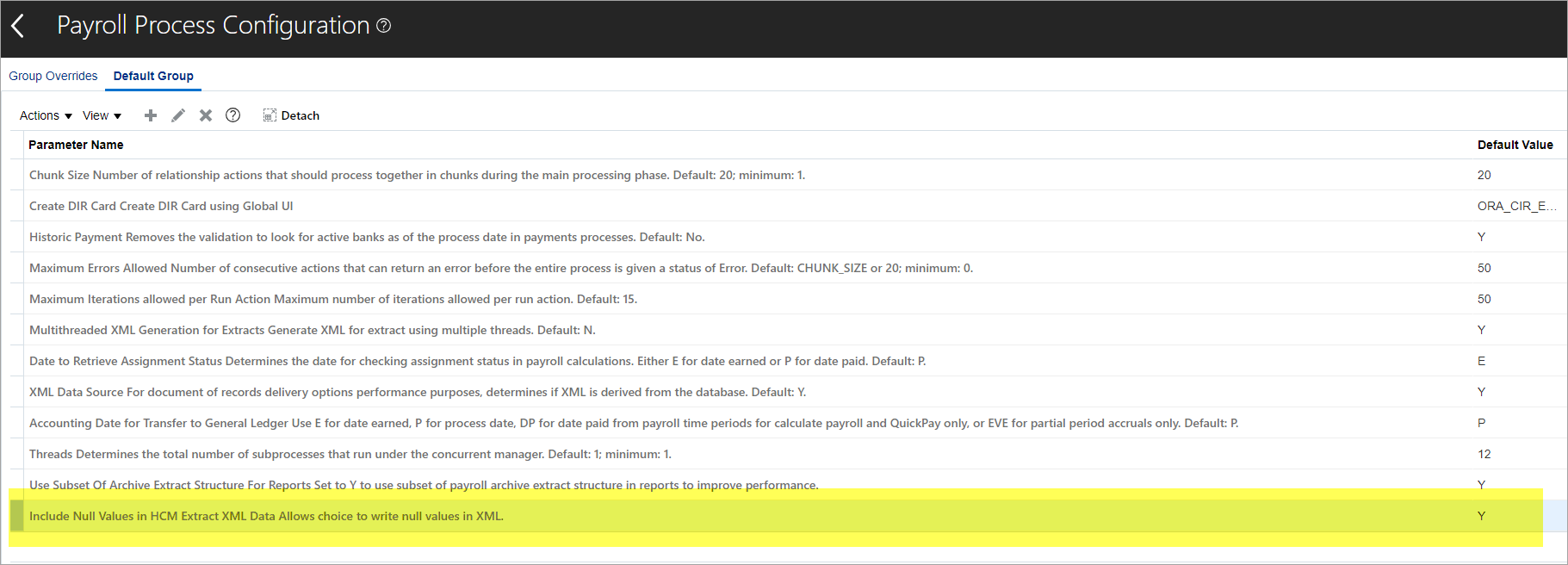
Resolution: Check your HCM Configuration for Include Null Values in HCM Extract XML Data (WRITE_NULL_VALUES), by performing the following:
- In Oracle, Go to My Client Groups > Show More > Payroll > Payroll Process Configuration, and select the Default Group.
- If you don't see Include Null Values in HCM Extract XML Data (WRITE_NULL_VALUES) in the list, select the + icon.
-
In Parameter Name, select Include Null Values In HCM Extract XML Data allow choice to write null values in XML.
Screenshot
Note
This screenshot may vary from customer to customer depending on their environment.
-
Set the Default Value to Y.
- Now that your configuration has been checked, ensure that WORKER_TYPE values are correct and according to standard as defined in Create a Separate HCM Export File.
Test connection fails when incorrect PGP keys are used
You might notice one of the following errors when the incorrect PGP Public Key or PGP Private Key are used during configuration:
Error 1
sailpoint.connector.InvalidConfigurationException: [ InvalidConfigurationException ] [ Possible suggestions ] Ensure that pgp encrpted file is provided or correct Public Key, Private Key and Private Key Password is provided [ Error details ] Signature not found
Error 2
sailpoint.connector.InvalidConfigurationException: [ InvalidConfigurationException ] [ Possible suggestions ] Ensure that pgp encrpted file is provided or correct Public Key, Private Key and Private Key Password is provided [ Error details ] invalid armor
Error 3
sailpoint.connector.ConnectorException: [ ConnectorException ] [ Possible suggestions ] Ensure that configuration parameters is correct and SFTP server is reachable [ Error details ] org.bouncycastle.openpgp.PGPSecretKeyRing found where PGPPublicKeyRing expected
Error 4
sailpoint.connector.ConnectorException: [ ConnectorException ] [ Possible suggestions ] Ensure that configuration parameters is correct and SFTP server is reachable [ Error details ] crc check failed in armored message
Error 5
sailpoint.connector.ConnectorException: [ ConnectorException ] [ Possible suggestions ] Ensure that configuration parameters is correct and SFTP server is reachable [ Error details ] invalid header encountered
Resolution: Ensure you are using PGP Public Key or PGP Private Key in the correct format as generated by the Oracle Fusion HCM system during configuration.
For example, you can use the format as shown below:
-----BEGIN PGP PUBLIC KEY BLOCK-----
Version: BCPG v1.71
lEVFBsA1Iqt4Abh+8dWh3UtTcSuT8KIDYX+OpnVrWAUXMmnKT+JAI7Tk3vtYPiWe7E
slg+8m7jXsFfZE5vaJOeFMbMfxC1jVNy+azO/EMg41kKW7pJHCTsGnChrteJ1ocv1iycl
NAPf7E==ofag
-----END PGP PUBLIC KEY BLOCK-----
Or use only the key as shown below:
lEVFBsA1Iqt4Abh+8dWh3UtTcSuT8KIDYX+OpnVrWAUXMmnKT+JAI7Tk3vtYPiWe7E
slg+8m7jXsFfZE5vaJOeFMbMfxC1jVNy+azO/EMg41kKW7pJHCTsGnChrteJ1ocv1iycl
NAPf7E==ofag
For more information on the PGP Public Key or PGP Private Key, refer to Connection Settings.
Test connection fails with checksum mismatch at in checksum of 20 bytes
You might get the following error when incorrect PGP Private Key Password is provided during configuration:
[ InvalidConfigurationException ] [ Possible suggestions ] Ensure that pgp encrypted file is provided or correct Public Key, Private Key and Private Key Password is provided [ Error details ] checksum mismatch at in checksum of 20 bytes
Resolution: Ensure you are using correct PGP Private Key Password generated by the Oracle Fusion HCM system during configuration.
Test connection fails with unknown object in stream: 16
You might get the following error when the HCM export file provided is unencrypted and not signed.
[ InvalidConfigurationException ] [ Possible suggestions ] Ensure that pgp encrypted file is provided or correct Public Key, Private Key and Private Key Password is provided [ Error details ] unknown object in stream: 16
Resolution: Ensure that HCM export file is encrypted and signed. For more information for creating HCM extract file, refer to Create a Separate HCM Export File.
Test connection fails with Poor PGP. Signature not found
Resolution: Ensure that HCM export file is encrypted and signed. For more information for creating HCM extract file, refer to Create a Separate HCM Export File.
Get Object / Single account aggregation failure
Get Object / Single account aggregation fails with the following error:
Resolution: Ensure that additional fields is defined under Workers API Additional Fields.
Data Is Overwritten After Provisioning
After a provisioning operation, account data aggregated from the CSV extract is overwritten. The connector performs a getObject call that reads the account from the Workers API and updates the record. Attributes that exist in the CSV extract and are not returned by the Workers API might be cleared.
Resolution: To skip the getObject call after an update, add the following entry to the source using the Update Source API.
Key: skipGetObjectAfterUpdate
Value: true
Documentation Feedback
Feedback is provided as an informational resource only and does not form part of SailPoint’s official product documentation. SailPoint does not warrant or make any guarantees about the feedback (including without limitation as to its accuracy, relevance, or reliability). All feedback is subject to the terms set forth at https://developer.sailpoint.com/discuss/tos.