Configuring Additional Google Workspace Settings
Advanced Settings
Provide the settings for your aggregation. After you select Advanced Settings, the following page displays.
Screenshot
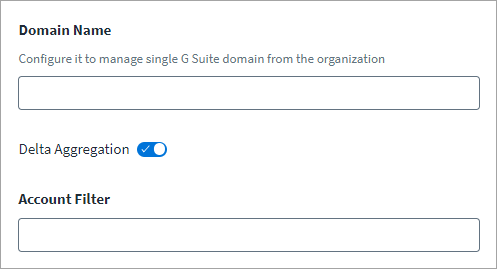
- (Optional) Enter a Domain Name to aggregate from only a single Google Workspace domain in your organization. The connector supports and manages multi-domain environments. If you want to aggregate from all domains, leave this field empty or remove the domain name that was previously entered.
-
(Optional) Select Delta Aggregation to toggle enable or disable this feature. If you enable delta aggregation, the aggregation only includes changes since the last aggregation.
Refer to Configuring Delta Aggregation for more information.
-
(Optional) Use the Account Filter field to configure the scope of user records during full and delta account aggregation. This filter is only applicable for user accounts and not for service accounts or domains. For example, to filter out suspended users, enter
isSuspended=falseas an Account Filter entry.For more information about the filter syntax, refer to Search for users in the Google documentation.
Note
The Google documentation is not maintained by SailPoint, and is subject to change without notice.
-
Select Save.
Improving Aggregation Performance
You can configure the following optional attributes to improve aggregation performance when using the Google Workspace connector:
Note
Refer to Best Practices: REST API Authentication and REST API - Update Source (Partial) in the SailPoint Developer Community for more information on SailPoint REST APIs.
Configuring isSkipAlias
The number of API calls can be reduced during account aggregation by setting the isSkipAlias attribute to true. By default, this attribute value is false, which means one API call per user is required to fetch aliases. This has a greater risk of exhausting the daily limit of API calls and adversely affects account aggregation performance. When isSkipAlias is set to true, it saves one API call per user, improving account aggregation performance and reducing the number of API calls.
Set the attribute value using:
- Key -
connector_isSkipAlias - Value -
true
Configuring skipPreloadingMemberships
You can turn off group membership preloading if the number of group memberships is greater than or equal to the total number of users in your environment. Preloading group memberships means the connector performs account and entitlement aggregation to build a map of group memberships for each account.
By default, the value of skipPreloadingMemberships is false, so the connector preloads group membership.
Set the attribute value using:
- Key -
connector_skipPreloadingMemberships - Value -
false
Note
If set to true, the connector skips membership preloading and instead executes many APIs during account aggregation, reducing performance and risking exhaustion of the API call limit. SailPoint recommends only setting this attribute to true when the number of groups is greater than or equal to the number of users in your environment.
Configuring Delta Aggregation
Important
The Google Workspace documentation lists the events that can be configured and fetched during delta aggregation. However, some attributes, such as isEnrolledIn2Sv, which corresponds to the event USER_ENROLLED_IN_TWO_STEP_VERIFICATION, are not fetched by the Google Workspace API.
To define the scope for delta account and group aggregations, refer to Generating OAuth 2.0 Credentials. Use Advanced Settings to enable or disable delta aggregation.
The Google Workspace connector retrieves accounts based on Activity Events for delta aggregation. By default, the following events are supported for account delta aggregation:
ADD_NICKNAME, CHANGE_USER_RELATION, CHANGE_USER_ORGANIZATION, CHANGE_USER_IM, CHANGE_LAST_NAME, CHANGE_FIRST_NAME, CHANGE_PASSWORD_ON_NEXT_LOGIN, MOVE_USER_TO_ORG_UNIT, REMOVE_NICKNAME, RENAME_USER, SUSPEND_USER, UPDATE_BIRTHDATE, CHANGE_PASSWORD, UNDELETE_USER, UNSUSPEND_USER, CHANGE_USER_CUSTOM_FIELD
Refer to Admin Audit Activity Events - User Settings in the Google Workspace documentation for more information on events.
Delta aggregation is supported only for the User account type. The connector performs full aggregation for Service Account and Domain account types.
You can override the default account and group activity events using these source attributes:
| Delta Aggregation Type | Default Events | Source Attribute |
|---|---|---|
| Account | ADD_NICKNAME, CHANGE_USER_RELATION, CHANGE_USER_ORGANIZATION, CHANGE_USER_IM, CHANGE_LAST_NAME, CHANGE_FIRST_NAME, CHANGE_PASSWORD_ON_NEXT_LOGIN, MOVE_USER_TO_ORG_UNIT, REMOVE_NICKNAME, RENAME_USER, SUSPEND_USER, UPDATE_BIRTHDATE, CHANGE_PASSWORD, UNDELETE_USER, UNSUSPEND_USER, CHANGE_USER_CUSTOM_FIELD |
accountUpdateEvents |
| Group | CHANGE_GROUP_SETTING, CHANGE_GROUP_DESCRIPTION, CHANGE_GROUP_NAME, DELETE_GROUP, REMOVE_GROUP_MEMBER |
groupUpdateEvents |
Note
Refer to Best Practices: REST API Authentication and REST API - Update Source (Partial) in the SailPoint Developer Community for more information on SailPoint REST APIs.
Configuring Additional REST Parameters
Note
Refer to Best Practices: REST API Authentication and REST API - Update Source (Partial) in the SailPoint Developer Community for more information on SailPoint REST APIs.
The connector supports a configurable page size for Group and Role by adding the following entries through the REST API:
Configuring Aggregation Statistics Logging
The connector logs aggregation statistics by default when the log level is set to Debug. To disable aggregation statistics logging, add the following source attribute through the REST API:
- Key -
disableStatistics - Value -
true
Configuring Data Transfer Before Account Deletion
Configure the following source attributes through the REST API to transfer Google Workspace application data before deleting an account:
excludeAppsFromTransfer- List of Google Workspace applications to exclude from data transfer. By default, this list containsCalendarandNone. The list must contain at least one entry (None).enableDataTransferOnDelete- Boolean value that indicates whether data transfer is performed after account deletion.relationsForDataTransfer- Ordered list of relationships used to identify the data owner whennewOwneris not provided in the provisioning form. Example values includemanager,assistant, andfather.
groupPageSize
Number of records per page for Group Aggregation. The default value is the value provided in the Page Size field. Refer to Advanced Settings for more information. The maximum value is 200.
rolePageSize
Number of records per page for Role Aggregation. The default value is the value provided in the Page Size field. Refer to Advanced Settings for more information. The maximum value is 100.
The connector supports account type configuration using the accountTypes attribute, which creates a list of account types you want to manage. If provided, Account Aggregation aggregates according to the configured list. By default, the connector aggregates all three account types (users, serviceAccount, and domain).
fetchCustomIamRolesOnly- Boolean/String. Fetches only custom roles during aggregation when set totrue. It skips predefined roles. Requires a SailPoint CIEM license.aggregateGARolesOnly- Boolean/String. Fetches generally available roles during aggregation when set totrue. It skips roles in stages such as alpha and beta. Requires a SailPoint CIEM license.iamRoleView- String. Possible values areFULLorBASIC.FULLis the default, which brings all permissions along with roles.BASICskips theincludedPermissionattribute. Requires a SailPoint CIEM license.iamRolePageSize- Page size for the role API. The default is 300. The maximum is 1,000. Requires a SailPoint CIEM license.serviceAccountPageSize- Page size for the Service Account API. The default is 100. The maximum is 500.assetSearchPageSize- Page size for the Cloud Asset API. The default and maximum are 500.
When GCP support is enabled, the connector fetches both searchable resource types, cloudresourcemanager and iam, by default. To limit the number of entitlements, configure the connector to fetch one or the other by setting searchableResourceTypes to iam (Service Accounts) or cloudresourcemanager (Organization, Folders, and Projects) through the REST API.
To fetch iamResourcePermission for only the iam resource type, which consists of Service Accounts, use the following PATCH body:
To fetch iamResourcePermission for only the cloudresourcemanager resource type, which consists of Organizations, Folders, and Projects, use the following PATCH body:
[
    {
        "op": "add",
        "path": "/connectorAttributes/searchableResourceTypes",
        "value": "cloudresourcemanager"
    }
]
Configuring the Exponential Backoff Retry Mechanism
By default, the connector handles the following retryable error messages:
- Request rate higher than configured
- Quota exceeded
- Rate limit exceeded
You can configure additional error messages using the following entry key:
<entry key="connectorRetryableErrors">
  <value>
    <List>
      <String>Error message 1</String>
      <String>Error message 2</String>
    </List>
  </value>
</entry>
Note
Refer to Best Practices: REST API Authentication and REST API - Update Source (Partial) in the SailPoint Developer Community for information on SailPoint REST APIs.
Use the REST API to configure the following attributes to set the amount of time the connector should wait before retrying the provisioning operation:
- Key -
connector_waitBeforeProvisioningRetry - Value - Time in seconds, for example
5
Documentation Feedback
Feedback is provided as an informational resource only and does not form part of SailPoint’s official product documentation. SailPoint does not warrant or make any guarantees about the feedback (including without limitation as to its accuracy, relevance, or reliability). All feedback is subject to the terms set forth at https://developer.sailpoint.com/discuss/tos.