Discovering Applications with Delinea Secret Server PAM
The SailPoint Delinea Secret Server PAM Discovery connector discovers Delinea secrets by using Delinea APIs to retrieve secret metadata from Delinea Secret Server PAM instance. It reads relevant attributes, such as names, IDs, template types, creation dates, and active status, and maps them into a structured dataset that SailPoint can consume.
This discovery data helps you identify the secrets that exist in Delinea, understand their key properties, and use that information as a foundation for application cataloging, access reviews, and policy enforcement.
Each discovery connector belongs to a connector category that helps you identify and collect information about applications, users, and their activities. SailPoint manages discovery connectors separately from Identity Governance and Administration (IGA) sources, and they are not intended for governance purposes.
To create a Delinea Secret Server PAM Discovery connector, refer to Base Configuration.
Supported Features
The Delinea Secret Server PAM Discovery connector supports the following features:
- Application Discovery - Discover Delinea secrets and the associated metadata.
- Test Connection - Verify connectivity and authenticate to Delinea Secret Server PAM.
Prerequisites
For OAuth 2.0 Authentication
Create a dedicated Service User in Delinea with the required OAuth 2.0 configuration so that the connector can authenticate and read secret data. Configure the user and the application registration according to the Delinea OAuth 2.0 setup guidance.
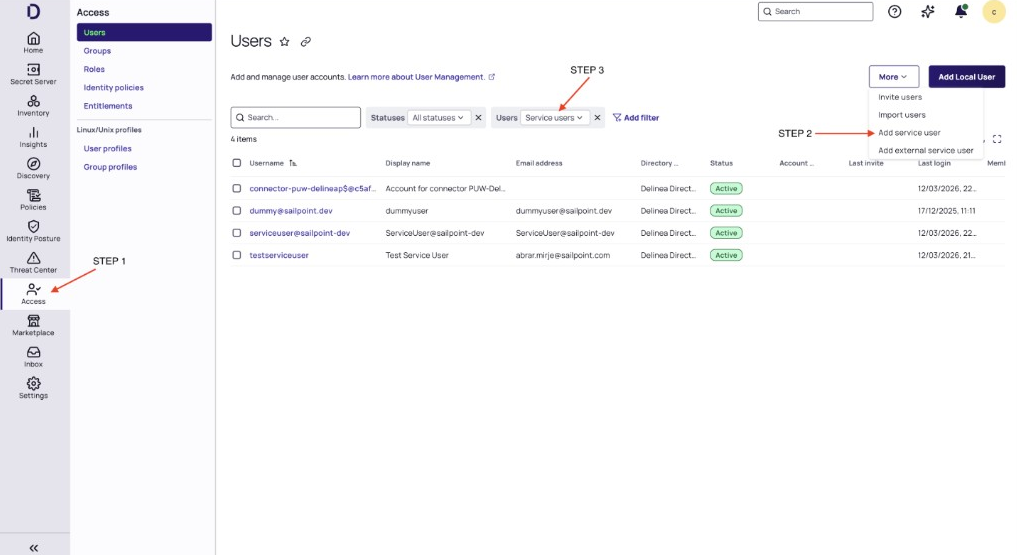
Create Service User
Create a Service User in Delinea Platform before you configure the connector.
-
Go to the Delinea Platform.
Screenshot
-
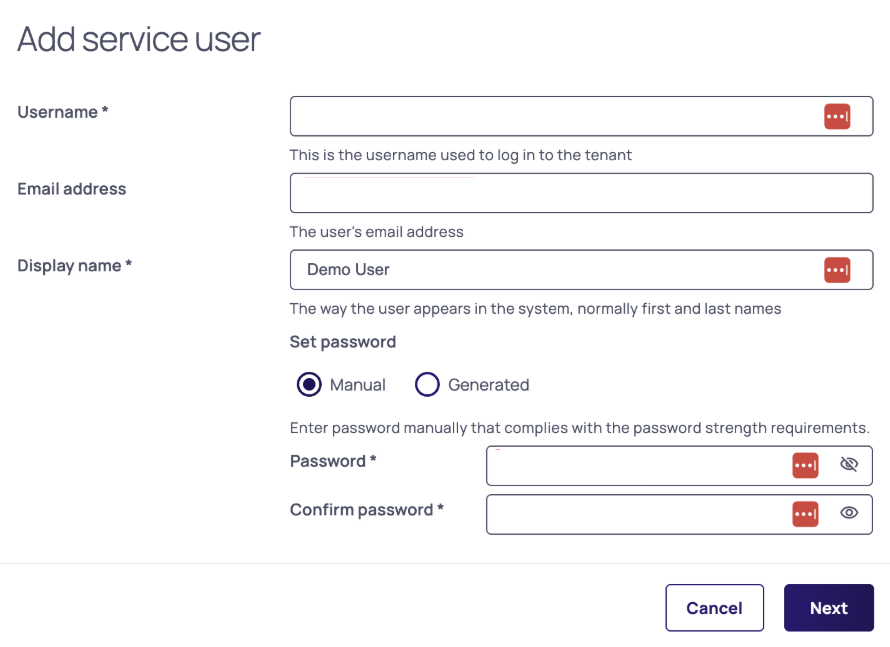
Open the Add service user workflow and enter the required details.
Screenshot
-
To fetch secrets, assign the Service User to the required secrets, then select Add.
- The Service User is created successfully.
- Use the Service User username as Client ID and the Service User password as Client Secret during connector setup.
Assign a Service User to Secrets
To fetch secrets for a specific Service User, assign that Service User to the required secrets.
- Go to the Delinea Platform.
- Go to Secret Server, then select the secret to which you want to assign the Service User.
- Select Sharing.
- Select Edit, add the Service User to the selected secret, and select Save.
Get Host URL (Secret Server URL) to Discover Secrets
The Host URL is also referred to as the Secret Server URL.
- Go to the Delinea Platform.
- Go to Settings.
- Go to Secret Server > Secret Server Connection.
- Copy the Secret Server URL, and use this value as the Host URL.
Documentation Feedback
Feedback is provided as an informational resource only and does not form part of SailPoint’s official product documentation. SailPoint does not warrant or make any guarantees about the feedback (including without limitation as to its accuracy, relevance, or reliability). All feedback is subject to the terms set forth at https://developer.sailpoint.com/discuss/tos.