Configuring CyberArk Conjur Cloud
Base Configuration
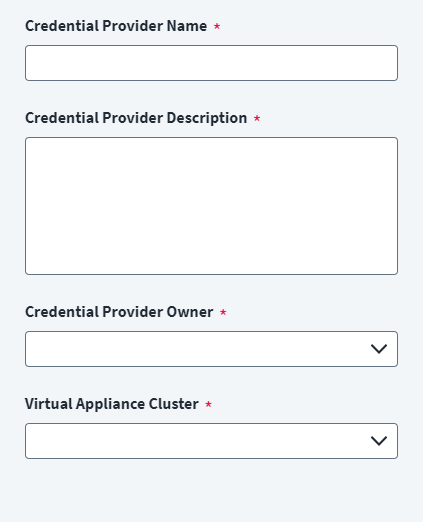
Provide the base configuration parameters. Information you entered during the initial creation of the credential provider is automatically entered into the fields in the Base Configuration page. You can edit this information if necessary.
Screenshot
Note
Ensure that the name and description of each credential provider is unique.
- Go to Admin > Connections > Credential Providers.
- Search for the credential provider you want to edit.
- Enter a unique Credential Provider Name.
- Enter a Credential Provider Description that provides details necessary to distinguish it from similar credential providers.
- Select a Credential Provider Owner by typing the owner's name into the field provided. Matches display after you type at least two letters. Select the credential provider owner as required.
- Select a Virtual Appliance Cluster with connectivity to the credential provider. For more information about configuring and deploying virtual appliances, refer to the Virtual Appliance Reference Guide.
- Select Save.
Connection Settings
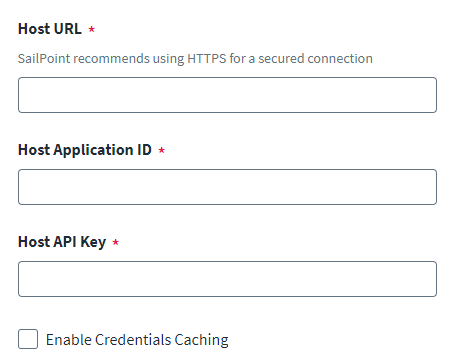
Configure the authentication parameters to connect to and authenticate with the Conjur CyberArk Secret Server host.
Screenshot
To configure an authenticated connection:
- Enter the Host URL for the Conjur CyberArk Secret Server host.
- Enter the Host Application ID provided by Conjur to authenticate the Conjur CyberArk Secret Server host.
-
Enter the Host API Key to authenticate the host created on Conjur Secret Server.
Note
You must configure a host for Conjur Cloud to generate a Host Application ID and a Host API Key. For more information, refer to Prerequisites.
-
(Optional) Enable credential caching. For more information, refer to Caching Credentials.
- Select Save.
Documentation Feedback
Feedback is provided as an informational resource only and does not form part of SailPoint’s official product documentation. SailPoint does not warrant or make any guarantees about the feedback (including without limitation as to its accuracy, relevance, or reliability). All feedback is subject to the terms set forth at https://developer.sailpoint.com/discuss/tos.