Integrating SailPoint with Atlassian Suite SaaS
Atlassian is a leading product company providing tools for collaboration and service desk. SailPoint's Atlassian Suite SaaS connector supports reading and provisioning of Atlassian users and groups. Use the Atlassian Suite SaaS source to manage Atlassian Suite user accounts. After it is successfully configured, your organization is able to aggregate and provision accounts for Jira users and manage access to other Atlassian Suite products such as Confluence and Jira Service Management by managing memberships of groups having access to the respective products.
This guide is designed to give specific information about the requirements and field definitions needed to get a working instance of the Atlassian Suite SaaS source.
Note
To view the latest features, enhancements, and fixes for all SaaS connectors, refer to the SaaS Release Notes page.
Supported Features
The Atlassian Suite SaaS connector supports the features listed on this page.
Note
Before you can use any feature marked with an asterisk (*), SailPoint must activate the feature for your site.
Account Management
- Aggregate accounts
- Add and remove entitlements
-
*Provision accounts
- Create new accounts
-
Enable and disable managed accounts
Note
Accounts must be claimed accounts from verified domains. For more information, refer to Claim accounts and Verified domains in your organization in the Atlassian documentation. Atlassian documentation is not managed by SailPoint and is subject to change without notice.
-
*Access Certifications (certification of entitlements connected to accounts)
- Multiple Group Objects and Direct Permissions
- Delete Accounts
For more information on features, refer to Source Features.
The following table lists the account feature details:
| Feature | Users |
|---|---|
| Aggregate | ✔ |
| Create | ✔ |
| Group Entitlements (Read, Request, Revoke) | Groups and Project Roles |
| Enable Direct Permissions | ✔ |
Group Entitlements
Group Entitlements enable SailPoint to aggregate additional details from the managed system. These objects have a separate schema attribute definition list that the aggregation fetches when aggregation is run for that Group Entitlement type.
The following table lists the group feature details:
| Feature | Groups | Project Roles |
|---|---|---|
| Aggregation | ✔ | ✔ |
Non-Human Identity Discovery
- Aggregate Atlassian Cloud service accounts and agents
Refer to Dataset Management for more information.
Refer to Discovering Potential Non-Human Accounts for more information.
Activity Insights
Activity Insights supports activity from Atlassian Suite and its associated accounts. This allows you to gather account information and activity data from Atlassian Suite.
Important
Contact your SailPoint Customer Success Manager (CSM) for more information on Activity Insights. For more information on configuring Activity Insights, refer to Activity Insights Settings.
Supported Managed Systems
The SailPoint Atlassian Suite SaaS connector supports the following Atlassian products:
- Jira Software (Cloud)
- Jira Service Management
- Opsgenie
- Statuspage
- Confluence
Note
The Jira Administrator can manage the Default Access group associated with different products. Users created from SailPoint are automatically assigned to the default Product Access Groups enabled on the managed system.
Prerequisites
-
The client is authorized using basic authentication which uses a Site Admin API Token. The token is encoded, and it is generated by user account with Site Admin access. It is added to headers for API requests.
For more information on generating Site Admin API tokens, refer to Manage API tokens for your Atlassian account in the Atlassian documentation.
Note
Atlassian API tokens don't use selectable scopes like OAuth scopes. They inherit the creator's Atlassian roles, so use an account with the required admin role when creating the token. Create the API token without a scope.
-
Enabling or disabling accounts uses token authentication. It needs an Org Admin API Token generated by a user with Org and Site Admin access.
For more information on generating API tokens, refer to Manage an organization with the admin APIs in the Atlassian documentation.
Note
Atlassian API tokens don't use selectable scopes like OAuth scopes. They inherit the creator's Atlassian roles, so use an account with the required admin role when creating the token. Create the API token without a scope. The linked document is not maintained by SailPoint and is subject to change without notice.
Screenshot
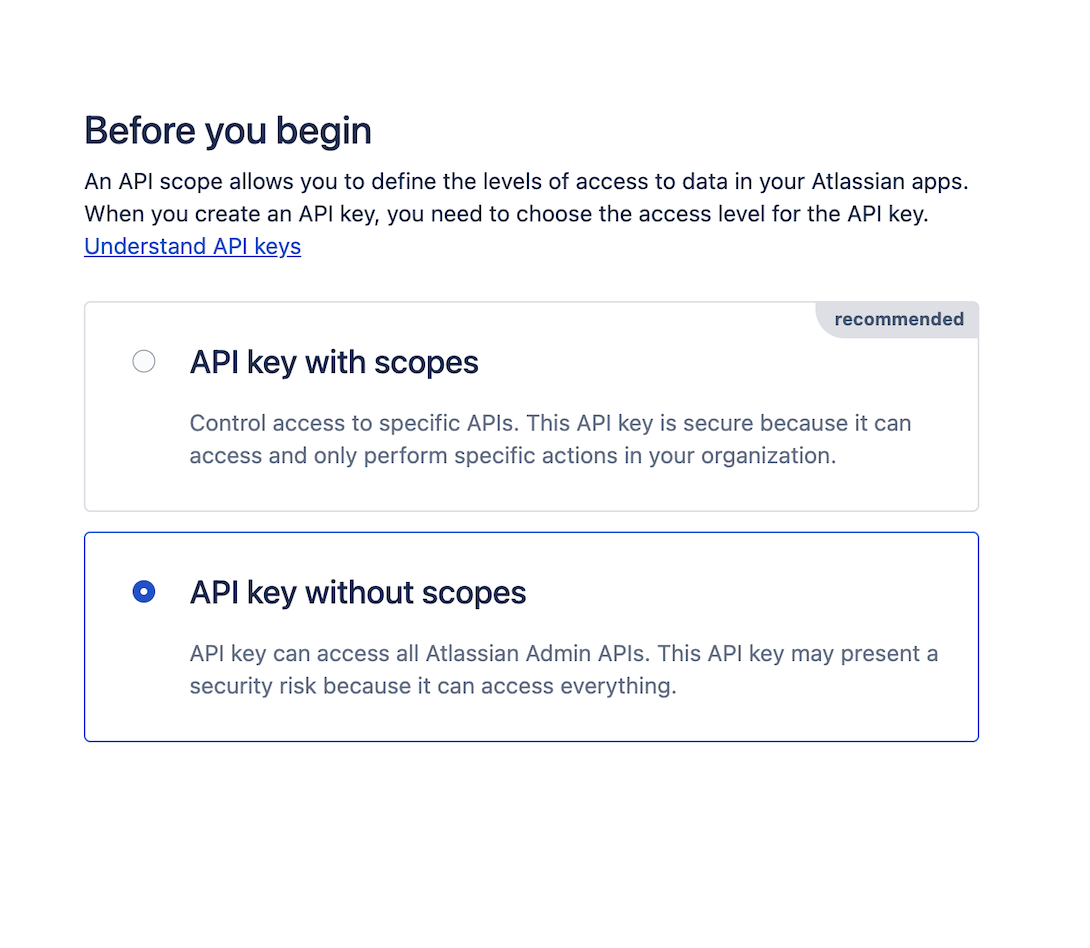
For Basic Authentication
The client is authorized using basic authentication which uses a Site Admin API Token. The token is encoded, and it is generated by user account with Site Admin access. It is added to headers for API requests.
For more information on generating Site Admin API tokens, refer to Manage API tokens for your Atlassian account.
Note
The linked document is not maintained by SailPoint and is subject to change without notice.
Screenshot
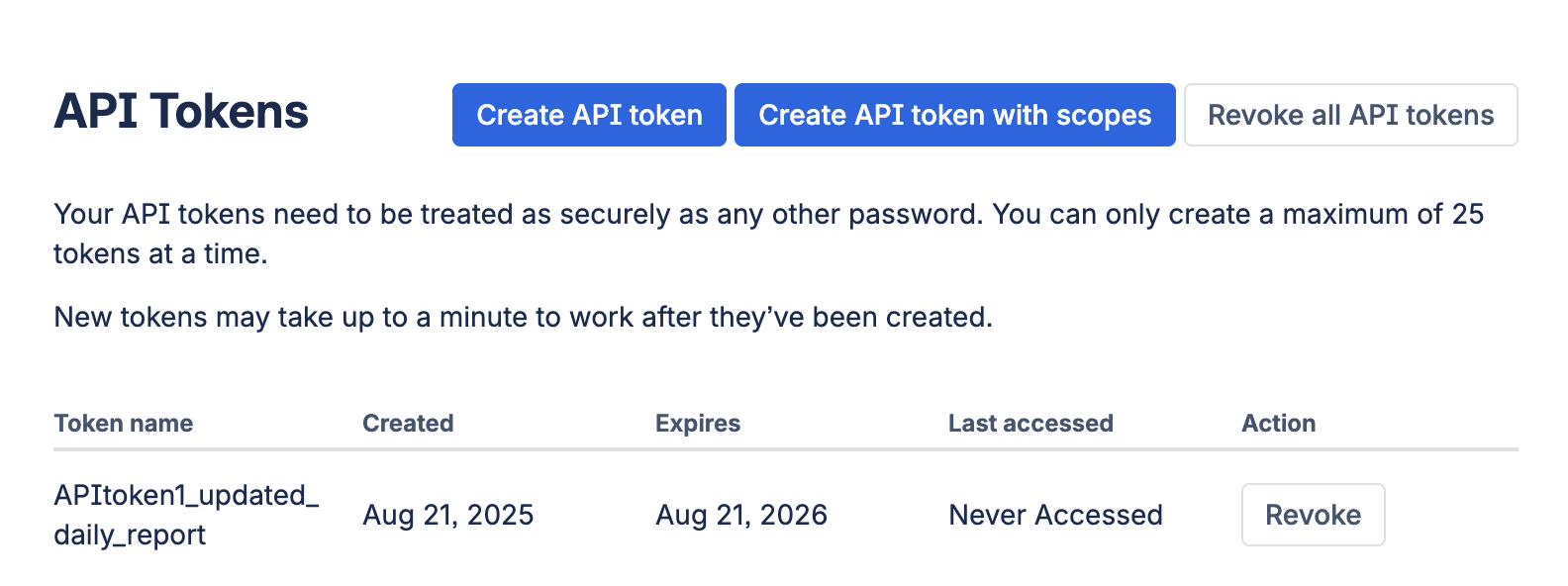
For Service Account Authentication
-
The client is authorized using the email address of an Atlassian service account and a Service Account API Token. Use a scoped API token generated for a service account that has Jira product access and the required permissions. The token must include these classic scopes:
read:jira-workread:jira-usermanage:jira-configurationmanage:jira-project
For more information, refer to Manage API tokens for service accounts.
Note
The linked document is not maintained by SailPoint and is subject to change without notice.
For Activity Insights
- Configure Organization ID which is the unique identifier of the organization of Atlassian tenant. For more information, refer to Manage an organization with the admin APIs in the Atlassian documentation.
- Configure Org Admin API Token to enable activity insights. For more information, refer to Connection Settings.
Required Permissions
-
The service account must be a Site Admin User (Site Admin/ jira-administrators) with an API token created on the Atlassian Suite managed target system.
-
To support enabling and disabling accounts, the service account must be a Org and Site Admin User with an Org Admin API token created on the Atlassian Suite managed target system.
Onboard Atlassian Suite SaaS with SailPoint Agentic Fabric (SAF)
SailPoint Agentic Fabric (SAF) provides an automated, guided onboarding experience to connect your Atlassian Suite environment to SailPoint. SAF automatically creates, deploys, and configures the Atlassian Suite SaaS source in SailPoint, reducing the manual setup steps. After onboarding, the source is ready for aggregation and governance.
For detailed onboarding instructions, prerequisites, and supported deployment models, refer to Connecting Sources.
Important
To enable advanced governance capabilities for Atlassian Suite resources and AI agents, an active SailPoint Agentic Fabric Advanced Governance license is required. Contact your SailPoint Customer Success Manager to request access and for more information.
Documentation Feedback
Feedback is provided as an informational resource only and does not form part of SailPoint’s official product documentation. SailPoint does not warrant or make any guarantees about the feedback (including without limitation as to its accuracy, relevance, or reliability). All feedback is subject to the terms set forth at https://developer.sailpoint.com/discuss/tos.