Access Certification Flow: How to Create And Run a Campaign
Campaigns have the following stages:
-
Campaign template - Basic parameters from which you can create a campaign
-
Campaign Created and ready to run - Campaigns waiting to be run
-
Campaign In progress - Campaigns in various stages of being run
Note: For a complete list of campaign statuses, see Campaign Management.
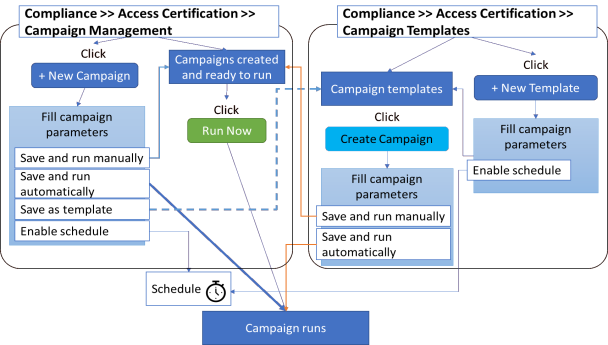
Run a Campaign
You can run a campaign by any of the following methods:
Compliance > Access Certification > Campaign Management
-
Select a prepared campaign and select Run Now.
-
Select +New Campaign, create a campaign and run it. You can also save the created campaign as a template or schedule it to run later.
Compliance > Access Certification > Campaign Templates
-
Select + New Templateand fill in the parameters.
-
Select a template, and select Create Campaign. Fill in the parameters, then either press run now, or schedule.