Machine Identity Governance Settings
Use these settings to aggregate Slack Bots as machine accounts. Human Slack users, groups, channels, and workspaces continue to use the SCIM connection. For more information, refer to Connection Settings.
Note
Identity Security Cloud displays these settings only when your organization is entitled to Agentic Identity Governance. Slack Bots dataset aggregation also requires the Machine Identity Security license (idn:machine-identity-security). You can configure the same toggle and token during Express Setup. These settings are not available on Connection Settings.
Before you configure these settings, add the required bot scopes to your Slack app and obtain its Bot User OAuth Token. Refer to Prerequisites and Required Permissions.
Express Setup
Express Setup remains a 4-step process and does not include an additional step for machine accounts. For the complete procedure, refer to Adding the Source in SailPoint.
-
The authentication card requires API URL and API Token for the SCIM connection. The default API URL is
https://api.slack.com/scim/v1. In API Token, enter the User OAuth Token that starts withxoxp-. Identity Security Cloud encrypts this value. -
If your organization is entitled to Agentic Identity Governance, the card also displays the Enable Slack Machine Accounts toggle. Selecting the toggle displays the required Bot User OAuth Token field.
-
If your organization is not entitled to Agentic Identity Governance, the card does not display the toggle or token field.
-
After you finish Express Setup, Machine Identity Governance Settings displays the same toggle and token state.
 Screenshot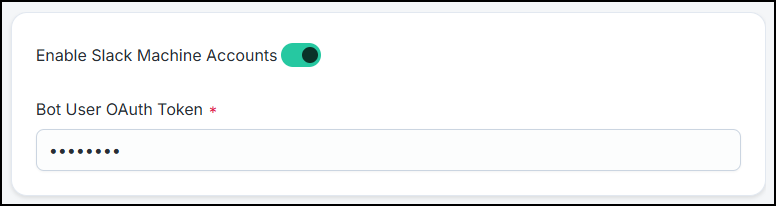
To aggregate Slack Bots as machine accounts:
-
Select Machine Identity Governance Settings from the menu.
-
Select the Enable Slack Machine Accounts toggle.
-
In Bot User OAuth Token, enter the bot token issued for your Slack app. The value starts with
xoxb-. This field is required when you enable the toggle. -
Select Save.
|
Field |
Configuration key |
Required |
Description |
|---|---|---|---|
|
Enable Slack Machine Accounts |
|
No |
When you enable this toggle, the connector aggregates Slack Bots as machine accounts. The default value is off. |
|
Bot User OAuth Token |
|
Yes, when the toggle is on |
Bot token ( |
Review and Test
-
Test Connection validates the SCIM API URL and API Token.
-
An empty Bot User OAuth Token does not block Test Connection or SCIM account aggregation when the Enable Slack Machine Accounts toggle is off.
-
Slack Bots dataset aggregation requires a valid bot token. If the bot token is missing, Slack Bots aggregation fails with a configuration error that prompts you to enter the Bot User OAuth Token.