Aggregation Settings
Provide the information the source uses to manage and filter Ceridian Dayforce HCM employees.
For more information about aggregation, refer to Loading Account Data.
 Screenshot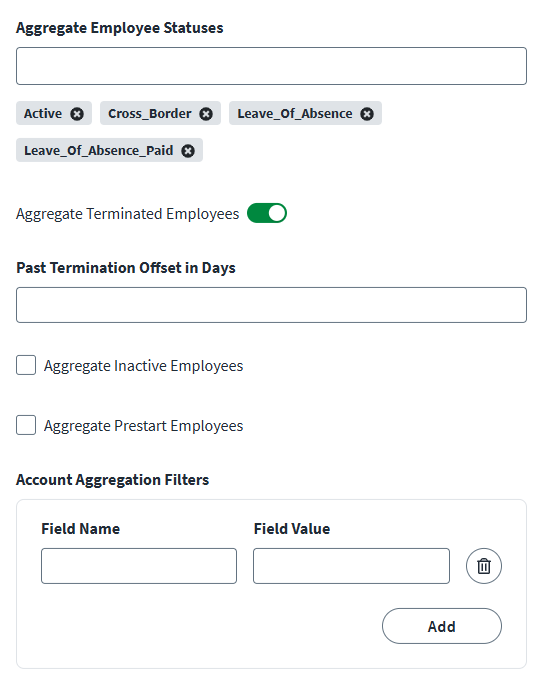


Aggregate Employee Statuses
By default, the connector only aggregates Active employees. You can add additional custom employee status values to include in account aggregation processes.
To add additional custom employee statuses in account aggregation:
-
In the Aggregate Employee Statuses field, enter the name of a custom employee status.
Important
The Active status is the default aggregation status. It should not be removed. -
Press Enter on your keyboard to add the employee status name to a growing list.
-
Select Save.
Aggregate Terminated Employees
You can include terminated employees within a defined time period to account aggregation processes.
To include terminated employees and configure the time period:
-
Enable Aggregate Terminated Employees to include terminated employees in account aggregation processes.
-
In the Past Termination Offset in Days field that displays, enter the number of days in the past you want to aggregate terminated employees. You can also enter a specific date range.
Note
If the Past Termination Offset in Days field entry is null, the connector aggregates all terminated employees. -
Select Save.
Aggregate Inactive Employees
Enable Aggregate Inactive Employees to include inactive employees in account aggregation processes.
Aggregate Prestart Employees
Enable Aggregate Prestart Employees include employees whose Employment Status is Prestart in account aggregation processes.
Configure Account Aggregation Filters
Define the scope of accounts to aggregate based on query parameters.
To configure account aggregation filters:
-
In the Account Aggregation Filters field, enter a Field Name and an associated Field Value.
For example:
Field Name:
filterOriginalHireStartDateaField Value:
2017-01-01T13:24:56 -
Press Enter on your keyboard to add the filter to the rolling list of account aggregation filters. Repeat as necessary for additional account aggregation filters.
-
Select Save.
Define Employee Statuses for Enabled Accounts
Define the account statuses that indicate which employee accounts are enabled in the managed system.
To define enabled employee account statuses:
-
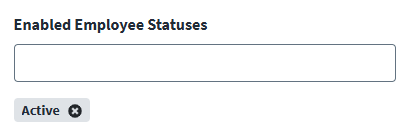
In the Enabled Employee Statuses field, enter the name of an account status which indicates that the employee account is enabled.
Important
The Active status is the default enabled account status. It should not be removed. -
Press Enter on your keyboard to added the status to a growing list.
-
Select Save.
Aggregate Primary Employment
Enable Aggregate Primary Employment to include the primary employment attributes in employee aggregation. If this option is disabled, the source aggregates the most recent employment attributes.
Delta Aggregation
Enable Delta Aggregation to aggregate new accounts or accounts that have changed since the last aggregation.