Base Configuration
Provide the base configuration parameters. Information you entered in the Create New Source dialog is automatically entered into the fields in the Base Configuration page. You can edit this information if necessary.
 Screenshot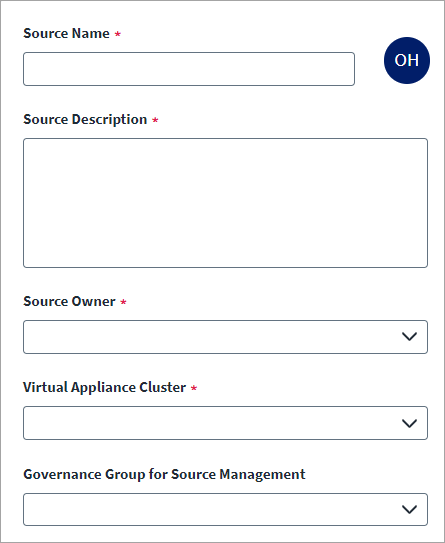
Note
Ensure that the name and description of each source is unique.
-
Enter a descriptive Source Name for the connection.
-
Enter the Source Description that provides details necessary to distinguish it from similar connection sources.
-
In Source Owner, begin typing the name of the source owner. Matches display after you type two or more letters. Set up the source owner as per requirement.
-
In Virtual Appliance Cluster, select the virtual appliance cluster that will be used as the application connector for the source. For more information about configuring and deploying virtual appliances, see the Virtual Appliance Reference Guide.
-
(Optional) Select the appropriate Governance Group for Source Management from the dropdown list. For more information about governance groups, see Associating Governance Groups with a Source on the SailPoint Compass site.
-
(Optional) To enable deep governance provisioning, select Enable Provisioning.Provisioning requires additional configuration.
CautionThis is a permanent change. Once you enable provisioning, you cannot disable it. -
Select Save.