Dataset Management
Dataset Management lets you review the object types a source collects and control how the source aggregates those objects into SailPoint. Use Dataset Management to view and manage resource attributes, datasets and their resources, enable dataset aggregation schedules, perform manual aggregation, and view aggregation history.
Note
Datasets are also available in SailPoint Agentic Fabric. Contact your Customer Success team and refer to SailPoint Agentic Fabric for more information.
For more information, refer to Managing Datasets and Resources for datasets, resources, owner correlation, and aggregation.
Datasets
A dataset is a named group of one or more related resources that the source aggregates together.
When aggregation runs for a dataset, the source collects all resources in that dataset from the managed system in one aggregation job. Activate or deactivate aggregation at the dataset level, not for individual resources.
Note
Each resource belongs to exactly one dataset for that source. The source defines which resources belong to each dataset. You can enable aggregation and review associated resources, but you cannot create or delete datasets or move resources between them.
Dataset Aggregation
Configure aggregation on the Dataset Aggregations tab for each dataset. Configure each dataset separately. During aggregation, your owner correlation rules are automatically applied to link machine identities to their human owners. For more information, refer to Configuring Dataset Aggregations.
Resources
A resource defines an object type from the managed system. It specifies the kind of object, the attributes the source collects, and how the source identifies and displays each object. Resources form the building blocks of the data model.
In the UI, each resource appears under Dataset Management > Resources with its schema. A resource does not run aggregation by itself. The dataset that owns the resource collects it during aggregation.
For more information, refer to Managing Resources.
Owner Correlation
Configure owner correlation on each resource to link aggregated objects to human owners. If you do not configure owner correlation, or if the mapping produces no match, an owner is not assigned. For more information, refer to Configuring Owner Correlation.
Creating Datasets and Resources
Create datasets and resources for your JDBC source in Dataset Management. Refer to Creating Datasets and Creating Resources for the steps.
Use the following JDBC-specific guidance when you create them:
- Name datasets to describe the group of resources they aggregate, for example
snowflake:cortex. - Name resources to describe the object type you want to aggregate, for example
Snowflake Cortex Agent. - Enter schema attribute names that match names your SQL query returns.
Important
The resource ID attribute must exactly match a column name that your SQL query returns. Some databases, such as Snowflake, treat column names as case-sensitive.
After you create the resource, configure SQL queries in Configuring Dataset Query Settings, then aggregate the dataset.
Configuring Dataset Query Settings
Configure the SQL queries SailPoint runs to load resource data from your database.
Enabling Agent Governance
Screenshot

-
Select the Enable Agent Governance toggle. This action reveals the Dataset Query Settings section, which displays a card for each resource you created in Dataset Management.
Note
When you turn off this toggle, SailPoint hides the Dataset Query Settings section.
Configuring Resource Query Settings
- Select the edit icon for the resource you want to configure.
-
Perform the following tasks to configure queries for each resource:
Important
SQL entries can't end with a semicolon (;). Ending an SQL entry with a semicolon (;) can cause a general error message to display.
Configuring Connection Settings
Enter the connection details SailPoint uses to connect to your database and load resource data for dataset aggregation.
Note
If you leave these fields blank, the connector uses the Account Connection Settings.
Screenshot
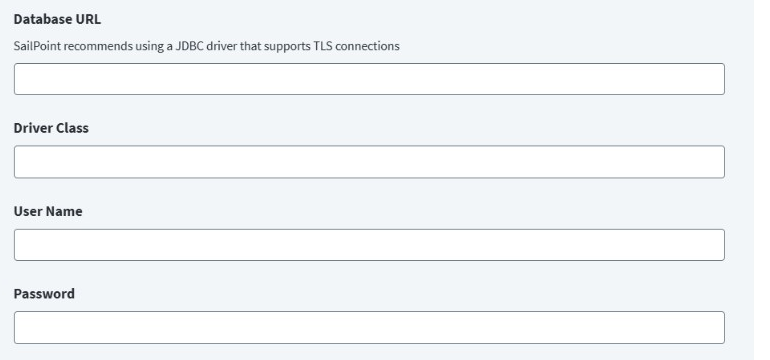
-
In the Database URL field, provide the JDBC connection string corresponding to the database with which to connect. The generic format is as follows:
jdbc:<database_type>://:<port>/<database_name>For example:
jdbc:snowflake://sailpoint-conn.snowflakecomputing.comNote
The JDBC SaaS connector is a generic connector that supports connecting to a database, provided that the database has a JDBC driver available.
-
Enter the Driver Class path according to database you want to connect.
For example:
net.snowflake.client.jdbc.SnowflakeDriver -
Enter the User Name required to access the server.
- Enter the Password associated with the user name to access the server.
- Select Save.
Configuring SQL Query Settings
Configure the SQL query SailPoint runs to load resource data from your database.
Screenshot
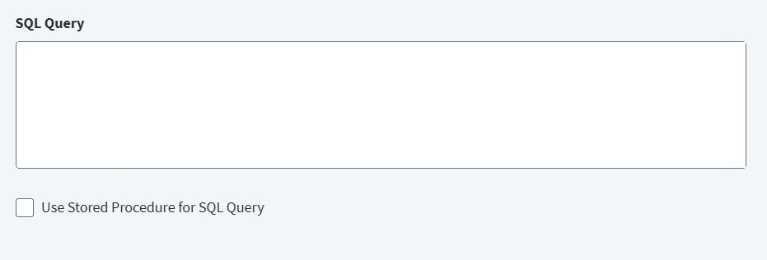
-
Enter an SQL query in the SQL Query field. The query must return columns that match the attribute names you defined in the resource schema.
For example, for a resource schema with attributes NAME, DATABASE_NAME, and SCHEMA_NAME:
For example, for a capability resource with attributes CAPABILITY_NAME, AGENT_NAME, and DESCRIPTION:
-
(Optional) Select the Use Stored Procedure for SQL Query checkbox to execute a stored procedure on the database.
For example:
-
Select Save.
Setting Additional Query Settings
Set additional query settings to support the SQL query for a resource.
Screenshot
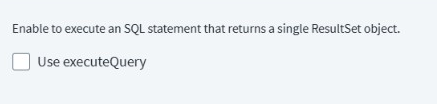
- (Optional) Select the Use executeQuery checkbox to return a single ResultSet object when connector queries the JDBC database.
- Select Save.
Governance Attributes
During aggregation, the connector adds the spBusinessApplication attribute with the value JDBC_NHI to agent resources (std:agent). You do not need to include this attribute in your SQL query or resource.
The spStatus attribute tells SailPoint whether an agent is enabled or disabled. To report agent status, add spStatus as an attribute on the resource and return the matching column in your SQL query. You can also add spDescription to provide a description for the resource.
For example:
SELECT NAME, DATABASE_NAME, STATUS AS spStatus, DESCRIPTION AS spDescription FROM SNOWFLAKE.CORTEX.AGENTS
Documentation Feedback
Feedback is provided as an informational resource only and does not form part of SailPoint’s official product documentation. SailPoint does not warrant or make any guarantees about the feedback (including without limitation as to its accuracy, relevance, or reliability). All feedback is subject to the terms set forth at https://developer.sailpoint.com/discuss/tos.