CyberArk Conjur Cloud Secret Path Expressions
For more information, refer to Retrieve a secret in the CyberArk documentation.
For information on how to configure the CyberArk Conjur Cloud credential provider, refer to CyberArk Conjur Cloud Credential Provider.
Note
The linked document is not maintained by SailPoint and is subject to change without notice.
Username
Path syntax: secrets://{CredentialProviderSourceName}/{ResourceIdOfSecret}
Note
The ResourceIdofSecret attribute can be obtained from Conjur Cloud > Resources then select the created Secret.
Screenshot
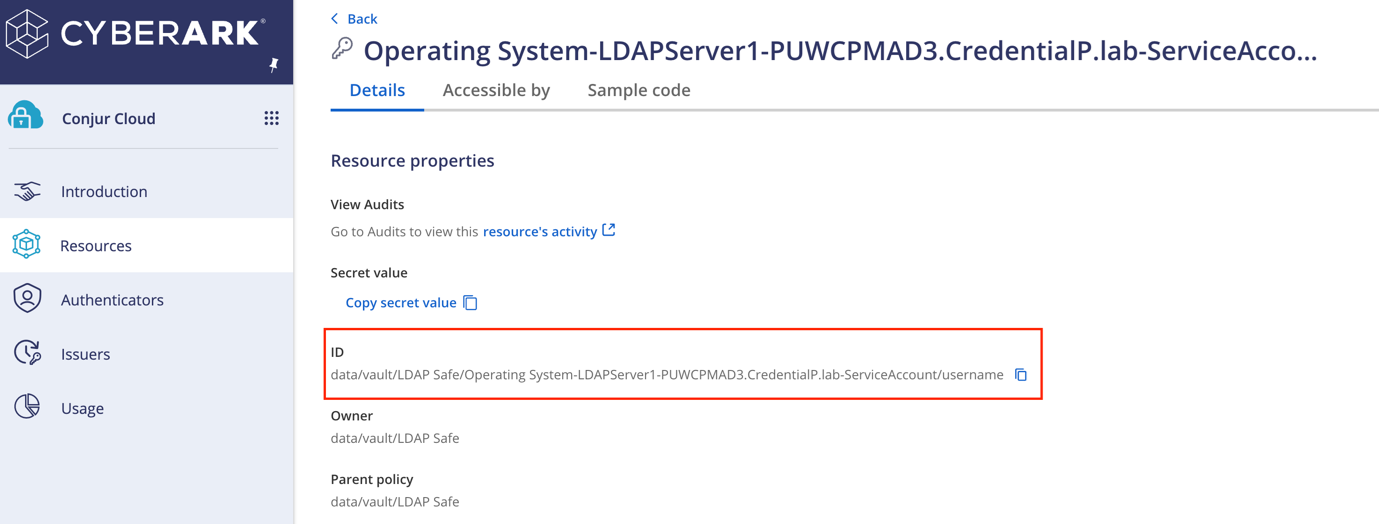
For example:
Before Encoding
secrets://CyberarkConjurCloudSource/data/vault/LDAP Safe/Operating System-LDAPServer1-PUWCPMAD3.CredentialP.lab-ServiceAccount/username
Important
The URL path should always start with the prefix, secrets://. Each URL attribute should be URL-encoded. For example, CredentialProviderSourceName, ResourceIdOfSecret, the prefix, and the suffix must be encoded separately. Each URL attribute in the path is case-sensitive.
After Encoding
After you encode the URL path, it should appear as follows:
secrets://CyberarkConjurCloudSource/data%2Fvault%2FLDAP%20Safe%2FOperating%20System-LDAPServer1-PUWCPMAD3.CredentialP.lab-ServiceAccount%2Fusername
The following is an explanation of the attributes of this URL:
CyberarkConjurCloudSource- The Configured Credential Provider in the Credential Provider Section.data%2Fvault%2FLDAP%20Safe%2FOperating%20System-LDAPServer1-PUWCPMAD3.CredentialP.lab-ServiceAccount%2Fusername- The encoded resource ID of the secret.
Tip
Use urlencoder.org to encode your URL attributes.
Password
Path syntax: secrets://{CredentialProviderSourceName}/{ResourceIdOfSecret}
For example:
Before Encoding
secrets://CyberarkConjurCloudSource/data/vault/LDAP Safe/Operating System-LDAPServer1-PUWCPMAD3.CredentialP.lab-ServiceAccount/password
Important
The URL path should always start with the prefix, secrets://. Each URL attribute should be URL-encoded. For example, CredentialProviderSourceName, ResourceIdOfSecret, the prefix, and the suffix must be encoded separately. Each URL attribute in the path is case-sensitive.
After Encoding
After you encode the URL path, it should appear as follows:
secrets://CyberarkConjurCloudSource/data%2Fvault%2FLDAP%20Safe%2FOperating%20System-LDAPServer1-PUWCPMAD3.CredentialP.lab-ServiceAccount%2Fpassword
The following is an explanation of the components of this URL:
CyberarkConjurCloudSource- Configured Credential Provider in the Credential Provider Section.data%2Fvault%2FLDAP%20Safe%2FOperating%20System-LDAPServer1-PUWCPMAD3.CredentialP.lab-ServiceAccount%2Fpassword- The encoded resource ID of the secret.
Tip
Use urlencoder.org to encode your URL attributes.
Prefixes and Suffixes
If any secret paths have a prefix or a suffix, you must append a query parameter to the secret path as follows:
-
To add a prefix -
?prefix=<prefix>. For example, if the secret value returned after evaluation isLocalAdmin, but the complete value required by the secret field isDomainOne\LocalAdminthen the secret path expression will be as follows to add the required prefix: -
To add a suffix -
?suffix=<suffix>. For example, if the secret value returned after evaluation islocaladministrator, but the complete value required by the secret field islocaladminstrator@sp.comthen the secret path expression will be as follows to add the required suffix:
Important
All input parameters must be encoded.
Documentation Feedback
Feedback is provided as an informational resource only and does not form part of SailPoint’s official product documentation. SailPoint does not warrant or make any guarantees about the feedback (including without limitation as to its accuracy, relevance, or reliability). All feedback is subject to the terms set forth at https://developer.sailpoint.com/discuss/tos.