Configure a Source to Use a Credential Provider
After you create a credential provider, you can begin configuring your sources to use it for authentication. When you use a credential provider in a source configuration, any authentication fields you need to configure allow you to use the credential provider or use static authentication credentials.
To configure your source to use a credential provider:
-
In the source's Base Configuration tab, select Use a Credential Provider.
Note
Enabling a credential provider in your connector adds an additional 30-second timeout for each connector operation.
-
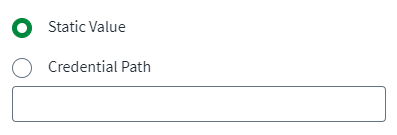
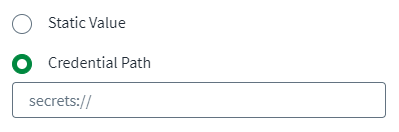
Toggle every secret field in the configuration pages which should use the credential provider to Credential Path. The field changes to accept the secret path expression for the credential provider instead of the static value.
Screenshot
Static Value
Credential Path
-
Enter the secret path expression for the credential provider into the Credential Path field.
Note
For a list of all available SailPoint credential provider path expressions, refer to Credential Provider Secret Path Expressions.
Documentation Feedback
Feedback is provided as an informational resource only and does not form part of SailPoint’s official product documentation. SailPoint does not warrant or make any guarantees about the feedback (including without limitation as to its accuracy, relevance, or reliability). All feedback is subject to the terms set forth at https://developer.sailpoint.com/discuss/tos.