Configuring Reminders
To set reminders for access requests:
-
In the administrative client, navigate to Access Requests > Configuration > Configure Reminders
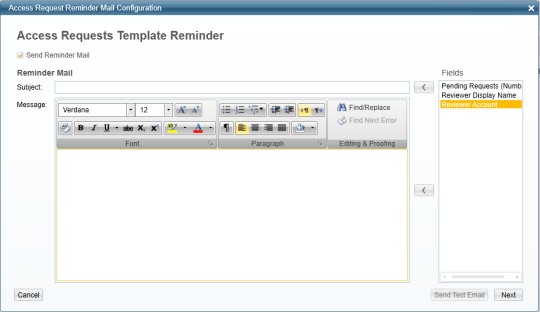
The Access Requests Template Reminder displays.
The Access Requests template reminder sends bulk emails to reviewers regarding all access requests pending their review.
-
Check the Send Reminder Mail check box.
An empty email template displays.
-
Write free text in the email template and transfer information from the fields displayed in the Fields box to the right of the email template.
-
You can use the following fields either in the subject or in the body of the email, or in both locations:
-
Pending Requests – these pending requests are per reviewer.
-
Reviewer Display Name – this is the display name, and not the unique user name.
-
Reviewer Account – this is the unique user name.
-
-
Click Next.
The Reminder Email Scheduler displays.
-
Check the Create a Schedule check box to create a schedule.
-
Fill in the Name, Schedule, On (date), and At (time) fields with the relevant information.
-
Click Finish.