Access Fulfillment Configuration
The following subsections describe the available actions associated with the Access Fulfillment configuration.
 Configure Access Fulfillment Requests Commit Schedule
Commit schedule defines when to run pending normalization requests (which can be during non-working hours so it will not affect end users).
To define the Access Fulfillment Requests Schedule, perform the following steps:
-
In the administrative client, navigate to Access Fulfillment > Configuration > Configure Access Fulfillment Requests Commit Schedules.
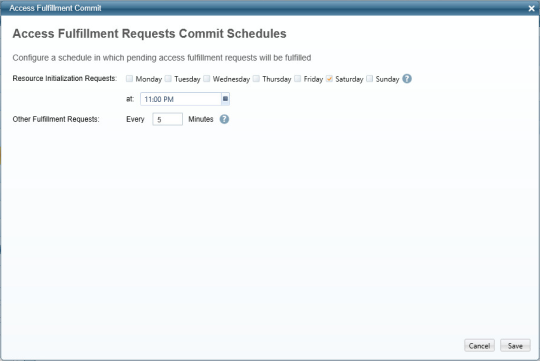
The Access Fulfillment Requests Commit Schedules window displays.
-
In the Resource Normalization Requests field, select the day and time for this schedule.
It is better to schedule normalization of new managed resources for off-peak hours; otherwise, it may overload the system. -
In the Other Fulfillment Requests field, type the time cycle in minutes for this schedule.
-
Click Save.
Configure Access Fulfillment Groups Naming Convention
This activity configures the naming convention for groups created during the normalization process of a business resource
To configure Access Fulfillment Groups Naming Convention, perform the following steps:
-
In the administrative client, navigate to Access Fulfillment > Configuration > Configure Access Fulfillment Groups Naming Convention.
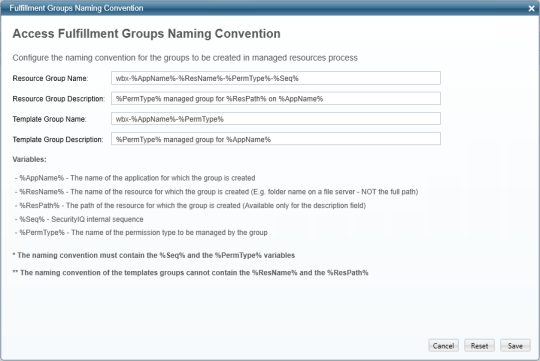
The Access Fulfillment Groups Naming Convention window displays.
-
Enter the relevant data in the following fields:
-
Resource Group Name
-
Resource Group Description
-
Template Group Name
-
Template Group Description
Note: The name must contain the variables %Seq% and %PermType%.
Note: Template group names cannot contain the variables %ResName% or %ResPath%.
-
Click Save.