OAuth 2.0 Authentication
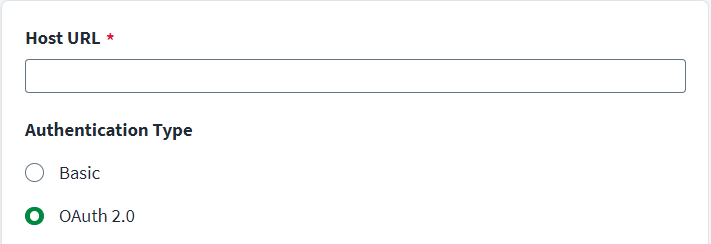
To configure your source with OAuth 2.0 authentication, complete the following:
-
Enter the Host URL for the ServiceNow instance that is used for communication.
-
Select OAuth 2.0 as the authentication type.
-
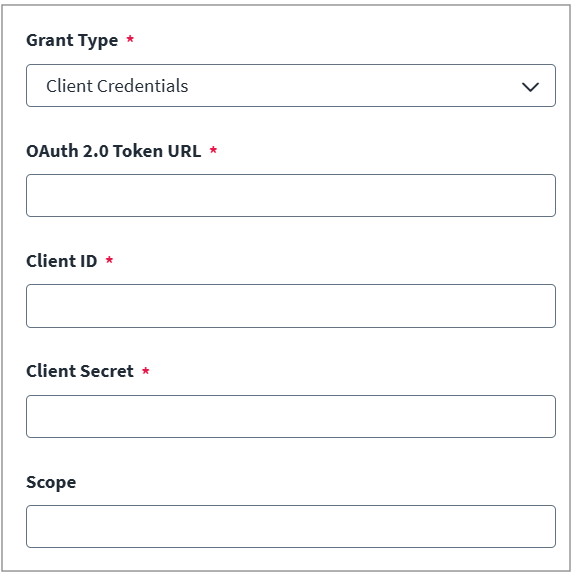
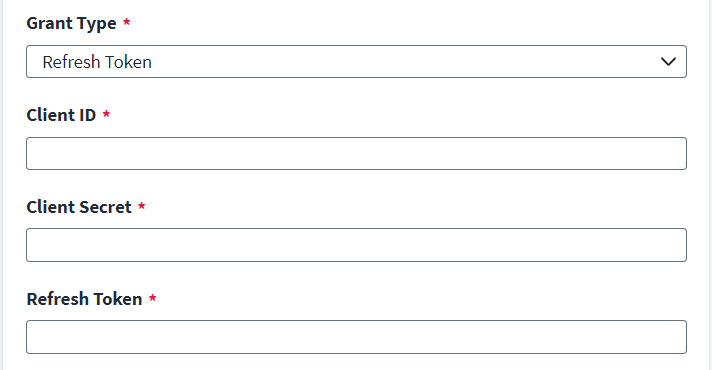
Select Client Credentials or Refresh Token from the Grant Type dropdown.
 Client Credentials
Note
-
The Okta External OIDC Provider in ServiceNow is supported with the Client Credentials Grant Type.
-
ServiceNow also supports Microsoft Entra ID as an External OIDC Provider using the Client Credentials grant type.
-
To configure OAuth 2.0 in the SailPoint Identity Governance connector,you must provide the OAuth 2.0 Token URL, Client ID, Client Secret, and Scope.These values are specific to the External OIDC Provider configured in ServiceNow. For example, Okta or Microsoft Entra ID.
-
For configuration in ServiceNow, refer to Product Documentation | ServiceNow.
-
Enter the Oauth 2.0 Token URL. This URL depends on the External OIDC Provider configured in ServiceNow. For example:
-
Okta External OIDC Provider:
{yourOktaDomain.com}/oauth2/{authorizationServerId}/v1/token
-
Microsoft Entra ID (Azure AD):
https://login.microsoftonline.com/{tenantId}/oauth2/v2.0/token
-
ServiceNow Inbound Client Credentials (local OAuth provider):
https://{yourInstanceName}.service-now.com/oauth_token.do
-
-
Enter the Client ID, Client Secret, and Scope.
-
Select Save.
Refresh Token
Note
To configure OAuth 2.0 in the SailPoint Identity Governance connector, a Client ID, Client Secret, and Refresh Token are required. The Client ID, Client Secret, and Refresh Token are specific to the ServiceNow instance and configured while enabling OAuth 2.0 in your ServiceNow instance. Contact your ServiceNow Administrator to obtain the Client ID, Client Secret, and Refresh Token.- Enter the Client ID and Client Secret.
-
Enter the Refresh Token. For more information on creating an OAuth 2.0 profile on your ServiceNow instance, refer to ServiceNow: Create an endpoint for clients to access instance .
To create a refresh token, use the following curl command:
Copy$ curl -d "grant_type=password&client_id=be3aeb583ace210011c15b24a43e25d8
&client_secret=client_password
&username=admin&password=admin"
POST https://instancename.service-now.com/oauth_token.do - Select Save.
For more information on token generation, refer to ServiceNow: OAuth API request parameter.
-