Troubleshooting
If you encounter any of the following issues or errors, SailPoint recommends that you follow the guidance provided below to resolve the error before contacting SailPoint Support.
 Account aggregation returns zero accounts
Account aggregation completes successfully but returns no accounts from Workday.
The integration user may lack the required domain security policy permissions, even if all documented permissions have been assigned.
Resolution: Ask the customer’s Workday administrator to verify and configure the following permissions:
-
In Workday, search for Domain Security Policies for Functional Area.
-
Select Staffing and go to Worker Data: Workers.
-
Under the Integration permission section, verify that the SailPoint security group is listed.
-
If the security group is not present, add it to the Integration permission section.
-
-
Run the Activate Pending Security Policy Changes task.
-
Verify that the issue is resolved.
Aggregation is passed but SECURITY_GROUPS attribute is not fetched
During entitlement aggregation in the Workday Accounts Connector, you may encounter one of the following issues:
-
Aggregation completes successfully, but the SECURITY_GROUPS attribute is not returned.
-
Aggregation fails with the following error:
Copyinvalid request: WQL error.",
"errors":[{"error":"Enter a valid report field. This field is invalid: cf_SecurityGroupName.",
"field":"cf_SecurityGroupName",
"location":"Invalid SELECT clause"
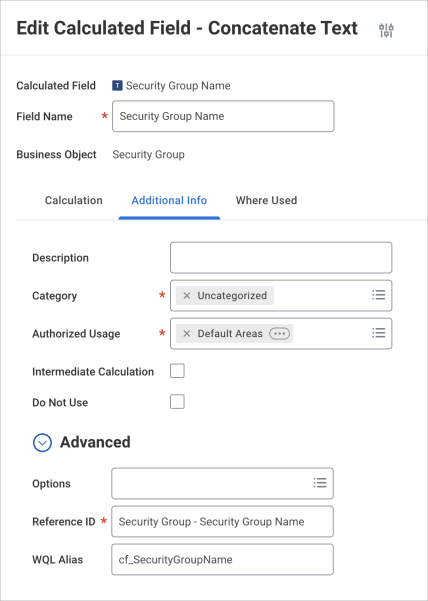
Resolution : Check with your Workday team to verify and correct the configuration by following these steps:
-
In the search bar, enter Edit Calculated Field.
-
Search for Security Group Name form the list of Calculated Field.
-
Under the Additional Info section, verify that the WQL Alias Name is set exactly as follows:
cf_SecurityGroupNameNote
The alias is case-sensitive and must be entered exactly as shown -
If the WQL alias is incorrect or missing, update it accordingly.
-
Save the changes and re-run the entitlement aggregation.
Workday Accounts connector does not provision multiple requests simultaneously.
Resolution: This is a limitation of the Workday API, where multiple provisioning requests containing different entitlements cannot be processed simultaneously. As a workaround, customers should include all required entitlements within a single provisioning request.
Create Account operation is failing with the following error:
Please check the logs. Either username, filenumber, or worker-type is empty.
Resolution: The Create Account policy must include values for username, filenumber, and worker-type. If any of these values are missing, the operation will fail with the error mentioned above.