Data Access Aggregation Settings
The Data Access Aggregation feature supports aggregation of all security context and security context values (data access) from the Oracle ERP Cloud managed system.
 Use previous REST framework version's for Data Securities
Enable enableOldRestFrameworkForDataSecurities for handling special characters in the Data Access. By default, the value is set as false. entry to the source XML using the REST APIs:
-
Key:
enableOldRestFrameworkForDataSecurities -
Value:
true
Note
For more information on SailPoint's REST APIs, refer to Best Practices: REST API Authentication and REST API - Update Source (Partial) in the SailPoint Developer Community.
Supported Security Contexts
|
Context Name |
Module |
|---|---|
|
Financials |
|
|
Financials, Procurement |
|
|
Financials |
|
|
Financials |
|
|
Financials |
|
|
Financials |
|
|
Project Management |
|
|
Financials |
|
|
Financials |
Minimum Permissions Required
The following Function Security Policies, Role Hierarchy, and existing aggregation permissions are required to use this feature.
Function Security Policy - to access Security Context LOVs REST APIs
|
User Friendly Name of Role |
Role Code |
|---|---|
|
Manage Application Reference Data Set |
|
|
Manage Application Reference Data Set Assignment |
|
|
Get Enterprise Structures Using REST Service |
|
|
Get General Ledger Setups Using REST Service |
|
|
Get Intercompany Setups Using REST Service |
|
|
Manage Control Budgets |
|
|
View Fixed Asset Transaction Accounting |
|
|
Manage Project Labor Schedules |
|
|
View Purchase Order Work Area |
|
Data Security Policy- to create a data Security Policy
|
Data Resource |
Value |
Usage |
|---|---|---|
|
|
All values |
Manage Access Sets (Data) |
|
|
All values |
|
|
|
All values |
|
|
|
All values |
|
|
|
All values |
|
Role Hierarchy - to schedule and access Oracle Business Intelligence Reports
|
Role Name |
Role Code |
Security for Analysis and Reports |
Usage |
|---|---|---|---|
|
BI Consumer Role |
BIConsumer |
View-Only |
View Report |
|
BI Author Role |
BIAuthor |
Create and Edit |
Reschedule Report |
|
BI System Role |
BISystem |
Access SOAP and Related services |
Backend SOAP calls |
|
BI Application Administrator Duty Role |
BIA_ADMINISTRATOR_DUTY |
Manage Permissions |
Manage report permissions and Download Report |
Prerequisites
By default, the user with BI Administrator privileges must unarchive the following archive (i.e. SailpointDAv1.catalog) located in ‘Shared Folders' under Catalog of Reports and Analytics platform. Once unarchived, the new folder with 'SailpointDAv1’ name should start appearing in the Shared Folders path.
Caution
Once unarchived, any further modification of the content in 'SailpointDAv1’ folder is strictly prohibited.
Download SailpointDAv1.zip here.
Important
If the path of the BI report is set to anything other than 'SailpointDAv1', it is mandatory to overwrite all the reports in the unarchived folder by recreating them with the correct data model path. Additionally, make sure in report settings that the Output Format and Default Format are set to Data(CSV) and saved.
Enable the Data Access Aggregation feature
Warning
Enabling the Data Access Aggregation feature may seriously impact the system performance. It is advised to use this feature only if required.
-
Ensure the Minimum Permissions Required have been met.
-
Ensure the Prerequisites have been met.
-
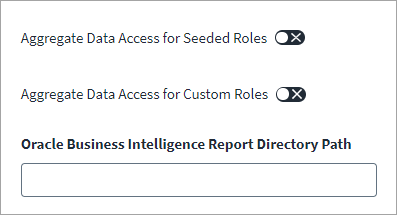
Enable the Aggregate Data Access for Seeded Roles and Aggregate Data Access for Custom Roles features based on your aggregation needs.
-
In the Oracle Business Intelligence Report Directory Path field, enter SailpointDAv1.
-
Select Save.
Note
Once the aggregation with the features enabled is complete, SailPoint advises that you disable the features to avoid system performance impacts for each consecutive aggregation attempt when data access aggregation is not required.