Installing Services: Activity Monitor Collector
The activity monitor is installed per application, collecting activity logs.
Install the activity monitor using the Collector Installation Manager. This tool is part of the File Access Manager installation package.
-
Run the Collector Installation Manager as an Administrator.
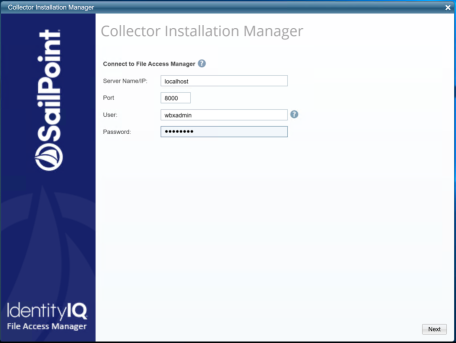
The installation files are in the installation package under the folder Collectors.The Collector Installation Manager window displays.
-
Enter the credentials to connect to File Access Manager.
- ServerName/IP should be pointed to the Agent Configuration Manager service server.
- An File Access Manager user with Collector Manager permission (permission to install collectors). For Active Directory authentication, use the format domain\username.
-
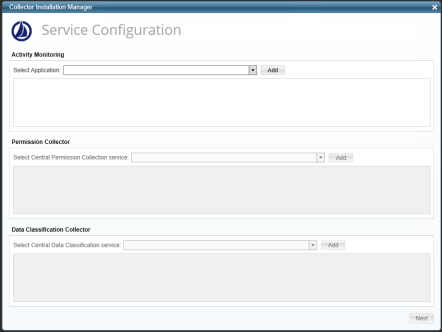
Click Next to open the Service Configuration window.
-
Select the appropriate application, and click Add.
-
Click Next.
The Installation Folder window displays.
If this is the first time you are installing collectors on this machine, you will be prompted to select an installation folder. All future collectors will be installed in this folder.
- Browse and select the location of the target folder for installation.
- Browse and select the location of the folder for system logs.
- Click Next.
- The system begins installing the selected components.
-
Click Finish
The Finish button is displayed after all the selected components have been installed.
The File Access Manager Administrator Guide provides more information on the collector services.